

"Is there a tool that can download an entire Spotify playlist? I don't want to download songs one by one manually."
"My Spotify playlist has over 1,000 tracks. What is the most efficient way to back up large Spotify playlists?"
If you've ever tried downloading a Spotify playlist, you've probably run into tools that can only save individual songs, fail halfway through large playlists, or miss tracks during batch downloads. To find out which options actually work, we tested dozens of Spotify playlist downloaders on desktop, mobile, and online platforms using playlists ranging from 10 to 100+ songs.
In this guide, you'll discover the 10 best Spotify playlist downloaders for saving entire playlists as MP3 and other formats, complete with our real-world results on speed, success rate, missing tracks, and large-playlist performance.
- Quick Answer: Which Spotify Playlist Downloader Works Best?
- How We Tested These Spotify Playlist Downloaders
- 1. TuneFab Spotify Music Converter (Windows, Mac)
- 2. Allavsoft (Windows, Mac)
- 3. Spotify Downloader GitHub Tool (Windows)
- 4. TuneFab Online Spotify Downloader (Online)
- 5. SpotiSongDownloader (Online)
- 6. SpotiDown (Online)
- 7. SpotiSaver (Online)
- 8. SpotiFlyer (Android)
- 9. SpotifyPlaylistDownloader (Android)
- 10. RoutineHub (iOS)
- Spotify Playlist Downloader Comparison: Features at a Glance
- FAQs About Spotify Playlist Downloaders
- Final Words
Quick Answer: Which Spotify Playlist Downloader Works Best?
After testing Spotify playlist downloaders across Windows, Mac, Android, iPhone, and online platforms, we found that no single tool fits every situation. Some are better for downloading large playlists with hundreds of tracks, while others are more suitable for quick online downloads or mobile use.
- Best for large Spotify playlists (100+ tracks): TuneFab Spotify Music Converter
- Best Spotify playlist downloader online: TuneFab Online Spotify Downloader
- Best free Spotify playlist downloader for advanced users: Spotify Downloader GitHub Tool
- Best Spotify playlist downloader for Android: SpotiFlyer
- Best for exporting Spotify playlists to MP3 with full ID3 tags: TuneFab Spotify Music Converter
If your goal is simply downloading a small playlist occasionally, an online tool may be enough. However, if you need to batch-download entire Spotify playlists without missing tracks, a desktop playlist downloader generally offers higher success rates, better output quality, and more robust playlist management features. To learn more, scroll down and get our detailed reviews!
How We Tested These Spotify Playlist Downloaders
To make this Spotify playlist downloader review as practical as possible, we tested every tool under the same conditions and focused on what playlist users care about most: whether an entire playlist can be downloaded successfully, how long batch downloads take, and whether tracks, metadata, and file organization are preserved.
Test Environment
- Systems: Windows 11, macOS 26, Android 16, and iOS 26
- Network: Stable high-speed Wi-Fi connection
- Playlist Types Tested:
- A self-made playlist containing 10 songs
- Spotify Top Hits playlist (50 songs)
- A popular Spotify workout playlist with over 100 tracks
Key Factors to Consider
Downloading a single Spotify song is easy, but downloading an entire playlist often involves dozens or even hundreds of tracks. Based on our testing, these are the most important factors to consider:
- Efficient and Stable Batch Conversion: A reliable tool should support batch downloading Spotify playlists with high speed and a strong success rate. This is essential when you need to download entire Spotify playlists at once for offline use or backup.
- High Audio Quality and Selectable Formats: The best downloader for Spotify playlists should keep original quality up to 320 Kbps and support various output formats, such as MP3, FLAC, and WAV. This way, you can save high-quality Spotify songs for offline playback on any device.
- Full ID3 Tag Preservation: For easy management of your Spotify playlists, preserving ID3 tags (e.g., track number, artists, albums, cover art) should be a crucial factor to consider.
10/50/100-Track Playlist Test Results
During testing, we found that playlist size had a significant impact on download performance. Most tools handled 10-song playlists without difficulty, but the differences became obvious when testing 50-track and 100-track playlists.
- Desktop downloaders generally delivered the highest success rates and fastest batch downloads.
- Many online Spotify playlist downloaders could parse playlist links but struggled with larger playlists.
- Android and iPhone solutions were convenient, but they often experienced slower speeds, missing tracks, or download failures.
For each tool below, we note whether it worked better for 10-track, 50-track, or 100+ track playlists, including the main limits we found during testing. Scroll down and check them out!
Tips: If you want to learn more about desktop Spotify converters and why they're considered better than online tools, check out the posts below.
1. Best Overall Spotify Playlist Downloader: TuneFab Spotify Music Converter
| Batch Conversion Speed | Output Quality | Handle 10-Track Playlist | Handle 50-Track Playlist | Handle 100-Track Playlist | ID3 Tag Preservation | Success Rate |
| Up to 35X | Original 128kbps ~ 320kbps, lossless | ✔️ ~1 minute | ✔️ ~6 minutes | ✔️ ~12 minutes | ✔️ | 98% |
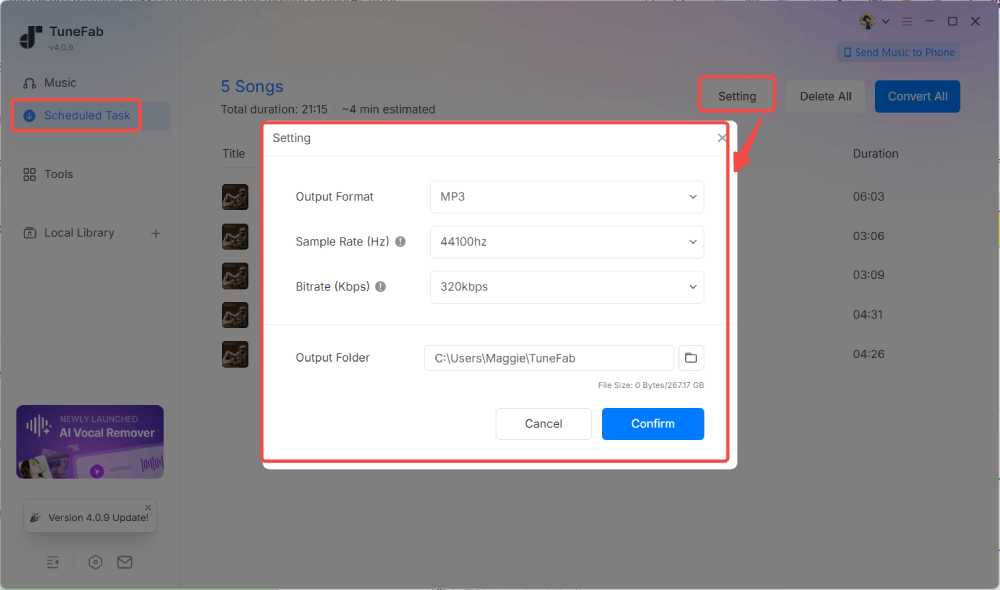
TuneFab Spotify Music Converter stands out when your goal is to download entire Spotify playlists rather than individual songs. Unlike many tools that require copying and pasting playlist links repeatedly, it features a built-in Spotify web player that provides direct access to your music library. Whether you're saving a 50-song playlist for a road trip or backing up a playlist with hundreds of tracks, you can queue everything at once and start batch downloading with a single click.
In our hands-on testing, the most impressive aspect was its consistency when handling large playlists. While many online and mobile tools began slowing down or missing tracks as playlist sizes increased, TuneFab successfully processed our 100+ track playlist test with fewer interruptions than the online and mobile tools we tried. It also preserves ID3 tags, supports MP3, FLAC, WAV, M4A, and other formats, and allows custom file naming and folder organization based on playlist metadata. These features make it especially useful for users managing large Spotify libraries offline.
For step-by-step instructions, read our full guide on how to download Spotify playlists with TuneFab Spotify Music Converter.
In our hands-on testing, the most impressive feature was its ability to handle large-scale libraries. Whether it is a small collection or a massive playlist with hundreds or even 1,000+ tracks, TuneFab can deal with it at a stable 35X faster speed without crashing. Moreover, it automatically preserves ID3 tags and even lets you customize output file names and folder structures based on metadata. It is no surprise that many consider it the best Spotify playlist downloader for Windows or Mac.
If you are wondering about the specific steps to get started, you can follow this detailed guide on how to download Spotify playlists for a smooth experience.
Pros:
- No need for the official Spotify app or URL pasting to download Spotify playlists seamlessly.
- Save Spotify playlists, albums, songs, and podcasts in MP3, M4A, FLAC, WAV, ALAC, and AIFF.
- Offer the best audio quality up to 320 kbps MP3 and lossless FLAC/WAV.
- Ensure up to 35X faster batch conversion speed to save you time.
- Preserves the ID3 tags of Spotify songs.
- Custom output file name and archive output tracks.
- Stable performance with a high success rate.
Cons:
- Support Windows and macOS only.
Pro Tip: If you are ready to upgrade to the full version of TuneFab Spotify Music Converter, use code TFWELCOME for a limited-time 10% discount!
2. Allavsoft (Windows, Mac)
| Batch Conversion Speed | Output Quality | Handle 10-Track Playlist | Handle 50-Track Playlist | Handle 100-Track Playlist | ID3 Tag Preservation | Success Rate |
| High | Up to 320kbps | ✔️ ~3 minutes | ✔️ ~12 minutes | ✔️ ~22 minutes | ✔️ | 90% |
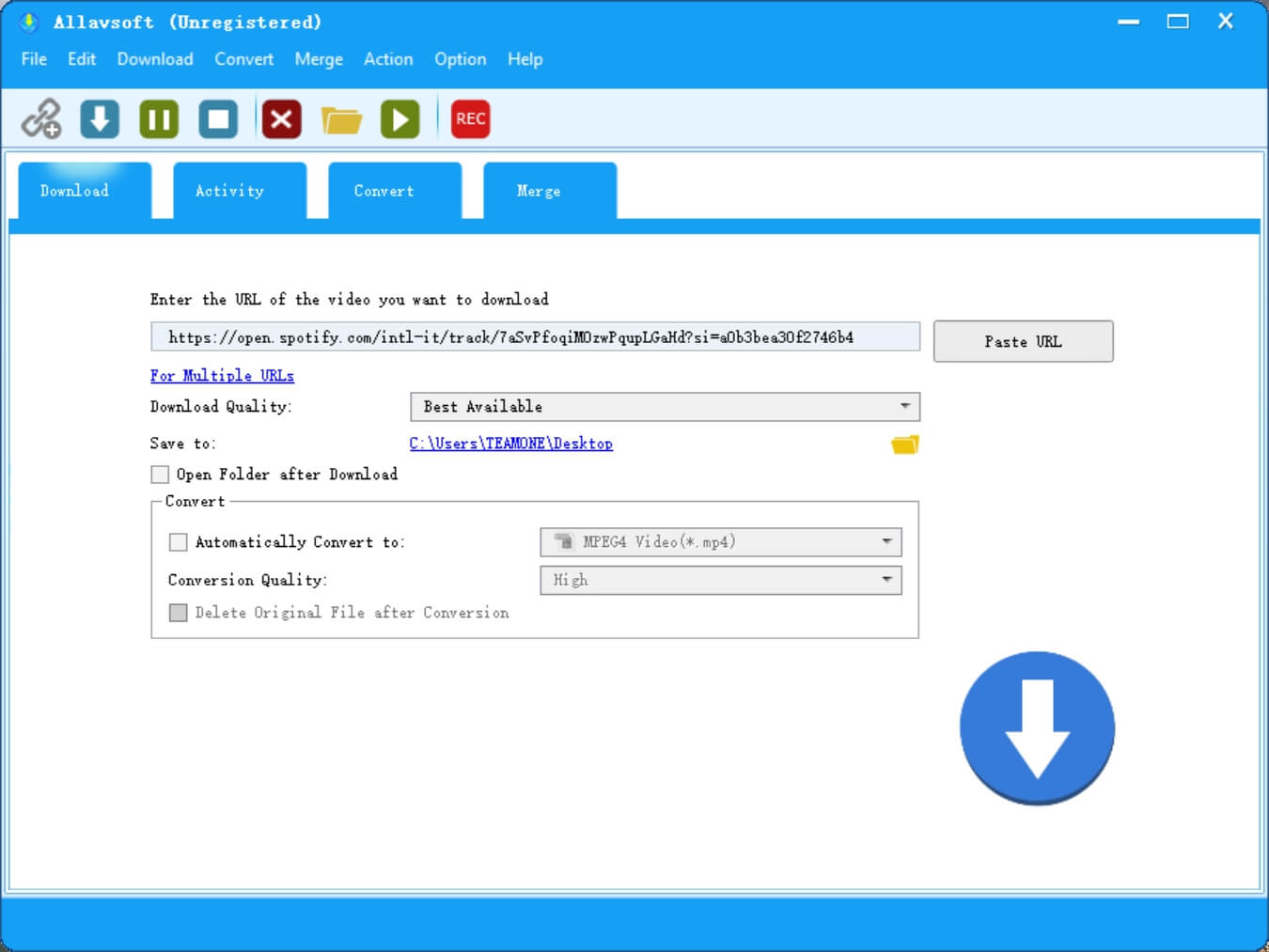
Allavsoft Allavsoft stands out as a Spotify playlist downloader for users who want to export entire playlists in different audio formats. It can export Spotify playlists to a wide range of audio formats like MP3, M4A, WAV, WMA, AC3, RA, AU, Opus, etc. While its interface design looks outdated, the playlist download process is straightforward: simply paste a Spotify playlist link, choose your preferred format, and start the batch download. After that, you can manage the converted files locally for personal offline playback.
During our 2026 testing, Allavsoft handled 10-, 50-, and 100-track playlists reliably, making it a workable option for medium-sized playlist downloads. However, our tests found that the free version is restricted, allowing only 5 playlist tracks to be downloaded per day. To download larger playlists without interruption, you will need to upgrade, with paid plans starting at $19.99. If you frequently back up large Spotify playlists, this limitation can quickly become a bottleneck.
Pros:
- Batch download Spotify playlists to MP3, WAV, M4A, WMA, OGG, OPUS, etc.
- Retain ID3 tags of the downloaded Spotify songs for better library organization.
- Convert or merge local audio or video
- Grab videos from many websites, such as YouTube and Vimeo.
Cons:
- The free version is limited to 5 songs per day.
- Only support downloading Spotify playlists via links
- Download large Spotify playlists slowly and inefficiently.
- May carry a potential risk of account restrictions if used improperly.
3. Spotify Downloader GitHub Tool (Windows)
| Batch Conversion Speed | Output Quality | Handle 10-Track Playlist | Handle 50-Track Playlist | Handle 100-Track Playlist | ID3 Tag Preservation | Success Rate |
| High | Lossy 128kbps ~ 320kbps | ✔️ ~4 minutes | ✔️ ~14 minutes | ✔️ ~28 minutes | ✔️ | 85% |
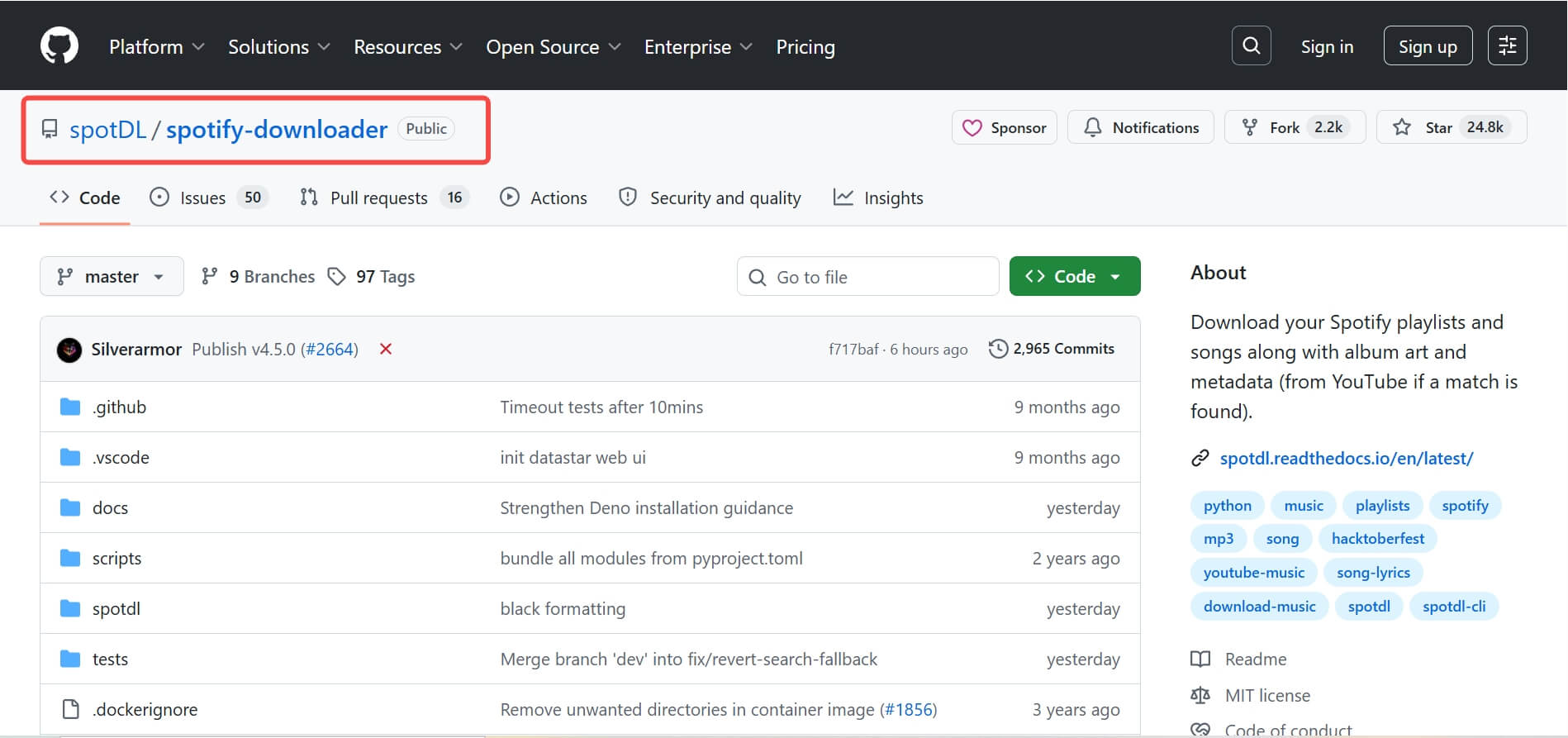
For users seeking a free Spotify playlist downloader, this open-source GitHub project by WilliamSchack offers a lightweight solution. It is particularly appealing for users who want to download large playlists without subscription fees or daily download limits. Our favorite part is that Spotify Downloader uses a multithreading function to automatically split playlists into smaller lists, helping improve batch download performance when processing longer playlists.
However, keep in mind that this tool matches tracks with audio sources from YouTube rather than downloading directly from Spotify. During our playlist testing, this occasionally resulted in missing tracks, incorrect matches, or different versions of the same song appearing in the final download. Additionally, while there is no software-imposed limit, large playlist downloads can become less reliable as the playlist size increases. Very large playlist downloads may also become unstable because the tool relies on external audio sources and can run into rate limits during repeated requests.
Pros:
- Entirely free to use
- Multithreading function to download Spotify playlists quickly in batches
- Easy to use
- No need to register or sign in with an account
Cons:
- No customer support
- Grab sources from YouTube, so the downloading process may easily fail (when the sources can't be matched)
- Require YouTube Premium account to unlock the highest 320kbps quality.
- Large-scale Spotify playlist downloads may trigger temporary IP restrictions.
4. TuneFab Online Spotify Downloader (Online)
| Batch Conversion Speed | Output Quality | Handle 10-Track Playlist | Handle 50-Track Playlist | Handle 100-Track Playlist | ID3 Tag Preservation | Success Rate |
| High | Original 128kbps, 320kbps | ✔️ ~2 minutes | ✔️ ~11 minutes | ✔️ ~19 minutes | ✔️ | 95% |
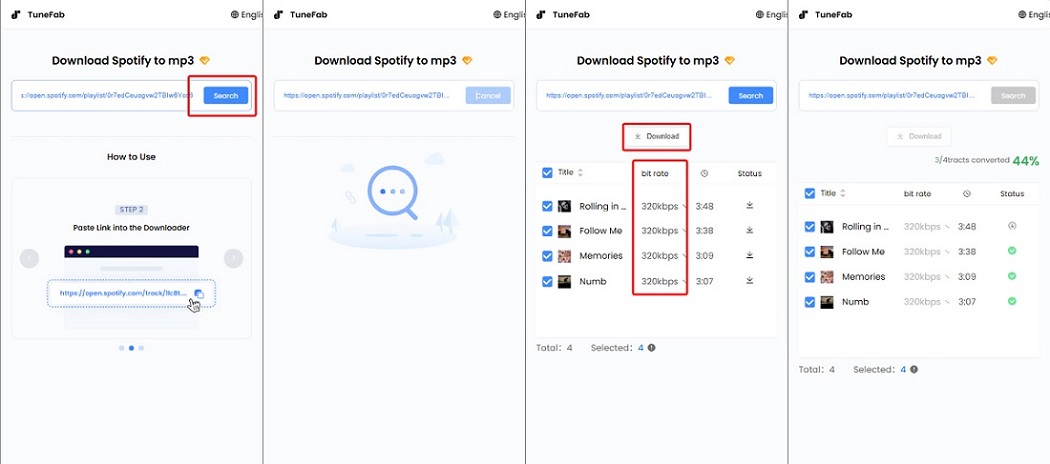
If you want an online Spotify playlist downloader with no installation, TuneFab's web-based version is a viable option. It is best suited for users who want to quickly download small Spotify playlists without installing desktop software. Accessible through major browsers, this TuneFab Online Spotify Downloader can convert Spotify playlists to MP3 with customizable 128kbps or 320kbps quality while preserving ID3 tags.
During testing, the tool handled small playlist downloads smoothly and supports batch processing of up to 10 tracks at a time by default. This makes it more suitable for short playlists, albums, or occasional playlist backups rather than large music libraries. Another advantage is that downloaded tracks can be packaged into a ZIP archive, making it easier to save and transfer small playlists or playlist batches. For users who regularly download playlists containing hundreds of songs, a desktop playlist downloader remains the more reliable option.
Pros:
- A reliable online Spotify playlist downloader for quick, installation-free use.
- One-tap Spotify playlist downloads
- User-friendly interface with no ads.
- Batch download playlists and albums
- Retains original audio quality and ID3 tags
Cons:
- Require a premium upgrade to unlock unlimited batch downloads.
- Only supports MP3 output.
5. SpotiSongDownloader (Online)
| Batch Conversion Speed | Output Quality | Handle 10-Track Playlist | Handle 50-Track Playlist | Handle 100-Track Playlist | ID3 Tag Preservation | Success Rate |
| 1X | Origianl 128kbps, lossy 64kbps ~ 320kbps | ✔️ ~6 minutes (Login required) | ❌ Can parse links, but download fails. | ❌ | ✔️ | 80% |
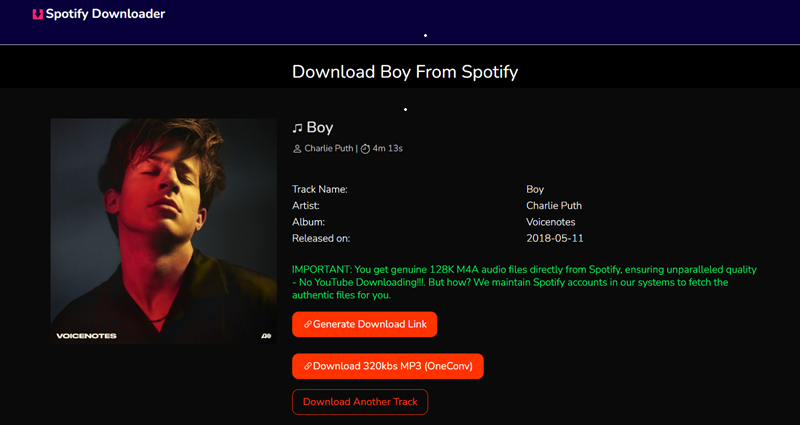
SpotiSongDownloader is another popular online tool that allows you to download Spotify playlists for offline playback at no cost. It is mainly suited for users who need a free Spotify playlist downloader for occasional or small playlist downloads. Even better, it offers multiple output options, iincluding a 128kbps M4A option and MP3 output options ranging from 64kbps to 320kbps. For shorter playlists, the tool provides a quick way to export tracks without installing additional software.
However, during our testing, we found a noticeable limitation. Without logging in, the tool can only batch download 2 songs at a time. If you attempt to download a larger playlist, the website prompts you to log in or install its desktop tool. In our tests, it could successfully parse playlist links, but downloading larger playlists was often restricted or incomplete. This may be inconvenient if you value privacy and prefer to avoid logging into third-party services.
Pros:
- Completely free to use.
- Offer several customizable output formats and quality options.
- Preserves basic ID3 tags, including artwork.
- Present a clean interface with no ads.
Cons:
- Guest users can only batch download 2 tracks simultaneously.
- It successfully analyzes the URLs of large playlists, but cannot complete the download.
6. SpotiDown (Online)
| Batch Conversion Speed | Output Quality | Handle 10-Track Playlist | Handle 50-Track Playlist | Handle 100-Track Playlist | ID3 Tag Preservation | Success Rate |
| 1X | Original 128kbps, 320kbps | ✔️ ~3 minutes (Premium required) | ✔️ ~12 minutes (Premium required) | ✔️ ~27 minutes (Premium required) | ✔️ | 85% |
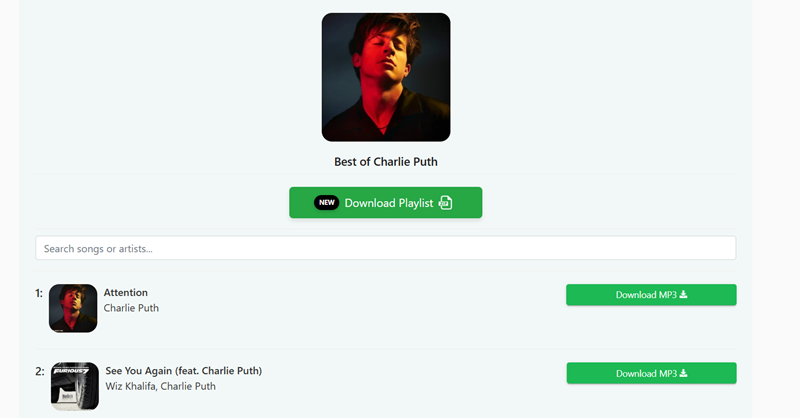
SpotiDown is also a convenient and free Spotify playlist downloader online. Simply paste the Spotify playlist link into its webpage, and it will analyze and convert music from Spotify to MP3 format.
We tested SpotiDown with various scale playlists. Its parsing speed was impressive, but it can batch handle album/playlist free downloads for up to 5 tracks. If you have a playlist with 10 or 50 tracks, you will need to subscribe to the premium plan ($20/month). Additionally, the output filenames automatically include the website's name, which means you will likely need to spend time manually renaming your files or using a bulk renamer tool.
Pros:
- Spotify playlist downloader for 320kbps MP3.
- Offer a high-speed parsing and download engine.
- No ads on the screen.
- Keep basic ID3 tags and metadata.
Cons:
- No customizable output settings.
- Filenames contain the SpotiDown tag, requiring manual renaming.
7. SpotiSaver (Online)
| Batch Conversion Speed | Output Quality | Handle 10-Track Playlist | Handle 50-Track Playlist | Handle 100-Track Playlist | ID3 Tag Preservation | Success Rate |
| 1X | Original 128kbps, 320kbps | ✔️ ~5 minutes | ✔️ ~15 minutes | ✔️ ~29 minutes | ✔️ | 90% |
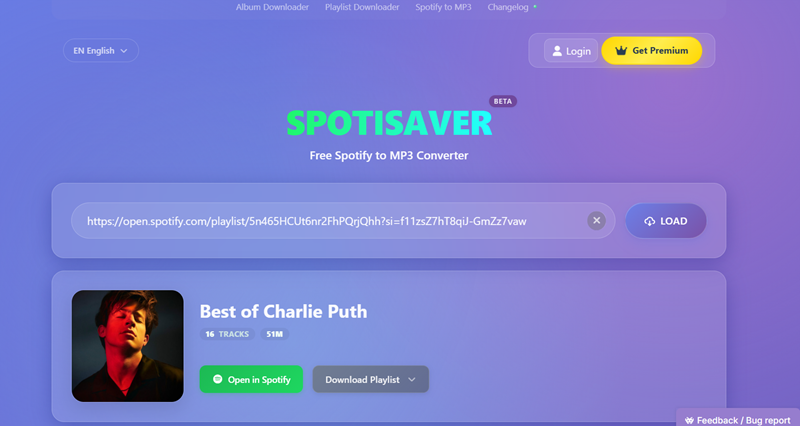
SpotiSaver is one of the best Spotify playlist downloaders online for free. Its biggest advantage for playlist downloads is the ability to package tracks into a single ZIP archive. Instead of manually downloading songs one by one, you can save a small or medium-sized Spotify playlist batch to your computer or phone in one go, making playlist management much more convenient.
Our team also tested its performance with playlists of different sizes. The tool successfully loaded playlists containing up to 200 tracks, but the ZIP archive creation was limited to 100 tracks in our testing. For larger playlists, this means you may need to split downloads into multiple batches. Also, the output filename contained a "SpotiSaver" tag, making library organization less tidy. Overall, it works well for downloading small to medium-sized Spotify playlists, but very large playlists can still be restrictive.
Pros:
- Offer a free Spotify playlist downloader for small music libraries.
- Save Spotify playlists in 320kbps MP3 offline.
- Works on all devices without installation.
Cons:
- Batch download Spotify playlists with no more than 100 tracks.
- Premium features require a subscription.
- Filenames for free users require manual renaming.
8. SpotiFlyer (Android)
| Batch Conversion Speed | Output Quality | Handle 10-Track Playlist | Handle 50-Track Playlist | Handle 100-Track Playlist | ID3 Tag Preservation | Success Rate |
| 1X | Original 128kbps, 320kbps | ✔️ ~6 minutes | ✔️ ~28 minutes | ✔️ ~40 minutes | ✔️ | 75% |
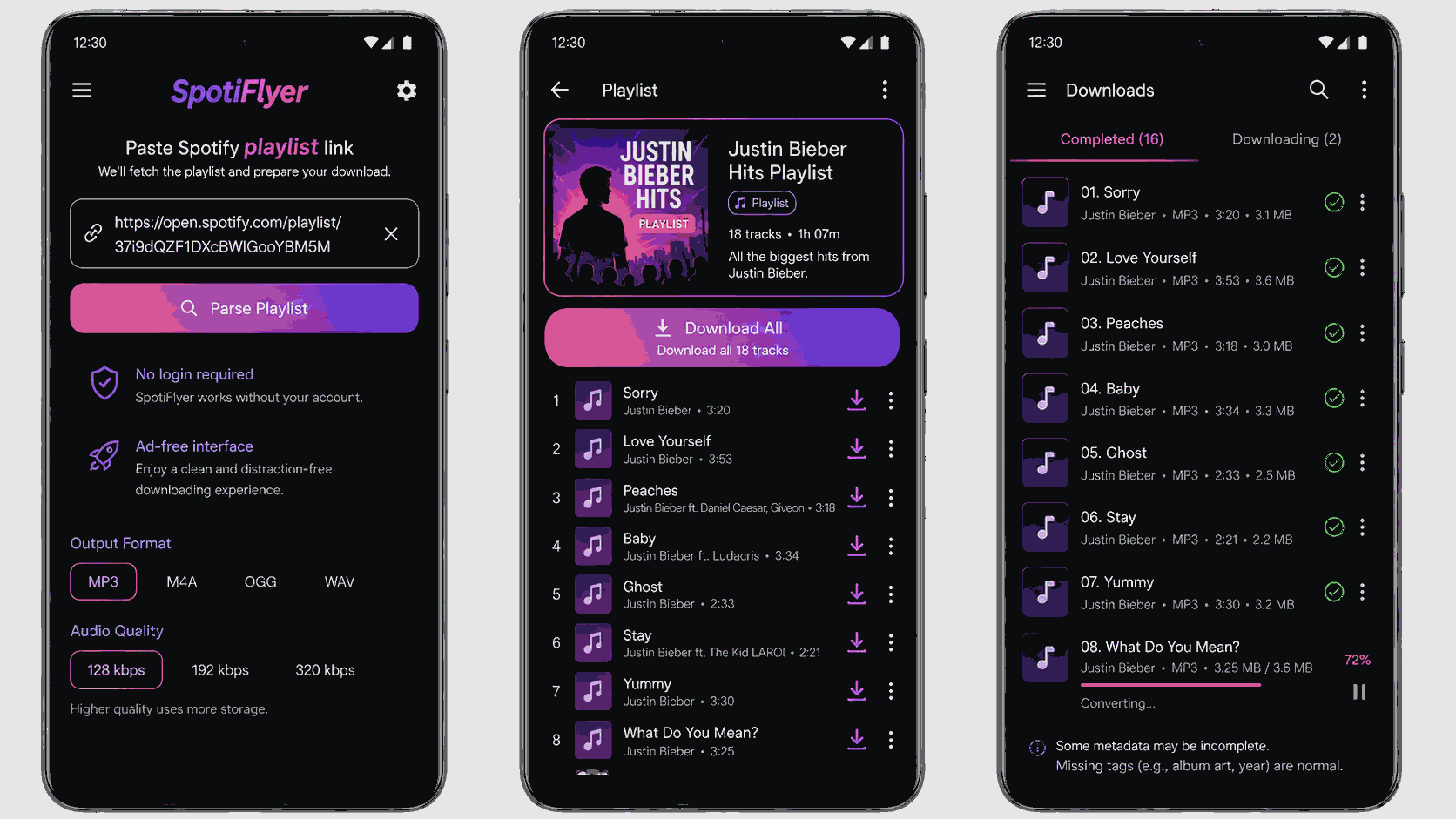
SpotiFlyer is a free MP3 Spotify playlist downloader for Android. For the download process, just run SpotiFlyer, paste the Spotify playlists/albums link into the search box, tap the "Download" button, and you can get local MP3 files for free offline listening and share Spotify music with friends without any hassle.
During our performance review, SpotiFlyer handled a 10-track Spotify playlist to MP3 conversion smoothly, but it struggled with larger batches. It was common to see app crashes, download interruptions, and missing tracks. Also, since the tool does not fetch music directly from Spotify but relies on YouTube, its output quality and stability were inconsistent.
Pros:
- Ideal for Spotify playlist download on Android devices.
- Support customizable audio quality for downloaded files.
- Preserve basic ID3 tag information.
- Free and easy to use.
Cons:
- Download Spotify content only in MP3 format
- The success rate is low for large playlists, and sometimes it fails to download
- Occasional app crashes and link parsing failures
- Match and download audio from YouTube sources.
9. SpotifyPlaylistDownloader (Android)
| Batch Conversion Speed | Output Quality | Handle 10-Track Playlist | Handle 50-Track Playlist | Handle 100-Track Playlist | ID3 Tag Preservation | Success Rate |
| 1X | 256kbps | ✔️ ~8 minutes | ❌ Failed | ❌ Failed | ✔️ | 70% |
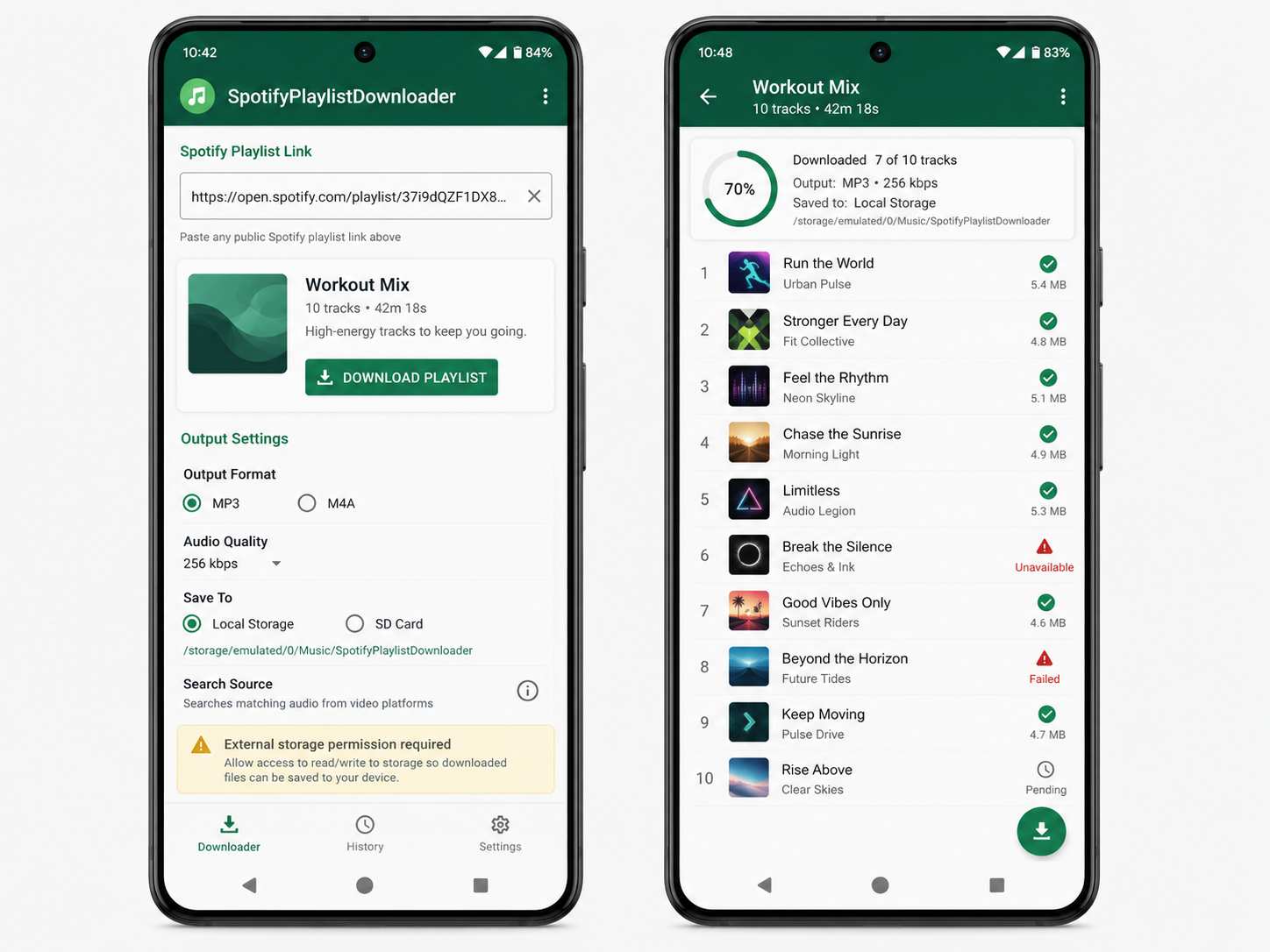
SpotifyPlaylistDownloader is another handy free Spotify playlist downloader app designed for Android that allows users to save Spotify playlists as MP3/M4A files in SD cards or local storage for offline listening.
While it claims to search YouTube Music for the optimal matching streams, we noticed compressed audio quality, up to 256kbps. Also, its conversion speed can be a bit slower compared with other online or professional Spotify playlist downloaders. More importantly, we also noted that the app requires permissions from unknown sources, which poses a security risk.
Pros:
- Easy operations to download Spotify playlists by links
- Support mainstream MP3 and M4A formats to output Spotify downloads
- Don't need to log in to your own Spotify account
- Free to use
- Support direct download to Android SD cards.
Cons:
- The output quality is compressed
- Sudden errors can occur
- Installation from unknown sources may pose security risks.
- Slower download speed compared to professional Spotify playlist downloaders.
10. RoutineHub (iOS)
| Batch Conversion Speed | Output Quality | Handle 10-Track Playlist | Handle 50-Track Playlist | Handle 100-Track Playlist | ID3 Tag Preservation | Success Rate |
| 1X | 128kbps | ✔️ ~10 minutes | ❌ Failed | ❌ Failed | ✔️ | 70% |
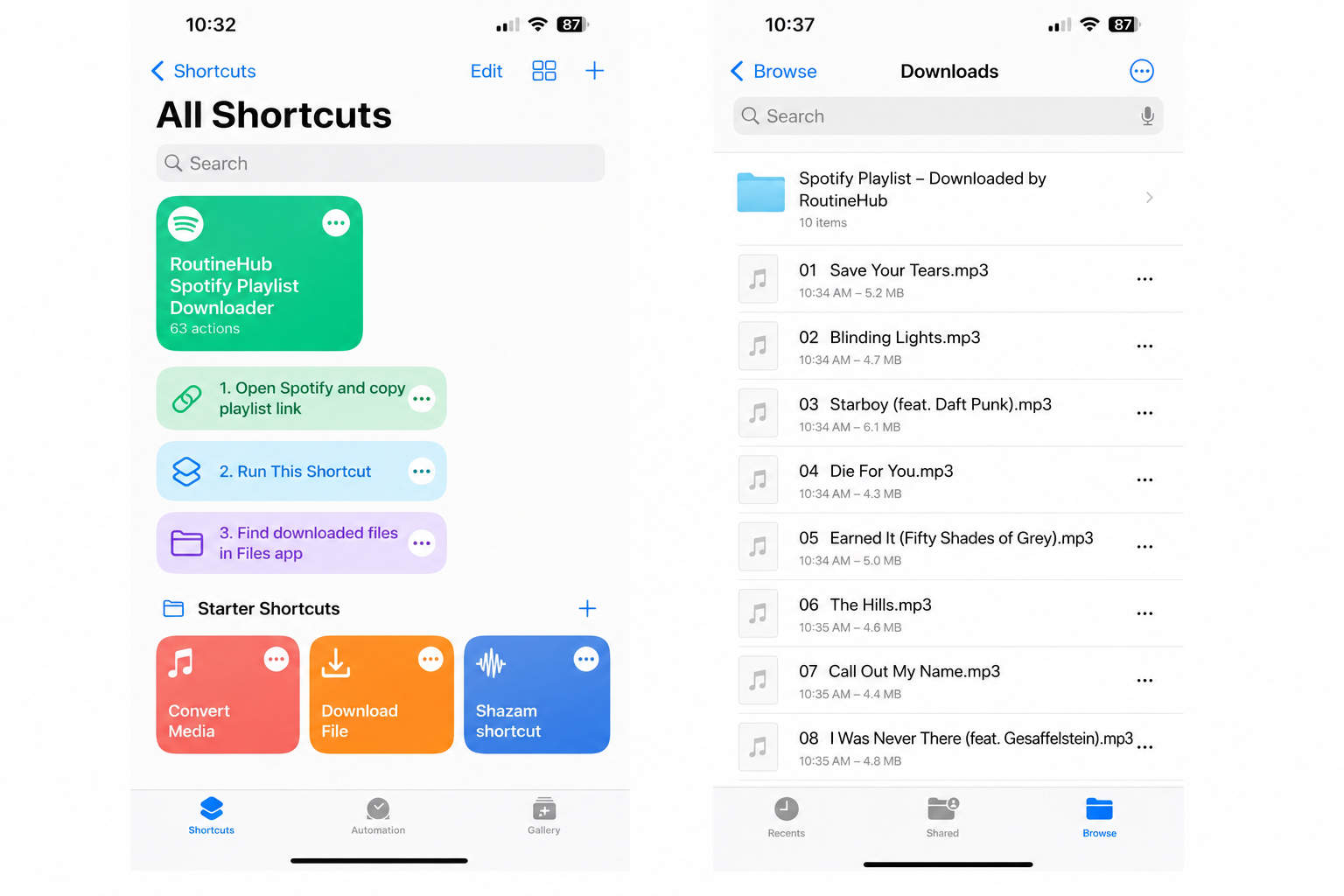
For iOS users, RoutineHub provides a variety of free shortcuts that allows you to download entire playlists from Spotify only within a few taps. By adding a specific shortcut to your iPhone, you can parse a Spotify playlist link and the tool will automatically parse the link and get your Spotify playlist downloaded to your "Files" app.
However, it is important to note that the music resources are extracted from YouTube rather than Spotify. Therefore, original sound quality and ID3 tags preservation can not be guaranteed. Some songs are unavailable as well, resulting in failure to download a full playlist from Spotify. If you would like to have a smooth downloading experience, professional downloader software like TuneFab Spotify Music Converter, is a more reliable choice. It helps transfer Spotify playlist downloads from PC to your iPhone with ease.
Pros:
- Completely free of charge
- Able to download entire playlists from Spotify
- Easy to use
- No need to log in to your Spotify account.
Cons:
- Fail to parse the Spotify link from time to time
- No audio quality customization.
- Does not retain full ID3 tags.
- Slow downloading speed (one song per 1-2 minutes).
Spotify Playlist Downloader Comparison: Features at a Glance
Still deciding between multiple options? While our playlist tests focused on download success rates and large-playlist performance, the table below compares additional factors such as output quality, supported formats, ID3 tag preservation, file organization, and overall usability. This can help you choose the best Spotify playlist downloader based on your listening habits and device preferences.
| Tool | Best For | Max Quality | Output Formats | Large Playlist Support | ID3 Tags | Custom File Naming |
| TuneFab Spotify Music Converter 🥇 | 100+ track playlists & library backups | Original 320kbps or Lossless | MP3, M4A, FLAC, WAV, ALAC, AIFF | ✔️ Unlimited | ✔️ | ✔️ |
| Allavsoft | Medium-sized playlists & format flexibility | 320kbps | MP3, WAV, M4A, OGG, OPUS, etc. | ✔️ | ✔️ | ✔️ |
| Spotify Downloader GitHub Tool | Free large-playlist downloads | Up to 320kbps | MP3, AAC, WAV, FLAC, OGG | ✔️ | ✔️ | ✔️ |
| TuneFab Online Spotify Downloader | Small playlists online | 320kbps | MP3 | Limited | ✔️ | ❌ |
| SpotiSongDownloader | Occasional playlist downloads | Up to 320kbps | MP3, M4A | Limited | ✔️ | ❌ |
| SpotiDown | Downloading a few playlist tracks | Up to 320kbps | MP3 | Limited | ✔️ | ❌ |
| SpotiSaver | ZIP downloads for small playlists | Up to 320kbps | MP3 | Up to 100 tracks | ✔️ | ❌ |
| SpotiFlyer | Android playlist downloads | Up to 320kbps | MP3 | Limited | ✔️ | ❌ |
| SpotifyPlaylistDownloader | Android offline listening | 256kbps | MP3, M4A | Limited | ✔️ | ❌ |
| RoutineHub | iPhone playlist downloads | 128kbps | MP3 | Limited | ❌ | ❌ |
If you frequently download full Spotify playlists, support for large libraries, accurate metadata preservation, and flexible output settings often matter more than platform availability alone. Based on our testing, desktop tools like TuneFab Spotify Music Converter delivered the best experience for large playlists, while online and mobile solutions were more suitable for occasional downloads or smaller playlist collections.
FAQs About Spotify Playlist Downloaders
Q1. Can I Download an Entire Spotify Playlist as MP3?
Yes. Many Spotify playlist downloaders allow you to convert entire playlists to MP3 files for offline listening. However, not every tool can successfully process large playlists. In our testing, desktop solutions generally delivered higher success rates and better playlist management features than online or mobile tools.
Q2. Do I need a Spotify Premium account to download playlists with these tools?
No. Most Spotify playlist downloaders work with both Spotify Free and Spotify Premium accounts. You can usually paste a playlist link or access your library directly without requiring a Premium subscription.
Q3. How to convert Spotify playlists on Android/iPhone?
To download Spotify playlists on your Android phone or iPhone, you can use SpotiFlyer for Android and RoutineHub for iOS, as mentioned. But since they are not secure and reliable to use, you can consider using professional software or a free online one to download Spotify playlists as local files, and then get Spotify downloaded playlists on Android or iOS devices without worries.
Q3. Does an Online Spotify Playlist Downloader Really Work?
It depends on the playlist size. Many online Spotify playlist downloaders work well for small playlists, but larger playlists often expose limitations such as download caps, missing tracks, ZIP restrictions, or slower processing speeds. This is why online tools are generally better suited for occasional downloads rather than large playlist backups.
Q4. Is There a Spotify Playlist Downloader for Android?
Yes. Android users can try tools such as SpotiFlyer or SpotifyPlaylistDownloader. However, our testing found that many Android-based solutions struggled with large playlists and occasionally missed tracks. If reliability is a priority, downloading playlists on a desktop device first and then transferring the converted files to Android may provide a smoother experience.
Q5. Are free Spotify playlist downloaders safe?
Laws and platform rules vary by country and region. In general, downloaded or converted music should only be used for personal offline listening. Do not redistribute, upload, sell, or use copyrighted music commercially without permission. Always check your local laws and Spotify’s Terms of Use before using any Spotify playlist downloader.
Final Words
There are many Spotify playlist downloaders available today, and the right choice largely depends on the size of your playlists and how often you download them. Online tools can be convenient for occasional downloads, while mobile solutions work best when portability is your priority. However, our testing showed that many free and browser-based options begin to struggle when handling larger playlists, often resulting in download limits, missing tracks, or reduced reliability.
If your goal is to download entire Spotify playlists, especially playlists containing dozens of songs, a dedicated desktop downloader generally provides the most consistent experience. After evaluating all the tools in this guide, TuneFab Spotify Music Converter delivered the strongest overall performance for large playlist downloads thanks to its high success rate, support for multiple output formats, ID3 tag preservation, and flexible file organization features.