

Finding the best Apple Music downloader in 2026 is harder than it looks. Some may claim to export Apple Music songs, playlists, and albums with high quality, but many of them struggle with batch conversion, restricted audio quality, limited formats, intrusive ads, etc.
Our team conducted hands-on testing in June 2026, reviewing popular desktop solutions, online tools, GitHub CLI programs, and open-source audio recorders across Windows and macOS. You can find a reliable tool to download Apple Music in seconds in the following sections.
Quick scan first: use the table to shortlist 2–3 tools. Then click a tool name to jump to the full review and make the final choice.
| Item | TuneFab Apple Music Converter | Sidify Apple Music Converter | APLMate | AppleMusicMp3 | Gamdl Apple Music Downloader | Audacity |
| Price / Limits | Free Trial, Starting at $25.95/mo | Free Trial, Starting at $44.95/yr | Free | Free with limits | Open Source | Open Source |
| Access Type | Online & Desktop app | Desktop app | Online | Online | Desktop CLI | Desktop app |
| Works for? | Song/Album/Playlist | Song/Album/Playlist | Song/Album/Playlist | Song/Album/Playlist | Song/Album/Playlist | Records what’s playing |
| Easy and smooth? | Easy and smooth | Easy and smooth | Easy | Easy, but can fail | Not beginner-friendly | Not beginner-friendly |
| Download Speed (e.g.: a 3:33 song) | ~ 6s | ~ 18s | ~ 3s | ~ 13s | Varies | Real-time (~3:33) |
| Format | MP3, M4A, WAV, FLAC, ALAC, and AIFF | MP3, WAV, AAC, AIFF, ALAC, and FLAC | MP3 | MP3, M4A | AAC 256kbps (and more codecs) | MP3/WAV/FLAC/OGG… |
| Top Quality | 320kbps/Lossless | 320kbps/Lossless | 320kbps | 320kbps | Varies (by source) | Depends on settings |
| Ads / Risk | Ad-free | Ad-free | CAPTCHA + pop-up ads | Redirects + login paywall | Ad-free | Ad-free |
| Batch | ✅ Yes | ✅ Yes | ❌ No | ✅ Yes (ZIP, 2 songs free) | ✅ Yes | ❌ No |
| Tags | Keeps ID3 tags | Keeps ID3 tags | Partial tags | Partial tags | Advanced CLI option | Free recorder fallback |
Important Note
This article is for informational review only. Third-party tools should only be used in ways that comply with Apple Music's terms and your local copyright laws.
Test devices and timing baseline
Before you dive into the full reviews, here's the test setup we used, so the results below are easier to compare.
We tested the tools on two devices:
- Windows laptop: Windows 10 (64-bit), Intel Core i3-7020U 2.30GHz, 8GB RAM
- Mac laptop: MacBook Air (M2, 2022), 8GB RAM, macOS Sequoia 15.6.1
To ensure fair and consistent testing on these Apple Music downloaders, we use the same content:
- Single Track Test: the 1 by Taylor Swift (3:30)
- Bulk Download Test: folklore (deluxe version) by Taylor Swift (17 songs, 1 hour 7 mins total)
Of course, our rankings are not random. Each Apple Music download tool in this guide was evaluated on the same factors, including download speed, output format/quality, metadata preservation, batch support, reliability & stability, ease of use, etc.
Best Apple Music Downloaders for PC and Mac
Desktop tools usually offer more stable performance, broader format support, and stronger batch downloading than most web-only tools. We tested the most frequently mentioned options, including TuneFab, Sidify, ViWizard, DRmare, and more. Here are our top picks for Apple Music downloaders for Windows and Mac, based on our real-world test results in June 2026.
TuneFab Apple Music Converter
TuneFab Apple Music Converter is a desktop Apple Music downloader for Windows and Mac. Compared with free online tools, it's built for real batch downloads, stable results, and cleaner output. It supports songs, albums, and playlists, with multiple formats and full ID3 tags. It's not fully free, but new users can get 3 free downloads to test it first—so use those tries wisely.
At a glance
- Test status: Tested (worked)
- Best for: Batch downloads (albums/playlists) with stable quality
- Biggest limit: Not fully free (3 free downloads for new users)
- Speed (3:30): ~5–6s (Close to the advertised 35X faster)
- Output: MP3, M4A, WAV, FLAC, ALAC, AIFF (app)
- Quality: 320kbps, 44.1kHz (our MP3 samples)
- Ads / friction: No ads; clean desktop workflow
- Batch / tags: True batch; full ID3 tags kept
How we tested TuneFab Apple Music Converter
[Single Song & Playlist / album]
1. We installed the desktop app and opened it. We selected the Apple Music platform.
2. Inside the built-in Apple Music web player, we picked the content to download. Using the same test album as our other tools, it parsed in about 1 second.
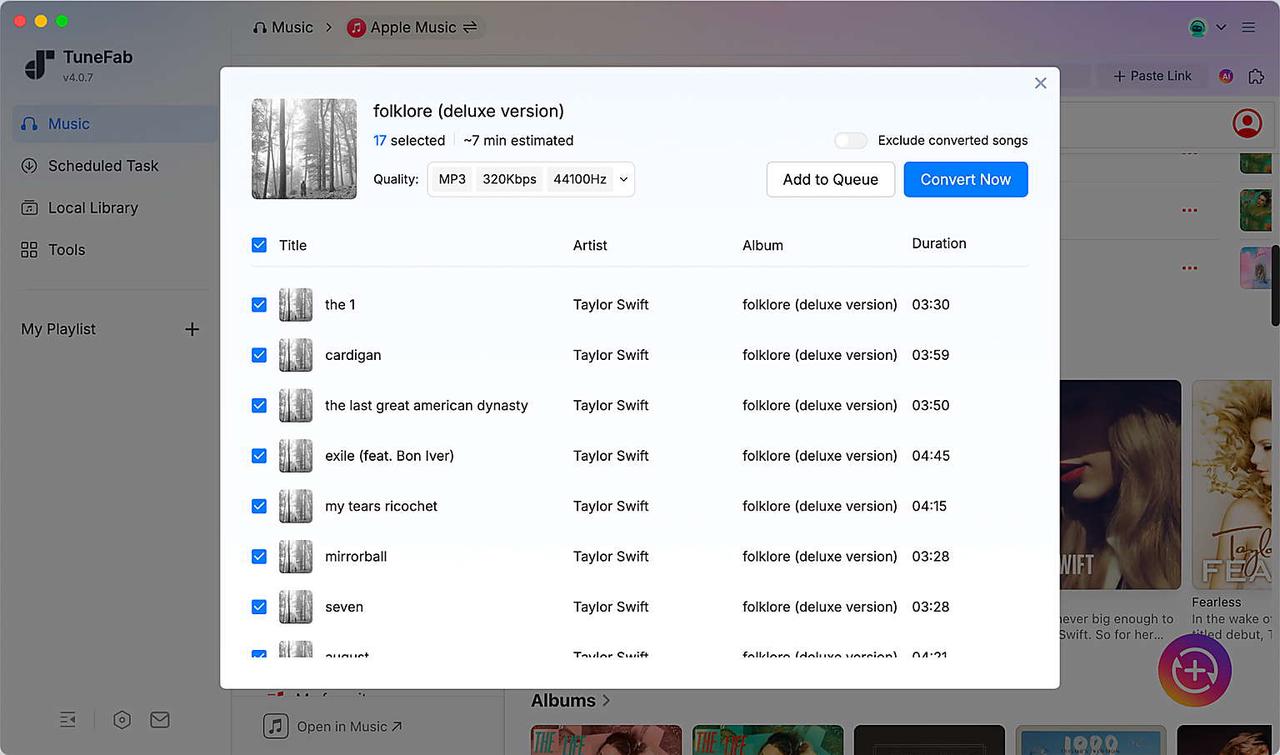
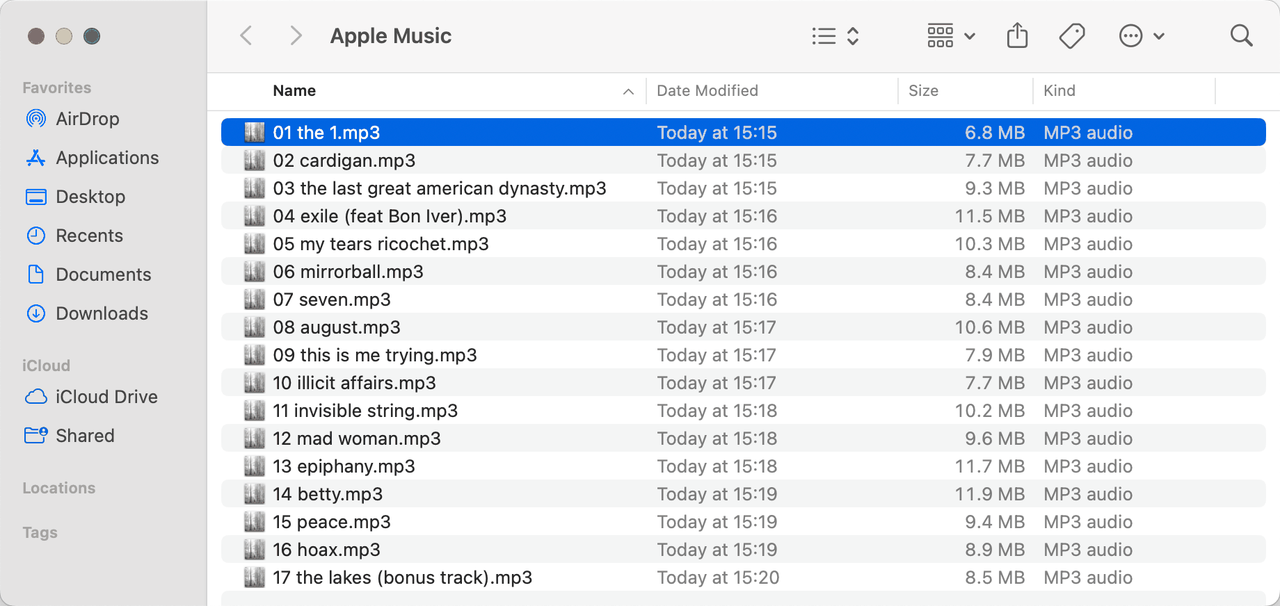
3. We tested the same single track (Taylor Swift - the 1 (3:30)). The total download time was about 5 - 6 seconds. We also used TuneFab as an Apple Music album downloader and batch-downloaded a full album (Taylor Swift – "folklore (deluxe version)", 17 tracks) in about 5 minutes.
4. We checked file properties for the single track and all tracks in the album. They matched our settings: MP3, 320kbps, 44.1kHz.
[TuneFab Apple Music Converter Online]
We also tested "TuneFab Apple Music Converter Online". If you really don't want to install a desktop app, it's worth a quick try. But the online version is more limited: it only exports MP3, and the output quality is lower than the desktop app in the free trial (we got 128kbps in our test). For that reason, we won't expand the full test here.
If you want to try it, go to its "Member Center" and open the "Online Music Converter" section to start your free trial.
Tips
TuneFab is a professional Apple Music downloader. If you run into any issues during the free trial or after subscribing, you can check the Help Center first or contact customer support directly. Compared with many anonymous online Apple Music downloaders, TuneFab provides a clearer support path through its Help Center and customer support.
What we found from our test
- It delivered true batch downloads. A 17-track album finished in about 5 minutes in our test.
- Output quality was consistent. Our MP3 files matched the settings (320kbps, 44.1kHz).
- The built-in Apple Music player made the workflow smooth—no link parsing, no redirects, and no pop-ups.
- Tags were consistent across tracks (title/artist/album all kept in our test).
- The online version is easier to start, but it's more limited (MP3 only, and lower output quality than the desktop app).
- Reliability & stability: TuneFab was the most stable option we tested. We did not see CAPTCHA checks, redirects, "convert error", or stalled pages. Batch downloads completed normally, and output settings stayed consistent across files. If you want predictable results, TuneFab was the most consistent option in our tests.
Who it's for
Use TuneFab if you want a reliable Apple Music Playlist Downloader for albums/playlists, you care about stable quality, and you want batch downloads with clean output and tags. Skip it if you only need a one-time MP3 and you don't want to install anything—then an online tool may be enough.
| Pros | Cons |
| ✔ True batch downloads for albums and playlists ✔ Clean workflow (no ads, no redirects, no CAPTCHA) ✔ Multiple formats on desktop (not MP3-only) ✔ Consistent output quality in our test ✔ Better support: help center + customer service |
❌ Not fully free (3 free downloads for new users) ❌Requires installation (desktop app) |
Sidify Apple Music Converter
Sidify Apple Music Converter is another top-tier downloader for Apple Music and iTunes on Windows and Mac. Similarly, it claims to batch save single tracks, playlists, and albums while preserving the original audio quality and ID3 tags. Also, Sidify offers a free trial for new users to test core features before purchasing, but it is limited to the first 1 minute of each audio track.
At a Glance
- Test status: Tested (worked)
- Best for: Users who want more output customization and format options
- Biggest limit: Slower than TuneFab when processing larger playlists.
- Speed (3:30 track): ~15 - 18s (our test)
- Output: MP3, AAC, WAV, FLAC, AIFF, ALAC
- Quality: 320kbps 44.1kHz verified
- Ads / friction: Ad-free, clean desktop app
- Batch / tags: Batch downloads supported; metadata preserved
How we tested Sidify Apple Music Converter
[Single Song & Album]
1. We installed Sidify Apple Music Converter from its official website. After launching, it automatically popped up the official web player.
2. Once we clicked on the "+" button on the target album page, Sidify spent about 2s to fetch album information. In our test, Sidify could parse the album page without requiring an immediate Apple Music login. However, actual access may vary by region, account status, and source availability.
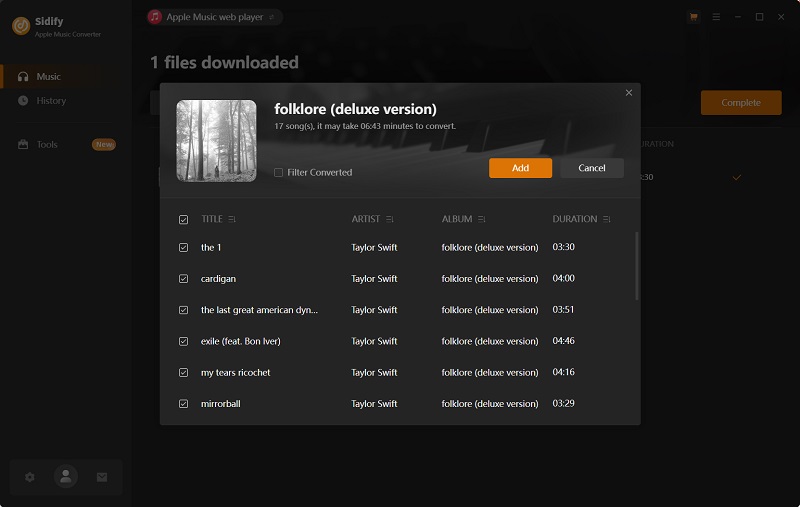
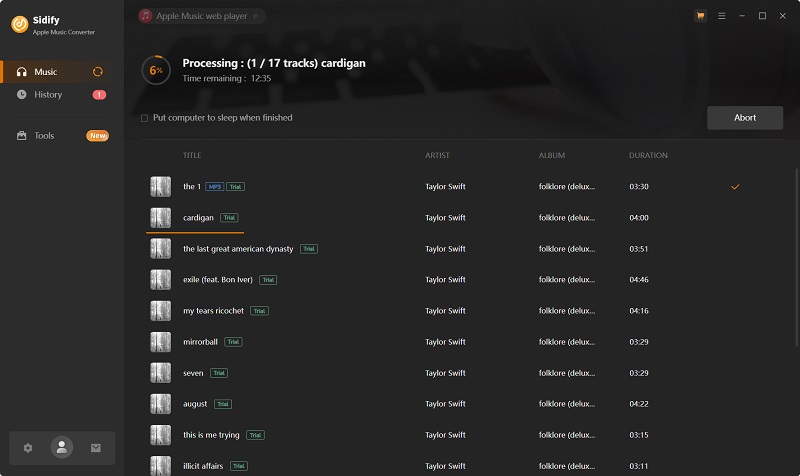
3. The single track "the 1" was completed in about 18 seconds during our testing. We also used Sidify as an Apple Music album downloader to process Taylor Swift's "folklore (deluxe version)" (17 tracks), which finished in around 12 minutes.
4. All downloads completed successfully, and the exported files matched our selected output settings (MP3 with 320kbps & 44.1kHz).
What we found from our test
- It featured a clean layout with the Apple Music web player, making the download process seamless.
- Output quality was consistent, matching our testing settings.
- Song titles, artists, album names, artwork, and lyrics (if provided) remained intact after conversion.
- Playlists and albums can be queued and converted in one go.
- Its toolbox is useful with CD burner, Tag Editor, Format Converter, and Audio Editor, which are useful for better management.
- Sidify lacks a monthly subscription plan, so you have to start with a more expensive annual plan ($44.95).
- When converting full albums, the conversion speed was slower than expected.
- Reliability & stability: Sidify successfully completed all of our test downloads without crashes or major errors.
Who it's for
Use Sidify if you prefer an Apple Music to MP3 converter featuring practical additional tools and don't mind slower conversion speeds. Skip it if you want to download large Apple Music playlists in a short time.
| Pros | Cons |
| ✔ Cover common audio formats. ✔ Output high-fidelity audio files with no restrictions. ✔ Full batch download for songs, albums, and playlists. ✔ Complete metadata and ID3 tag preservation. ✔ Stable performance across Windows and Mac. ✔ Clean and user-friendly interface. |
❌ Higher starting price. ❌ Free trial limits conversions to the first 1 minute per track. ❌ Playlist processing can be slower on large libraries. |
Top Free Apple Music Downloader Online
When you only need to save a few tracks for offline listening, using a free Apple Music downloader online can be more convenient. Web-based tools require no software installation and can quickly convert Apple Music to MP3 directly through your browser.
However, based on our tests, we found that they often come with intrusive ads, fake batch support, and inconsistent audio quality. For regular playlist or album downloads, a desktop Apple Music converter is usually the more reliable choice.
APLMate
As an Apple Music song downloader online, APLMate is a decent pick if you only need a quick MP3 from a single link. It feels fast and simple. The trade-off is friction: CAPTCHA checks, redirects, and pop-up ads can interrupt the flow. And it's not built for batch saving.
At a glance
- Test status: Tested (worked)
- Best for: One-off MP3 downloads
- Biggest limit: No true batch download
- Speed (3:30): ~3s (our test)
- Output: MP3 only
- Quality: 320kbps, 44.1kHz (shown in our samples)
- Ads / friction: CAPTCHA check, redirects, pop-up ads
- Batch / tags: No batch; basic tags only
How we tested APLMate
[Single song]
1. We pasted one Apple Music song link and clicked "Download". A CAPTCHA check appeared.
2. After that, the site redirected us to another page with multiple options. We chose "Download MP3".
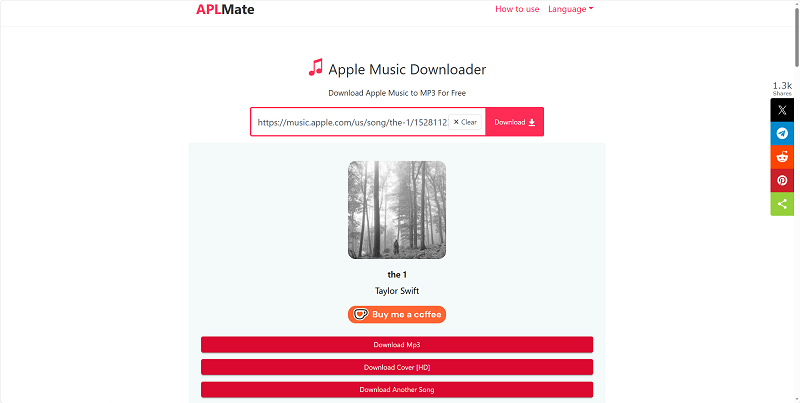
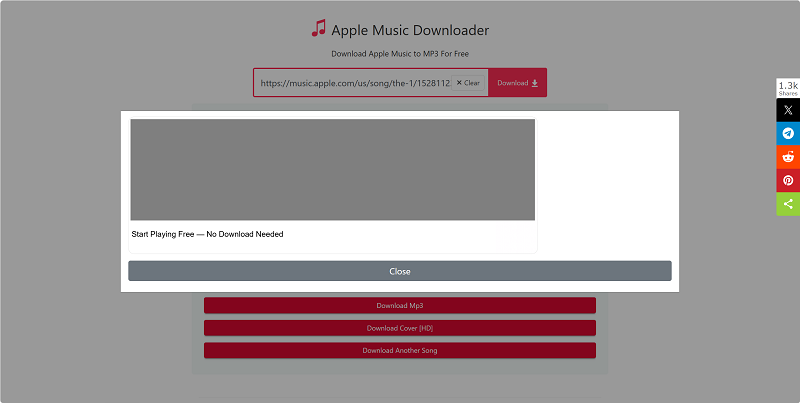
3. A pop-up ad appeared right after the click. It didn't stop the download, but it added noise. The song finished in about 3 - 4 seconds.
4. After the download, we checked the file properties. Across our samples (including Taylor Swift – "the 1" (3:30)), the files showed 320kbps and 44.1kHz, and they kept basic ID3 info (like title/artist).
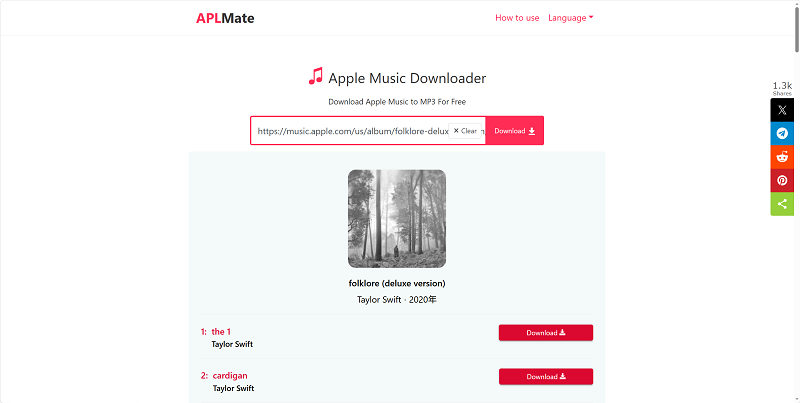
5. We ran the same test on the playlist URL and discovered that no batch download feature was available. As a result, we had to manually enter album links 17 individual times just to successfully save Taylor Swift's folklore (deluxe version).
What we found from our test
- Very fast for single tracks when it works (our 3:30 sample finished in ~3s).
- It parses playlist/album links, but there's no one-click batch download. You still have to download tracks one by one.
- Output is MP3 only. No lossless options.
- Tags are basic. Don't expect perfect metadata every time.
- The main downsides are CAPTCHA + redirects + pop-up ads, which make the experience less smooth.
- Reliability & stability: APLMate can be quick, but results can vary by time and traffic. When the site is busy, you may see more CAPTCHA prompts or slower responses.
Who it's for
Use APLMate if you want to download Apple Music to MP3 once in a while, and you don't mind ads. Skip it if you need playlist downloads, a clean workflow, or stable success at scale.
| Pros | Cons |
| ✔ Free, no install ✔ Very fast for a single track (our test: ~3s for 3:30) ✔ Simple UI |
❌ No true batch downloadMP3 only ❌ CAPTCHA, redirects, and pop-up ads ❌ Tags are limited |
AppleMusicMp3
AppleMusicMp3 works best as an Apple Music song downloader when you only need single tracks. It can generate a download link quickly, and it supports MP3 (64–320kbps) and M4A. But the "playlist/album ZIP" feature is mostly a paywall: the free ZIP only includes two songs, and the full ZIP requires login and a paid plan. Free use is also limited (only a few tries per day).
At a glance
- Test status: Tested (worked)
- Best for: Quick single-song downloads (MP3/M4A)
- Biggest limit: ZIP "batch" is paywalled (free ZIP = 2 songs)
- Speed (3:30): ~13s (our test)
- Output: MP3 (64–320kbps), M4A (256kbps)
- Quality: Matches selected kbps on single songs (in our test); ZIP results may vary
- Ads / friction: Redirect button to OneConv; login → paid plan
- Batch / tags: Batch ZIP with limits; tags partial
How we tested AppleMusicMp3
[Single song]
1. We pasted an Apple Music link. The page parsed it automatically (no button needed).
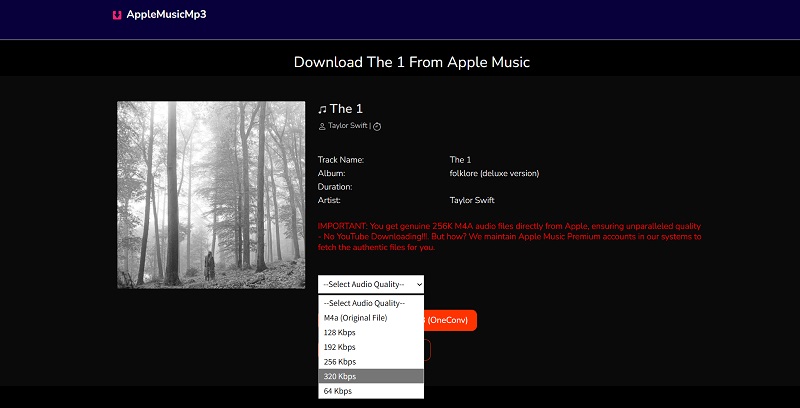
2. It parsed the link almost instantly (about 0.5s in our test). Then we clicked "Generate Download Link", chose "320kbps MP3" (it also offers 64–320kbps MP3 or M4A), and downloaded the file. The full process took about 13s in our test. If the download didn't start, the retry buttons ("Download Again" and "Click here if download not started") worked.
3. We checked file properties. The format and kbps matched what we selected.
[Playlist / album]
1. We pasted a playlist/album link. It parsed automatically.
2. The next screen showed a "Download ZIP" button, which looks like a batch download.
3. After choosing kbps, the ZIP finished in about 38s, but it only contained two songs. The page then showed: "Two Songs Zip Downloaded – Login for full ZIP."
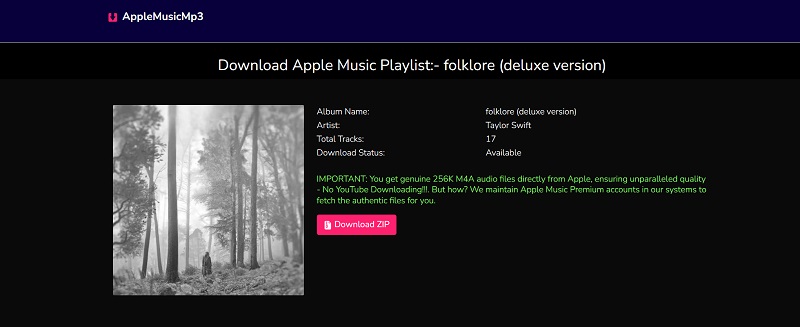
4. After we signed up and logged in, it went straight to a pricing page. A paid plan ($8.99/mo, $17.99/yr, $27.99/lifetime) was required to continue.
Important notes
- Free use is limited to 3 free single downloads per day (in our test). After that, it asks you to log in, and logging in leads to a paid plan flow.
- ZIP quality was not consistent across devices. We picked 320kbps, but after extracting the same ZIP, some files showed 320kbps while others showed 64kbps on different devices.
What we found from our test
- For single songs, the workflow is smooth: paste link → generate link → download.
- The "Download 320kbps MP3 (OneConv)" button is a redirect. It sends you to another product page and does not download your song.
- Free single-song downloads are limited. In our test, we hit a 3-per-day cap.
- The ZIP option looks like a batch download feature, but it is not true free batch downloading. In our test, each free ZIP only included the first two songs of an album, and the full ZIP flow required login and a paid plan.
- We were able to repeat the limited ZIP process several times and eventually collect all 17 tracks from Taylor Swift's folklore (deluxe version). However, this was more like a manual workaround than a real one-click album download.
- ZIP output quality was inconsistent across devices. Even from the same ZIP file, some extracted tracks showed different bitrates, which makes the results harder to trust.
- Reliability & stability: Single-song downloads were generally stable, and the retry buttons worked when a download did not start. The main issue is the album/ZIP experience: it looks convenient at first, but the two-song limit, paywall flow, repeated manual steps, and inconsistent quality make it unreliable for full albums or playlists.
Who it's for
Use AppleMusicMp3 if you only need a few single tracks in MP3/M4A and you're fine with daily limits.
Skip it if you want real playlist downloads, consistent quality, or a clean workflow without redirects and paywalls.
| Pros | Cons |
| ✔ Fast link parsing (auto, no extra clicks) ✔ Supports MP3 (64–320kbps) and M4A ✔ Retry buttons help when a download fails to start |
❌ Daily free limit (we hit a 3-per-day cap) ❌ ZIP "batch" is paywalled (free ZIP = 2 songs) ❌ OneConv button redirects instead of downloading ❌ ZIP quality may be inconsistent across devices |
Advanced Apple Music Song Download Solutions
Additionally, we also found some advanced solutions for ripping audio files from Apple Music, such as GitHub tools and audio recorders. Keep in mind though, these tools come with a steep learning curve. If you are looking for the best Apple Music downloader for beginners, then skip this section.
Gamdl Apple Music Downloader (Advanced CLI Option)
Gamdl is one of the most discussed Apple Music downloader GitHub projects among advanced users. Developed by Glomatico, it downloads Apple Music tracks, albums, and playlists to 256kbps AAC from the command line and can preserve rich metadata. Unlike the typical Apple Music downloader mentioned previously, it fetches music information through a logged in account session. This means you will need to export Apple Music cookies from your browser, which is not beginner-friendly.
At a glance
- Test status: Tested (worked)
- Best for: Tech savvy users who want full control and high customization
- Biggest limit: Complex setup (Python, FFmpeg, cookies extraction)
- Speed (3:30): ~90s (depends on network and server response)
- Output: AAC, Atmos, AC3, and ALAC
- Quality: AAC 256kbps by default
- Ads / friction: No ads; the setup takes time
- Batch / tags: Batch flows are possible (CLI style); Full metadata preserved
How we tested Gamdl Apple Music Downloader
[Single song]
1. Followed the official installation guide on GitHub to get Python 3.10 or newer on the testing computer. Then, we logged in to a subscribed Apple Music account on the official web player and exported the Cookie.txt.
2. On Command Prompt(Windows) or Terminal (Mac), iwe installed Gamdl by running "pip install gamdl" and specifying the cookie file path.
3. We ran the command:
gamdl "https://music.apple.com/us/song/the-1/1528112361". And it took 1 - 2 minutes to finish the parsing and download process.
4. The output file was saved at 256kbps with full ID3 tags.
[Playlist / album]
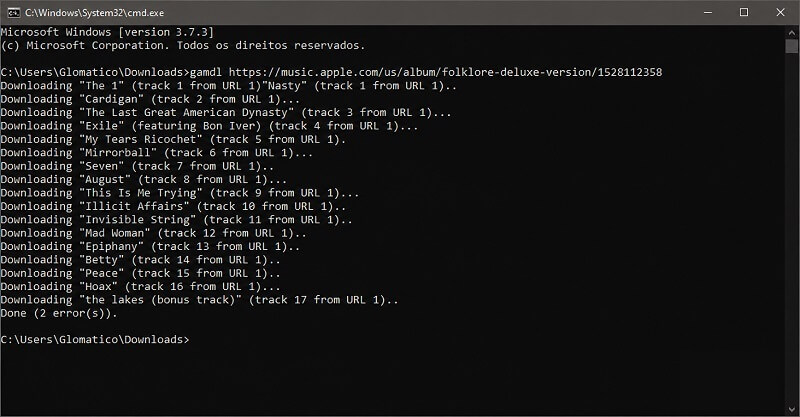
1. We also tested the 17-track album from Taylor Swift by running "gamdl "https://music.apple.com/us/album/folklore-deluxe-version/1528112358". This GitHub tool downloaded all tracks sequentially, completing in ~20 minutes. Although most songs were extracted successfully, 2 tracks failed to complete.
2. All downloaded songs were stored in the default "Download" folder. Metadata and album art were perfectly preserved.
What we found from our test
- It is a truly open-source and free Apple Music downloader for PC, Mac, and Linux.
- There were no ad interruptions during testing.
- The tool saved AAC 256kbps, which is identical to the original stream.
- The whole process heavily relied on command lines, which is not friendly for everyone.
- To keep the tool working properly, the Apple Music cookie needs to be refreshed and exported again every few weeks.
- Reliability & stability: This GitHub Apple Music downloader was generally stable in our test.While the conversion efficiency was not ideal and occasional download failures occurred, we experienced no crashes or freezes during hands-on testing.
Who it's for
Use Gamdl Apple Music Downloader if you are familiar with command line or prefer full control over the download process.
Skip it if you prefer an intuitive interface. For most users, a desktop Apple Music converter like TuneFab or Sidify is the faster, more reliable pick.
| Pros | Cons |
| ✔ Free to access on GitHub. ✔ Save Apple Music lyrics in LRC, SRT, or TTML format. ✔ Offer extensive highly custimizable options. ✔ Boast a vast user community for instant assistance. ✔ Support true batch conversion for playlists/albums. |
❌ Include complex setup. ❌ Require Apple Music subscription. ❌ No GUI, command-line interface only. |
Audacity (Free Recorder Fallback)
Audacity is not a typical Apple Music downloader. It's a free, open-source audio recorder and editor. Instead of downloading from a link, it records audio while it plays. That means it can export MP3/WAV and more, but it runs in real time and needs more setup than a dedicated converter.
At a glance
- Test status: Not thoroughly tested (setup-heavy)
- Best for: Free recording + basic audio editing
- Biggest limit: Real-time recording + setup required
- Speed (3:30): ~3:30 (real time)
- Output: MP3/WAV/FLAC/OGG (export options)
- Quality: Depends on the source (recording + export)
- Ads / friction: No ads, but installation and setup can be time-consuming
- Batch / tags: No true batch; tags are manual (not preserved)
How we tested Audacity
1. We went to the official download page and clicked "Download". Instead of getting Audacity right away, we were prompted to install "Muse Hub" first.
2. After opening Muse Hub, we saw a large Audacity banner. We clicked "Download" again. The button quickly changed to "Launch".
3. We clicked "Launch" and followed a guided install flow. After the setup finished, Audacity finally opened.
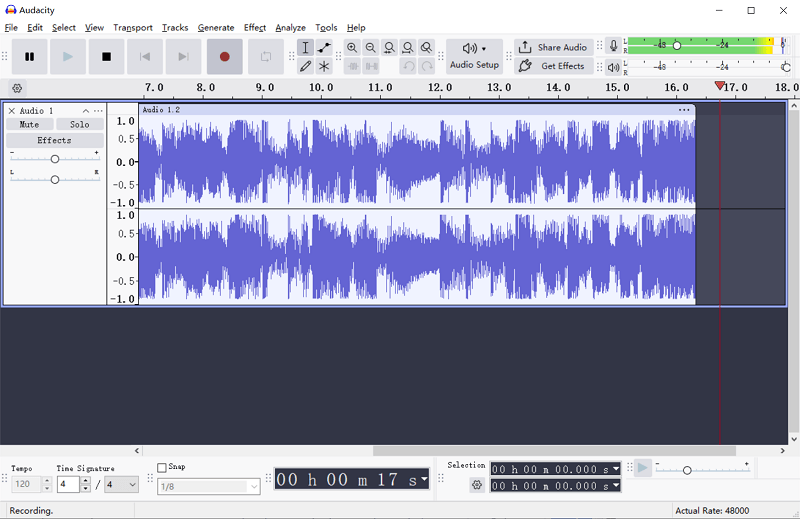
4. After configuring the input and output audio source, we started recording the song "the 1" (3:30) by Taylor Swift. No surprise. It took 3:30 for capturing, which was way less efficient than dedicated Apple Music converters.
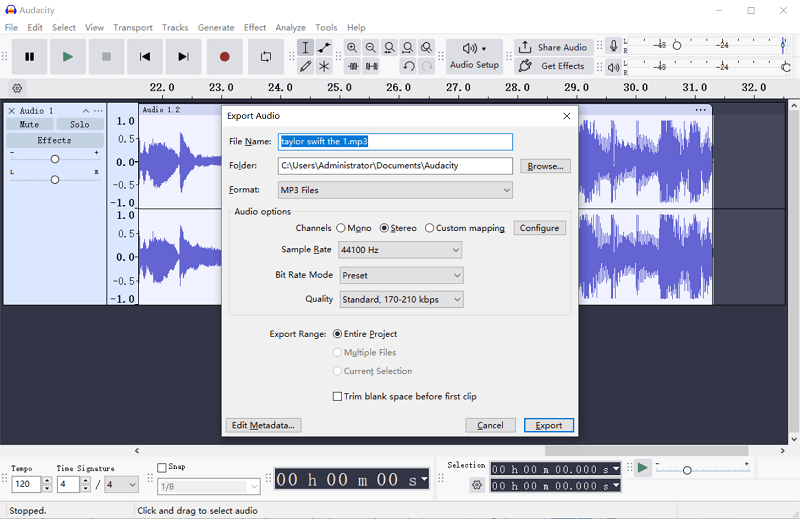
5. Exported the recorded audio files as MP3 and customized audio options based on the needs. However, no ID3 tags were preserved.
Tips:
- If you have plenty of time and don't mind the learning curve, Audacity is an option. You can find the full walkthrough on their "Recording desktop audio" page for the step-by-step setup.
- Audacity's support docs also mention a download option "without MuseHub". In our test, clicking the main "Download" button took us through the Muse Hub flow.
What we found
- This is not an online Apple Music downloader. It records playback instead of downloading from a link.
- Recording is real-time, so it will always be slower than converters.
- Setup effort is the real cost: installing via Muse Hub can add steps, and system-audio recording needs extra configuration.
- Tags are not automatically preserved. You usually need to add metadata manually when exporting.
- Reliability & stability: Audacity itself is mature and widely used, but your results depend on your recording setup. The main risk is not crashes—it's time and configuration. If your input source is not set correctly, you may record silence or the wrong audio source.
Who it's for
Use Audacity if you want a free tool to record audio and do basic edits, and you're okay with real-time recording and setup work.
Skip it if you want fast playlist downloads, batch conversion, or automatic tags. It's not the most efficient route for that goal.
| Pros | Cons |
| ✔ Free and open-sourceWorks on Windows/macOS/Linux ✔ Exports multiple formats (MP3/WAV/FLAC/OGG, etc.) ✔ Strong editing tools (trim, noise reduction, multi-track) |
❌ Not a link-based Apple Music downloader (records playback) ❌ Real-time recording is slow ❌ Installation and setup can be complex (Muse Hub + system-audio capture) ❌ Tags are manual (not preserved automatically) |
Tested But Not Recommended Downloaders for Apple Music 🚫 (Updated June 2026)
Not every Apple Music downloader that appears in search results actually completed our basic tests. We excluded the following tools from the main ranking because they failed to download the test track, got stuck during parsing, or did not start a real download.
| Tool | Reasons to Avoid |
| Apple-Music-Downloader.com | ❌ Single-song parsing failed in our tests ❌ No batch downloadLow audio quality in our sample (112kbps, 48kHz) ❌ Unstable: "convert error" appears |
| Apple Music Playlist Downloader | ❌ Single tracks failed to parse in our test ❌ Playlists/albums stuck on "searching…" ❌ The download icon stayed disabled, so we couldn’t complete any downloads |
| Zhaaray's Apple Music ALAC / Dolby Atmos Downloader | ❌ Command-line only (not beginner-friendly) ❌ Setup is heavy (extra components + tokens/cookies for some features) ❌ Not a good fit if you just want a quick download with minimal setup |
FAQs
Is it legal to use an Apple Music downloader?
Apple Music's terms of service prohibit removing DRM. Rules vary by region, and Apple Music's terms may restrict certain types of downloading or DRM removal. Before using any third-party Apple Music downloader, check the applicable terms and local copyright laws, and do not redistribute or commercially use downloaded music.
Which music downloader is best for iPhone and Android?
Based on our real-world tests, there is no direct, native Apple Music downloader app on the App Store or Google Play. In this case, online tools are viable options. Additionally, if you need to download Apple Music playlists regularly, we recommend using a desktop Apple Music downloader on Windows or Mac first and then transferring the downloaded files to your mobile device.
Is there a way to download the entire Apple Music library?
Yes, the key is to find a reliable bulk Apple Music downloader. According to our 2026 tests, here are some tools worth considering.
Can I download Apple Music as MP3?
Yes, there are many Apple Music MP3 downloaders available on both desktop and online to help you out.
Is there an Apple Music Downloader Telegram bot available?
Yes, you find many Telegram bots claiming to act as an Apple Music downloader. However, they usually suffer from poor stability, frequent downtime, low success rates, and limited output formats. For these reasons, we do not recommend using them.
Final picks (choose in 30 seconds)
Here's how to pick a free Apple Music downloader based on what you need.
- Pick APLMate if you want a free way to grab an MP3 fast. Expect CAPTCHA, redirects, and pop-up ads.
- Pick AppleMusicMp3 if you mainly download single songs and want to choose MP3 (64–320kbps) or M4A. Just note the daily free limit, and the "ZIP" promise is paywalled after two songs.
- Pick TuneFab Apple Music Converter (desktop) if you need albums/playlists, true batch downloads, and stable output. Use the 3 free downloads on a real song/playlist/album test.
- Skip Apple-Music-Downloader.com and Apple Music Playlist Downloader if you want a tool that actually finishes the job. In our tests, they failed on single songs, got stuck, or never started a real download.
- Pick Audacity or GitHub Apple Music Downloader only if you're okay with a setup-heavy workflow. Audacity records audio in real time, and even the installation flow can be a bit messy. GitHub tools are usually command-line and may require extra dependencies, plus account-related tokens/cookies. If you just want a simple free online Apple Music downloader, skip both.
Conclusion
When it comes to the best Apple Music downloader, the final answer completely depends on your actual needs and preferences. If you only need one MP3 once in a while, an online tool can be enough. If you care about playlists, batch downloads, and consistent file quality, a desktop converter that can also work as an Apple Music album downloader is the more reliable route.
To get started, click "Try It Free" on TuneFab Apple Music Converter and use your 3 free downloads wisely—test a real album or playlist first.