

Quick Verdict: Is TuneFab Amazon Music Converter Worth It?
TuneFab Amazon Music Converter is worth trying if you often save Amazon Music playlists or albums for personal offline listening. In our test, it was easy to use, handled batch downloads smoothly, and kept useful file details such as artist, album, and cover art.
It is not the best fit for everyone. The free trial only lets you download 3 songs per platform, so it is too limited for testing large libraries. The built-in web player can also feel a little slower than a native music app at times. If you only need a free tool for one or two songs, TuneFab may feel like more than you need.
Best for: Amazon Music users who need batch downloads, MP3/FLAC/WAV output, and local music management.
Not ideal for: free-only users, very casual downloaders, users who need commercial usage rights, or anyone expecting a fully native app experience.
TuneFab Amazon Music Converter Review Summary
| Rating Item | Our Take |
| Overall Rating | 4.3/5 |
| Best For | Batch downloading Amazon Music songs, albums, and playlists for personal offline use |
| Works On | Windows and macOS |
| Output Formats | MP3, FLAC, WAV, M4A, AAC, AIFF, ALAC |
| Trial Limit | 3 songs per platform, with no duration limit |
| Main Strength | Easy workflow, fast batch downloads, flexible formats, and useful ID3 tag retention |
| Main Drawback | The trial is too limited for large-library testing, and the built-in web player can feel slightly slow |
| Who Should Skip It | Users who only want a free tool, need occasional one-song downloads, or require commercial usage rights |
- What Is TuneFab Amazon Music Converter?
- How We Tested TuneFab Amazon Music Converter
- What TuneFab Amazon Music Converter Does Well
- What We Didn’t Like
- Is TuneFab Amazon Music Converter Worth Paying For?
- Is TuneFab Amazon Music Converter Safe and Legal?
- TuneFab vs. Other Ways to Download Amazon Music
- Final Verdict: Should You Use TuneFab Amazon Music Converter?
What Is TuneFab Amazon Music Converter?
TuneFab Amazon Music Converter is a desktop tool made for Amazon Music users who want to save songs, albums, playlists, and podcasts as local audio files for personal offline use. It supports common formats such as MP3, FLAC, WAV, M4A, AAC, AIFF, and ALAC, so the converted files can be played in many music players, media apps, and personal libraries.
The software uses a built-in Amazon Music web player. After logging in, you can search for music, open playlists or albums, add tracks to the conversion list, choose an output format, and start downloading from one interface.
In short, TuneFab is not trying to replace Amazon Music as a streaming service. It is mainly useful when you want more control over your own offline listening setup, especially if you prefer keeping music as regular local files for personal use.
How We Tested TuneFab Amazon Music Converter
To see whether TuneFab Amazon Music Converter works well beyond its feature list, we tested it with real Amazon Music content and common download scenarios.
| Test Item | Details |
| Windows Device | Windows laptop running Windows 11 |
| Mac Device | MacBook Air running macOS 26 |
| Test Content | 1 single song, 1 playlist with 40 songs, and 1 album with 10 songs |
| Main Checks | Setup, login, parsing, output settings, download speed, ID3 tags, local playback |
| Trial Limit Checked | 3 songs per platform, with no duration restriction |
| Output Checks | We checked whether the exported file information matched the selected format and quality settings |
| Stability Checks | We watched for crashes, failed downloads, page loading delays, and playback issues |
Our goal was not to test every Amazon Music track type in every region. Instead, we focused on a realistic workflow: opening Amazon Music inside TuneFab, adding songs to the conversion list, choosing output settings, downloading tracks, and playing the files locally afterward.
Real Workflow Impressions
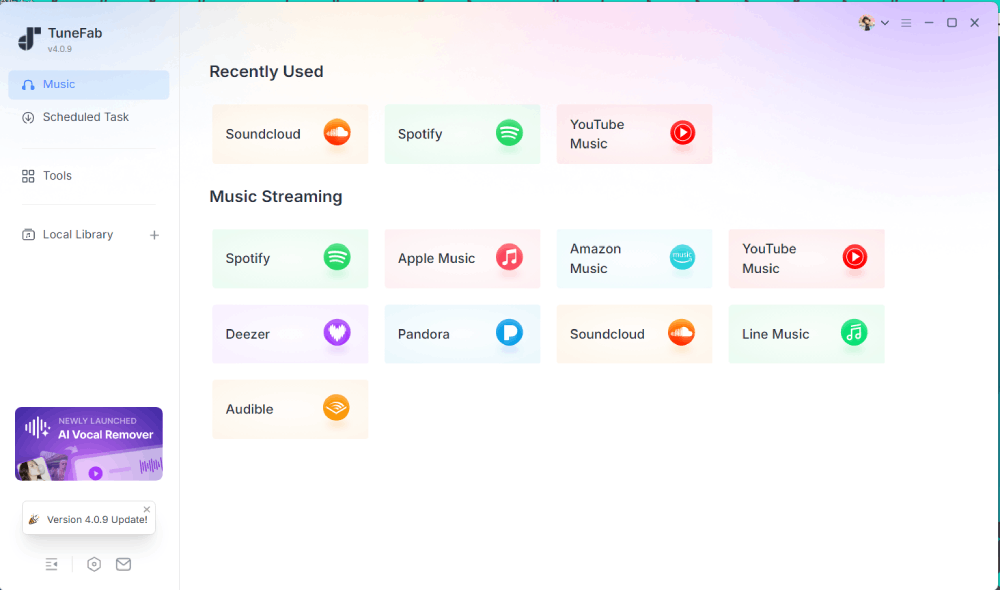
Step 1. After installing the software, we were first brought to a platform selection screen. Besides Amazon Music, TuneFab also supports services like Spotify, Apple Music, and YouTube Music. This makes the software feel more like a multi-platform music converter than a single Amazon Music tool.
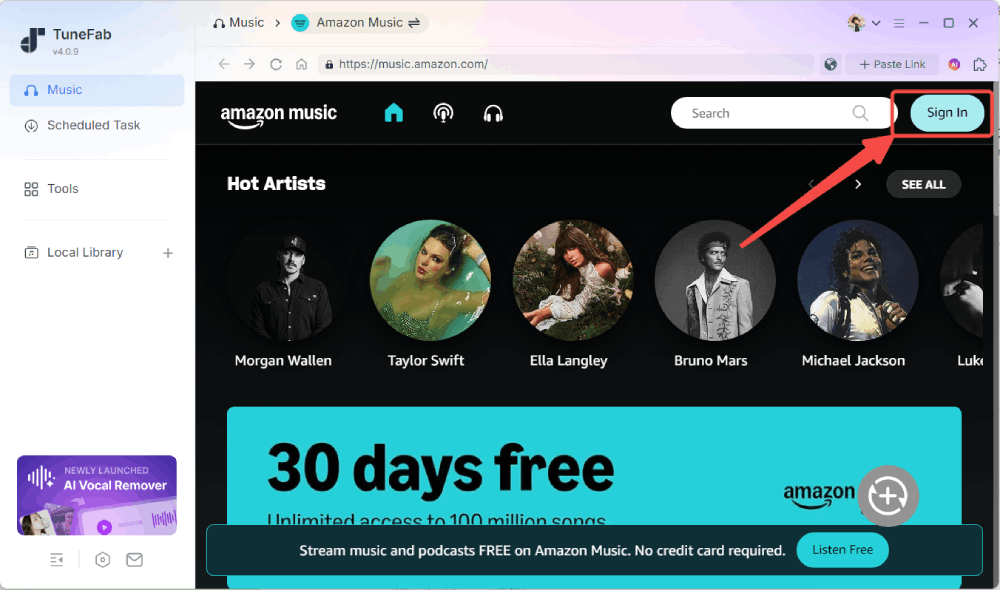
Step 2. Once we selected Amazon Music, the software immediately opened its built-in web player interface. From there, we logged into an Amazon account and entered a familiar homepage experience that looked very similar to using Amazon Music in a regular browser or desktop app.
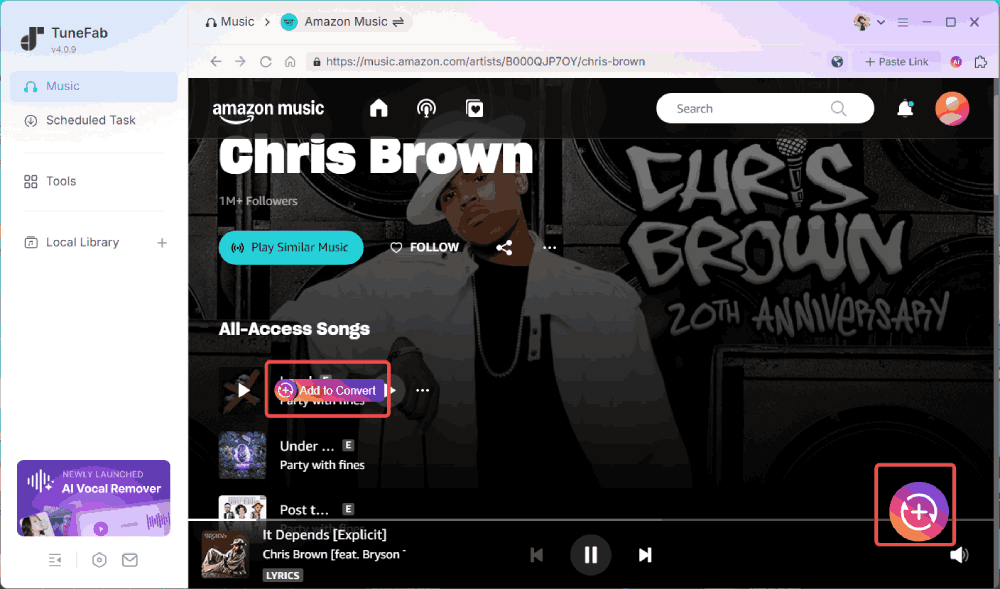
Step 3. From a new user's perspective, the workflow was fairly easy to figure out without much guidance. We could search for songs directly, open existing playlists or albums, and click either the floating "Add to Convert" button or the "+" icon in the lower-right corner to add music to the conversion queue.
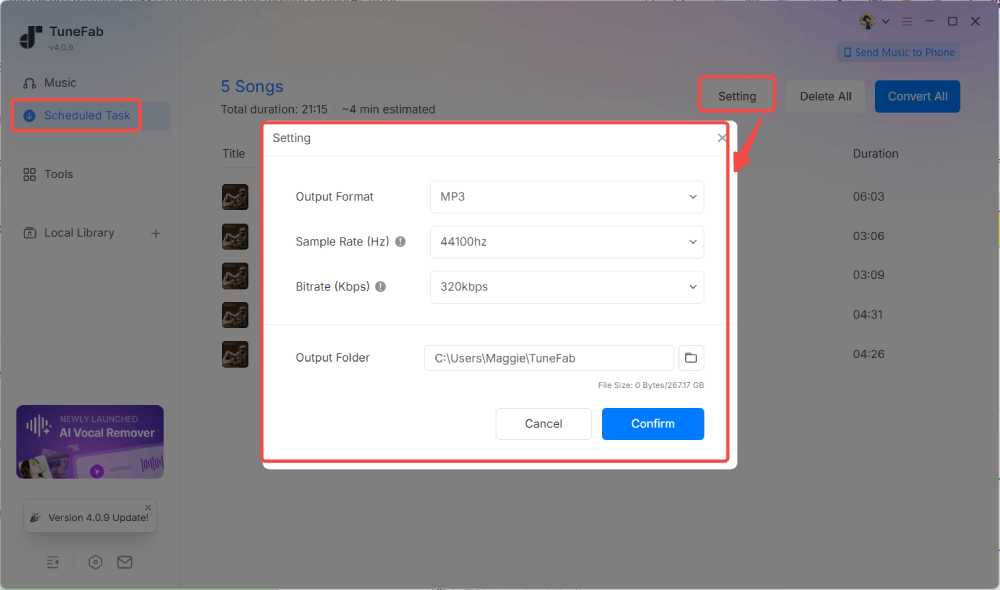
Step 4. After adding tracks, the software prompted us to configure output settings. The available formats matched the advertised options, including MP3, FLAC, WAV, M4A, etc. Bitrate and sample rate could also be customized manually, along with the output folder location.
At this stage, the software clearly explained the free trial limitation: up to 3 songs per platform with no duration restriction, while the paid version removes download limits entirely.
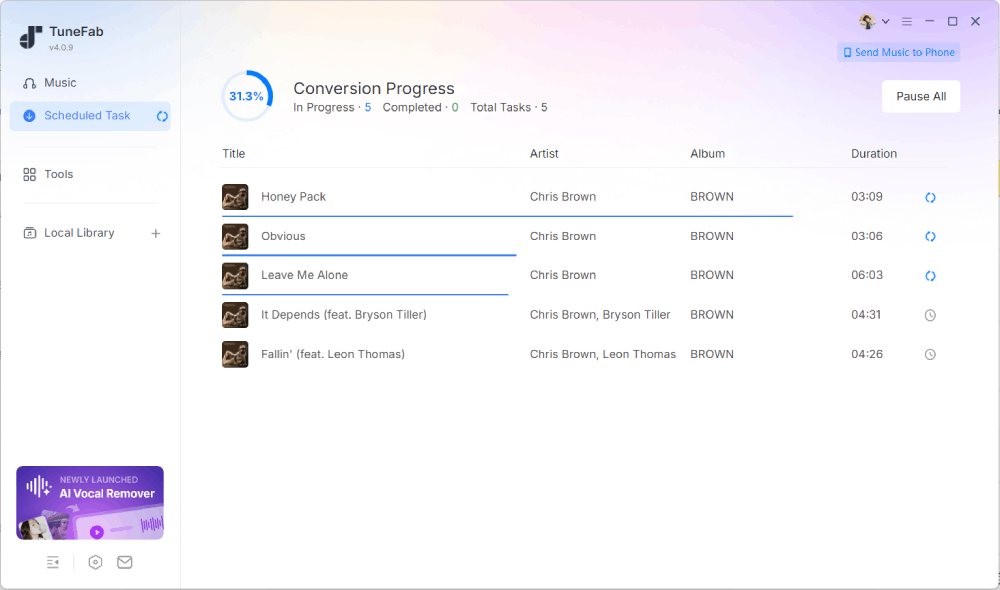
Step 5. Clicking "Convert Now" brought us to the "Scheduled Task" page, where download progress could be monitored in real time. In our testing, a single 4-minute track finished in roughly 10 seconds. The 40-song playlist took around 5 minutes, while the 10-track album took about 1.5 minutes.
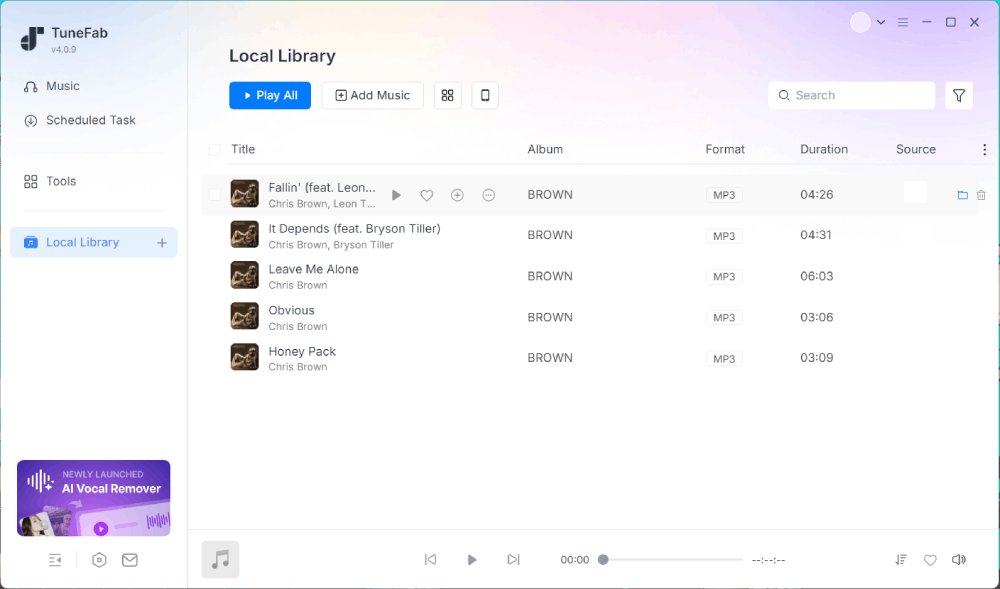
Step 6. Once the downloads were finished, the software automatically opened the "Local Library" tab, where we could find the converted songs with ID3 information such as title, artist, album, and cover art. The tracks could be played directly inside TuneFab or opened in the local output folder for use in other players and devices. We also checked the file information, and the exported files matched the output settings we selected.
If You Want to Learn More:
What TuneFab Amazon Music Converter Does Well
After testing songs, albums, playlists, and several output settings, TuneFab Amazon Music Converter felt more useful than a basic downloader. Its main strengths were the simple workflow, batch conversion speed, flexible output settings, and local library management.
Here is where it performed well in our test.
The Marketing Claims Don't Feel Overstated
One thing we noticed is that the software behaves much closer to a normal streaming app. Because TuneFab uses a built-in Amazon Music web player, the entire browsing and downloading process feels familiar from the start. Searching songs, opening playlists, and adding tracks to the queue all work similarly to the regular Amazon Music desktop experience, so there is very little learning curve involved.
As for the advertised "35X faster speed," we obviously couldn't verify what baseline that number was measured against. However, the actual download performance during testing was still reasonably fast and stable. More importantly, the free trial version did not heavily restrict advanced settings or core functionality beyond the 3-song download limit, which made it easier to properly evaluate the software before paying.
Maintain Amazon Music's High-Quality Audio
One of the key expectations when using any music converter is whether the output quality stays close to the original streaming source. In theory, Amazon Music itself already offers a fairly strong audio quality range depending on the plan.
- Amazon Music Prime: Up to 256 kbps (Lossy).
- Amazon Music Unlimited: HD (Lossless CD-quality 16-bit, 44.1 kHz at 850 kbps) and Ultra HD (Hi-Res up to 24-bit, 192 kHz at 3,730 kbps).
In our test, TuneFab provided output options aligned with Amazon Music's high quality, with customizable bitrate and sample rate settings. We verified the exported files' info, and they consistently matched the selected output settings with no noticeable quality loss. However, the listening results still depend on the playback environment. On standard headphones or speakers, the differences may be subtle, while higher-end audio setups are more likely to reveal the advantages of lossless formats like FLAC or WAV.
Surprisingly Convenient for Mac Users
This part stood out more than expected during testing. Since Amazon discontinued its standalone Prime Music desktop app for Mac, many Mac users have gradually been pushed toward relying on the browser version instead, which can feel fragmented compared to native music apps.
TuneFab partially solves that inconvenience by combining streaming, downloading, and local playback into a single desktop workflow. Instead of constantly switching between browser tabs, streaming apps, and local music folders, everything stays inside one interface. If you regularly move between streaming and offline listening, especially on macOS, this actually makes day-to-day music management feel noticeably cleaner.
Better Local Music Management Than Expected
TuneFab is not just acting as a downloader. Once songs are converted, the built-in "Local Library" section can also play existing audio files already stored on your computer, which helps centralize both downloaded Amazon tracks and your own local collection in one place.
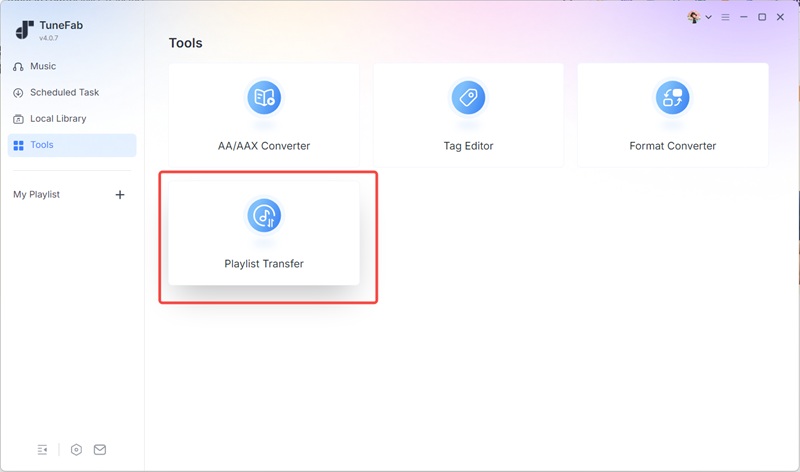
We also noticed that the software includes several smaller features hidden inside the "Tools" section, including a tag editor, audio format converter, playlist transfer tool, etc. None of these tools is necessarily groundbreaking on its own, but together they make the software feel more like a lightweight local music management hub rather than a single-purpose converter. If you care about organizing offline music libraries over time, these additions are genuinely useful instead of feeling like filler features.
What We Didn’t Like
Though most of the experience felt stable and beginner-friendly during testing, there are a few trade-offs worth knowing before deciding whether it fits your long-term listening habits and workflow.
The Interface Can Occasionally Feel Slightly Slow
During testing, the software itself stayed stable and did not crash, but some parts of the interface felt a little less responsive than native desktop music apps. For example, opening large playlists, loading album pages, or switching between tabs inside the built-in web player sometimes took a few extra seconds.
This is likely related to how TuneFab integrates multiple streaming platforms and runs a built-in web player inside the software itself. In other words, the experience depends not only on your computer performance, but also on network stability and how quickly the embedded web interface responds.
This did not stop downloads from completing normally in our testing. But if you expect an ultra-lightweight, instant-response experience similar to native music apps, you may notice the difference occasionally.
The Free Trial Is Limited for Long-Term Evaluation
One thing we appreciate is that the free trial does not heavily lock away advanced settings or output options. You can still explore the interface, adjust formats and quality settings, and experience the full download workflow before paying.
However, the limitation of only downloading three songs per platform does make it harder to fully evaluate longer-term usage scenarios. For example, it becomes difficult to properly test how the software handles large playlist libraries, repeated batch downloads, or long-term local music organization unless you upgrade to the paid version.
For casual users who only want to see how the software works, the trial version is probably enough. But if you are seriously considering building a permanent offline music library, the real experience only becomes clear after extended use with payment.
Is TuneFab Amazon Music Converter Worth Paying For?
TuneFab is worth paying for if you use Amazon Music often and want more control over your offline files. It is especially useful if you regularly download playlists or albums, need common formats like MP3 or FLAC, or want to move music into other players and personal libraries.
It is less convincing for very casual users. If you only want to download a few songs, the paid plan may feel too much. The free trial is also too limited to show how well the software handles a large library over time.
Before buying, check the latest price, plan type, renewal terms, and refund policy on the official checkout page. Pricing can change, and the best value depends on how often you plan to use the software.
Our take: TuneFab is not a must-have tool for every Amazon Music listener. But for users who regularly build personal offline libraries, it offers enough speed, format control, and workflow convenience to justify considering the paid version.
Is TuneFab Amazon Music Converter Safe and Legal?
One of the biggest concerns you may naturally have when using any kind of music converter is not the feature set, but rather whether it is safe to install and whether it stays within legal boundaries. This is especially true for tools that interact with streaming platforms, where rules and usage policies are often strict.
From our testing, TuneFab Amazon Music Converter itself appears to be clean and stable to install and run. We did not encounter any bundled software, browser hijackers, or unexpected background processes during installation. The interface is straightforward, and there were no intrusive ads or security warnings during normal usage, which makes it feel relatively safe from a software standpoint.
On the legal side, it's important to be precise. Streaming platforms like Amazon Music have their own terms of service regarding downloading and content usage. TuneFab essentially acts as a tool that enables users to save music for offline access by processing streamed content locally. In practice, this should be limited to personal use only, such as creating a private offline library or backup. It should not be used for redistribution, commercial use, or sharing downloaded content publicly, which would violate most platform policies.
Note: Don't Use TuneFab Amazon Music Converter APKs or Cracked Versions
Please always download or purchase TuneFab Amazon Music Converter from its official website. Avoid any APK files, cracked installers, or "free full version" packages circulating on third-party sites. These unofficial versions are not only unreliable, but they can also carry security risks such as malware, unstable performance, or modified code that may not work as intended.
Final Verdict: Should You Use TuneFab Amazon Music Converter?
TuneFab Amazon Music Converter is a good fit for Amazon Music users who want a desktop tool for saving songs, albums, and playlists as local audio files for personal offline use. In our test, it was easy to use, fast with batch downloads, flexible with output formats, and helpful for basic local music management.
You may want to skip it if you only need a free tool, download music very rarely, want to fully test large playlists before paying, or expect the same speed and feel as a native streaming app.
Overall, TuneFab is not necessary for every Amazon Music listener. But for regular users who need local files, batch conversion, and more control over personal offline playback, it is worth trying.