

Many YouTube Music downloaders work well for single tracks, but they become less reliable when handling full playlists, especially large ones. Some tools failed to load large playlists, while others stopped halfway after saving only a few tracks.
To find out which tools are actually reliable, we tested 6 popular YouTube Music playlist downloaders in 2026, including desktop apps and browser-based options. Below, we compare how each tool performed in playlist parsing, batch downloading, metadata retention, speed, ads, and daily usability.
- Our Top Tested Picks
- How We Tested These YouTube Music Playlist Downloaders
- Best YouTube Music Playlist Downloader Apps for Windows and Mac
- ① TuneFab YouTube Music Converter
- ② YT Saver
- ③ NoteBurner YouTube Music Converter
- Best Online YouTube Music Playlist Downloaders
- ④ TuneFab Online YouTube Music Converter
- ⑤ OFA Downloader
- ⑥ YouTubePlaylist.cc
- YouTube Music Playlist vs. YouTube Playlist: What’s the Difference?
- Comparison of the 6 Best YouTube Music Playlist Downloaders
- Conclusion
Our Top Tested Picks
| Downloader | Best For | Biggest Advantage | Main Limitation |
| TuneFab YouTube Music Converter | Playlist downloads with built-in browser & library management | Built-in web player with additional tools for a complete desktop workflow | Paid desktop software not suitable for casual users |
| YT Saver | Cross-platform batch playlist downloads | Supports multi-URL batch processing with broad platform compatibility | Outdated UI and some features locked behind paywall |
| NoteBurner YouTube Music Converter | Long-term, high-volume playlist conversion | Fast and stable single-playlist processing with reliable ID3 retention | No flexible subscription plan for short-term users |
| TuneFab Online YouTube Music Converter | Ad-free browser-based playlist downloads | Clean, no-install experience with smooth playlist handling | Requires payment for full playlist and audio features |
| OFA Downloader | Free lightweight online playlist downloads | No login, no ads, fast parsing with ZIP output support | Small batch size per session and time-based file expiration |
| YouTubePlaylist.cc | Cloud-based playlist storage & temporary downloading system | Backup-style system supporting playlists and video downloads | Limited free storage and 24-hour storage limit for free users |
Note: This guide is for personal offline use and for content you own or have permission to save. YouTube Music Premium lets users download songs, playlists, and podcasts for offline listening inside the YouTube Music app, but it does not export them as regular MP3 files. Do not redistribute downloaded files or use them in ways that violate YouTube’s terms or copyright rules.
How We Tested These YouTube Music Playlist Downloaders
To make the results more objective, we tested each tool with five YouTube Music playlists. The test set included large music playlists with 100+ tracks and podcast playlists with dozens of episodes.
Testing Environment
| Test Date | May 2026 |
| Operating System | Windows 10 |
| Processor | Intel Core i7-8550U Windows laptop |
| Internet Connection | 26 Mbps Wi-Fi connection |
| Browser | Microsoft Edge |
| Output Settings | MP3 |
We evaluated each tool based on the following criteria:
- Playlist link parsing success rate: A downloader must first recognize and load a YouTube Music playlist correctly. Otherwise, the rest of the workflow cannot start. If a playlist cannot even be parsed successfully, the tool becomes unusable from the beginning.
- Batch playlist downloading: Many users searching for a playlist downloader want to save full playlists instead of downloading songs one by one. Batch downloading is especially important for users with large download needs, as it saves significant time and effort.
- Download stability: This was especially important for long playlists, where crashes, freezes, or half-finished downloads can waste a lot of time. We checked whether each tool could complete long playlist downloads smoothly without crashing, freezing, or stopping halfway through the process.
- Audio quality consistency: Some tools may compress or downgrade audio quality differently from track to track. We tested whether the output quality stayed consistent throughout the entire playlist download.
- Metadata retention: Keeping song titles, artist names, album details, and cover art intact is important for building an organized offline music library.
- Download speed: Speed has a major impact on the overall user experience, especially when downloading playlists containing dozens or even hundreds of tracks.
- Ads and popups: Many browser-based downloaders rely on intrusive ads, redirects, or fake download buttons, so we also checked how clean and user-friendly each tool was during actual use.
You can also use these points as a checklist when comparing other YouTube Music playlist downloaders.
Best YouTube Music Playlist Downloader Apps for Windows and Mac
① TuneFab YouTube Music Converter
Best for regular playlist downloads and local library management
Compatible with: Windows & Mac
Tested Version: v4.0.9
Pricing:
| Plan | Pricing |
| Month | 25.95$ |
| Annual | 79.95$ |
| Perpetual | 99.95$ |
What Surprised Us During Testing
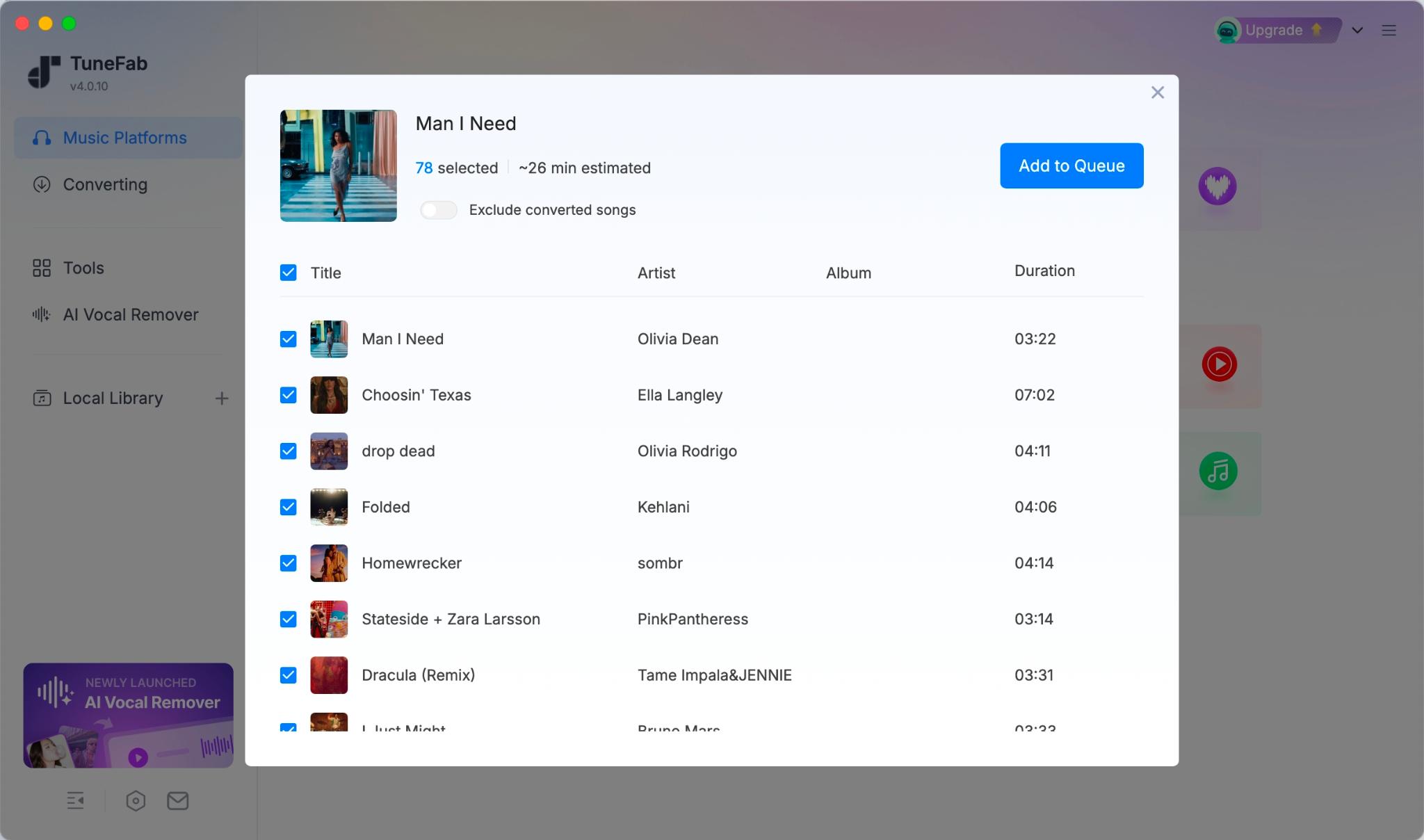
TuneFab YouTube Music Converter includes a built-in web player, so users can browse and search YouTube Music directly inside the app instead of relying only on pasted URLs. If you copy a YouTube Music URL before opening the app, TuneFab can detect and parse it automatically, which makes the workflow feel smoother.
The built-in tools, including the Tag Editor and format converter, were more useful than expected. They can be genuinely helpful for users who want to better manage and organize their local music library. Beyond playlists, it can also handle common YouTube Music content types such as songs, albums, and podcasts.
What It Does Best
- Downloads songs, albums, playlists, and podcasts from YouTube Music.
- Supports batch playlist downloading and quick output quality settings.
- Offers 6 output formats, including MP3, M4A, FLAC, WAV, AIFF, and ALAC.
- Exports MP3 files at up to 320kbps.
- Preserves key ID3 tags such as title, artist, album, and cover art.
Where It Struggles
- Large playlists may fail to parse under unstable network conditions.
- Some region-restricted tracks could not be parsed or downloaded during testing.
- Free trial version is limited and only allows a small number of full-track conversions.
Should You Use It?
If you regularly download YouTube Music playlists, albums, or podcasts, TuneFab is one of the most practical desktop options we tested. The built-in web player and batch download support make the downloading process much smoother than tools that rely entirely on pasted URLs. It is not perfect, especially when playlists include region-restricted tracks, but it offers one of the smoother workflows for long-term playlist downloading and library management.
② YT Saver
Best for cross-platform batch playlist downloads
Compatible with: Windows, Mac, and Android
Tested Version: v10.15.3
Pricing:
| Standard Plan | Pricing | Pro Plan | Pricing |
| Month | 9.95$ | Monthly | 19.95$ |
| Annual | 29.95$ | Annual | 69.95$ |
| Perpetual | 39.95$ | Perpetual | 89.95$ |
What Surprised Us During Testing
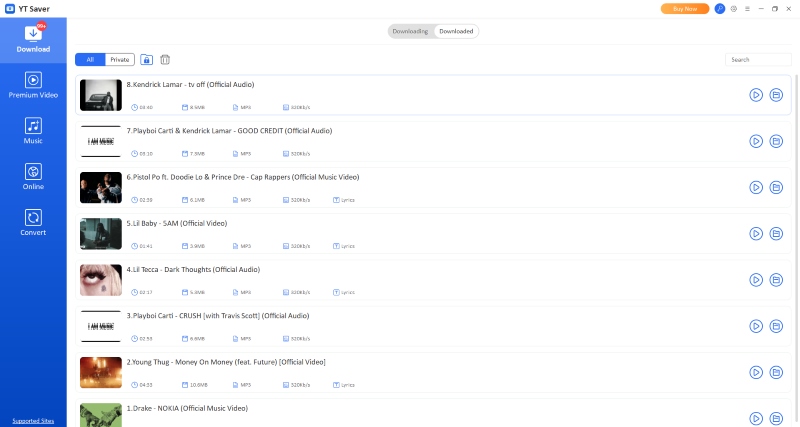
YT Saver's link parsing speed was noticeably faster than expected. During our test, most playlists were processed in about 5 seconds. We did not encounter download failures, freezes, or mid-task interruptions during the test. Another advantage was its ability to handle multiple URLs at once. This batch parsing feature significantly improves efficiency, especially for users managing large download lists.
In addition, YT Saver supports a wider range of use cases beyond YouTube Music. It works with multiple platforms and includes a built-in browser and conversion tools, making it feel more like an all-in-one media downloader than a single-purpose YouTube Music tool.
What It Does Best:
- Supports downloads from multiple music and video sites.
- Enables batch parsing of multiple URLs.
- Handles one-click batch downloading of entire playlists.
- Exports audio at up to 320kbps.
Where It Struggles
- Ad pop-ups appear every time the software is launched.
- The free trial is heavily restricted, limited to one playlist and one single track.
- The UI feels outdated compared to modern software standards.
- Some key settings, such as audio quality selection, are not easy to find.
- Downloaded files do not retain ID3 metadata.
Should You Use It?
YT Saver is a good option for users who prioritize fast link parsing, batch processing, and cross-platform downloading. It performed particularly well when handling multiple URLs and large playlists, making it suitable for users with high-volume download needs.
However, it is less suitable for users who want a well-organized local music library because it does not retain ID3 metadata and its interface feels less polished. Overall, it works best as a fast and functional downloader rather than a long-term library management tool.
③ NoteBurner YouTube Music Converter
Best for long-term, high-volume playlist conversion
Compatible with: Windows & Mac
Tested Version: v3.3.2
Pricing:
| Plan | Pricing |
| Annual | 44.95$ |
| Perpetual | 89.9$ |
What Surprised Us During Testing
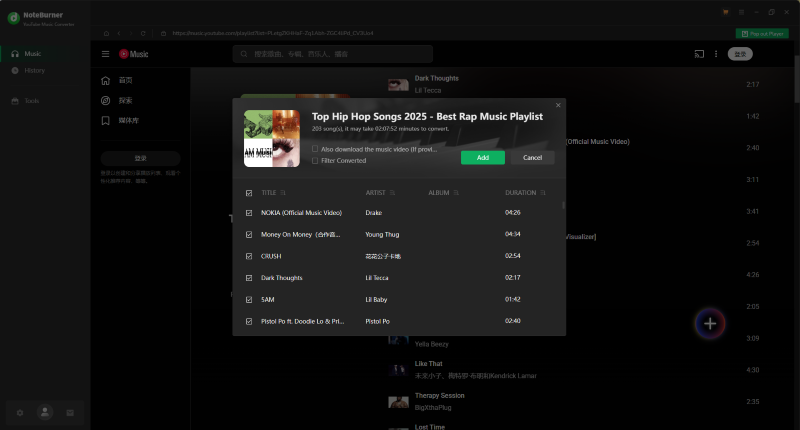
What stood out during testing was how smoothly NoteBurner YouTube Music Converter handled large playlist conversions after the task started. In our test with a 200+ song playlist, parsing finished in about 8 seconds, and all tracks were added to the download queue with one click.
We also noticed a useful after-download setting that can put the computer to sleep after all downloads are completed. This is particularly helpful for converting large playlists overnight or before leaving the device unattended.
What It Does Best
- Fast parsing of large playlists within 10 seconds.
- Stable one-click playlist conversion.
- Simple and straightforward user interface.
- Reliable ID3 tag preservation during downloads.
- Background downloading for long conversion tasks.
Where It Struggles
- Occasional promotional pop-up windows during use.
- Cannot directly parse external URLs (requires in-app browsing/search).
- Free trial is heavily restricted, only the first minute of each track.
- Single-device license limits flexibility for multi-device users.
Should You Use It?
In our test, NoteBurner stood out for its simple workflow and fast playlist parsing, making it a good choice for users who care most about ease of use and speed. However, because it does not offer a monthly plan, it may be less cost-effective for users who only download playlists occasionally.
Best Online YouTube Music Playlist Downloaders
④ TuneFab Online YouTube Music Converter
Best for ad-free browser-based playlist downloads
Compatible with: Browser-based; works on Windows, Mac, and mobile browsers
Pricing:
| Plan | Pricing |
| Monthly | 15.95$ |
| Yearly | 39.95$ |
| Perpetual | 59.95$ |
What Surprised Us During Testing
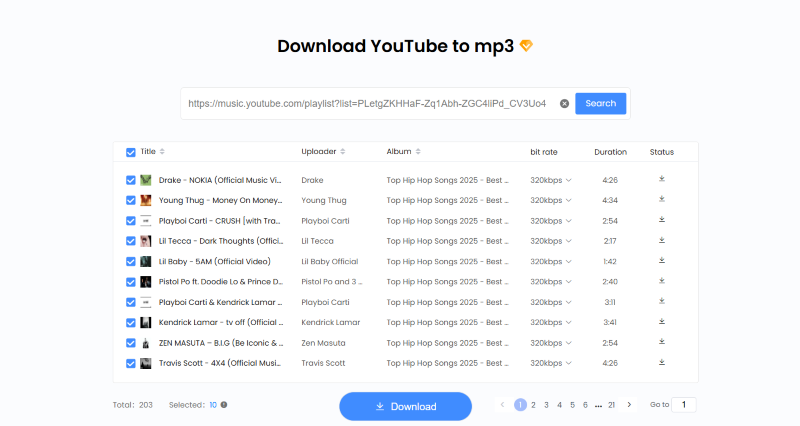
Unlike many online download tools that rely on intrusive ads or redirects, TuneFab Online YouTube Music Converter offered a clean interface with no pop-ups during our test, making the process feel more controlled.
It also performed steadily when handling multiple playlists. It successfully processed five playlists in sequence without interruption, and the conversion speed remained consistent throughout.
What It Does Best:
- Clean, ad-free interface with no pop-ups or redirects.
- Simple three-step setup for downloading music.
- Quick parsing performance for multiple playlists.
- Supports batch downloads of up to 10 tracks per session.
- Provides ZIP packaging for easy file management.
- Preserves ID3 metadata in downloaded files.
Where It Struggles:
- Requires account registration and login before use.
- Free version has limited functionality for playlist downloads.
- MP3 is the only available output format.
- Advanced playlist features are restricted to paid users.
Should You Use It?
This online tool is a good fit for users who prefer a simple, browser-based solution without installing additional software. It provided a clean experience with no intrusive ads, and playlist conversion and download success rates were consistently high. However, it operates on a paid model, which may not suit users looking for a completely free solution.
⑤ OFA Downloader
Best for free lightweight online playlist downloads
Compatible with: all
Pricing: Free
What Surprised Us During Testing
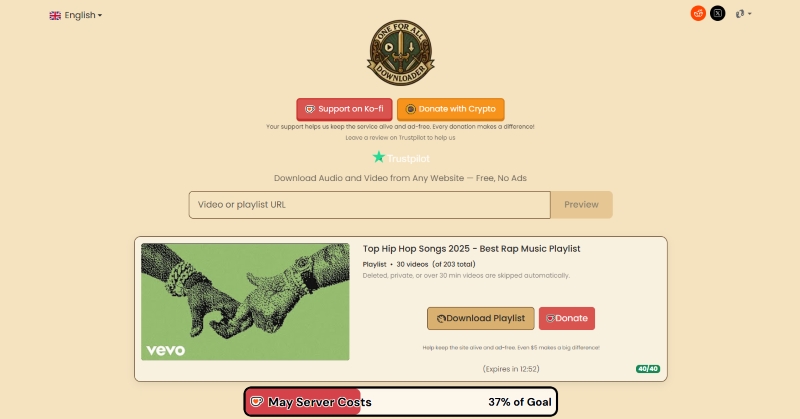
During our test, OFA Downloader performed better than expected for a free online playlist downloader. Its parsing speed was surprisingly fast during our test. All five playlists tested were processed within 6 seconds and immediately moved into the conversion stage without noticeable delay.
Although each batch is limited to about 30 tracks per session, users can continue from a specific point in later download rounds. This makes it more practical for handling larger playlists in multiple rounds. The tool does not require any login or registration, and the entire experience runs directly in the browser without ads.
What It Does Best:
- Quick playlist link parsing performance.
- No login or registration required.
- Fully ad-free online experience.
- Automatically packages downloads into ZIP files.
- Preserves ID3 metadata.
Where It Struggles:
- Download session links expire after 15 minutes, requiring re-parsing.
- Each session is limited to around 30 tracks per download batch.
- MP3 is the only available output format.
- The workflow becomes more manual when downloading playlists in multiple batches.
Should You Use It?
OFA Downloader is a good option for users who are looking for a completely free solution to download YouTube Music playlists. It can handle full playlists, but large playlists usually need to be downloaded in several batches. However, compared with desktop software that typically offers a more streamlined one-click workflow, this tool requires more manual steps and interaction throughout the process. It is therefore less convenient for users who prioritize simplicity and automation.
⑥ YouTubePlaylist.cc
Best for cloud-based playlist backup and temporary downloads
Compatible with: all
Pricing:
| Plan | Pricing |
| Starter-50GB | 19$ |
| Personal-200GB | 39$ |
| Pro-750GB | 89$ |
| Premium-1.5TB | 134$ |
What Surprised Us During Testing
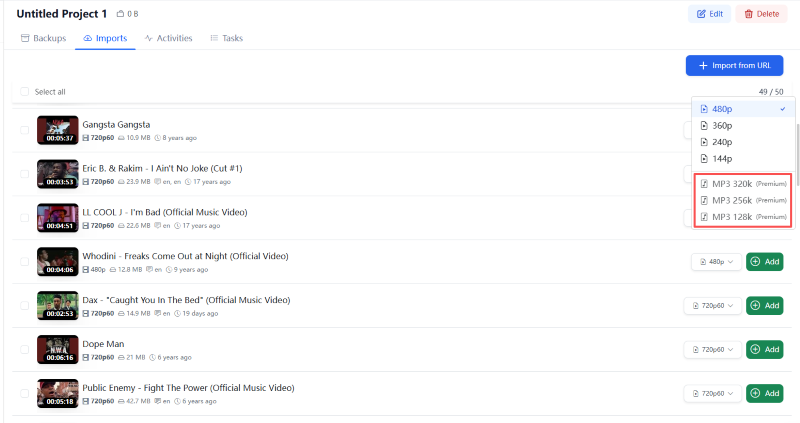
What makes YouTubePlaylist.cc different from most traditional downloaders is its cloud-based "backup" system. Instead of downloading files immediately after parsing a link, users first save playlists to a temporary backup space and then download them within 24 hours.
Although this structure is quite different from standard downloader tools, the interface turned out to be surprisingly easy to understand. In our tests, it only took a few minutes to get fully familiar with the process. This different workflow did not slow things down in our test. Playlist parsing and downloading stayed fast and stable, with no noticeable failures.
What It Does Best:
- Fast and reliable playlist link parsing.
- Cloud-based backup system for managing playlists.
- One-click application of format and audio quality settings.
- No advertisements in the interface.
- Preserves key ID3 metadata.
Where It Struggles:
- MP3 output and advanced audio quality options require a paid plan.
- Requires account registration and login before use.
- Free backup storage is limited to 3GB, with additional space requiring payment.
- Files stored in backup are automatically deleted after 24 hours for free users.
Should You Use It?
YouTubePlaylist.cc combines a downloader with a cloud-based storage system, making it more versatile than traditional playlist downloaders. In addition to music playlists, it also supports video downloads, which adds another layer of functionality for users looking for a more multi-purpose tool.
If you are interested in an all-in-one platform that integrates downloading and temporary cloud storage, this tool may be worth trying. However, audio download features are not available in the free tier, so check the paid plan details before using it as your main playlist downloader.
YouTube Music Playlist vs. YouTube Playlist: What’s the Difference?
A YouTube Music playlist is not always the same as a regular YouTube playlist. A normal YouTube playlist is usually built around videos on youtube.com, while a YouTube Music playlist often comes from music.youtube.com and may include songs, albums, official tracks, music videos, podcasts, and library-style metadata.
This difference matters because not every YouTube playlist downloader can handle YouTube Music links well. Some tools can parse regular YouTube video playlists but fail when the link comes from YouTube Music. Others may load the playlist but lose song titles, artist names, album information, or cover art during download.
That is why we focused on more than basic link parsing in this test. A good YouTube Music playlist downloader should be able to load the full playlist, batch download tracks without stopping halfway, keep useful ID3 metadata, and provide stable output quality across the entire playlist.
Comparison of the 6 Best YouTube Music Playlist Downloaders
| Operating System | Parse Success | Batch Download | Formats | ID3 Tag Retain | Ad-free | Overall Rating | |
| TuneFab YouTube Music Converter | Windows PC/macOS | 4/5 | ✔ | MP3, M4A, FLAC, WAV, AIFF, etc. | ✔ | ✔ | 4.6/5 |
| YT Saver | Windows PC/macOS/Android | 5/5 | ✔ | MP3, M4A, FLAC, WAV, AIFF, etc. | ❌ | ❌ | 4.4/5 |
| NoteBurner YouTube Music Converter | Windows PC/macOS | 4/5 | ✔ | MP3, M4A, FLAC, WAV, AIFF, etc. | ✔ | ❌ | 4.5/5 |
| TuneFab Online YouTube Music Downloader | All | 4/5 | 10 tracks per session | MP3 | ✔ | ✔ | 4.6/5 |
| OFA Downloader | All | 5/5 | 30 tracks per session | MP3 | ✔ | ✔ | 4.6/5 |
| YouTubePlaylist.cc | All | 4/5 | ✔ | MP3 | ❌ | ✔ | 4.5/5 |
Conclusion
After testing these 6 YouTube Music playlist downloaders, we found that the best choice depends on how often you download playlists and how large your playlists are. There is no perfect downloader for every situation. If you regularly save large playlists and want the smoothest long-term experience, desktop tools still perform noticeably better than browser-based downloaders. They offer more stable batch downloading, better metadata retention, and fewer interruptions during long download sessions.
Among all the tools we tested, TuneFab YouTube Music Converter delivered the most balanced overall experience for regular playlist downloading. It handled playlists reliably, preserved metadata well, and offered one of the smoothest workflows thanks to its built-in browser and batch downloading support. If you only download playlists occasionally and do not want to install software, OFA Downloader and TuneFab Online are easier to start with, though both come with batch or format limits.
The most important factor is not how many features a downloader advertises, but whether it can consistently finish large playlist downloads without unnecessary interruptions. For most users, the safest choice is the tool that can finish large playlist downloads consistently without too many manual steps.