

If you're searching for a Deezer playlist downloader recently, you've probably noticed how difficult it has become to find a reliable option. Many tools that used to work, such as community-driven downloaders and online converters, are either no longer maintained, require complicated account credentials, or fail to download large playlists consistently. This is especially frustrating if you want to back up hundreds of tracks, keep an offline music collection, or save playlists as local files.
Since Deezer is not that popular compared to others, many music downloaders and online services don't support it properly. To help you avoid wasting time on outdated or unreliable tools, we tested dozens of available options and selected the 5 Deezer playlist downloaders that still work for now. In this guide, we'll compare their download quality, playlist support, speed, ease of use, pricing, and real-world performance, so you can quickly find the one that best fits your needs.
- Why We Chose These 5 Deezer Playlist Downloaders
- Quick Pick: Which Deezer Playlist Downloader Is Better?
- #1. TuneFab Deezer Music Converter
- #2. DeeKeep Deezer Music Converter
- #3. DRmare Deezer Music Converter
- #4. Audials One
- #5. Telegram Deezer Bots
- FAQs About Deezer Playlist Downloaders
- Final Verdict
Why We Chose These 5 Deezer Playlist Downloaders
Not every Deezer downloader that appears in search results is still usable today. Some tools are no longer maintained, some require complicated setup processes, and others struggle with large playlists or fail to preserve audio quality. For this review, we focused on tools that are still accessible and can reliably handle real playlist downloads.
To be included in this list, a Deezer playlist downloader needed to meet most of the following criteria:
- Support downloading entire Deezer playlists, not just individual tracks
- Offer at least MP3 or other commonly used output formats
- Maintain stable download performance during testing
- Preserve important metadata such as title, artist, album, and cover art
- Provide a user-friendly workflow without excessive technical setup
Testing Environment
To keep the comparison as fair as possible, all tools were tested under similar conditions:
- Devices: MacBook (running macOS 26) and a Windows PC (running Windows 11)
- Test Sample: A Deezer playlist containing 20 songs from different artists and genres
- Network: Stable high-speed WiFi connection
- Evaluation Criteria: Playlist recognition, download success rate, output quality, metadata retention, download speed, ease of use, and overall reliability
Quick Pick: Which Deezer Playlist Downloader Is Better?
There is no single perfect tool for everyone; the right choice depends on whether you prioritize speed, output quality, platform flexibility, or ease of use. To help you make a quick decision, we've summarized the core differences below based on real testing results.
| Downloader | Best For | Key Strength | Main Limitation | Recommended For |
| TuneFab Deezer Music Converter | Balanced all-in-one solution | Stable playlist recognition + rich format support | Paid features required for full use | Users who want reliable MP3/FLAC downloads with minimal setup |
| DeeKeep Deezer Music Converter | Deezer-focused simple workflow | Straightforward Deezer-only interface | Free version heavily restricted | Users who prefer a clean, dedicated Deezer downloader |
| DRmare Deezer Music Converter | Multi-platform streaming support | Very fast conversion speed across services | Trial limitations on audio length | Users who want faster conversion speed |
| Audials One | Streaming recording approach | Works across all platforms, high-quality recording | Real-time process is time-consuming | Users who want a universal recorder tool |
| Telegram Deezer Bots | Mobile quick download | No installation, very fast access | Unstable quality and reliability | Users who need quick downloads on mobile devices |
Each Deezer playlist downloader reviewed here serves a different type of user and use case, whether it's focused on stability, speed, platform support, or ease of use. To understand how they actually perform in real testing conditions, including their limitations, download behavior, and output quality, let's go through each tool in detail below.
#1. TuneFab Deezer Music Converter
| Support OS | Download Format | Quality | ID3 Tags | Speed | Best For |
| Windows, macOS | MP3, FLAC, WAV, AIFF, M4A, AAC, ALAC | Up to 320kbps MP3 and HiFi FLAC | Preserved | Fast | Users who want an easy-to-use Deezer playlist downloader with flexible formats and batch downloads |
TuneFab Deezer Music Converter is a dedicated Deezer downloader that combines a built-in Deezer web player with playlist downloading and format conversion features. It can download Deezer music, including songs, albums, playlists, and podcasts, to MP3, FLAC, WAV, AAC, and ALAC. In our testing, it delivered smooth experiences, with fast playlist recognition and accurate metadata retention. It also includes useful extras such as an ID3 editor, local music player, and audio format converter for managing offline music libraries.
Our Testing Experience
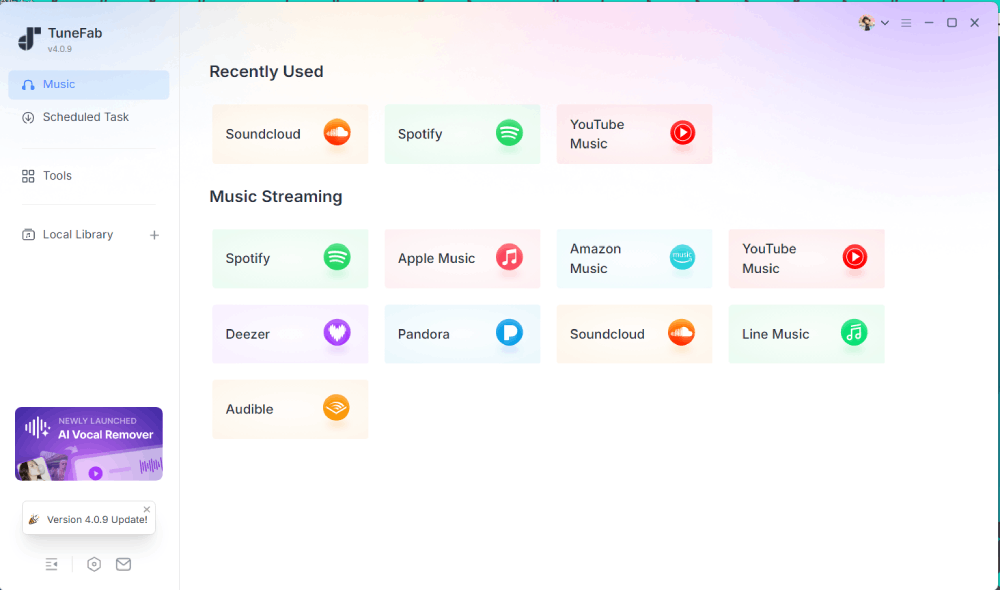
Step 1. After launching TuneFab, we found that it supports multiple streaming platforms in a single program. Selecting Deezer opened the built-in Deezer web player directly, without requiring a separate browser.
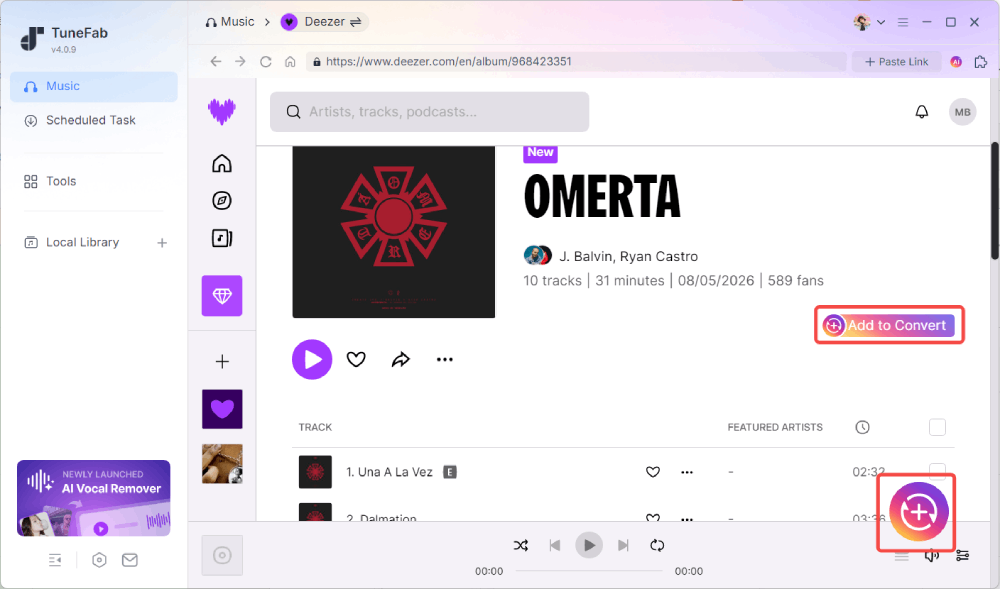
Step 2. We signed in using a Deezer account and accessed a previously saved playlist. The playlist appeared automatically inside the integrated player. Clicking "Add to Convert" successfully analyzed all tracks and added them to the conversion queue.
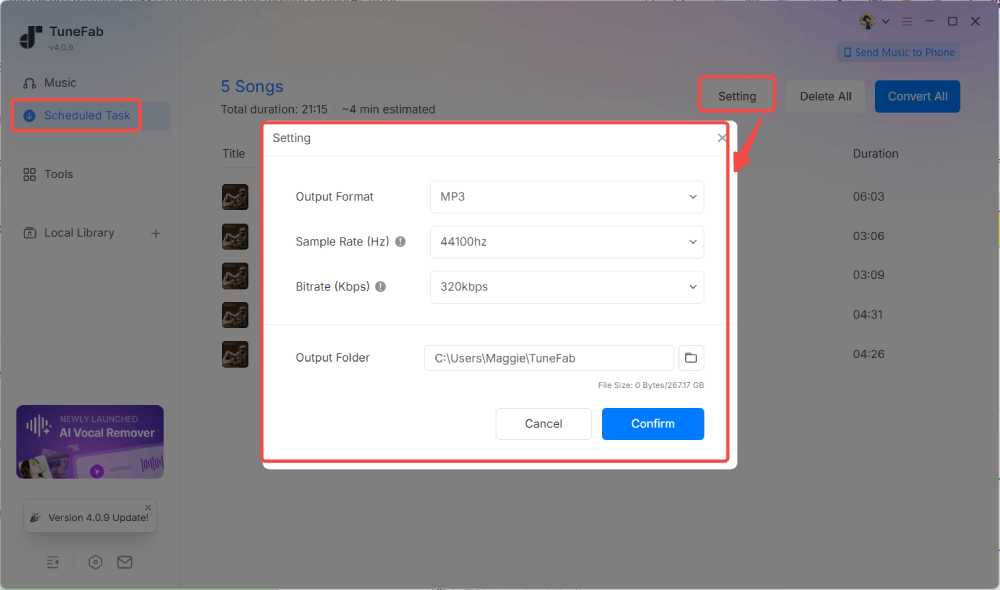
Step 3. Before downloading, TuneFab prompted us to select the output format, audio quality, and save location. The free trial also clearly displayed its limitations (up to 3 songs per supported platform) and provided pricing information without interrupting the workflow.
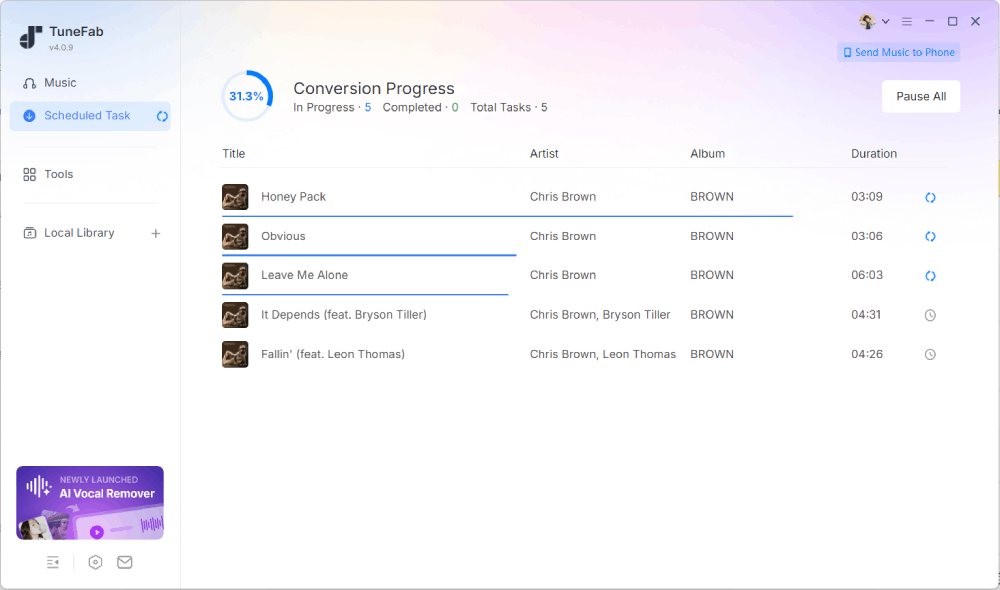
Step 4. After clicking "Convert Now", the playlist started downloading immediately. It took about 4 minutes to download the whole playlist (20 songs). Once finished, the downloads will be under the "Local Library" tab. We checked several output files and confirmed that the selected format and quality settings were applied correctly. Song titles, artists, album information, and cover artwork were retained as expected.
Pros
- Built-in Deezer web player makes playlist downloading straightforward
- Supports MP3, FLAC, WAV, AAC, ALAC, AIFF, and other formats
- Successfully recognized and downloaded entire playlists during testing
- Preserved ID3 tags and cover artwork accurately
- Batch download support with customizable output settings
- Includes additional tools such as ID3 editing and format conversion
Cons
- Free trial is limited to 3 songs per platform
👉 For More Info: TuneFab Deezer Music Converter Review: Out of Expectation
#2. DeeKeep Deezer Music Converter
| Support OS | Download Format | Quality | ID3 Tags | Speed | Best For |
| Windows, macOS | MP3, AAC, WAV, FLAC, AIFF, ALAC | Up to HiFi Quality | Preserved | Medium | Users who want a simple Deezer downloader with basic features |
DeeKeep Deezer Music Converter is another dedicated Deezer downloader that uses an integrated Deezer web player to download songs, albums, playlists, and podcasts. It supports multiple output formats, including MP3, AAC, WAV, FLAC, AIFF, and ALAC, while preserving metadata and lyrics. Compared with others, DeeKeep offers a more Deezer-focused experience from the start, as the software launches directly into the Deezer login page without requiring users to select a streaming service first.
Our Testing Experience
Step 1. After installing DeeKeep, the software opened directly to the built-in Deezer web player login page. Unlike some all-in-one converters, there were no additional platforms or menus to navigate.
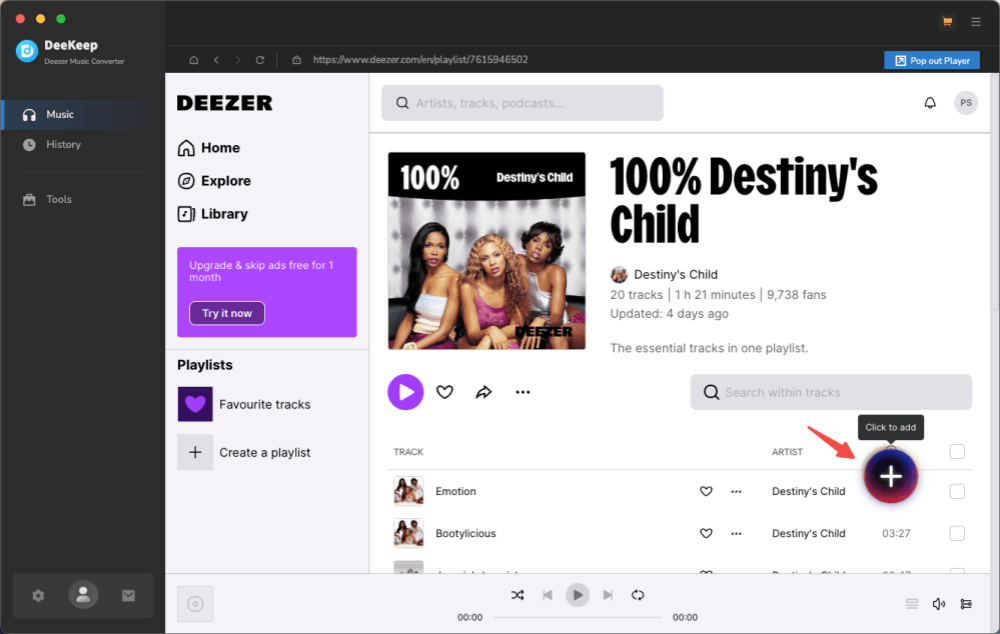
Step 2. Once logged in, we opened a Deezer playlist and clicked the "+" button in the lower-right corner. DeeKeep successfully analyzed the playlist and added all available tracks to the download queue.
Step 3. When we proceeded with the download, the software displayed its free trial restrictions. During testing, the trial version only allowed downloading the first minute of each song and did not provide access to output format, bitrate, or quality customization options.
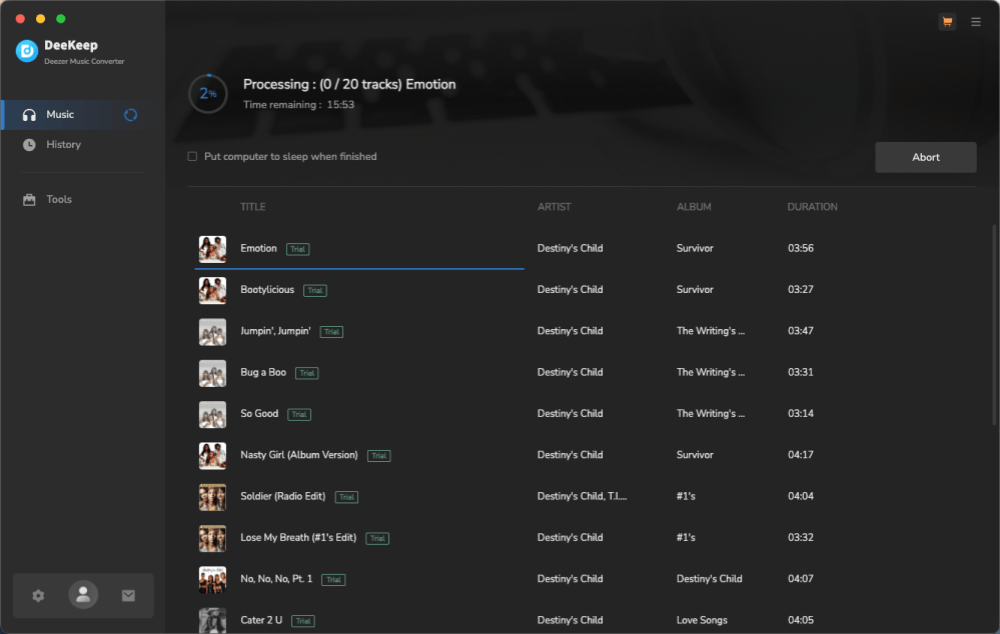
Step 4. The download page displayed an estimated completion time before conversion started. In practice, each track took roughly 20 seconds to process. For our 20-song test playlist, the entire task finished in approximately six and a half minutes. The exported files were saved as MP3s using the default quality settings, and basic song metadata was retained correctly.
Pros
- Dedicated Deezer interface with a straightforward workflow
- Supports MP3, FLAC, AAC, WAV, AIFF, and ALAC formats
- Successfully recognized playlists during testing
- Preserves ID3 tags and lyrics information
- Includes extra tools such as tag editing, CD burning, and format conversion
Cons
- Free trial only downloads the first minute of each song
- Output format and quality settings are locked in the trial version; only MP3 is allowed
- Conversion speed during testing was slower than that of some competitors
#3. DRmare Deezer Music Converter
| Support OS | Download Format | Quality | ID3 Tags | Speed | Best For |
| Windows, macOS | MP3, FLAC, WAV, AIFF, M4A, M4B | Up to HiFi Quality | Preserved | Fast | Users who want a multi-platform streaming ripper with fast conversion speed |
DRmare Deezer Music Converter is a more comprehensive tool that supports not only Deezer but also other major streaming platforms such as Spotify, Apple Music, Tidal, Amazon Music, and SoundCloud. Compared to more Deezer-focused tools, DRmare positions itself as an all-in-one streaming audio solution. It provides a built-in Deezer music player and supports exporting tracks into multiple formats, including MP3, FLAC, WAV, AIFF, M4A, and M4B, while keeping metadata and audio structure intact.
Our Testing Experience
Step 1. After installation, DRmare opened directly into its built-in Deezer web player. The login process was straightforward, and no additional platform selection was required before entering the interface.
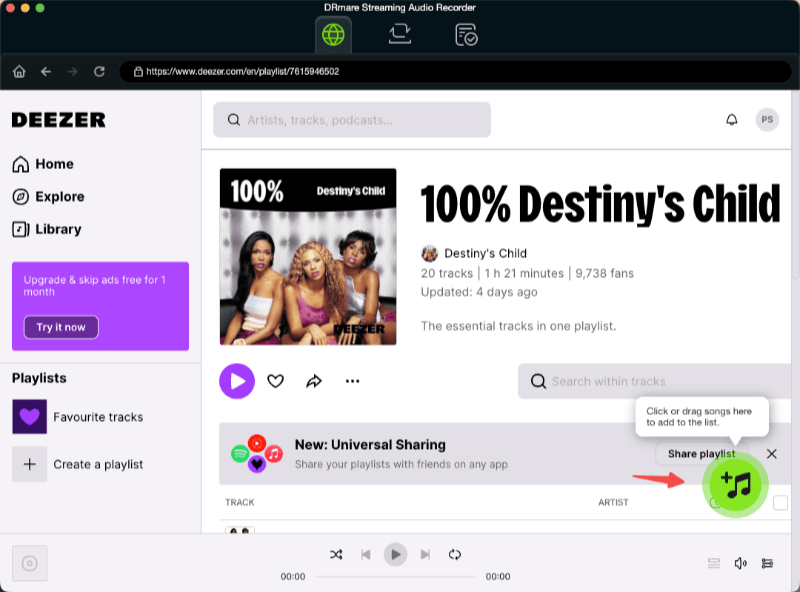
Step 2. Once inside the Deezer environment, we navigated to a saved playlist and clicked the "+" icon to import all tracks into the conversion list. The software responded quickly and parsed the playlist without noticeable delay.
Step 3. Before starting the download, DRmare displayed its free trial restrictions. In our test, the trial version limited each track to the first 30 seconds and disabled format or quality customization options, which significantly reduced flexibility compared to the full version.
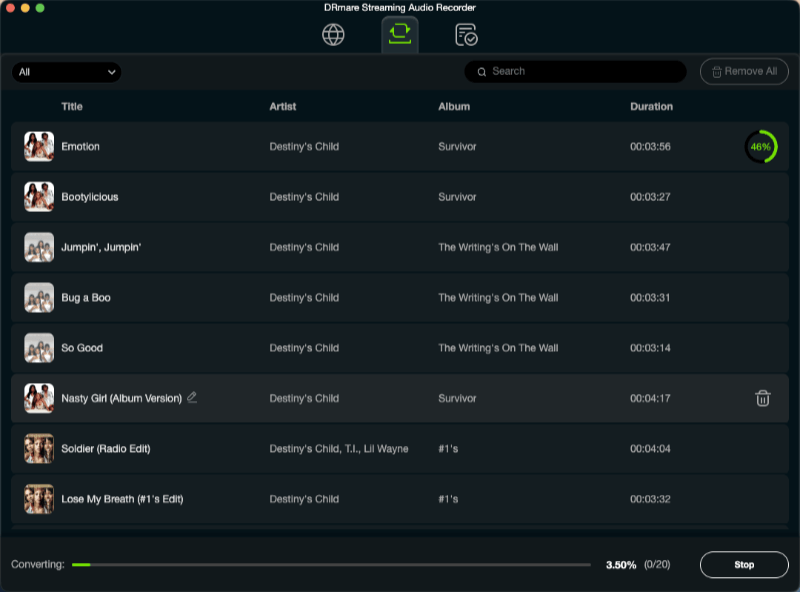
Step 4. After clicking "Start", the conversion began immediately. Each track is processed in roughly 10 seconds, making the overall workflow feel very fast. However, since only the first 30 seconds of each song were exported in the trial version, this speed advantage is partially offset in real usage scenarios. The full 20-track playlist finished in under 3 minutes, with output files saved in the default MP3 format and metadata preserved.
Pros
- Supports multiple major streaming platforms beyond Deezer
- Very fast conversion speed (up to 46X claimed)
- Simple workflow with built-in Deezer web player
- Supports multiple output formats, including FLAC and WAV
- Retains basic ID3 tags and album information
Cons
- Free trial only exports the first 30 seconds of each track
- Format and quality settings locked in trial mode
#4. Audials One
| Support OS | Download Format | Quality | ID3 Tags | Speed | Best For |
| Windows Only | MP3, FLAC, AAC, M4A, AIFF | Up to 24-bit | Preserved | Slow (real-time recording) | Users who want a streaming recorder that works across multiple platforms |
Audials One takes a different approach compared to traditional Deezer playlist downloaders. Instead of directly converting or extracting files, it records audio in real time while you stream music from services like Deezer. This makes it a more universal solution that works across multiple platforms, not just Deezer. It automatically detects songs during playback and saves them as individual audio files, while also removing ads and organizing metadata such as track titles and album information.
Our Testing Experience
Step 1. After installation, we opened Audials One and selected Deezer from the main interface. Logging into the Deezer web player was straightforward and did not require any additional setup.
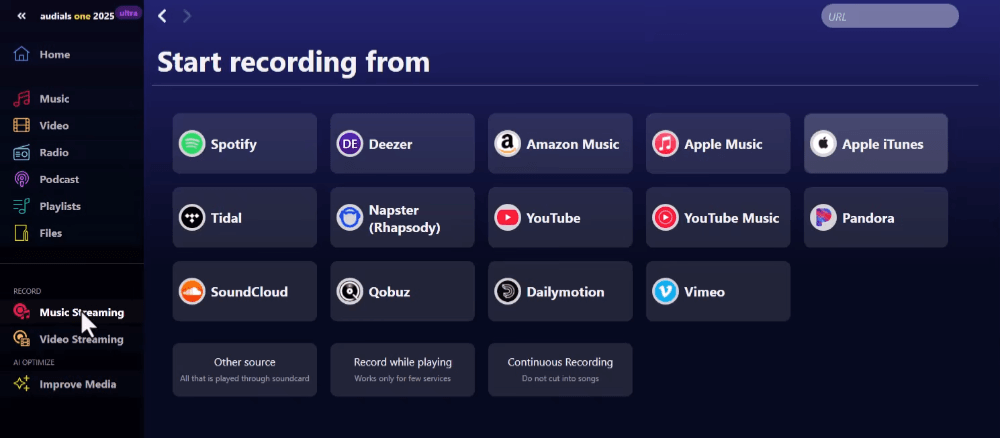
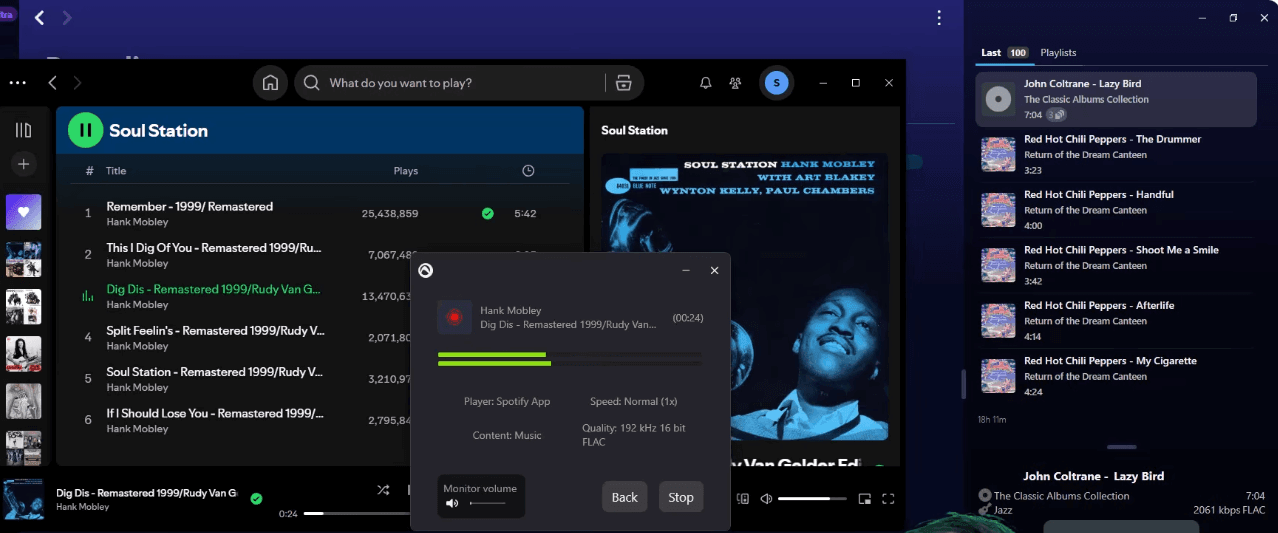
Step 2. Once inside the Deezer player, we played a test playlist as usual. Audials automatically detected the streaming audio and began recording in the background without requiring manual input for each track.
Step 3. Before starting, we could choose the output format and audio quality settings. In the premium version, Audials also offers an automatic song detection mode that helps organize recordings more efficiently, though this feature was not essential for basic testing.
Step 4. Unlike converter-based tools, Audials records in real time, meaning the duration of the process depends entirely on the length of the playlist. In our test, the 20-song playlist took roughly one and a half hours to complete. The output files were saved as MP3s by default, with acceptable audio quality and properly separated tracks.
Pros
- Works across multiple streaming platforms, not limited to Deezer
- Automatically records and splits songs into individual files
- Supports multiple output formats including MP3, FLAC, AAC, and AIFF
- Removes ads during recording
- Offers high-quality recording up to Ultra HD / 24-bit audio
Cons
- Real-time recording makes the process significantly slower
- Requires full playback time to complete downloads
- Recording quality may be affected by other apps or network conditions
- Interface and workflow are more complex than converter-based tools
#5. Telegram Deezer Bots
| Support OS | Download Format | Quality | ID3 Tags | Speed | Best For |
| Android, iOS, Desktop | MP3, AAC (varies by bot) | Lossy | Preserved | Fast | Users who want a quick mobile-friendly Deezer playlist downloader without installing desktop software |
If you mainly need a mobile-friendly way to download Deezer playlists, Telegram bots can be a surprisingly convenient option. Instead of installing desktop software, you can handle the entire download process inside a chat interface, making it especially useful for quick, on-the-go playlist saving. However, stability and output quality can vary depending on the bot you use.
Our Testing Experience
Step 1. We searched for @deezload2bot on Telegram and entered the bot chat. After starting it, the bot prompted us to join an additional channel to receive updates and service notifications.
Step 2. Next, we opened the Deezer app/web player and selected a playlist. Using the share option, we copied the playlist URL and sent it directly to the Telegram bot.
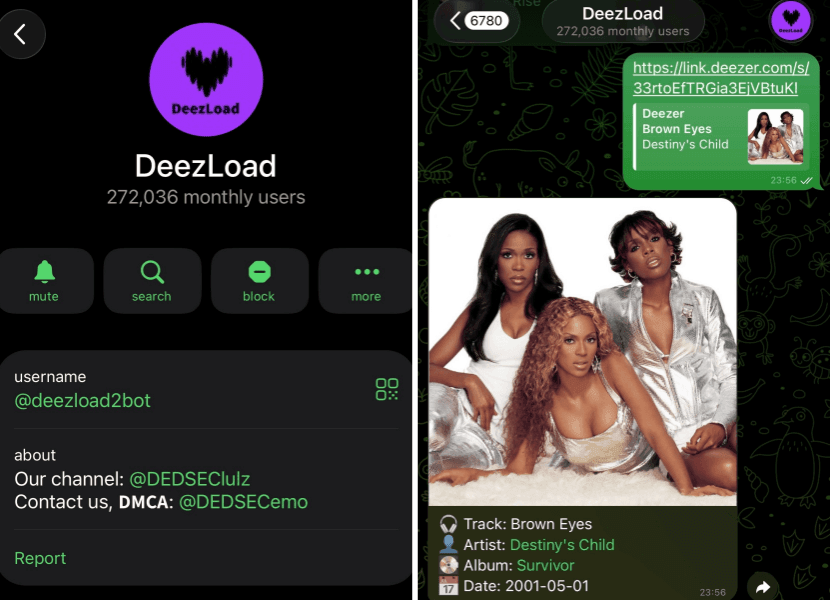
Step 3. The bot quickly parsed the link and displayed the playlist content, including cover art and track listings. This step only took a few seconds, and no additional setup was required.
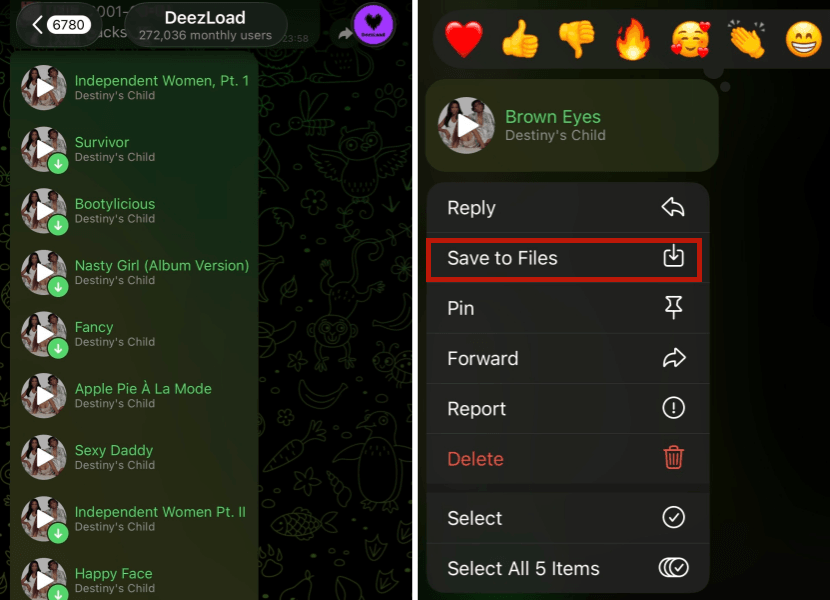
Step 4. We could either download individual songs by tapping "Save to File" or use the "Get All" option to download the entire playlist as a ZIP file. The output format was MP3, and while metadata was included, the overall quality was more basic compared to desktop converters.
Pros
- No installation required, fully chat-based workflow
- Works on mobile (Android and iOS) and desktop Telegram
- Fast playlist parsing and download initiation
- Supports bulk download via the ZIP option
- Simple and beginner-friendly experience
Cons
- The output format is lossy compared to other options
- Only supports MP3 as the default output format
- Less stable compared to desktop tools
- Playlist downloads may occasionally fail or be incomplete
FAQs About Deezer Playlist Downloaders
Can I Download a Deezer Playlist as MP3?
Yes, many Deezer playlist downloaders support exporting Deezer Music as MP3 files. Most desktop tools convert Deezer streaming audio into MP3 format so you can play it offline on different devices. However, output quality and stability depend on the specific tool you use, with some offering higher bitrate options like 320kbps.
Do I need Deezer Premium to download playlists?
It depends on the tool. Some Deezer downloaders require a logged-in account but work with both Free and Premium users, while others may offer better quality or fewer restrictions with Premium accounts. In general, Premium is not always required, but it can improve playback quality and access in certain tools.
Is there a Deezer playlist downloader for Android?
Yes, there are Android-based solutions, including certain apps and Telegram bots that allow playlist downloads directly on mobile devices. However, compared to desktop software, Android options are usually less stable and may have more limitations in terms of quality, batch downloads, or reliability.
Are Deezer playlist downloader APKs safe?
APK-based Deezer downloaders can be risky, especially when downloaded from unofficial sources. Some may contain ads, malware, or unstable modifications. If you choose to use an APK, it's important to be cautious and understand that desktop-based tools are generally more secure and reliable.
Why can't I find a Deezer playlist downloader online?
Many online Deezer playlist downloaders have been taken down or no longer work reliably due to platform restrictions and frequent updates. Deezer also makes it difficult for web-based tools to maintain stable access, which is why most current working solutions are desktop applications or bot-based tools instead of simple online converters.
Final Verdict
After testing all Deezer playlist downloaders, it's clear that each tool takes a different approach to solving the same problem. Desktop converters like TuneFab, DeeKeep, and DRmare generally provide the most complete experience in terms of playlist recognition, format options, and overall usability. Audials One stands out for its universal recording approach across streaming platforms, while Telegram bots offer a quick and lightweight mobile alternative, though with more compromises in stability and output consistency.
If you want a balanced and reliable solution for downloading Deezer playlists, TuneFab Deezer Music Converter is the most practical starting point based on our tests, thanks to its stable workflow and strong format support. For users who prefer a simpler Deezer-only interface, DeeKeep is a reasonable alternative, while DRmare is better suited for multi-platform users. However, if your priority is convenience on mobile or cross-platform recording rather than precision and quality control, Audials One and Telegram bots can still serve specific needs.