

Quick Verdict: Which Apple Music Converter is the Best?
🥇 Best Overall: TuneFab Apple Music Converter
Delivered the strongest balance of conversion speed, output flexibility, metadata retention, and trial usability in our testing.
🥈 Best for Basic Needs: ViWizard Apple Music Converter
A straightforward option for users who prefer a simple workflow and don't need advanced customization.
🥉 Best for Flexible Settings: NoteBurner
Apple Music Converter Offers multiple conversion modes and visible output settings, though processing speed was slower in our tests.
If you're converting Apple Music playlists or libraries regularly, TuneFab provided the most well-rounded experience. ViWizard and NoteBurner remain viable alternatives depending on whether you prioritize simplicity or configuration options.
Apple Music offers millions of songs, but downloaded tracks are designed to work primarily within the Apple Music ecosystem. As a result, many subscribers still look for ways to convert Apple Music to MP3 or other common formats for offline playback on different devices, media players, or personal music libraries.
Not all Apple Music converters work equally well, however. In this guide, we focus specifically on desktop Apple Music converters because they generally provide better stability, batch conversion support, output format control, and library management than browser-based alternatives. After testing several popular options, we've selected 3 best Apple Music converters that stood out for their overall performance, usability, and feature set.
- What Makes the Best Apple Music Converter & How We Tested Them
- 3 Best Apple Music Converters for Mac & Windows (In-Depth Review)
- TuneFab Apple Music ConverterHOT!
- ViWizard Apple Music Converter (Same as DRmare & TunePat)
- NoteBurner Apple Music Converter (Same as Sidify)
- Feature Comparison Table (Speed, Quality, Formats & Pricing)
- Final Verdict: Which Apple Music Converter Is Best for You?
- Bonus: FAQs About Using Apple Music Converters
What Makes the Best Apple Music Converter & How We Tested Them
With so many Apple Music converters available online, it can be difficult to know which one is actually worth using. Some tools focus on speed, others emphasize audio quality, and many claim to be "the best" without clearly explaining why. To choose the right solution, it helps to evaluate a few key technical factors rather than relying on marketing claims.
How We Tested These Apple Music Converters
To keep this comparison practical, we tested each Apple Music converter using its free trial version on both Mac and Windows systems. Rather than focusing solely on advertised features, we evaluated how each tool performed during everyday use, including setup experience, conversion speed, trial limitations, output format options, metadata retention, and whether the exported files matched the selected settings.
We also focused specifically on desktop Apple Music converters. While online Apple Music downloaders may be suitable for occasional downloads, desktop tools generally provide better stability, batch conversion support, output format control, and library management for playlists and larger music collections.
👀 Looking for a different type of Apple Music converter?
Evaluation Criteria
When reviewing the best Apple Music converter, these are the most important aspects to consider:
- Compatibility: Whether the software can reliably process Apple Music tracks, albums, and playlists for offline playback.
- Conversion Speed: How quickly it converts music, especially when handling larger libraries.
- Audio Quality: Whether output files retain good sound quality and support formats such as MP3, FLAC, or WAV.
- Format & Metadata Support: Availability of multiple output formats and whether ID3 tags like artist, album, and cover art are preserved.
- Stability & Ease of Use: Overall workflow, web-player integration, and how consistently the software performs during everyday use.
By comparing these core features, you can identify which desktop tool truly delivers reliable performance and high-quality output. In the next section, we take a closer look at three leading Apple Music converters for Mac and Windows and evaluate how they perform across these criteria.
📌 Disclaimer: The converted Apple Music files are for personal use only. Do not distribute the resultant audio files for commercial purposes.
3 Best Apple Music Converters for Mac & Windows (In-Depth Review)
To better understand how these factors translate into real performance, we tested three established desktop Apple Music converters. While they share similar core functions, their user experience, output flexibility, and efficiency can vary. The following sections break down each tool in detail, all with the free trial version.
TuneFab Apple Music Converter
💡 Best For: Users Who Want Balanced Performance and Value
TuneFab Apple Music Converter is a desktop solution designed for users who want more flexibility when managing and listening to their Apple Music library across devices. Instead of relying solely on the official app environment, it allows you to export tracks into widely supported formats for broader offline playback.
Compared to many similar tools, TuneFab emphasizes processing efficiency, stable web-player integration, and format versatility. Below is how it performs during our tests.
100% Secure
100% Secure
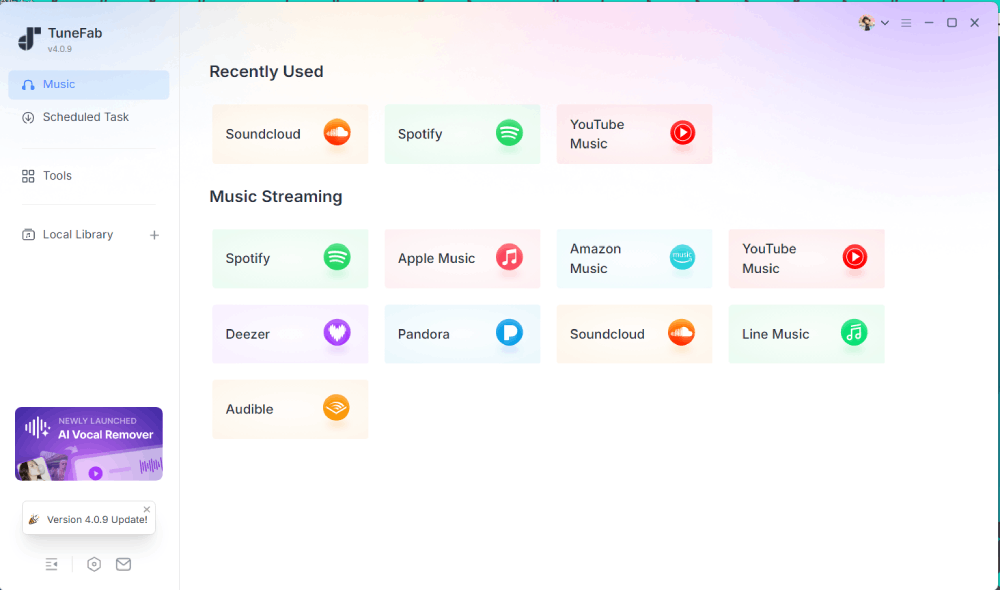
Step 1. After downloading and launching the software, the first thing we noticed was a clean interface with a sidebar listing multiple supported streaming services. We selected Apple Music to proceed.
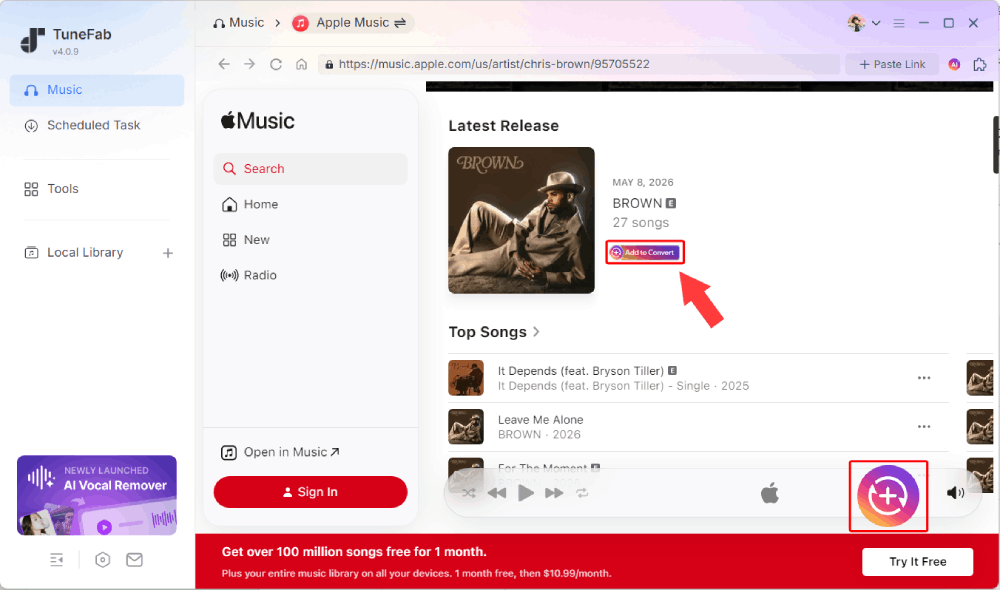
Step 2. The program opened an integrated web-player interface where we could browse playlists, albums, and individual tracks. When hovering over a song or playlist, an "Add to Convert" button appeared, allowing us to quickly add items to the conversion queue.
A little incident: When adding songs, it suggested logging into the Apple Music account for a more stable experience. We chose to skip this step, but the selected tracks were still successfully added to the conversion list without interruption.
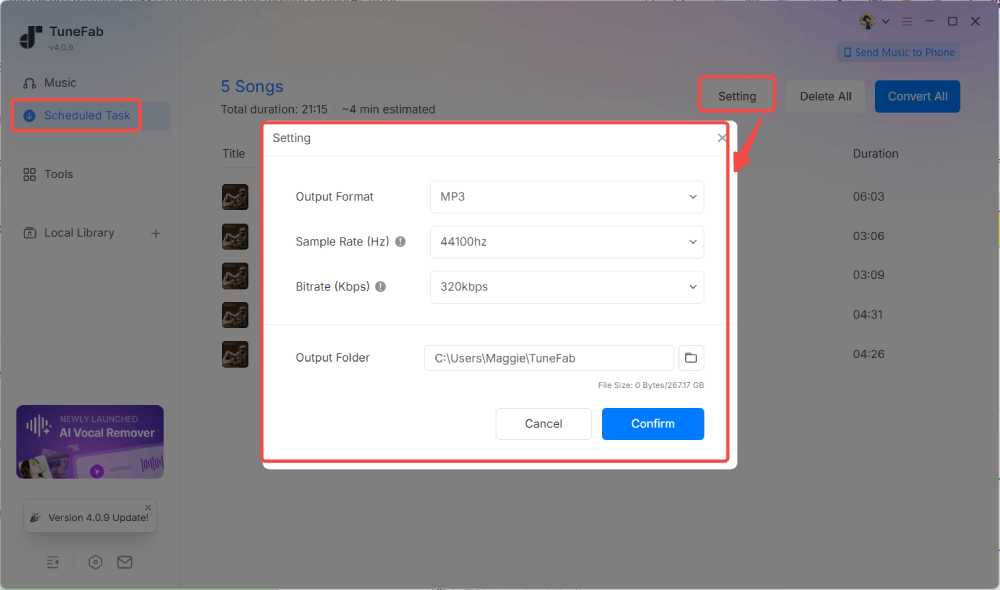
Step 3. In the conversion panel, we selected MP3 as the output format and chose the highest available bitrate (320 kbps). We then added three tracks to test speed performance.
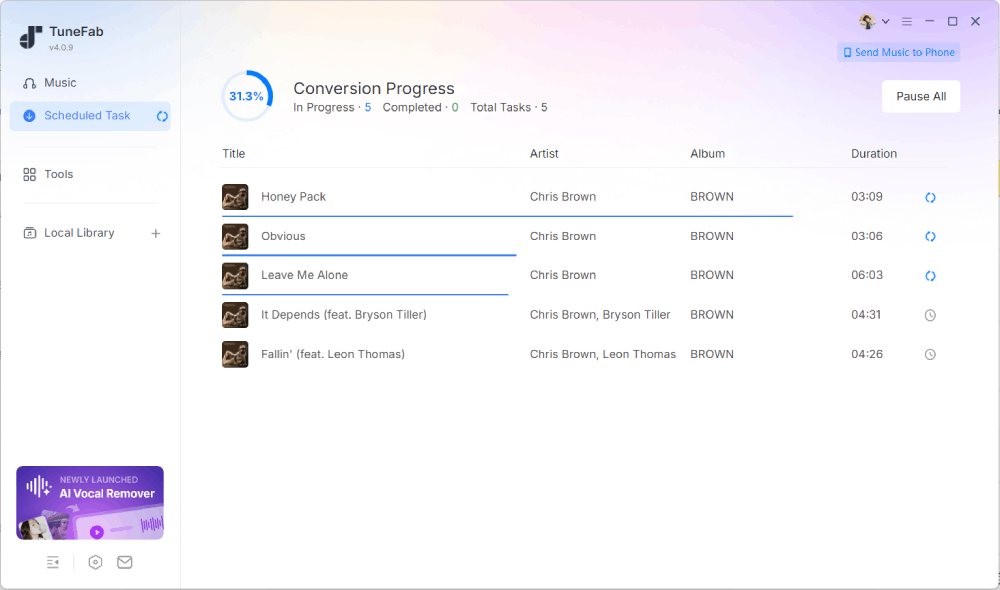
The conversion process took approximately 8 seconds for each song. While the website mentions speeds of up to 35× faster, real-world performance may vary depending on track length and system configuration.
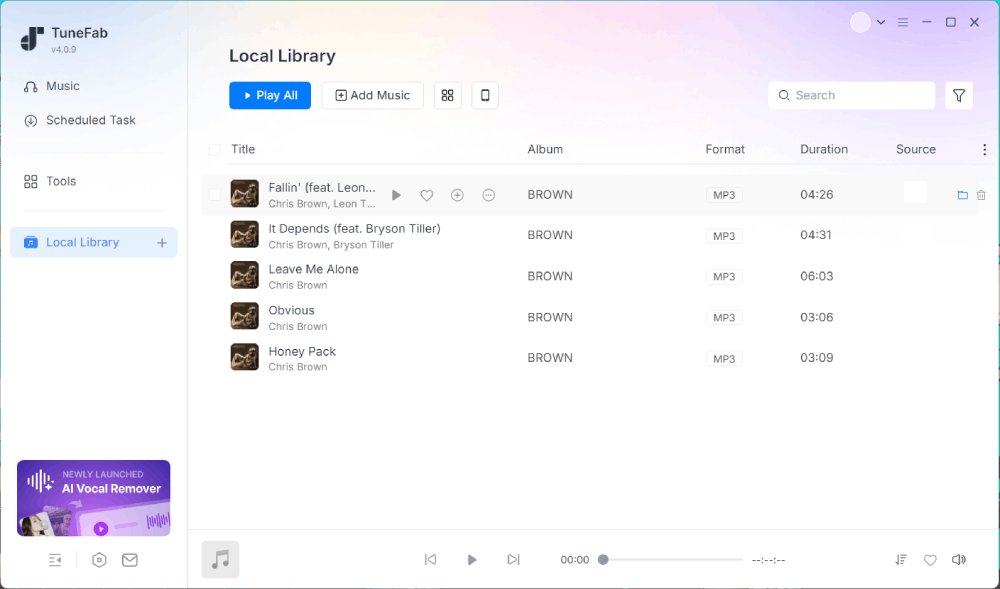
Step 4. Once completed, the files appeared in the built-in Local Library. We were able to preview playback directly inside the software. During the free trial, 3 full tracks were exported without additional restrictions. After that limit, a purchase reminder appeared.
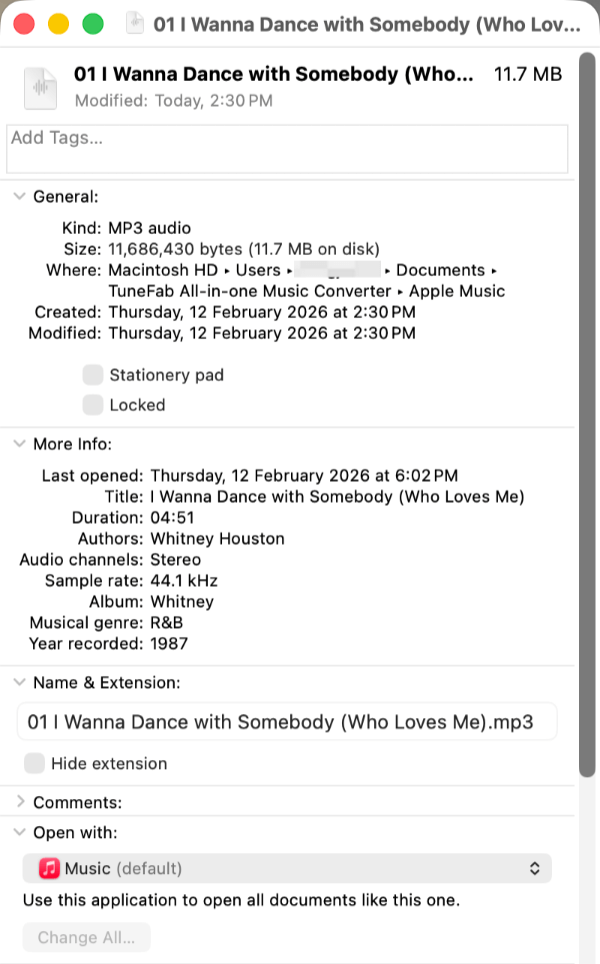
Step 5. We checked the downloaded files using macOS file information. The format and bitrate matched the selected output settings, consistent with what the software claims.
Pros & Cons of TuneFab Apple Music Converter
✅ Pros
- Smooth Web-Player Integration: The built-in Apple Music web player loads directly inside the software. During testing, tracks could be added to convert without login, and it remained stable.
- Fast Batch Processing: The software supports accelerated conversion speeds (advertised up to 35×). In our test, three tracks were processed in roughly 30 seconds, which is not bad.
- Customizable Output Quality: Users can select output formats and adjust bitrate settings (up to 320 kbps for MP3). The exported files matched the selected parameters when verified on macOS.
- Broad Format Compatibility: Supports MP3, M4A, FLAC, WAV, AIFF, and ALAC, allowing playback across Android players, car audio systems, and other third-party apps.
- Metadata Retention: Song information such as artist, album, track title, and cover artwork was preserved in our exported files, helping maintain an organized music library.
🤔 Cons
- Limited Free Trial: The free version allows exporting three full tracks. After that, a purchase prompt appears. Users who want to convert larger playlists will need to upgrade.
- Real-World Speed May Vary: While high-speed conversion is advertised, actual performance may vary depending on system setup and track length.
👉 For More Info: TuneFab Apple Music Converter Review: An Honest Look at Features, Limits, and Use Cases
ViWizard Apple Music Converter (Same Software Family as DRmare & TunePat)
💡 Best For: Casual Users with Basic Conversion Needs
ViWizard Apple Music Converter is part of the same software family as DRmare and TunePat, sharing the same interface and underlying workflow. It is positioned as a desktop solution for converting Apple Music tracks into commonly supported audio formats.
Compared to other desktop converters, ViWizard focuses on a straightforward conversion process with minimal configuration options in the free version. During testing, its behavior was largely consistent with what users would expect from this software group.
We installed it and tested several tracks and playlists under the free trial.
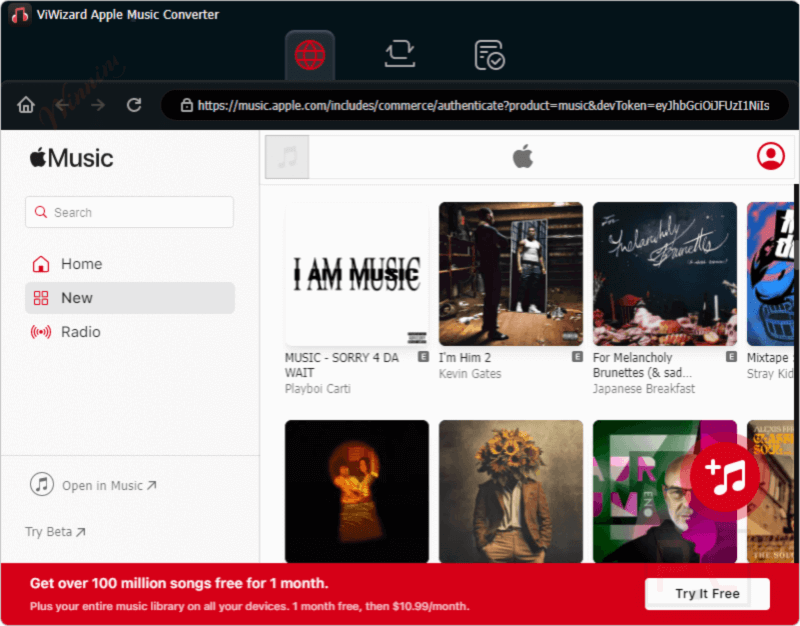
Step 1. After launching the program, we were taken directly to the Apple Music web player interface without selecting a streaming service from a menu. The layout closely resembles the official browsing experience.
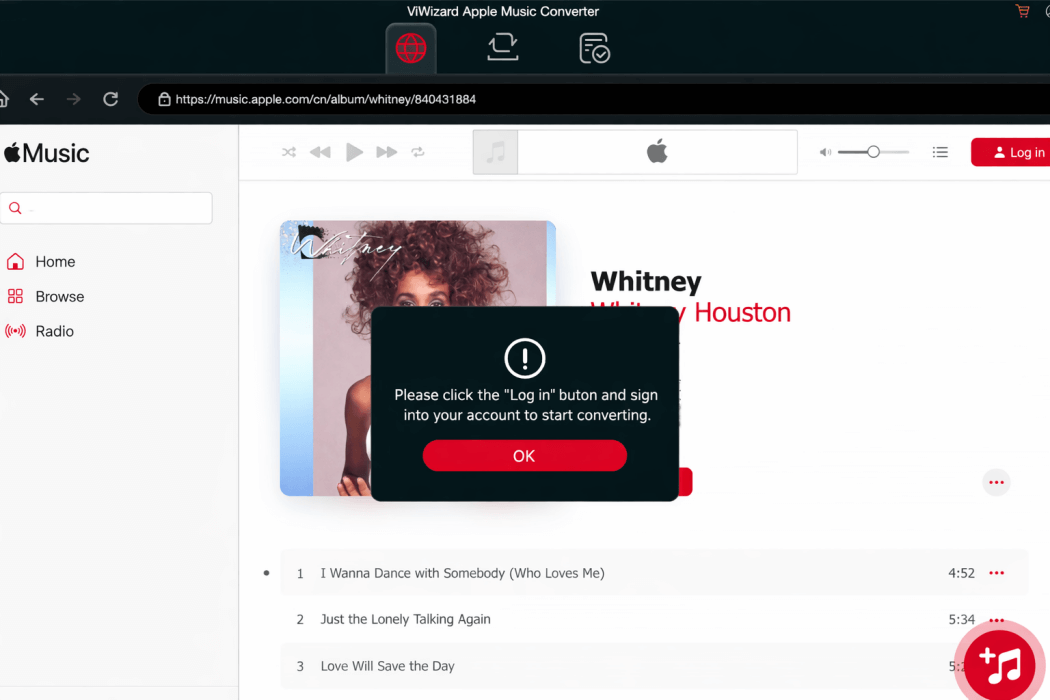
Step 2. When attempting to add tracks without logging in, a pop-up message appeared stating that an Apple Music login was required to add songs. After logging in, tracks could be added to the conversion list normally.
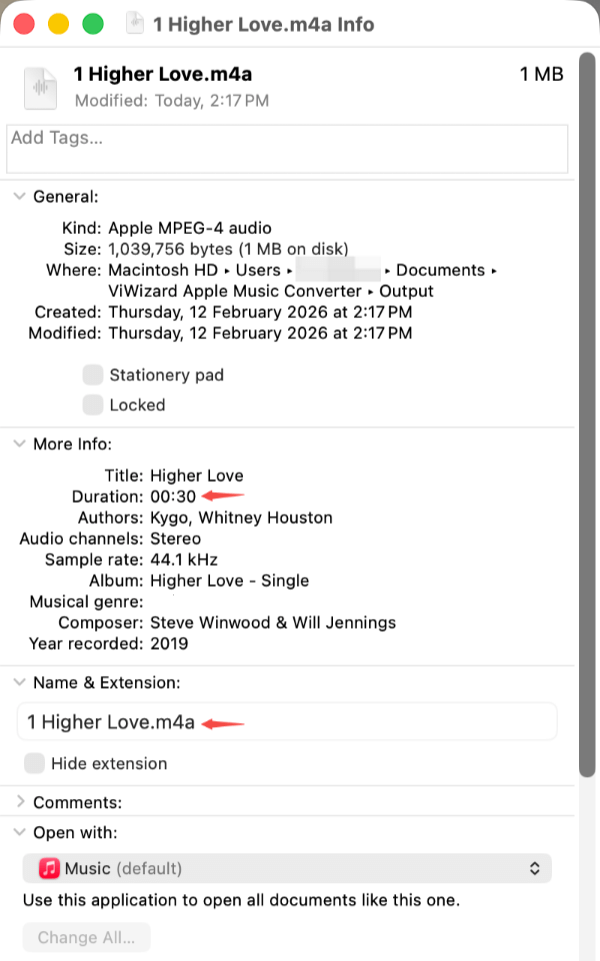
Step 3. Under the free trial, both individual songs and full playlists were limited to 30-second exports. No adjustable settings (such as bitrate or format selection) were available in trial mode.
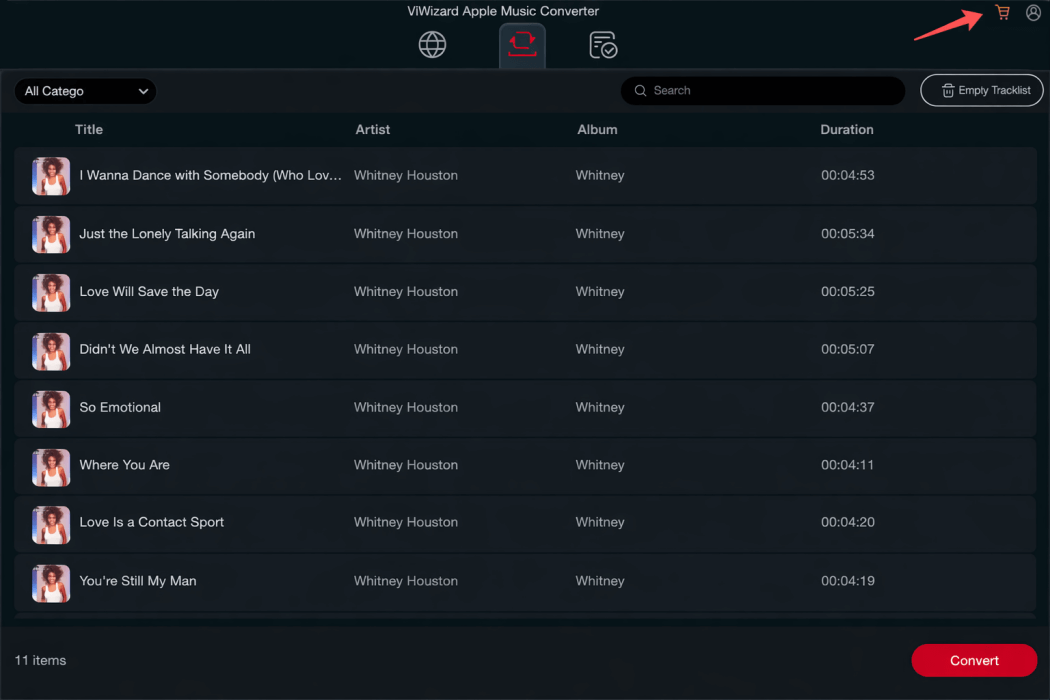
Step 4. After adding songs to the conversion list, clicking "Convert" immediately started processing. A single track took roughly 15 seconds to complete in our test. There was no restriction on the number of tracks added, but each file was capped at 30 seconds.
Step 5. The exported file was saved in M4A format by default (44.1 kHz). ID3 metadata, such as artist, album, and cover artwork, were preserved correctly in the file information.
Pros & Cons of ViWizard Apple Music Converter
✅ Pros
- Simple Web-Based Interface: Direct integration with the Apple Music web player makes browsing and selection intuitive.
- No Track Quantity Limit in Trial: Users can queue multiple tracks or playlists, though each export is limited in length.
- Metadata Retention: ID3 tags and cover artwork were preserved accurately in our test files.
- Part of an Established Software Family: Shares the same technical framework as DRmare and TunePat, resulting in a consistent user experience across these products.
🤔 Cons
- Free Trial Limited to 30 Seconds Per Track: All exported files are capped at 30 seconds unless the software is unlocked.
- No Output Settings in Trial Mode: Bitrate, format selection, and other customization options are unavailable before purchase.
- Speed & Audio Stability May Vary: Some user reviews online report inconsistent conversion speeds and occasional audio skips at higher acceleration settings. While we did not encounter skips during short trial testing, long-term performance may depend on system configuration and settings.
NoteBurner iTunes Music Converter (Same Software Family as Sidify)
💡 Best For: Users Who Prioritize Flexible Settings Over Speed
NoteBurner iTunes Music Converter shares the same software framework as Sidify, with a nearly identical interface and workflow. Both products operate through a web-based Apple Music interface and offer similar conversion modes and output settings.
Compared to other desktop converters, NoteBurner provides more visible customization options in its interface, even in trial mode. During testing, it offered flexible configuration settings but showed noticeable limitations under the free version.
Here's how we tested it and its performance on several tracks using the free trial.
Step 1. Upon launching the software, we were taken directly into the Apple Music web player interface, without a platform selection step.
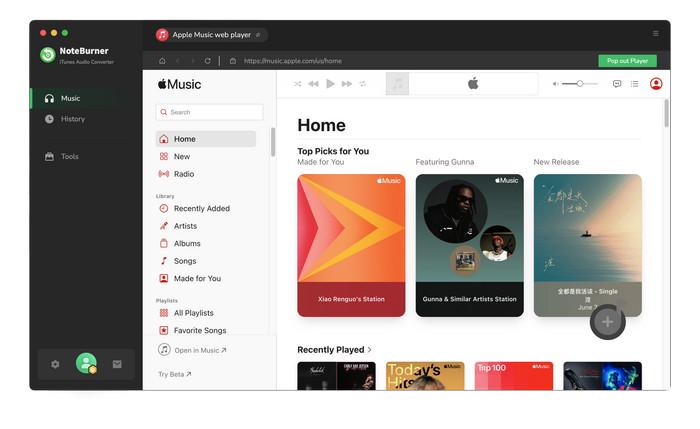
Step 2. When adding tracks, the software prompted us to log in for a more stable experience. However, we were able to skip login and still add songs to the conversion queue.
Step 3. In the conversion queue, three processing modes were available: "Record Mode", "YouTube Mode", and "Intelligent Mode". Even in trial mode, the software allowed output format customization. We selected "MP3" for testing.
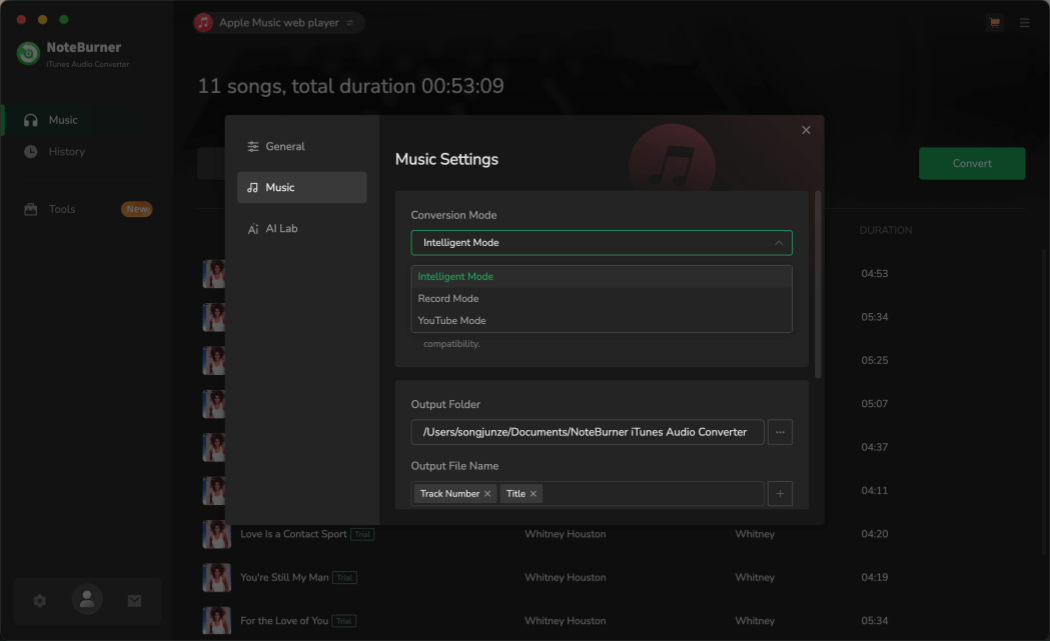
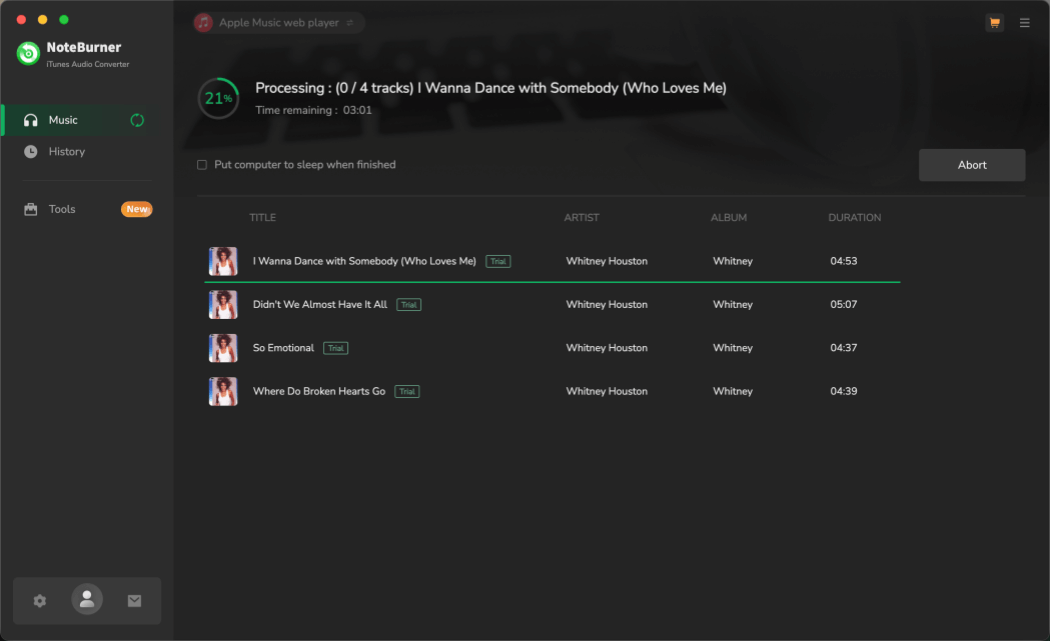
Step 4. After clicking "Convert," a purchase reminder appeared. The free version supports exporting only the first 60 seconds of any track. During our test, converting a single song took nearly one minute to complete, even though only one minute of audio was exported. Actual performance may vary depending on system and network conditions.
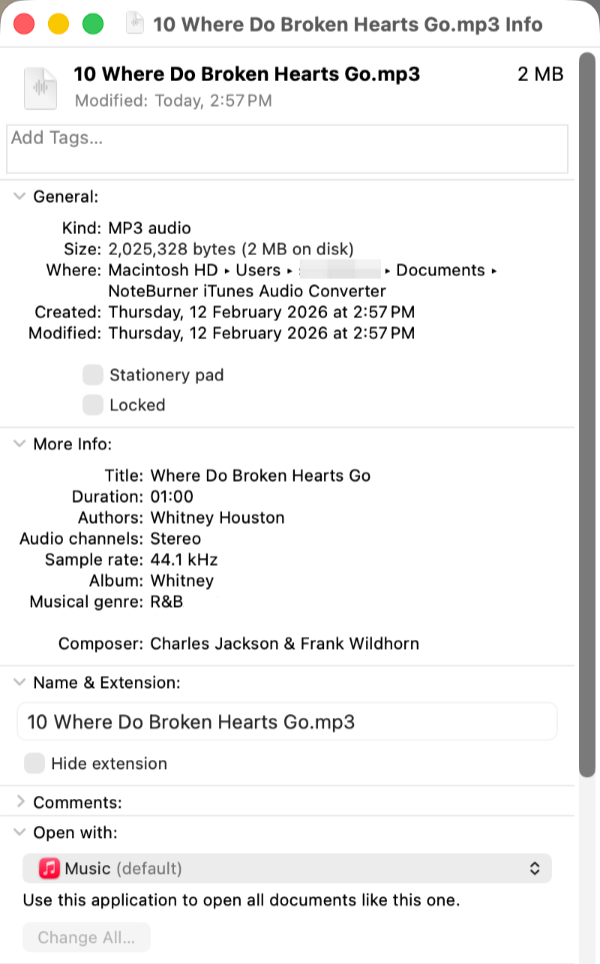
Step 5. The exported file (MP3 format, 44.1 kHz) matched the selected settings. ID3 metadata, including album art and track information, was preserved correctly.
Pros & Cons of NoteBurner iTunes Music Converter
✅ Pros
- Multiple Conversion Modes Available: Offers Record, Intelligent, and YouTube modes, giving users different processing approaches.
- Output Settings Accessible in Trial: Even in free mode, users can select output formats (e.g., MP3) and view available configuration options.
- Metadata Retention: Artist name, album title, and cover artwork were preserved correctly in our exported test files.
- Established Software Framework: Shares the same technical structure as Sidify, providing a familiar and consistent user interface.
🤔 Cons
- Free Trial Limited to 60 Seconds Per Track: Only the first minute of each song can be exported before upgrading.
- Processing Speed May Approach Real-Time: In our test, exporting one minute of audio took close to one minute to complete. Actual performance may vary depending on system and network conditions.
- Separate Licensing for Windows and Mac: Licenses are typically platform-specific.
- Uncertainty Around Audio Fidelity Claims: While the software offers high-quality format options, some users question whether the output fully matches the source stream. Independent verification may be advisable for critical listening use cases.
Feature Comparison Table (Speed, Quality, Formats & Pricing)
Each of the three desktop converters performed differently in our testing, particularly in conversion speed, trial restrictions, output flexibility, and overall usability. To make the differences easier to compare, the table below summarizes the key results from our hands-on tests alongside pricing and feature support.
| User Priority | TuneFab | ViWizard (Same as DRmare & TunePat) | NoteBurner (Same as Sidify) |
| Free Trial Limits | 3 full tracks | Unlimited tracks, 30 sec each | Unlimited tracks, 60 sec each |
| Tested Trial Performance | ~8 sec per full song | ~15 sec per 30-sec clip | ~1 min to export 1 min |
| Output Format Options (Trial) | MP3, FLAC, WAV, M4A, etc. | Not adjustable in trial | MP3, FLAC, WAV, etc. |
| Audio Quality Control | Up to 320 kbps + lossless formats | Default M4A 44.1 kHz | Adjustable output settings |
| Metadata Retention | Full ID3 tags & artwork | Full ID3 tags & artwork | Full ID3 tags & artwork |
| Web Player Integration | Stable built-in interface | Built-in web player | Built-in web player |
| Processing Speed (Full Version) | Up to 35× acceleration | Advertised high-speed processing | Varies by mode |
| Pricing & License Model | Monthly ($25.95), Yearly ($79.95), Lifetime ($99.95); 7-day refund |
Monthly ($19.95), Yearly ($49.95), Lifetime ($89.95); 14–30 day refund |
Yearly (~$44.95), Lifetime (~$89.90); 5–30 day refund |
| Best For | Balanced performance & value | Simple, straightforward workflow | Prefer flexible settings over speed |
Final Verdict: Which Apple Music Converter Is Best for You?
Choosing the best Apple Music converter depends less on marketing claims and more on how you plan to use it.
- Choose ViWizard if you want a simple, straightforward workflow and only need basic conversion features.
- Choose NoteBurner if you prefer exploring different conversion modes and output settings before purchasing.
- Choose TuneFab if you want the strongest balance of speed, format flexibility, metadata retention, and trial usability based on our testing.
No converter is the right choice for everyone. The best option is the one that matches your listening habits, device needs, and how often you plan to manage or convert your Apple Music library.
👍 Tip: TuneFab currently offers a 10% discount with the code TFWELCOME for new users. You can check the official pricing page for the latest availability.
FAQs About Using Apple Music Converters
Is It Legal and Safe to Use an Apple Music Converter?
Legality depends on your local copyright laws and how the converted files are used. In general, personal use is treated differently from redistribution or commercial use, and users should ensure they comply with applicable laws and subscription terms.
As for safety, desktop converters from established vendors are typically safer than unknown online tools. To reduce risk, always download software from official sources and follow standard account security practices.
Are Free Apple Music Converters Safe and Good?
It depends on the tool. Many free online converters have limitations on audio quality, export length, or supported content, while some may contain intrusive ads or security risks. Desktop trial versions from established providers are usually more reliable for testing, though they often restrict export length or advanced features until a license is purchased.
Does an Apple Music Converter Reduce Audio Quality?
Not necessarily. Most desktop converters allow you to choose output formats and quality settings, including high-bitrate MP3 and lossless formats such as FLAC or WAV. In practice, audio quality depends on the selected format and settings. For most listeners, high-bitrate MP3 files provide excellent playback quality across devices.