

Spotify offline downloads are encrypted and can only be played within the Spotify app. If you want to transfer songs to an MP3 player, USB drive, SD card, or car stereo, you'll need a reliable Spotify music converter.
To find out which tool is actually worth using, we tested 10+ Spotify to MP3 converters under identical conditions and selected six desktop options for Windows and Mac, including both strong performers and tools with clear limitations.
Instead of relying on marketing claims, we evaluated each tool based on conversion speed, success rate, audio quality, batch playlist handling, pricing, and overall ease of use. Now, scroll down to find the one that fits you best.
Quick Comparison of the Top Spotify Music Converters
| Software | Price | Trial Limit | Best For | Main Drawback | Overall Score |
| TuneFab Spotify Music Converter (Editor's Choice) |
1-month plan: $25.95 1-year plan: $79.95 Lifetime plan: $99.95 |
3 full songs | Frequent playlist and album downloads with stable batch processing | Relatively expensive for short-term users | 9.5/10 |
| NoteBurner Spotify Music Converter | 1-year plan: $44.95 Lifetime plan: $89.90 |
First minute of each song | Users who value fast playlist parsing and reliable performance | No simultaneous downloads and no monthly plan | 9.2/10 |
| Sidify Music Converter | 1-year plan: $44.95 Lifetime plan: $89.90 |
First minute of each song | Users who want extra utilities and better long-term value | Less stable and no simultaneous downloads | 8.8/10 |
| AudFree Spotify Music Converter | 1-month plan: $19.95 1-year plan: $44.95 Lifetime plan: $89.90 |
First 30s of each song | Users who need flexible bitrate and audio settings | Slow conversion speed and occasional download failures | 8.5/10 |
| TuneMobile Spotify Music Converter | 3-month plan: $49.95 1-year plan: $79.90 Lifetime plan: $159.9 |
First minute of each song | Users who want music, podcasts, and radio downloads in one platform | No batch downloads and expensive lifetime plan | 8.3/10 |
| Allavsoft | 1-month plan: $19.99 1-year plan: $29.99 Lifetime: $59.99 |
5 songs everyday | Occasional users who prefer URL-based downloads without Spotify login | Poor reliability and frequent download failures | 7.8/10 |
How We Tested These Spotify Music Converters
Testing Environment
| Device | Windows 10 |
| CPU | Intel Core i7 |
| RAM | 16GB |
| Network | 26 Mbps Wi-Fi |
| Spotify Account | Spotify Free |
| Test Library | 1. One 50-song playlist 2. One 29-track album 3. One podcast episode (1 hour 38 minutes) |
| Output Format | MP3 320kbps |
Evaluation Criteria
- Download Speed
- Success Rate
- Output Quality
- Batch Parsing and Download Performance
- Metadata Preservation
- Ease of Use
- Value for Money
- Safety
[Test Results] 6 Best Spotify Music Converters for Mac and Windows
#1 TuneFab Spotify Music Converter
Verdict: Our top pick for desktop Spotify conversion, with the strongest balance of speed, stability, output quality, and batch handling in our test.
| Best For | Users who frequently download full playlists or albums or those who need stable batch processing for daily use. |
| Not For | Occasional users who only need a few tracks or budget-sensitive users looking for the cheapest subscription. |
Test Results
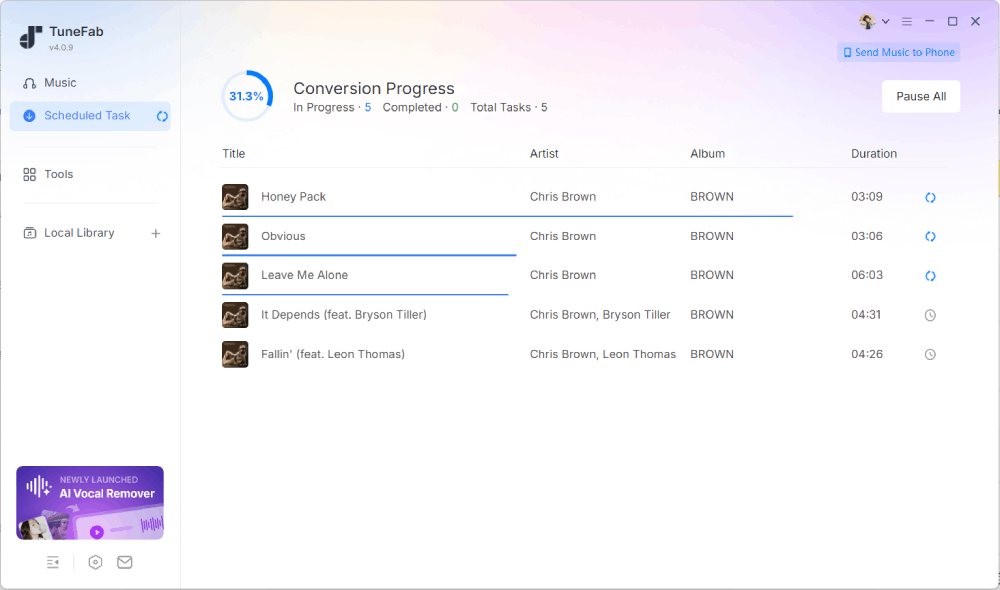
During testing, TuneFab Spotify Music Converter delivered the most balanced performance among all the tools we evaluated.
- Compatible with: Windows & macOS
- Performance: In our test, the playlist and album links were parsed in around 12 seconds, while podcast links took about 5 seconds to load. Downloading a 3.5-minute track took approximately 1 minute and 30 seconds. No freezing or lag was observed during the download process. The success rate is near 100%.
- Output: Spotify music can be converted into six common formats with 128 to 320kbps quality, ID3 tags, album art, and lyrics successfully preserved.
- Safety: No malware, adware, or bundled software during the installation. Also, there are no ads or intrusive pop-ups on the screen.
- Limitations: Users must log into Spotify through the built-in web player, and its pricing may feel relatively expensive for those who only need short-term access.
You May Also Want to Read: Full Review of TuneFab Spotify Music Converter
Pros
- ✔ Supports batch downloading Spotify songs to MP3 (up to three songs simultaneously).
- ✔ Includes a built-in Spotify web player.
- ✔ Provides advanced features like a local file format converter, ID3 editor, LRC lyrics file, proxy support, etc.
- ✔ Free trial allows three full tracks instead of preview clips.
- ✔ Multiple conversion modes for balancing speed and stability.
Cons
- ❌ Full features require a paid subscription.
- ❌ Subscription pricing may be high for short-term users
#2 NoteBurner Spotify Music Converter
Verdict: A fast and reliable Spotify converter that performs especially well in playlist parsing, but is less flexible due to the lack of simultaneous downloads and limited pricing options.
| Best For | Users with large playlists who value fast playlist parsing and dependable performance. |
| Not For | Users who require simultaneous downloads or prefer more flexible subscription plans. |
Test Results
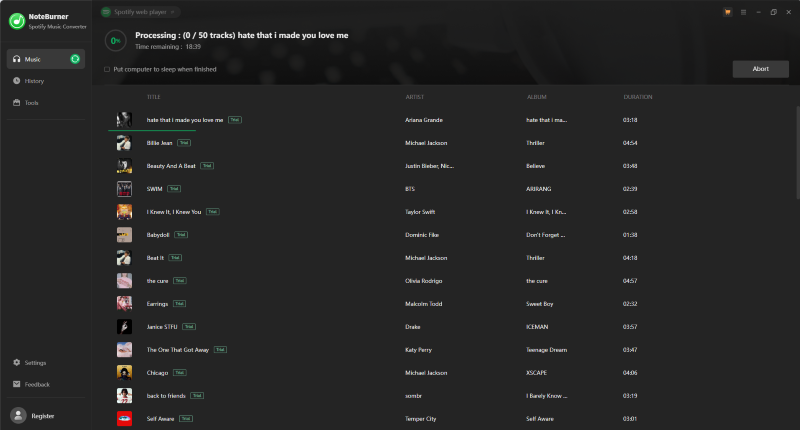
NoteBurner Spotify Music Converter showed excellent responsiveness during testing.
- Compatible with: Windows, macOS & Android
- Performance: This Spotify music converter offers a stable conversion process. The playlist and album links were parsed in about 5 seconds. However, its free trial version is limited to the download of the first minute of each track. In our test, most one-minute songs were completed in roughly 20 seconds.
- Output: The downloaded audio files maintained a consistent 320kbps quality matching the selected setting. Like TuneFab, it supports common audio formats such as MP3, AAC, FLAC, AIFF, and ALAC and all output files preserved ID3 tags.
- Safety: No viruses or malware were detected during our tests. However, some users have reported account-related concerns on third-party review platforms, so users should avoid using converted files for redistribution or commercial purposes.
- Limitations: There is no support for simultaneous downloads, which affects efficiency in bulk conversion scenarios. On top of that, NoteBurner only provides annual and lifetime plans, which may feel less flexible for users seeking short-term pricing options.
Pros
- ✔ Built-in CD burner for creating audio CDs from converted Spotify tracks.
- ✔ Includes a built-in Spotify web player.
- ✔ Fast playlist analysis.
- ✔ Consistent output quality.
- ✔ Preserved ID3 tags accurately.
Cons
- ❌ Free trial limited to one minute.
- ❌ No simultaneous downloads.
- ❌ No monthly subscription option.
#3 Sidify Music Converter
Verdict: Famous for delivering Spotify conversions with ID3 tags retained, along with useful extras such as a CD burner and tag editor.
| Best For | Users who want extra utilities and long-term value without paying premium prices. |
| Not For | Users who prioritize maximum stability or need efficient batch downloads for large playlists. |
Test Results
- Compatible with: Windows & macOS
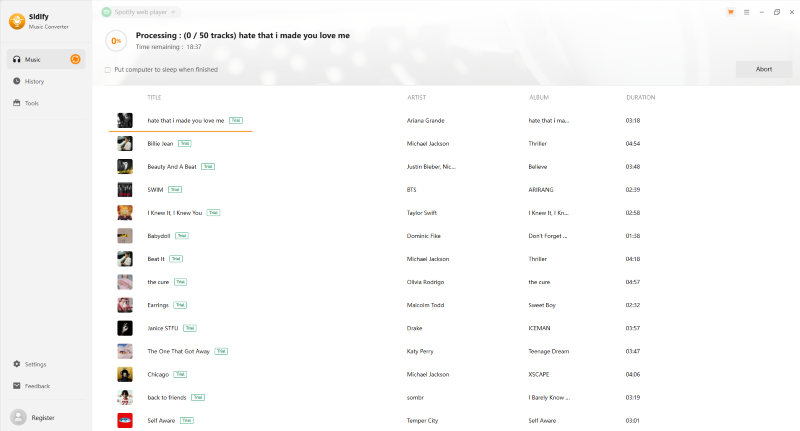
- Performance: Sidify Music Converter shares a very similar interface to NoteBurner. Users familiar with NoteBurner will find the interface easy to navigate. In addition, Sidify delivered download speeds comparable to NoteBurner, with most one-minute tracks completing in around 20 seconds during our tests.
- Output: This Spotify music converter can output crisp 320kbps audio and ID3 tags are preserved properly.
- Safety: We didn't encounter any security issues during our testing, but some users have recently reported account-related concerns in online communities.
- Limitations: The free trial only allows users to convert the first minute of each track. Although conversion performance was generally smooth, occasional web player loading failures affected overall reliability. In addition, there is no support for simultaneous downloads, which reduces efficiency when handling larger music collections.
Pros
- ✔ Fast conversion speed.
- ✔ Consistent output quality and accurate ID3 tag preservation.
- ✔ Multiple built-in tools and utilities.
- ✔ Built-in CD burning feature.
- ✔ Competitive annual and lifetime pricing.
Cons
- ❌ Trial version only converts the first minute of each track.
- ❌ No simultaneous downloads.
- ❌ Occasional web player loading failures.
- ❌ Less stable than some competitors.
#4 AudFree Spotify Music Converter
Verdict: A desktop Spotify converter with flexible audio settings, but less suitable for large playlists based on our test.
| Best For | Users who want more control over output settings and prefer having greater flexibility over bitrate, sample rate, and channel configurations. |
| Not For | Users who frequently download large playlists and prioritize batch conversion efficiency. |
Test Results
- Compatible with: Windows & macOS
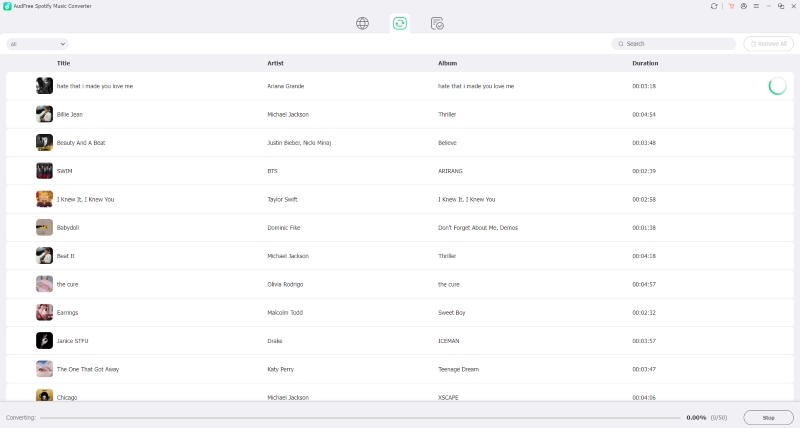
- Performance: Playlist and album links were parsed in around 10 seconds, while podcast links loaded in approximately 3 seconds. However, during testing, 6 out of 50 tracks in the playlist failed to download, affecting overall completion consistency. Although AudFree Spotify Music Converter claims up to 13X conversion speed, the full process took over 20 minutes in our test, which was noticeably slower than expected.
- Output: Spotify music can be converted into six common audio formats with a wider range of bitrate, sample rate, and channel options than most Spotify converters. The output quality remained consistent with the selected settings, and ID3 tags were successfully preserved.
- Safety: We scanned the software with antivirus tools and detected no malware, viruses, or suspicious Trojans. Additionally, no ads or pop-ups appeared during use.
- Limitations: The free trial only allows users to convert the first 30 seconds of each track. Besides, the tool does not support batch downloads, meaning that songs must be processed individually. In addition, unlike the previous options, AudFree does not include extra utilities or built-in tools beyond music conversion.
Pros
- ✔ Useful post-conversion actions, including sleep, shutdown, and auto-exit options.
- ✔ Flexible bitrate, sample rate, and channel settings.
- ✔ Preserved ID3 tags accurately.
Cons
- ❌ Trial version only converts 30 seconds.
- ❌ No simultaneous downloads.
- ❌ Lacks additional tools and utilities found in some competitors.
- ❌ Poor customer support.
#5 TuneMobile Spotify Music Converter
Verdict: A multi-service desktop downloader for users who also need podcasts, radio, or other streaming platforms, but not the best choice for large Spotify playlists.
| Best For | Users who want to download not only Spotify music but also podcasts and radio content in one platform. |
| Not For | Users who prioritize fast, efficient batch music conversion. |
Test Results
- Compatible with: Windows & macOS
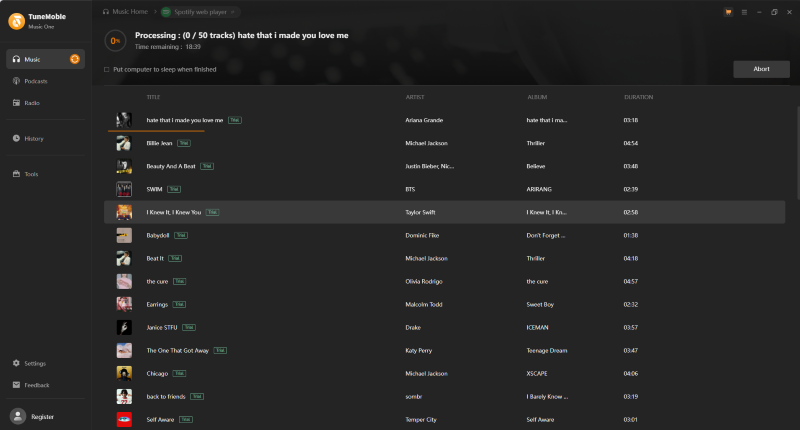
- Performance: TuneMobile Spotify Music Converter includes multiple built-in streaming music services, allowing users to download music not only from Spotify but also from other supported sources. During testing, most tracks were downloaded in around 25 seconds, while some songs took up to nearly 40 seconds. In addition to music, the platform also provides a broader content experience with dedicated podcast and radio sections.
- Output: Audio quality can reach up to 320kbps, and the final output consistently matches the selected quality settings across all tested tracks.
- Safety: No bundled software was detected during installation, and security scans showed no signs of malware. The software is also free from ads and intrusive pop-ups during use.
- Limitations: Despite its polished interface and additional content features, TuneMobile does not support batch downloads, which limits efficiency when handling larger playlists. In addition, its lifetime plan was the most expensive option in our comparison.
Pros
- ✔ Supports podcasts and radio content in addition to Spotify music.
- ✔ Stable output quality with accurate metadata preservation.
- ✔ Supports Spotify, Apple Music, Amazon Music, and other streaming services in one platform.
- ✔ Extra content categories beyond standard music conversion.
Cons
- ❌ Higher price.
- ❌ Inconsistent download speeds.
- ❌ No batch downloads.
#6 Allavsoft
Verdict: Allavsoft is better treated as a general URL-based downloader. It may work for occasional single-track attempts, but it is not ideal for Spotify playlists or users who need consistent output quality.
| Best For | Occasional users who prefer copying URLs directly and do not want to sign in to Spotify. |
| Not For | Users who need stable playlist downloading or consistent conversion reliability. |
Test Results
- Compatible with: Windows & macOS
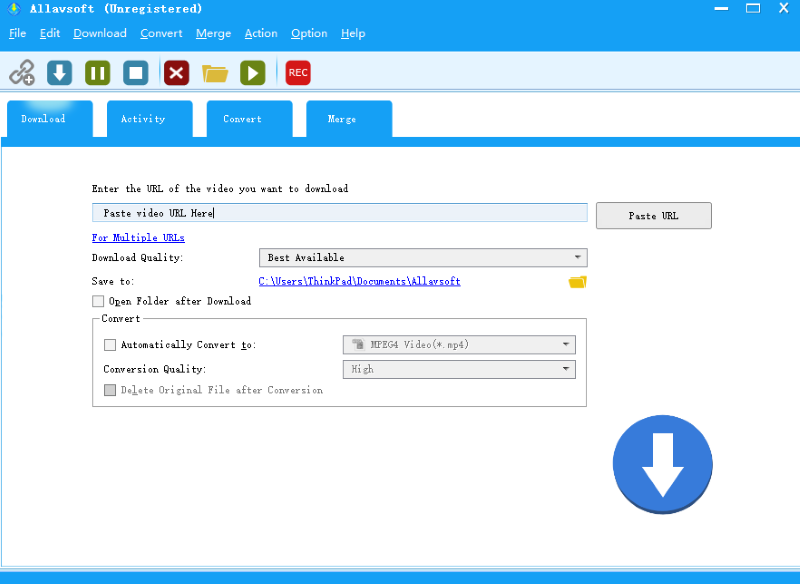
- Performance: During our testing, both playlist and album conversions encountered repeated failures. Interestingly, some failed downloads succeeded after repeated attempts. Similar issues have also been reported by other users. In many cases, the progress bar remained stuck at 0%, and even successful downloads generally took longer than expected.
- Output: We found that Allavsoft does not directly extract Spotify's protected audio streams. Instead, it appears to use the track information contained in Spotify URLs to locate matching audio sources from other public platforms, such as YouTube or Deezer. As a result, the exported files are standard MP3, FLAC, or other audio formats rather than genuine Spotify audio files. Consequently, output quality was not always consistent and did not necessarily match the selected settings.
- Safety: The download and installation process took noticeably longer than expected, partly because additional bundled programs were included. However, during our actual use, we did not encounter malware, intrusive pop-up ads, or other obvious security issues.
- Limitations: Despite its lower price point and flexible URL-based design, Allavsoft showed poor reliability during testing, particularly when handling Spotify content, where multiple download attempts failed.
Pros
- ✔ No Spotify login required.
- ✔ Supports multiple output formats.
- ✔ Lightweight URL-based workflow.
- ✔ Relatively low pricing.
Cons
- ❌ Outdated interface design.
- ❌ Unstable download performance.
- ❌ Downloads frequently failed.
Alternatives to Desktop Spotify Music Converters
In the previous sections, we tested six desktop Spotify music converters. Some performed well for batch conversion, while others are better treated as limited or alternative options. In addition to these options, there are many other tools available on the market, such as online converters like TuneFab Online and SpotiDown. Some users also choose audio recording tools like Audacity to rip Spotify music to MP3.
These methods can all be useful. Browser-based online converters offer a quick solution without requiring software installation, while audio recorders can capture Spotify playback and save it as local files. However, these alternatives often come with their own trade-offs, such as lower success rates, slower speeds, or additional manual steps.
Since this guide focuses on dedicated desktop Spotify converters, we won't cover those options in detail here.
○ For browser-based tools, read our Spotify to MP3 Converter Online Best List.
○ For free tools and trial limits, read our Spotify to MP3 Converter Free guide.
○ For large playlists, read our Spotify Playlist Downloader guide.
○ For a full method overview, read our Spotify Downloader guide.
Final Verdict: Which Desktop Spotify Converter Is Best?
Choosing the best desktop Spotify converter ultimately depends on your specific needs and use cases. Here’s a quick breakdown to help you decide:
If you are a heavy user who needs long-term and batch downloading, a full-featured desktop converter with stable performance like TuneFab Spotify Music Converter is the best choice.
If you are on a tight budget but plan to use it long term, you can consider annual subscriptions like NoteBurner or Sidify to minimize long-term costs. For audio parameter control, AudFree is worth considering, but it is less reliable for large playlists. Allavsoft is not recommended as a first choice for Spotify playlist conversion based on our test. For free or online tools, check the dedicated free/online guides instead.
If you only want a free or online solution, this is not the best page to start with. Use our free online Spotify to MP3 guides instead.