Spotify offers official offline listening through Spotify Premium, but those downloads remain inside the Spotify app. Third-party Spotify music downloaders work differently by creating local audio files, and their methods, quality, compatibility, and risks vary depending on the tool.
In this guide, we have tested and compared the best Spotify downloaders for Windows, Mac, Android, iOS, and web platforms, including free options! You can compare output quality, batch support, stability, and free limits, then choose the tool that best fits your offline listening needs. Explore the full list below.
Disclaimer: All tools in this article are reviewed for personal offline use only. We do not encourage unauthorized downloading, redistribution, or commercial use.
- The Quicklist: Which Spotify Downloader Should You Choose?
- How We Tested These Spotify Audio Downloaders
- Best Spotify Downloaders for Desktop (Windows/Mac)
- Best Overall: TuneFab Spotify Music Converter
- Cheaper Option: DRmare Spotify Music Converter
- Best Open-Source Spotify Music Downloaders
- Top Pick: spotDL
- Best Lightweight: spotify-dl
- Best Free Spotify Song Downloaders Online for Occasional Use
- Top Pick: TuneFab Web-Based Spotify Downloader
- Other Free Spotify Downloaders We Checked
- Best Spotify Downloaders for Android and iPhone
- Top Pick: SpotiFLAC Mobile
- More Spotify Song Downloaders for Mobile (Quick Look)
- Comparison Table of the Top Downloaders Based on Test Results
- Common Problems When Using Spotify Downloaders
- FAQs
- Final Recommendation: Choose Based on Your Use Case
The Quicklist: Which Spotify Downloader Should You Choose?
We've distilled our extensive testing into a quick-glance guide. If you need a fast decision, here are our top recommendations based on your primary need. All data is derived directly from our hands-on testing in July 2026.
| Use Case | Named Tool | Mechanism | Best For | Not Ideal For | Tested Result | Free Limit | Account/Login | Audio Source | Last Tested |
| Fast and Stable on PC/MAC | TuneFab Spotify Music Converter | Built-in Spotify web player with direct downloading | Users who frequently download large playlists and want fast, reliable batch conversion | Users looking for a completely free, unlimited tool | 97/100 tracks downloaded successfully (~8 min) | 3 full songs | TuneFab account required; Spotify account (optional) | Spotify direct | July 17, 2026 |
| Budget-Friendly for PC/MAC | DRmare Spotify Music Converter | Built-in Spotify web player with direct downloading | Users who want a capable desktop downloader at a lower price point with good quality | Users who need the fastest conversion speeds | 95/100 tracks downloaded successfully (~20 min) | First minute per song | Spotify account required | Spotify direct | July 17, 2026 |
| Best Open-Source (Free) | spotDL | Command-line tool that matches Spotify metadata to YouTube audio | Tech-savvy users comfortable with CLI who want a free, lightweight tool | Beginners or users who want a simple GUI; those who need lossless quality | 92/100 tracks downloaded successfully (~9 min) | Unlimited | No Spotify account required; YouTube Music Premium for higher quality | YouTube / YouTube Music (external) | July 17, 2026 |
| Best for Lossless Audio | spotify-dl | Command-line downloader with Spotify Premium authentication | Advanced users with Spotify Premium who prioritize true lossless FLAC output | Beginners; users without Spotify Premium | 95/100 tracks downloaded successfully (~10 min) | Unlimited | Spotify Premium required | Spotify direct | July 17, 2026 |
| Best Online (No Install) | TuneFab Web-Based Spotify Downloader | Browser-based downloader using Spotify links | Quick, one-off downloads on any device without software installation | Users who frequently download large playlists for free | 95/100 tracks downloaded successfully (~15 min) | 2 free songs | TuneFab account required | Spotify direct | July 17, 2026 |
| Best Mobile App | SpotiFLAC Mobile | Mobile app using community extensions to access multiple music providers | Advanced mobile users who want lossless FLAC downloads on the go | Beginners; users who need a simple one-click downloader | 94/100 tracks downloaded successfully (~12 min) | Unlimited (open-source) | Not required | Tidal, Qobuz, Amazon Music & Deezer (via extensions) | July 17, 2026 |
Tip: Downloader Types Compared: Online, Desktop & Mobile Solutions
1. Choose a desktop Spotify music downloader for Mac/Windows if you need faster batch processing, stable performance for large playlists, and higher audio quality.
2. Online tools are better for occasional use with no installation.
3. Mobile solutions are convenient but may offer limited stability and quality.
How We Tested These Spotify Audio Downloaders
To bring you a comparison that’s both fair and practical, we dedicated several days to rigorously testing desktop software, online tools, open-source solutions, and mobile apps under consistent, controlled conditions. Our goal was to look beyond vendor claims and evaluate each tool based on real-world performance.
All tests were conducted on July 17, 2026, using a 100 Mbps wired broadband connection with stable latency to ensure network conditions did not skew the results.
Testing Devices
To ensure a level playing field, we used the same internet connection and comparable hardware specifications across all tests. This minimizes variables and ensures that performance differences are due to the software itself, not the hardware.
Our primary batch performance test—downloading a 100-track playlist in MP3 format—was conducted on both PC and iPhone to evaluate cross-platform stability and speed. Results from these two devices served as the benchmark for our batch download scoring.
| Device | Test Object | Specifications |
| PC | Desktop software | HP, Intel Core i7, 16GB RAM, Windows 11 Pro (23H2) |
| Mac | Desktop software | Apple M1, 8GB RAM, macOS Sonoma |
| iPhone | Mobile app | iPhone 14 Pro, iOS 17 |
| Android | Mobile app | Samsung Galaxy S23, Android 14 |
| Chrome Browser on PC | Online Service | Google Chrome 126.0.6478.127 (Official Build, 64-bit) |
| Safari on iPhone | Online Service | Safari for iOS 17.5.1 |
Testing Dataset, Download Tasks
Every downloader was challenged with the same types of Spotify content to simulate typical user scenarios. The core metrics—Download Stability, Speed, and Batch Performance—were measured and recorded using a 100-track playlist (Soft Pop Hits) downloaded in MP3 format. Other features were tested for feasibility.
| Test Task | Purpose |
| 100-track playlist (Soft Pop Hits) | Evaluate batch performance, download speed, download stability, and success rate |
| Single Spotify track | Measure parsing speed, output format and highest output quality |
| Spotify album | Verify album recognition, metadata preservation, and folder organization |
| Artist page (when supported) | Check large library handling and batch capability |
| Podcast episode (when supported) | Test compatibility beyond music tracks |
Testing Steps
The following procedure was strictly followed for the 100-track playlist test. Steps for other content types were analogous.
Step 1. We installed desktop apps with a fresh installation; cleared browser cache and cookies for online tools to prevent cached results.
Step 2. We set output format to MP3 with the highest available bitrate (e.g., 320kbps). Enabled metadata preservation if available as an option.
Step 3. We added the test playlist via the method each tool supports—paste link, drag-and-drop, built-in browser, or command-line input.
Step 4. We started the download or conversion task and recorded total processing time using a stopwatch. Monitored for crashes, errors, or interruptions.
Step 5. We navigated to the output folder, counted files, checked file sizes, and performed initial playback tests.
Verification Methods
We assessed each tool based on a comprehensive set of basic functions. The table below outlines the key testing areas we evaluated across all tools.
| Testing Area | What We Evaluated |
| Download Speed | Total audio duration divided by actual processing time |
| Audio Quality | Measured output bitrate, available formats, and whether higher-quality output was supported |
| Metadata Preservation | Accuracy of song title, artist, album, artwork, track number, and other ID3 tags |
| Batch Stability | Success rate, failed downloads, duplicate files, and interruptions during large playlist downloads |
| Output Formats | Available export formats such as MP3, FLAC, WAV, M4A, AAC, ALAC, and AIFF |
| Ease of Use | Installation process, interface design, login requirements, and overall workflow |
| Overall Success Rate | Percentage of successfully completed downloads during repeated testing. A file counted as successful only when it matched the correct recording, contained the full duration, opened normally, and retained the stated metadata. |
To ensure objectivity and accuracy, we applied the following verification methods to each testing area rather than relying on tool specifications or vendor claims.
| Verification Check | Method |
| Measured Bitrate | Analyzed using MediaInfo to read the actual encoding bitrate—not trusting the tool's claim or file extension. |
| Spectral Analysis | Used Spek to visualize the audio spectrum and detect high-frequency cutoffs that indicate upsampled or "fake" high-bitrate files. |
| Sample Rate Check | Verified sample rate (e.g., 44.1kHz, 48kHz) using audio analysis tools. |
| Playback Compatibility | Opened files in VLC, Windows Media Player, and iOS/Android native music players to confirm no corruption or format errors. |
| Duration Match | Compared the downloaded file's total duration against the Spotify web player to confirm the correct song version was retrieved. |
| Codec Information | Identified the actual codec used (LAME, Fraunhofer, FFmpeg, etc.) to assess encoding quality. |
Scoring System
We rated each tool on a 5-point scale across five weighted criteria. The weighted total determined each tool's final ranking in our comparison table.
| Criteria | Weight | What We Measured | Scoring Logic |
| Download Speed | 25% | Time taken to complete the 100-track playlist (total duration: ~6 hours) | Faster processing time = higher score. Scored relative to the fastest tool. |
| Audio Quality | 30% | Measured bitrate, sample rate, spectral integrity, and codec | Highest priority. Tools producing genuine high-bitrate files scored higher than those with upsampled or low-quality output. |
| Batch Stability | 20% | Crashes, freezes, errors, or file corruption during batch processing | Tools completing all 100 tracks without interruption scored highest. Each failure or retry reduced the score. |
| Ease of Use | 15% | Installation steps, UI clarity, learning curve, and required technical knowledge | One-click solutions scored higher than command-line tools requiring manual dependency installation. |
| Feature Completeness | 10% | Metadata saving, multiple format options, file naming rules, playlist support | Tools offering more flexible and complete features scored higher. |
Testing Limitations
We want to be transparent about the boundaries of our evaluation. The following limitations apply to our testing methodology and results:
| Limitation | Description |
| Source Dependency | Open-source tools like spotDL and some online downloaders match Spotify tracks with external sources such as YouTube. Our quality measurements reflect the matched source, not Spotify's original audio stream. These tools may retrieve live versions, remixes, or clean/explicit variants different from the intended track. |
| Dynamic Online Services | Online tools, web-based downloaders, and Telegram bots are updated frequently without notice. Our results are accurate only for the test period (July 17-18, 2026) and may change after server-side updates or policy changes. |
| Scope Restriction | We did not test podcasts, audiobooks, or playlists containing local files. Results may vary with those content types due to different metadata structures and source availability. |
| Security Snapshot | We scanned desktop installers with VirusTotal at the time of testing and noted detection ratios. However, this represents a single point-in-time check and is not a comprehensive security audit. Malware signatures evolve, and new vulnerabilities may emerge after our test date. Always download software from verified publisher sources. |
| Spotify Account Variability | Some tools require logging in with a Spotify account. We used a standard free account without Premium benefits. Performance may differ for Spotify Premium users when tools claim higher-quality output is available with Premium credentials. |
| Hardware Dependency | Download speed results are specific to our test hardware (HP PC with Intel Core i7, 16GB RAM, Windows 11 Pro (23H2)). Slower or older hardware may produce different processing times, especially for tools with hardware acceleration features. |
Best Spotify Downloaders for Desktop (Windows/Mac)
Desktop Spotify downloaders are usually the best choice for users who need stable performance, batch playlist processing, and higher-quality audio output. Below, we compare 2 tested desktop solutions based on speed, audio quality, metadata preservation, stability, supported formats, and ease of use.
Editorial disclosure: Ratings.TuneFab.com is published by TuneFab Software Inc. TuneFab products are included in this comparison and may benefit commercially from downloads or purchases. We identify product-page claims separately from results observed or verified in our tests. Every scored tool follows the same published test dataset and scoring criteria.
Best Overall: TuneFab Spotify Music Converter
A Quick Check:
- Pricing: Free trial, starting at $25.95/Month
- Refund Policy: 30-day money-back guarantee
- Formats: MP3, M4A, WAV, FLAC, AAC, ALAC, AIFF
- ID3 Tags: Preserved (cover, artist, album, date, etc.)
- Max Audio Quality: Up to 320kbps MP3 / 24-bit FLAC (Verified)
- Playlist/Album Support: Yes (songs, albums, playlists, artist page, podcasts)
- Batch Download Support: Yes
- Ease of Use: Built-in Spotify web player with drag-and-drop operation; no Spotify desktop app or recording process required
- Ad-Free: Yes
In our 2026 testing, TuneFab Spotify Music Converter stands out as the top Spotify downloader for Windows and Mac. This tool offers an easy way for Spotify Free users to download Spotify music to MP3 while maintaining high sound quality (up to 320kbps MP3 / 24-bit FLAC). Even better, this downloader can also download tracks from an artist page. This makes it much easier to build an offline music library.
Plus, its interface is incredibly clean, featuring the built-in Spotify web player. This means you simply log in, drag a playlist, and the software imports the playlist directly from Spotify after you sign in. In our July 2026 batch test, TuneFab successfully completed 97 of 100 tracks from a Spotify playlist in under 10 minutes. Three tracks failed to download because they became temporarily unavailable during processing. We verified the downloaded files by checking playback duration, output format, measured bitrate, codec information, and ID3 metadata, including album artwork and artist details.
While TuneFab advertises download speeds of up to 35X, actual performance varies depending on factors such as playlist size, output format, hardware configuration, and network conditions. Our testing reflects real-world performance rather than theoretical maximum speed.
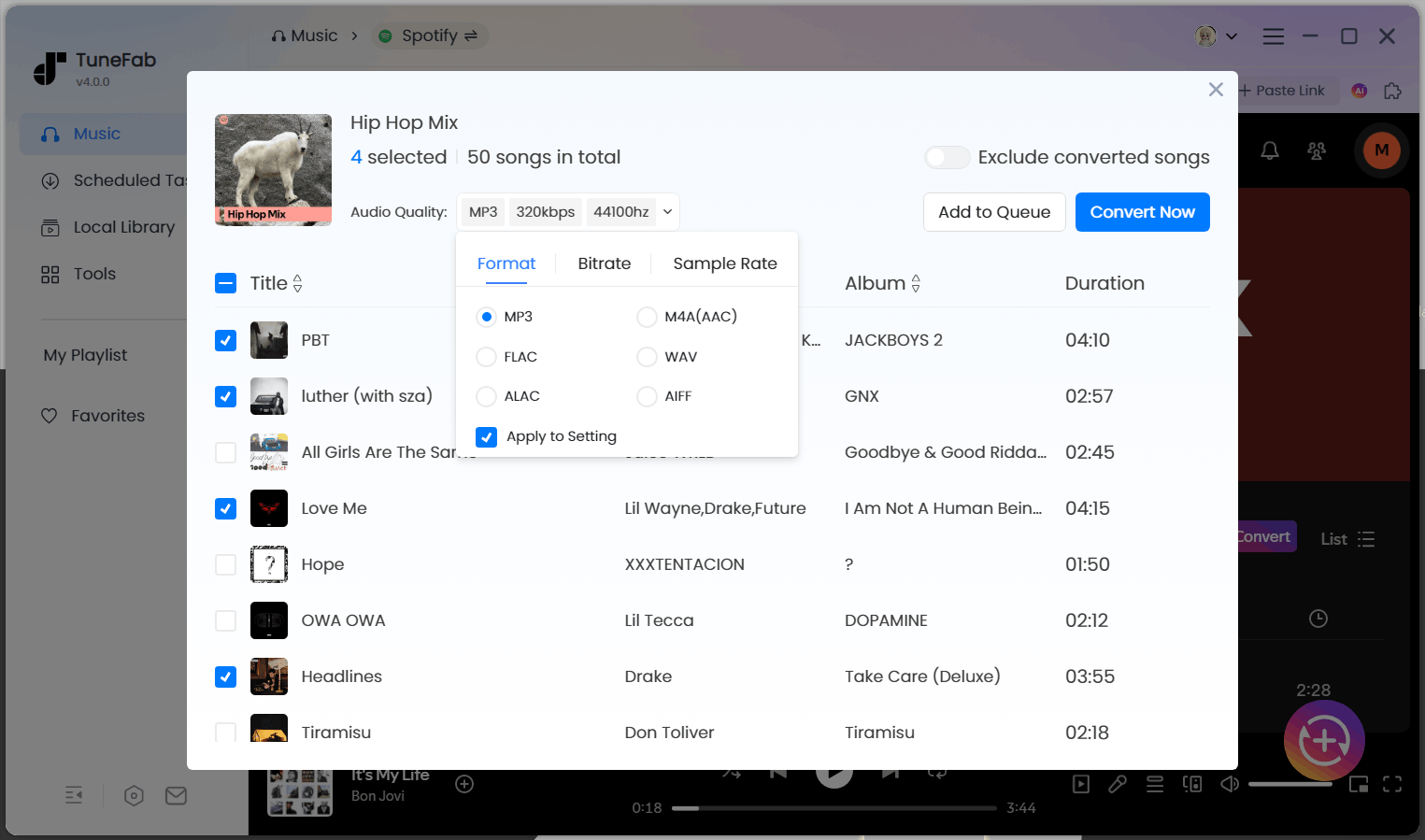
Who It's For: This software can meet the needs of most people, especially those who want to batch download songs from Spotify to MP3 in the embedded Spotify Web Player without quality loss.
How It Works: TuneFab Spotify Music Converter unlocks Spotify playback restrictions, letting you seamlessly search, add, download music from the Spotify web player directly, and then save songs as local audio files in multiple formats. There is no need for the official app or any recording step.
✅ What We Like
- True lossless FLAC and 320kbps output available.
- Fast batch conversion (up to 35X) of Spotify songs, playlists, albums, and podcasts.
- No Spotify app or Premium is required.
- Supports common formats such as MP3, M4A, FLAC, and more.
- Saves full ID3 tags and lyrics.
- Custom file-naming and archiving rules for easier management.
- Even beginners can get started quickly.
❌ What We Don't Like
- You can only download 3 full Spotify songs for free during the trial.
Further Reading: TuneFab Spotify Music Converter Review
Pro Tip: After the free trial, if you want to keep using the software, you can also try TuneFab's hidden 10% off discount code: TFWELCOME – available for a limited time.
Cheaper Option: DRmare Spotify Music Converter
A Quick Check:
- Pricing: Free trial, starting at $19.95
- Refund Policy: 30-day money-back guarantee
- Formats: MP3, FLAC, WAV, AIFF, M4A, M4B
- ID3 Tags: Preserved (cover, artist, album, title, etc.)
- Max Audio Quality: Up to 320kbps for MP3s / 24-bit 44.1kHz for FLACs
- Playlist/Album Support: Yes (songs, albums, playlists, podcasts, audiobooks)
- Batch Download Support: Yes
- Ease of Use: Built-in Spotify web player; no official Spotify desktop app required
- Ad-Free: Yes
DRmare Spotify Music Converter is a feature-rich Spotify playlist downloader for Windows and Mac that supports downloading Spotify songs, playlists, albums, podcasts, and audiobooks into multiple local audio formats. Unlike traditional converters that rely on the Spotify desktop app, DRmare uses a built-in Spotify Web Player, allowing you to import and download Spotify content without installing the official Spotify application.
During our 2026 evaluation, DRmare successfully handled everyday playlist and album downloads while preserving metadata such as artist, album, and cover artwork. It supports output formats including MP3, FLAC, WAV, AIFF, M4A, and M4B, with quality options up to 320kbps or 24-bit/44.1kHz FLAC depending on the selected format.
In terms of download speed, DRmare advertises speeds of up to 15X. In our batch test, it completed 95 of 100 tracks in about 20 minutes. Overall, the performance was reliable, but it was noticeably slower than TuneFab when processing larger playlists.
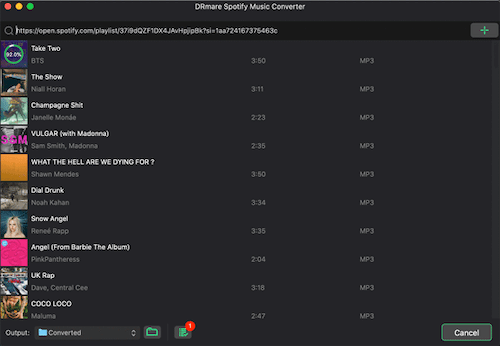
Who It's For: Users who want a desktop Spotify downloader with flexible output formats, high-quality audio options, and a built-in Spotify Web Player without installing the official Spotify app.
How It Works: DRmare lets you log in through its built-in Spotify Web Player, select Spotify songs, playlists, or albums, choose your preferred output settings, and convert them into local audio files on your computer.
✅ What We Like
- Supports downloading Spotify songs, playlists, albums, podcasts, and audiobooks.
- Preserves metadata, including album artwork and artist information.
- Offers multiple output formats, including FLAC, WAV, AIFF, MP3, M4A, and M4B.
- Built-in Spotify Web Player eliminates the need for the official Spotify desktop app.
❌ What We Don't Like
- Free trial limitations apply before purchasing the full version.
- Download speed could be faster, especially when handling large playlists.
Further Reading: DRmare Spotify Music Converter Review
Best Open-Source Spotify Music Downloaders
If you are looking for a lightweight, free Spotify downloader for PC or Mac, open-source tools can be a good alternative. While they typically require more setup than desktop converters, they offer a cost-free way to save Spotify songs offline.
Top Pick: spotDL
A Quick Check:
- Pricing: Free (open-source)
- Formats: MP3, M4A, OPUS
- ID3 Tags: Preserved (metadata, album artwork, lyrics when available)
- Max Audio Quality: Up to 128kbps (standard) / 256kbps M4A (when source is available from YouTube Music Premium)
- Playlist/Album Support: Yes (songs, playlists, albums, and sync tasks)
- Batch Download Support: Yes
- Ease of Use: Requires command-line setup with Python and FFmpeg; Web UI is available for users who prefer a browser-based interface.
- Ad-Free: Yes (open-source, clean)
If you are considering a more lightweight Spotify downloader instead of using a full-featured desktop application, spotDL Spotify Downloader is a solid option. It is an open-source command-line downloader that uses Spotify links and metadata to find matching audio on YouTube. Its CLI supports tracks, albums, playlists, artists, and playlist syncing; the optional Web UI has more limited functionality.
MP3 is the default output, while M4A and OPUS are also supported. According to the official documentation, regular downloads are generally limited by the matched YouTube source, often around 128kbps, with higher-quality M4A available to eligible YouTube Music Premium users. Because it matches tracks from YouTube rather than downloading directly from Spotify, different versions of the same song may occasionally be selected.
However, spotDL requires more technical setup than standard desktop software. Installation involves Python, FFmpeg, and optional Deno dependencies, which may be complicated for beginners. If you're not comfortable working with command-line tools or managing these dependencies, a beginner-friendly downloader like TuneFab Spotify Music Converter may be a better choice.
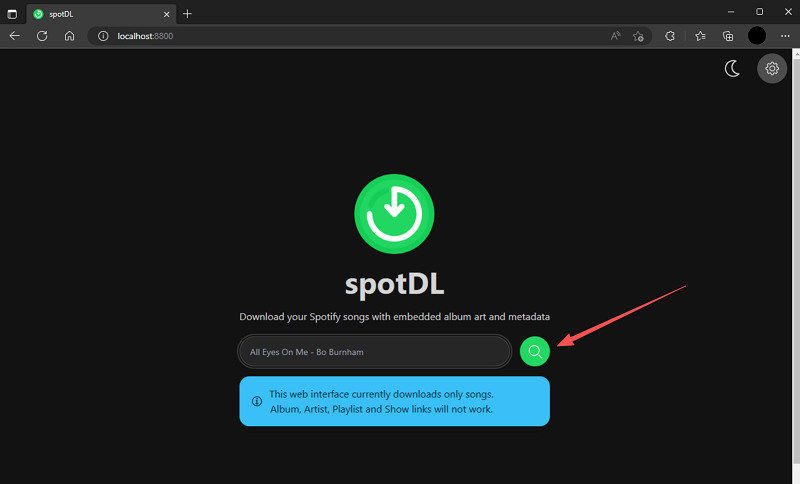
Who It's For: Best for users who want a free, open-source Spotify downloader and are comfortable using command-line tools or configuring technical dependencies. In our testing, spotDL was more suitable for smaller downloads than large playlist conversions.
How It Works: spotDL takes Spotify URLs as input, retrieves song information, searches for matching audio sources on YouTube, and downloads the files with embedded metadata. Users can run it through the command line or launch the built-in Web UI for a simpler browser-based workflow.
✅ What We Like
- Lightweight and completely open-source.
- Supports Spotify tracks, playlists, albums, and synchronization tasks.
- Automatically saves metadata, album artwork, and lyrics.
- No Spotify app installation or account login required.
- Offers flexible configuration options for advanced users.
❌ What We Don't Like
- Requires technical setup, including Python and FFmpeg installation.
- Audio quality depends on the matched YouTube source rather than Spotify's original stream.
- Output quality is limited compared with lossless-focused desktop converters.
- CLI-based workflow may not be beginner-friendly.
Best Lightweight: spotify-dl
A Quick Check:
- Pricing: Free (open-source)
- Formats: FLAC (default), MP3, and other supported formats depending on configuration
- ID3 Tags: Supported (metadata tagging and organized file output)
- Max Audio Quality: FLAC output available (requires Spotify Premium)
- Playlist/Album Support: Yes (songs, playlists, albums, podcasts)
- Batch Download Support: Yes
- Ease of Use: Command-line tool requiring installation via Cargo, Homebrew, source code, or pre-built binaries.
- Ad-Free: Yes (open-source)
spotify-dl takes a different approach from typical Spotify downloaders by focusing on lossless output and command-line flexibility. Unlike tools that mainly target convenience, it is designed for users who prefer technical control and want to save Spotify content in formats such as FLAC.
One of its biggest advantages is the default FLAC output option, which makes it appealing to Spotify Premium users who prioritize audio quality. The tool supports downloading Spotify playlists, individual tracks, podcasts, and full albums through Spotify URLs or URIs, while also preserving metadata and organizing downloaded files.
However, spotify-dl requires a Spotify Premium account and involves command-line operations, which creates a higher learning curve compared with desktop applications. During our evaluation, we found that it is better suited for advanced users who are comfortable with terminal-based tools and want more control over their music library.
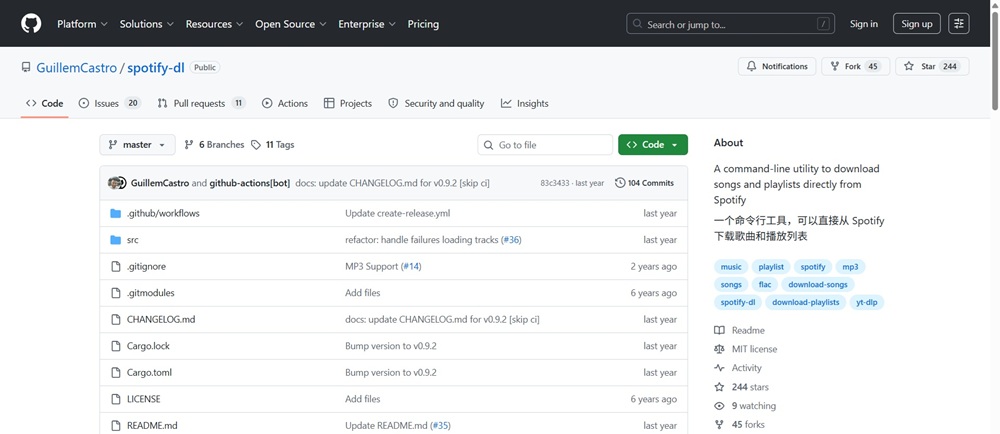
Who It's For: Best for Spotify Premium users who want an open-source command-line downloader with FLAC output support and don't mind using terminal commands.
How It Works: spotify-dl connects with Spotify through provided track, playlist, or album URLs/URIs. Users can configure output formats, download locations, and parallel download settings through command-line options before saving music files locally with metadata.
✅ What We Like
- Supports FLAC output for users who prioritize audio quality.
- Downloads individual tracks, playlists, albums, and podcasts.
- Preserves metadata and organizes downloaded files.
- Open-source and lightweight, with no advertisements.
- Offers flexible configuration options through command-line parameters.
❌ What We Don't Like
- Requires a Spotify Premium account to work.
- Command-line operation is less beginner-friendly than GUI-based Spotify downloaders.
- Setup requires additional steps such as installing through Cargo, Homebrew, or pre-built binaries.
- Not ideal for users who want a simple drag-and-drop workflow.
- Download speed was noticeably slower than desktop GUI converters.
Best Free Spotify Song Downloaders Online for Occasional Use
Online Spotify downloaders run directly in your browser and work across Windows, Mac, Android, and iOS, making them ideal for quick, one-off, or on-the-go offline listening. We tested several popular options in the community and found that they shared similar features and steps.
Top Pick: TuneFab Web-Based Spotify Downloader
A Quick Check:
- Pricing: Free with a TuneFab account; Premium upgrade available for unlimited batch playlist/album downloads
- Refund Policy: 5-30 days money-back guarantee
- Formats: MP3
- Max Audio Quality: 128kbps-320kbps
- ID3 Tags: Preserved
- Playlist/Album Support: Yes
- Batch Download Support: Yes (with ZIP output)
- Ease of Use: Browser-based workflow; no software installation required
- Ad-Free: Yes
This web-based Spotify downloader is developed by TuneFab for users who want to download music with Spotify links without software installation.
Before downloading, you'll need to sign in with a TuneFab account. It lets you download 2 songs for free. If you need larger batch downloads, upgrade to the Premium plan.
In our test, we processed a Spotify playlist containing 100 tracks and successfully downloaded 95 files within 15 minutes under a stable network connection. We checked the downloaded files by verifying playback duration, MP3 format, bitrate, and ID3 metadata, including song title, artist, album information, and cover artwork.
Compared with desktop Spotify converters, this online tool focuses more on convenience and accessibility. It works across desktops, tablets, and mobile devices, including PCs, smartphones, and tablets, making it suitable for users who only need occasional Spotify downloads without installing additional software.
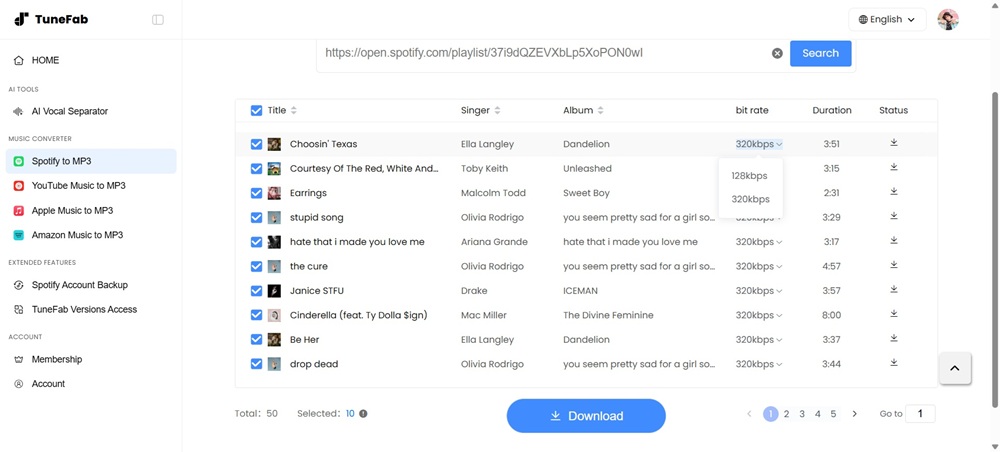
Who It's For: It is best for those who need to download Spotify songs to MP3 occasionally or want a no-install solution for work, school, or shared devices.
How It Works: The workflow is simple: paste the Spotify link into the input bar, click "Search", select your desired tracks, and click "Download".
✅ What We Like
- Enables batch download of playlists and albums.
- No installation of software required.
- Works on both desktop and mobile.
- Keeps ID3 information.
- Supports 320kbps for MP3 downloads.
❌ What We Don't Like
- Requires account login.
- The free version has limits.
Other Free Spotify Downloaders We Checked
SpotifyDownloader: https://spotidown.co/en6 (July 2026)
This easy-to-use Spotify to MP3 online tool downloads songs, albums, and playlists as ZIP files while keeping ID3 tags, but our tests revealed that users had to view ads before each download, and we encountered occasional conversion failures.
Spotisaver: https://spotisaver.net/en1 (July 2026)
Spotisaver is a browser-based Spotify playlist backup tool that processes Spotify links without requiring installation or Spotify login. It can read playlist metadata, match available audio from external sources, and export MP3 files (320kbps in default) or ZIP archives. However, our test found that the free version only allows users to parse playlists and download tracks individually, while batch ZIP downloads require a Premium upgrade.
MusicFab: https://musicfab.io/ (July 2026)
MusicFab is a browser-based Spotify to MP3 converter that requires no installation or Spotify login. It supports converting Spotify links into MP3 files, but our test found that it could only recognize individual track links rather than album or playlist URLs. The output is limited to 128kbps MP3 with no customizable quality settings, and downloaded files did not include ID3 metadata such as artist, album, or cover art.
Best Spotify Downloaders for Android and iPhone
To help mobile users enjoy Spotify offline anytime, anywhere, we also tested some of the most widely used Spotify downloaders for Android and iPhone.
Top Pick: SpotiFLAC Mobile
A Quick Check:
- Pricing: Free (open-source, no subscription)
- Formats: FLAC (primary), with quality depending on available providers
- Max Audio Quality: Up to 24-bit/192kHz (provider dependent)
- ID3 Tags: Preserved (album art, lyrics, genre, label, copyright, etc.)
- Playlist/Album Support: Yes (supports playlists and albums with queue management)
- Batch Download Support: Yes
- Ease of Use: Mobile app with built-in extension store; requires configuring providers before downloading
- Ad-Free: Yes
SpotiFLAC Mobile is an open-source mobile music utility designed for users who want higher-quality audio files and more control over their offline music library. Unlike typical Spotify downloaders, it does not rely on a single built-in source. Instead, it uses community-developed extensions to access different music providers, including Tidal, Qobuz, and Deezer.
The app supports searching by Spotify links, track names, or other streaming service links, then matching songs from available providers. It can download albums and playlists in batches, while embedding detailed metadata such as cover artwork, lyrics, genre, and copyright information directly into the audio files.
The main advantage of SpotiFLAC Mobile is audio quality. When the selected provider supports it, the app can save true lossless FLAC files up to 24-bit/192kHz without additional transcoding. However, download availability and quality depend heavily on installed extensions and the source service, so some tracks may fail to match or be available only at lower quality.
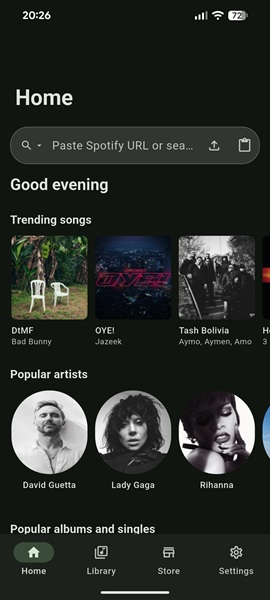
Who It's For: It is best for advanced mobile users who want lossless audio downloads, open-source software, and more customization options rather than a simple one-click downloader.
How It Works: Install SpotiFLAC Mobile, add available extensions through the built-in Store, paste a Spotify or other streaming service link, then select the matched source and download tracks, albums, or playlists to your Android or iPhone.
✅ What We Like
- Supports true lossless FLAC downloads up to 24-bit/192kHz when supported by the source provider.
- Works with multiple music providers through extensions.
- Supports playlist and album batch downloads.
- Preserves rich metadata, including artwork and lyrics.
- Open-source with no ads or subscription fees.
❌ What We Don't Like
- Requires extension setup and configuration before use.
- Download success depends on third-party providers and source availability.
- More suitable for advanced users than beginners.
- Mobile installation and permission setup may require extra steps.
More Spotify Song Downloaders for Mobile (Quick Look):
- Spotiflyer (https://spotiflyer.in/, tested in July 2026): This Android app successfully downloaded individual tracks and playlists with original ID tags during our tests. Also, there were no ads. However, while it claims to offer high audio quality up to 320kbps, our test results only reached 128kbps.
- Telegram Bots @SpotifyDL_Bot (tested in July 2026): It provides a simple way to download Spotify tracks directly inside the Telegram app without installing additional software. You can send a Spotify track link to a bot, and it may return an audio file such as MP3 or FLAC depending on the bot's available sources and settings. Since it's an unofficial third-party tool, avoid sharing your Spotify login credentials or personal information, and check bot permissions carefully before downloading files.
Tip: Telegram bots change frequently and should not be treated as one product. Results vary by bot, source, permissions, region, and availability. We only recommend a bot when its exact handle, test date, file source, account requirements, success result, and privacy limitations can be documented. Do not send Spotify credentials or other sensitive information to an unverified bot.
Comparison Table of the Top Downloaders Based on Test Results
Choosing the right downloader greatly depends on your priorities. After going through our detailed reviews, you may still wonder which one best fits your needs.
| Tool + tested version | Category | OS/device | Track | Album | Playlist | Podcast | Audio Source | Output format | Measured codec/bitrate | Batch result (to MP3) | Correct/full files | Metadata | Account | Free limit | Security evidence | Score |
| TuneFab Spotify Music Converter | Desktop App | Windows, Mac | ✅ | ✅ | ✅ | ✅ | Spotify library | MP3, M4A, FLAC, WAV, AAC, ALAC, AIFF | MP3 up to 320kbps; FLAC in 24-bit verified | Completed batch download in about 8 minutes with stable performance | 97/100 successful files | ID3 tags preserved | TuneFab account; Spotify account (optional) | 3 songs trial | Official software source | 4.8/5 |
| DRmare Spotify Music Converter | Desktop App | Windows, Mac | ✅ | ✅ | ✅ | ✅ | Spotify library | MP3, FLAC, WAV, AAC, M4A, M4B | MP3 up to 320kbps; FLAC in 24-bit verified | Completed batch download in about 20 minutes; performance was stable but slower than TuneFab | 95/100 successful files | ID3 tags preserved | Spotify account required | First minute per song | Official software source | 4.6/5 |
| spotDL | Open-source tool | Windows, Mac, Linux | ✅ | ✅ | ✅ | ❌ | YouTube / YouTube Music (from Spotify links) | MP3, M4A, OPUS | MP3 up to 128kbps; M4A up to 256kbps with YouTube Music Premium verified | Completed a batch download in about 9 minutes; some tracks failed to match with YouTube sources during the process. | 92/100 successful files | ID3 tags preserved | No Spotify account required; YouTube Music Premium account/cookies required for higher quality | Unlimited | Open-source project; requires Python, FFmpeg, and optional Deno dependencies | 4.2/5 |
| spotify-dl | Open-source tool | Windows, Mac, Linux | ✅ | ✅ | ✅ | ✅ | Spotify library | FLAC (default), MP3 (supported) | MP3 up to 320kbps; FLAC in 24-bit verified | Completed the batch download test in about 10 minutes. | 95/100 successful files | ID3 tags preserved | Spotify Premium account required | Unlimited | Open-source project; MIT License | 4.2/5 |
| TuneFab Web-Based Spotify Downloader | Web-based service | Browser (PC/mobile) | ✅ | ✅ | ✅ | ❌ | Spotify library | MP3 (default) | MP3 up to 320kbps verified | Completed the batch download test in about 15 minutes and packaged downloaded files into a ZIP archive. | 95/100 successful files | ID3 tags preserved | TuneFab account required | 2 free songs | Official website | 4.5/5 |
| SpotifyDownloader | Web-based service | Browser | ✅ | ✅ | ✅ | ❌ | YouTube | MP3 | MP3 320kbps verified | Completed the batch download test in about 15 minutes and packaged downloaded files into a ZIP archive. | 93/100 successful files | ID3 tags preserved | Not required | Free with ads | Ads and redirects observed; no additional security issues found during testing | 4.0/5 |
| Spotisaver | Web-based service | Browser | ✅ | ✅ | ✅ | ❌ | Independent external sources | MP3, TXT | MP3 320kbps verified | Completed the batch download test in about 15 minutes with the Premium batch feature and packaged downloaded files into a ZIP archive. | 94/100 successful files | ID3 tags preserved | Optional premium | Free without batch mode | No security issues observed during testing; source verification recommended | 4.0/5 |
| MusicFab | Web-based service | Browser | ✅ | ❌ | ❌ | ❌ | Independent external sources | MP3 | 128kbps only verified | Does not support playlist and batch downloads in our testing; individual track downloads took about 60 minutes to complete the tested playlist. | 90/100 successful files | No ID3 metadata found | Not required | Free | Ads and redirects observed; avoid suspicious pages or downloads | 3.8/5 |
| SpotiFLAC Mobile | Mobile app | Android, iOS | ✅ | ✅ | ✅ | ❌ | Tidal, Qobuz, Amazon Music & Deezer (via extensions) | FLAC, MP3, AAC, OPUS | MP3 up to 320kbps; FLAC in 24-bit verified | Supported batch downloads and completed the test playlist in about 12 minutes. | 94/100 successful files | ID3 tags preserved | Not required | Free open-source | Open-source repository available; review extensions and permissions carefully | 4.1/5 |
| SpotifyDL_Bot | Bot on mobile app | Android, iOS, Windows, Mac, Linux | ✅ | ❌ | ❌ | ❌ | Independent external sources | MP3, FLAC | MP3 up to 320kbps; FLAC in 24-bit verified | Not suitable for playlist downloads; individual track downloads took around 50 minutes in total. | 80/100 successful files | ID3 tags preserved | Telegram account required | Free | Third-party bot risk; do not share Spotify credentials or private information | 3.5/5 |
Common Problems When Using Spotify Downloaders
Even reliable Spotify downloaders can run into issues. Based on our testing, these are the most common problems users may encounter.
Wrong Song Matching
Some downloaders use Spotify metadata to find audio from other sources instead of downloading directly from Spotify. This can result in a live version, remix, or clean/explicit edition instead of the original track. Check the title, artist, duration, and album artwork after downloading to confirm you got the correct version.
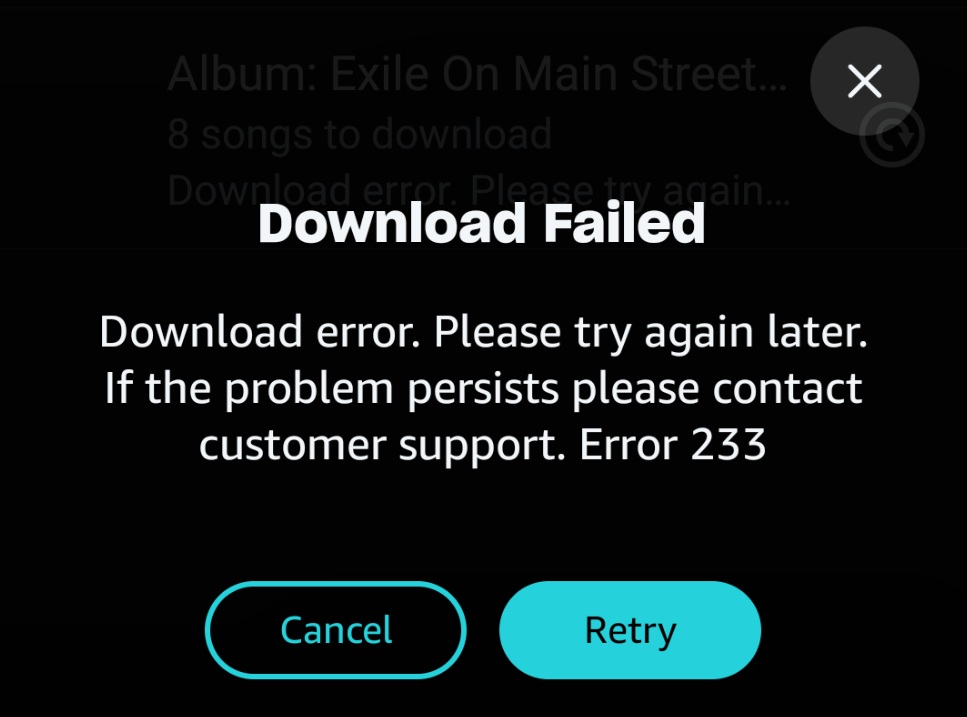
Playlist Download Failures
Large playlist downloads may fail because of unavailable tracks, source matching errors, network issues, or batch limits. If only a few songs fail, retry those tracks individually. Desktop downloaders generally handled large playlists more reliably in our tests.
Audio Quality Differences
The output format alone does not guarantee audio quality. We evaluated each tool based on measured bitrate, codec, sample rate, metadata, and playback rather than advertised specifications. The final quality depends on both the source audio and the downloader's processing method.
Account and Privacy Risks
Some tools require a Spotify login, while others ask you to create a separate account or use third-party services. Download software only from official sources, review requested permissions carefully, and avoid sharing unnecessary account information with unofficial websites or bots.
FAQs
Can I download Spotify songs without Premium?
Yes. Most Spotify downloaders in this guide can be used without a Spotify Premium subscription, but the requirements vary by tool.
- Desktop downloaders (such as TuneFab and DRmare) let both Spotify Free and Premium users download songs. Most require you to sign in with your Spotify account, but not a Premium subscription.
- Online downloaders may not require a Spotify login, but some ask you to create a separate tool account before downloading or unlocking batch features.
- Open-source tools like spotDL typically do not require Spotify Premium. Depending on the tool, you may need a Spotify account for metadata access or API setup.
- Some downloaders offer free trials, while batch downloads, unlimited conversions, or additional features may require purchasing the tool's paid version.
In short, Spotify Premium is usually not required, but you may still need a Spotify account, a tool-specific account, or a paid license depending on the downloader you choose.
Can I use these Spotify downloaders on my iPhone?
Yes, but your options are more limited than on Windows, Mac, or Android. Based on our testing, iPhone users can use browser-based downloaders or Telegram bots, since most desktop Spotify music downloaders cannot be installed on iOS.
We tested the following options:
- TuneFab Web-Based Spotify Downloader – Access it through Safari or another mobile browser. Downloaded files are saved to the Files app or your browser's default download folder. A TuneFab account is required, and the free version has download limits.
- Telegram Bot (@SpotifyDL_Bot) – Send a Spotify track link to the bot inside Telegram, then save the returned audio file to your iPhone. Availability, output quality, and supported formats may change over time because the bot relies on third-party sources.
When using any online downloader or bot, avoid sharing your Spotify password unless you're using the official Spotify login page, review requested permissions carefully, and download files only from trusted services. Our testing reflects the services as they were available on July 18, 2026, and functionality may change in future updates.
Is it possible to burn a CD from Spotify music downloads?
Yes. To burn Spotify to a CD, you must first use a Spotify downloader to save Spotify songs as local audio files, and then use any CD-burning software to create a music disc.
For a full tutorial, check this post: How to Burn a CD from Spotify in High Quality
Please note you can create a CD only from audio files you have the rights or permission to use. Do not distribute, sell, or share copyrighted recordings without authorization. Personal use does not automatically make a conversion lawful or compliant with Spotify's agreements; check applicable law, content rights, and Spotify's current terms.
Which downloader gives the best audio quality?
Based on the actual files generated during our testing, TuneFab, spotify-dl, and SpotiFLAC Mobile delivered the best audio quality, producing genuine 24-bit lossless FLAC files with audio quality consistent with Spotify Premium's lossless streams.
To reach this conclusion, we evaluated the actual output files rather than relying on the advertised output format. We compared the audio source, codec, measured bitrate, sample rate, metadata accuracy, and successful playback. A tool that exports FLAC or 320kbps MP3 does not necessarily produce higher-quality audio if the original source is lower quality or the output is simply transcoded.
What is the difference between Spotify offline downloads and local audio files?
Spotify Premium offline downloads are encrypted and can only be played inside the Spotify app while your subscription remains active. Local audio files created by third-party downloaders are saved to your device in formats such as MP3 or FLAC and can be played with other media players. These are different workflows and may involve different copyright, licensing, and platform policy considerations.
Why can spotDL download the wrong version?
spotDL uses Spotify metadata to search for matching audio on YouTube rather than downloading directly from Spotify. If multiple versions of a song exist, it may select a live performance, remix, radio edit, karaoke, or clean/explicit version instead of the original release. After downloading, compare the title, artist, duration, album artwork, and playback with the Spotify version to verify the match.
Are Telegram Spotify bots safe?
Safety depends on the specific bot you use. Before using a Telegram bot, verify its identity and source, avoid sharing your Spotify credentials or unnecessary personal information, and review any requested permissions. Since bot functionality and ownership can change, our observations reflect the bots we tested in July 2026 and should not be considered a permanent security assessment.
How was the 35X speed calculated?
TuneFab's "Up to 35X" is the vendor's maximum claimed conversion speed under supported hardware acceleration and optimal conditions.
Our testing calculated conversion speed using: Download Speed = Total Audio Duration ÷ Actual Processing Time
For example, a playlist containing approximately 350 minutes of audio completed in about 10 minutes, resulting in an observed speed of roughly 35× under our test conditions.
Test environment: Windows 11 PC, Intel Core i7 processor, 16GB RAM, stable broadband connection, and the latest public version of TuneFab Spotify Music Converter available during our July 17, 2026 testing. Actual performance varies depending on hardware, output settings, playlist size, and network conditions.
Does FLAC output mean the source is lossless?
No. A FLAC file is simply a lossless output format and does not guarantee that the original audio source was lossless. During our evaluation, we confirmed whether a downloader could export FLAC, but we did not assume the source audio itself was lossless. To assess audio quality, we checked the source used by the downloader, codec, measured bitrate, sample rate, playback quality, and file consistency rather than judging by the file extension alone.
Final Recommendation: Choose Based on Your Use Case
When it comes to the best Spotify downloader, the choice depends on your actual needs and device. In this guide, we tested and compared 10+ music downloaders for Spotify on Windows, Mac, Android, iPhone, and online, for speed, stability, format support, audio quality, and overall performance.
Based on our test results, free desktop tools, online tools, and mobile services offered convenient solutions but struggled with limited batch size, lower audio quality, or restricted output formats. Based on our weighted scoring and hands-on testing, TuneFab Spotify Music Converter delivered the strongest overall performance for desktop users. If you need a quick, no-install option, TuneFab’s separate web-based Spotify downloader may be a practical alternative, although its free downloads and batch size are limited.
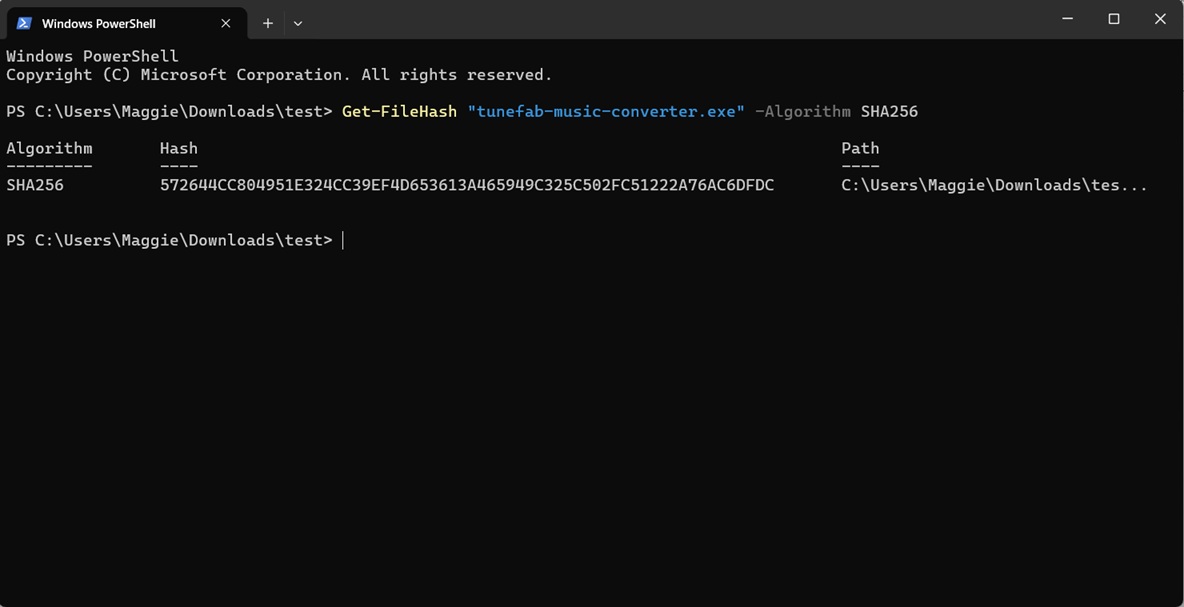
Note: We scanned the TuneFab installer (version 4.0.12) with SHA-256 [572644CC804951E324CC39EF4D653613A465949C325C502FC51222A76AC6DFDC] on July 17, 2026. VirusTotal reported 0/72 detections. This result describes one file at one point in time and is not a complete security or privacy audit. Download software only from the verified publisher source and review permissions before installation.