Product book Starts At Only $25.95 (free download 3 songs) Compare Plans
Want to save Spotify playlists to MP3 Songs?
Ease of use: 5/5
Conversion success rate: 98%
In-app ads: No
Supported formats: MP3/FLAC/WAV/AIFF/M4A/ALAC/AAC
ID3 Tags Preservation: Yes (Title, Artist, Album, etc)
Downloading speed: 35X or faster in batch
Logo Spotify Music Converter
Starts At Only $25.95 BUY NOW

TuneFab Spotify Music Converter Review 2026: Is It Worth It?

Spotify is convenient for streaming, but its official offline mode comes with download limits - downloads expire, and songs remain encrypted. If you want more control over your playlists, TuneFab Spotify Music Converter is a reliable solution. It lets you batch download Spotify songs to high-quality MP3s for permanent offline access.

But is it still worth using in 2026? To find out, our team spent 15 days testing TuneFab Spotify Music Converter v4.0+ on both Windows and Mac.

ranking icon

Quick Verdict: Is TuneFab Spotify Music Converter Worth It?

To ensure an unbiased TuneFab Spotify Music Converter review, our 15-day testing focused on playlist downloads, audio quality, conversion speed, metadata retention, and overall performance under real-world conditions. Below is a quick overview of our testing results.

Overall Rating star star star star star 4.8/5
Tested Version v4.0.10
Testing Period 15 days
Supported OS Windows 11/10/8/7, macOS 10.12+
Single Track Test (3:42) correct icon Success, ~ 7s at 320kbps
Album Test (10 Songs) correct icon Success, ~ 3 min (The actual result depends on network conditions)
Playlist Test (100 Songs) correct icon Success, ~ 18 min (4 failures initially, retry succeeded)
Batch Conversion correct icon Supported
Download Speed 18X–35X tested
(Depending on playlist size, network stability, and device performance.)
Audio Quality 128kbps ~ 320kbps tested
Preserved Metadata Song title, artist, album, cover art, etc; synced lyrics
Spotify Account Support Spotify Free, Premium
Free Trial Convert 3 full songs for free
Subscription Plans $25.95/month, $79.95/year, $99.95/lifetime
Promo Tip Save 10% on Tunefab Products – Use Code: TFWELCOME

Our Verdict: After our extensive tests on TuneFab Spotify Music Converter, we found that it is a reliable Spotify to MP3 converter for downloading playlists in up to 320kbps MP3, with ID3 tags preserved. It also supports FLAC and WAV output, but these formats should not be understood as true lossless Spotify audio. While its free trial is limited and a few tracks required a retry during large playlist testing, it remains an option worth considering to convert Spotify songs to MP3 for permanent offline listening.

ranking icon

1. What Is TuneFab Spotify Music Converter and Who Is It For?

TuneFab Spotify Music Converter is a high-performance desktop software for both Windows and Mac. Whether you are a Spotify Free or Premium user, you can use this professional Spotify to MP3 converter to save your favorite songs, playlists, albums, or podcasts from Spotify in MP3, FLAC, WAV, M4A, ALAC, and AIFF. It allows users to save Spotify content as local audio files, making long-term offline access and library management more convenient.

What Can You Get from TuneFab?

According to our hands-on testing on its main features, conversion performance, output quality, and more, you can:

  • Download Spotify songs without Premium.
  • Export Spotify tracks as local audio files, which Spotify’s built-in offline mode does not provide.
  • Convert Spotify streaming tracks to common formats, such as MP3 and WAV.
  • Keep local copies of converted Spotify songs, playlists, albums, podcasts, and audiobooks for personal offline listening, even without an active Spotify Premium subscription.
  • Play offline tracks on MP3 players, iPod shuffle, Zune players, or other portable devices.

Who Is It Perfect For?

TuneFab Spotify Music Converter is not a universal necessity for every music listener, but it is a practical option for users who want more control over how they access and store Spotify music. Consider this tool if you match one or more of the following cases:

  • Spotify Free users, looking to download songs offline without upgrading to Premium.
  • Commuters or travelers who want to listen to Spotify offline without buffering and data roaming.
  • Someone who prefers to reduce mobile data consumption.
  • Audiophiles who pursue stable, high-quality local audio offline playback.
  • Users who prefer owning local music files instead of relying entirely on streaming access.
  • Those who need Spotify songs in WAV or MP3 for flexible use and playback.
  • Cross-device listeners who want to play Spotify songs on MP3 players, iPods, or in the car.
ranking icon

2. Hands-On Testing: Key Features & Our Real Test Results

In this detailed TuneFab Spotify Music Converter review, we tested its key features to see why it stands out as one of the best Spotify music converters on Windows and Mac.

Our Testing Environment & Setup

Test Computer Windows 11 PC, macOS 15
Network Stable 500 Mbps connection
Spotify Account Spotify Free and Premium accounts
TuneFab Version v4.0.10/td>
Output Settings 320kbps MP3
Test Period June 2026
Test Sample - ALL MY LOVE by Coldplay (3:42)
- Awaken The World by WayV (10 Tracks)
- 100 Greatest Songs for You Vol.1 (100 Tracks)

User Interface: Integrated Spotify Web Player

TuneFab Spotify Music Converter, equipped with the Spotify web player, allows you to seamlessly search, browse playlists, and convert Spotify songs to MP3 right within the application. This means you do not need an additional Spotify desktop app installed, and it eliminates the hassle of copying and pasting song URLs.

Workflow: Is It Easy to Download Songs, Albums, and Playlists?

We tested the full conversion workflow of single track, album, and large playlist across both Windows and Mac. Here is what the process looks like in practice:

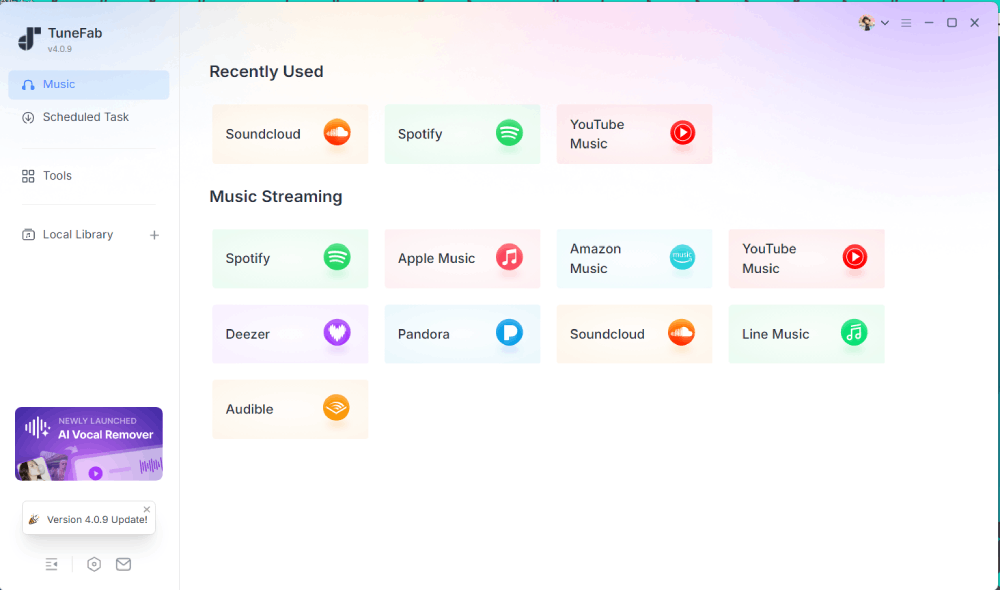
Step 1. Complete TuneFab Spotify Music Converter Setup

Run TuneFab Spotify Music Converter on your Windows or Mac computer and then access the Spotify web player. Logging into your Spotify account (Free or Premium) is optional, but improves the conversion success rate.

Enter Built-in Spotify Web Player

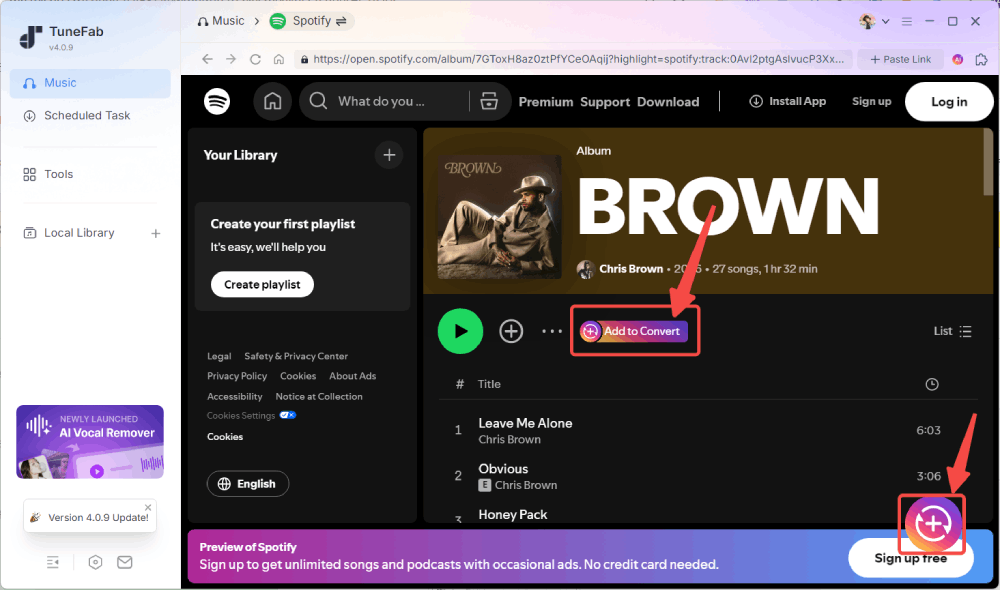
Step 2. Choose Spotify Tracks to Download

Search for the singles, albums, or playlists in the built-in Spotify web player. Click the "Add" or "Add to Convert" button. After parsing music, tick the songs you want to convert from the pop-up list and click "Add to Queue".

Choose Spotify Tracks to Download

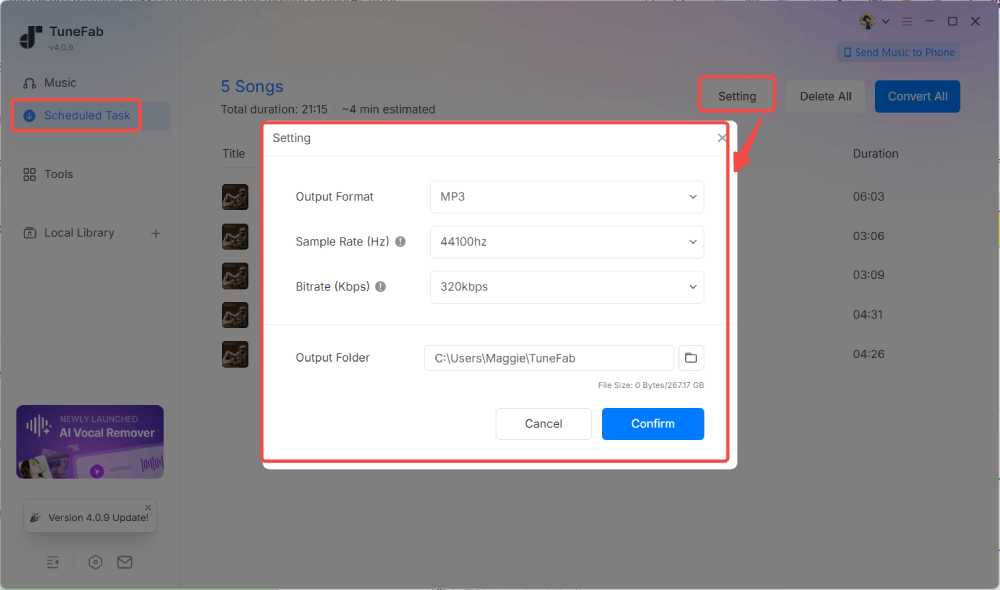
Step 3. Adjust Output Settings for Downloads

When you are in the "Converting" tab, click "Setting" to select your preferred output format, bitrate, and sample rate. For our tests, we used MP3 at 320 Kbps and 48kHz.

Select Spotify Singles/Playlists/Podcasts to Download

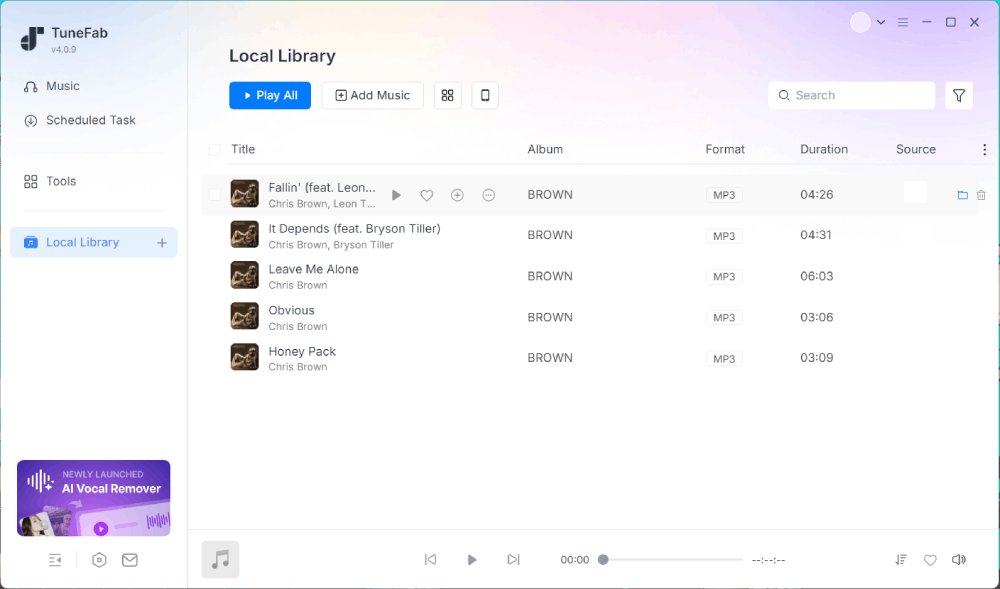
Step 4. Batch Convert Spotify Music

Click "Convert All" to start the conversion. Once the conversion is finished, go to the "Local Library" window to check all downloads. Then click the file icon to locate the converted files on your computer. You can transfer them to other devices for offline playback without Spotify Premium.

Start Converting Spotify Music

Let's see how it works to convert Spotify to MP3 via a video

Audio Quality: Can It Truly Retain 320kbps/Lossless Quality?

TuneFab claims to download Spotify songs without quality loss. Our audio quality test confirmed that it can save the original sound quality, supporting 320kbps MP3 or lossless formats such as FLAC and WAV, which is perfect for audiophiles seeking high-fidelity offline playback. Based on our test, we did not notice any obvious degradation compared with playback inside Spotify.

Editor Note: High-quality songs are typically larger in size, so if you want to save storage space, a song quality of 256kbps bitrate and a 44,100Hz sample rate is more than sufficient.

Title Duration Sample Rate Bitrate Full Size
Beautiful Mistakes - Maroon 5 03:47 48kHz 128Kbps 3.43 MB
256Kbps 6.83 MB
320Kbps 8.53 MB

Speed Test: Is the 35X Conversion Real?

Speed is where TuneFab Spotify Music Converter stands out from other similar tools, advertising up to 35X. To verify this claim, we tested multiple file types under identical network conditions.

Content Type Duration Time Consumed
A single song 3:42 ~7s
10-song album 33 min 17 sec ~3 min
100-song playlist 5 hr 30 min ~18min

In our tests, conversion speed ranged between 18X and 35X depending on playlist size, network stability, and overall performance.

Metadata: Does It Keep ID3 Tags and Lyrics?Speed Test: Is the 35X Conversion Real?

After reviewing the detailed file properties, we confirmed that song titles, artist names, album artwork, release information, and other ID3 tags were retained correctly. This ensures that your local music library stays organized and easy to navigate. Additionally, we also found that synced lyrics are retained in LRC format if available.

Additional Features for Spotify Library Management

Beyond the main conversion features, we also found these additional functions:

Customizable Output Settings: It allows users to preset file naming rules using ID3 tags such as song title, artist, and album, and auto-sort downloads into folders by playlist, artist, or album.

Practical Extra Tools: TuneFab includes a toolkit, including Tag Editor, Format Converter, Spotify Playlist Backup, Playlist Transfer, Send Music to Phone, and AA/AAX Converter to improve the management of your local library.

ranking icon

3. Key Limitations We Found During Testing

1. Quality Restriction. Since most Spotify streams are capped at 320kbps Ogg Vorbis, even when converting to FLAC, the output cannot achieve true lossless audio quality.

2. Occasional batch failures. Large playlists (100+ songs) occasionally encountered individual track failures, requiring a retry.

3. Speed Restriction. The claimed 35X speed is achievable only under a very stable network and decent hardware, but optimal conditions are difficult to obtain.

4. Network instability may interrupt conversions. A wired or stable network connection is recommended to reduce failed downloads and improve batch conversion success rates.

5. No mobile app for iOS or Android. TuneFab serves as a professional Spotify downloader for PC and Mac. While it offers an online solution for converting Spotify to MP3 on mobile devices, it only supports batch conversion for 10 songs.

6. Free Trial Limitations. TuneFab is not a free Spotify to MP3 converter, providing only 3 full song conversions during the trial.

ranking icon

4. What Other Users Say (Real User Reviews & Feedback)

  • star icon star icon star icon star icon star icon
    by Yhonfer David Martinez Naranjo 2025-07-01
    Works as it says

    Usually, I do not say this, but TuneFab Spotify Music Converter is one of the most complete platforms I know, although its free version is very limiting. I think it meets all the criteria, a good cover, name of the artist and the album, also its interface of use is quite simple in terms of the interface and ease of use.

  • star icon star icon star icon star icon star icon
    by David Bowen
    2025-06-20
    Works as it says

    I was extremely impressed by how easy it is to set up and get MP3s from Spotify. LOVELOVELOVELOVE, LOVE!!!!!!

  • star icon star icon star icon star icon star icon
    by Vandory Neal
    2025-06-13
    Simple to use

    This converter is simple to use. I love using it to convert Spotify songs to MP3……super-fast processing speed with nice converted sound quality.

  • star icon star icon star icon star icon star icon
    by Tracy Lee
    2025-05-28
    Works as it says

    I love its fast conversion speed. After adding like 30 songs to the queue and clicking one button, it starts to convert songs automatically. It takes like 8 minutes to complete the conversion. Not bad…

  • star icon star icon star icon star icon star icon
    by Simon McDermott
    2025-04-04
    Some Bugs but Overall A Great Converter

    It has some bugs sometimes like it takes quite a while to load Spotify tracks, but it does work most of the time.

  • star icon star icon star icon star icon star icon
    by Dick Kloosterman
    2026-05-29
    The software runs well

    The software runs well, which is really OK. The process for migrating the license to another pc is much too complicated, in my opinion. It took me two weeks to migrate with the assistance of the support team. Therefore, I do not give it the maximum rate. The reaction time of the support is, however, fast.

  • Usually, I do not say this, but TuneFab Spotify Music Converter is one of the most complete platforms I know, although its free version is very limiting. I think it meets all the criteria, a good cover, name of the artist and the album, also its interface of use is quite simple in terms of the interface and ease of use.

    star icon star icon star icon star icon star icon
    by Yhonfer David Martinez Naranjo
    2025-06-20
  • I was extremely impressed by how easy it is to set up and get MP3s from Spotify. LOVELOVELOVELOVE, LOVE!!!!!!

    star icon star icon star icon star icon star icon
    by David Bowen
    2025-06-13
  • This converter is simple to use. I love using it to convert Spotify songs to MP3……super-fast processing speed with nice converted sound quality.

    star icon star icon star icon star icon star icon
    by Vandory Neal
    2025-05-28
  • I love its fast conversion speed. After adding like 30 songs to the queue and clicking one button, it starts to convert songs automatically. It takes like 8 minutes to complete the conversion. Not bad…

    star icon star icon star icon star icon star icon
    by Tracy Lee
    2025-04-29
  • It has some bugs sometimes like it takes quite a while to load Spotify tracks, but it does work most of the time.

    star icon star icon star icon star icon star icon
    by Simon McDermott
    2021-01-08
  • The software runs well, which is really OK. The process for migrating the license to another pc is much too complicated, in my opinion. It took me two weeks to migrate with the assistance of the support team. Therefore, I do not give it the maximum rate. The reaction time of the support is, however, fast.

    star icon star icon star icon star icon star icon
    by Dick Kloosterman
    2026-05-29
reviews down icon

More Real User Reviews

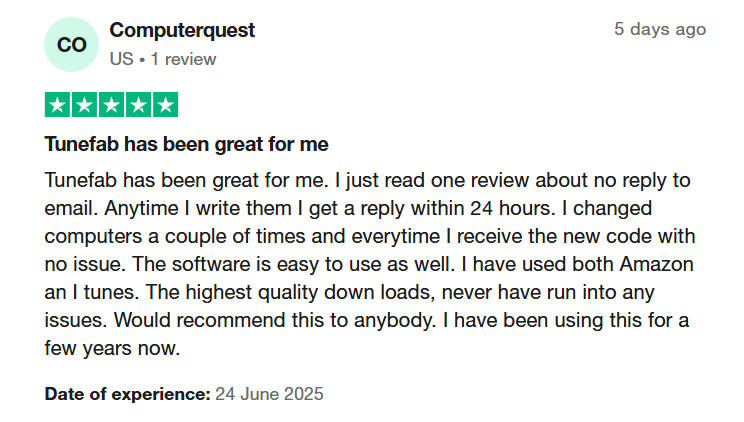
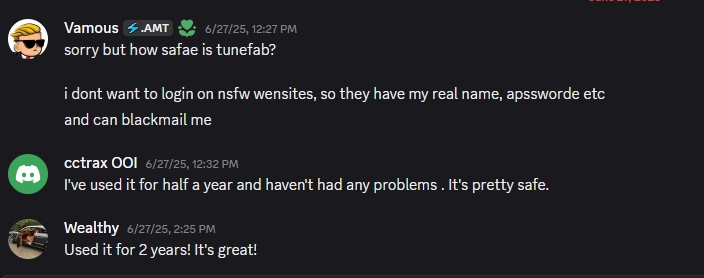
TuneFab Service User Review TuneFab Review TuneFab Discord User Review
Contents fast nav icon
ranking icon

5. TuneFab Spotify Music Converter vs Other Spotify Downloaders

To evaluate whether TuneFab Spotify Music Converter is worth considering, we compared it with several desktop Spotify converters and free online Spotify downloaders in the same playlist-download scenarios. In our tests with 10- to 100-track playlists, TuneFab was more stable than the online tools we tested, especially for batch downloads and metadata retention.

Features TuneFab Spotify Music Converter Other Desktop Converters Free Spotify Downloaders Online
Output Format MP3, M4A, WAV, FLAC, AIFF, ALAC MP3, AAC, WAV, FLAC Mostly MP3 only
Output Quality Up to original 320kbps 256kbps - 320kbps Compressed (Low Quality)
Download Speed Up to 35X faster 1X - 5X Average 1X
Batch Download Full Playlists/Albums Supported Usually Single Tracks
ID3 Tags Fully Preserved Partially Preserved Often Missing
Success Rate High Medium Low
Ad Removal No ads Occasional ads Lots of ads
Compatibility Windows, Mac Windows, Mac Web Based

So, it is more suitable for those who need long-term management of local Spotify music libraries.

ranking icon

6. Is TuneFab Spotify Music Converter Safe & Legal to Use?

So, Is It Safe?

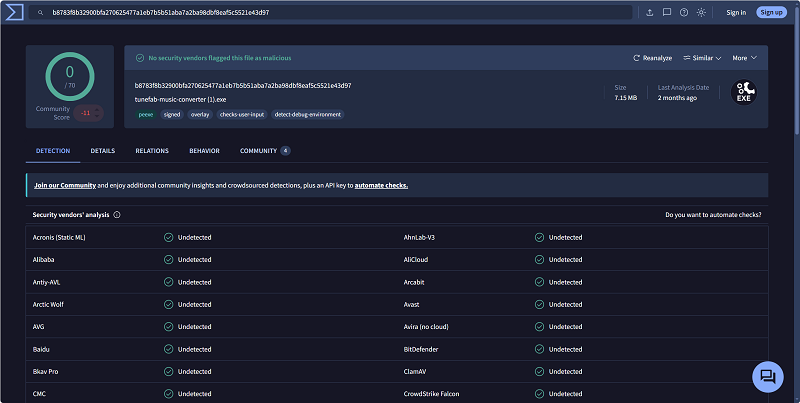
Yes, the official version is safe to use. During our TuneFab Spotify Music Converter review, our team tested the official installer with VirusTotal and found no malware or spyware detections. Also, TuneFab claims to be GDPR-compliant, which helps support user privacy and data security.

TuneFab Security Test on VirusTotal

  • Important Warning:
    Some users may search for a TuneFab Spotify Music Converter crack to skip payment. However, our security tests showed that cracked or modified versions often contain spyware and Trojans that pose potential security risks or may lead to a Spotify account ban. For safety reasons, we strongly recommend using the official software instead of cracked files from unknown sources.

Wait, is it legal?

The answer depends on your local copyright laws and how the files are used. One thing to be clear about is that selling, re-uploading, redistributing, or using copyrighted content for commercial purposes is illegal. Laws and platform rules vary by region. In general, converted files should only be used for personal offline listening. Do not sell, re-upload, redistribute, or use copyrighted music for commercial purposes without permission. Always check your local laws and Spotify’s Terms of Use before using any Spotify downloader.

ranking icon

7. Pros and Cons of TuneFab Spotify Music Converter

What We Like

  • correct icon Delivers fast batch downloads and handles large playlists efficiently.

  • correct icon Supports multiple output formats, including MP3, M4A, FLAC, WAV, AIFF, and ALAC.

  • correct icon Allows users to customize output quality up to 320kbps and 48kHz.

  • correct icon Preserves ID3 tags and metadata, including song title, artist, album, and artwork.

  • correct icon Offers flexible file naming and folder organization options.

  • correct icon Responsive customer support, with frequent updates to adapt to Spotify changes.

What We Don't Like

  • correct icon Desktop only, with no iOS or Android version currently available.
  • correct icon The free trial is limited to only 3 songs, not enough for fully evaluating large playlist downloads.
  • correct icon The actual conversion speeds may not always reach the advertised 35X, depending on playlist size, output settings, system performance, and network conditions.
  • correct icon Spotify playback on other devices may interfere with conversions because the built-in web player functions as a Spotify Connect device.
ranking icon

8. FAQs About TuneFab Spotify Music Converter

What to Do If TuneFab Spotify Music Converter is Not Working?

If TuneFab Spotify Music Converter is not working properly, here are several common solutions:

1. Update to the latest version to fix compatibility issues.

2. Check your internet connection stability.

3. Log out and log back into your Spotify account inside the built-in web player.

4. Clear the cache or restart the software.

5. Restart your computer.

For a more comprehensive guide on troubleshooting, you can read the full section in the post: Ultimate Guide on How to Fix TuneFab Spotify Music Converter Not Working

Can TuneFab Spotify Music Converter Really Convert Spotify Songs at 35X Faster Speed?

According to our tests, the conversion speed varied depending on playlist size, output format, computer performance, and internet stability. We did a playlist download test on TuneFab Spotify Music Converter version v4.0.10, saving 100 songs in 320kbps MP3. The whole process took about 18 minutes. Although the actual results did not reach 35X, it remains faster than real-time recording methods.

Additionally, the older versions (before V3.1.19) only support a 5X speed. If you find that your version is outdated, update it to the latest version for higher speed conversion performance.

TuneFab Spotify Music Converter Uses Web Player, Can It Really Retain Original Music Quality?

In our audio quality test, we compared the original streamed track with the exported file and found no noticeable quality loss when saving Spotify music at 320kbps MP3. TuneFab also supports FLAC and WAV as output formats, but because Spotify’s source audio is not true lossless, these formats should mainly be understood as flexible output options rather than real lossless Spotify downloads.

Learn More: FAQs of TuneFab Spotify Music Converter

Is TuneFab Spotify Music Converter Free?

You might be wondering if TuneFab Spotify Music Converter supports downloading Spotify songs for free. While it doesn't come at zero cost, it does offer a free trial to help you test its features before purchasing. During the trial, you can save 3 full songs at no cost. If you want to enjoy full features without limitation, you can buy a license.

PRICING PLANS
1-Month Subscription Auto-renew, cancel anytime
US$ 25.95
1-Year Subscription Auto-renew, cancel anytime
US$ 79.95
AIO 1-Month Subscription Auto-renew, cancel anytime
US$ 55.95
AIO 1-Year Subscription Auto-renew, cancel anytime
US$ 139.95
ranking icon

9. Final Verdict: Should You Try TuneFab?

Based on our full TuneFab Spotify Music Converter review 2026, it has proven to be a reliable solution for users who want more flexibility than Spotify's built-in offline mode. It gives users more control over offline listening by converting Spotify songs to local formats such as MP3, M4A, FLAC, or WAV for personal playback.

Who Should Buy It: Users who want to play large Spotify libraries offline with high quality on any devices and players without relying on a Spotify subscription.

Who Should Skip It: Mobile-only users who prefer a completely free solution, or those who rarely listen outside the Spotify app and are happy with an ongoing Premium subscription.

If you still cannot decide, the free trial is a practical way to test its features before purchasing.