

YouTube Music lets Premium subscribers download songs for offline listening, but those downloads stay locked inside the YouTube Music app. If you want local MP3, M4A, WAV, or FLAC files for more flexible personal playback, you need a different type of tool. The problem is that many YouTube Music downloaders look useful at first, but fail when you try to save playlists, keep metadata, avoid pop-ups, or get stable audio quality.
To see which tools are actually worth using, we tested 5 YouTube Music downloader options, including desktop software and one online downloader. This guide compares them by output quality, playlist support, ID3 tag retention, stability, ads/pop-ups, and real-world ease of use.
Note: Use YouTube Music downloaders only for personal offline listening and for content you are allowed to save. Official YouTube Music offline downloads require a Premium subscription and stay inside the app, while third-party downloads may be subject to YouTube's terms and local copyright rules.
- How We Tested These YouTube Music Downloaders
- Quick Picks: Which YouTube Music Downloader Suits You?
- 1. TuneFab YouTube Music Converter
- 2. NoteBurner YouTube Music Converter
- 3. Any Video Converter
- 4. MusicFab YouTube Music Converter
- 5. Y2Mate Online YouTube Downloader
- FAQs About Best YouTube Music Downloaders
- Final Verdict: Which Downloader Is Right for You?
How We Tested These YouTube Music Downloaders
To make the comparison fair, we tested each YouTube Music downloader under similar conditions and used the same playlists and albums whenever possible. We focused more on real download behavior than on feature claims from product pages.
- Test content: Full YouTube Music albums and playlists were prioritized over single-song downloads, because many tools become unstable during batch conversions.
- Evaluation factors: Audio quality, download speed, metadata retention, playlist download success, ads/popups, supported output formats, and overall stability.
- Test devices: A Windows laptop running Windows 11 and a MacBook Air (M2) running macOS 26.
Why These 5 Tools Were Selected
We did not include every YouTube Music downloader we found. Many online tools shared nearly identical interfaces, relied heavily on intrusive ads, or failed when downloading playlists and albums. Some desktop tools were also excluded because they were outdated, poorly maintained, or too similar to other options already covered here.
Instead, these 5 tools were selected to represent the main types of YouTube Music downloaders people actually use today: dedicated music converters, multi-purpose video/audio downloaders, multi-platform streaming downloaders, and one browser-based option for quick single-track downloads. We also limited the list to one online tool because browser-based downloaders are usually less stable and more ad-heavy than desktop software.
Quick Picks: Which YouTube Music Downloader Suits You?
The table below gives you a quick view of how each tool performed in our tests. It is meant to help you narrow down your choice before reading the full hands-on notes.
| Tool | Best Device | Output Quality | Playlist Support | ID3 Tags | Stability | Ads/Popups | Best For |
| TuneFab | Windows / Mac | High (up to 320kbps) | Yes | Yes | High | No | Balanced all-in-one use |
| NoteBurner | Windows / Mac | Medium | Yes (limited in free version) | Yes | Medium | No | Simple desktop workflow |
| Any Video Converter | Windows / Mac | Medium–High (format-dependent) | Yes | Partial | High | No | Format flexibility & advanced users |
| MusicFab | Windows / Mac | Medium | Yes | Yes | Medium–Low | No | Multi-platform support (but unstable) |
| Y2Mate | Any browser | Low–Medium | No | No | Low | Yes (heavy) | Quick single-song downloads |
From the table above, desktop tools generally offer better stability, audio quality, and metadata retention, while the online tool Y2Mate is more suitable for quick, lightweight single-track downloads.
Now, let's take a closer look at each YouTube Music downloader and see how they performed in real testing scenarios.
1. TuneFab YouTube Music Converter
| Supported OS | Windows, Mac |
| Best For | Users looking for a well-rounded YouTube Music downloader for Mac/PC with stable playlist support, good audio quality, and a smooth experience. |
TuneFab YouTube Music Converter is one of the more polished desktop downloaders we tested for YouTube Music. Instead of requiring you to copy and paste URLs manually, it comes with a built-in YouTube Music web player, making the download process feel much closer to using the official app. It can save songs, playlists, albums, and podcasts to common formats such as MP3, M4A, WAV, and FLAC while keeping ID3 tags like artist names and album artwork.
During testing, TuneFab performed reliably with playlist downloads and metadata retention. Download speed was also more stable than many online downloaders we tested, especially when handling larger albums or playlists.
For more information: TuneFab YouTube Music Converter Full Review
Our Testing Experience
Step 1. After installing TuneFab, you'll first be asked to choose from several supported streaming platforms. Select YouTube Music, and the built-in YouTube Music web player will open directly inside the software.
Step 2. From there, you can search for any song, playlist, or album just like using the normal YouTube Music interface. When hovering over a playlist or opening an album page, the floating "Add to Convert" button appears on the side. In our testing, adding tracks to the conversion queue felt smooth and responsive without noticeable lag.
Step 3. Once music is added, TuneFab lets you choose the output format, audio quality, and save location before downloading. The free trial also states its limits clearly: you can download 3 songs per platform for free, while most core features remain available for testing.
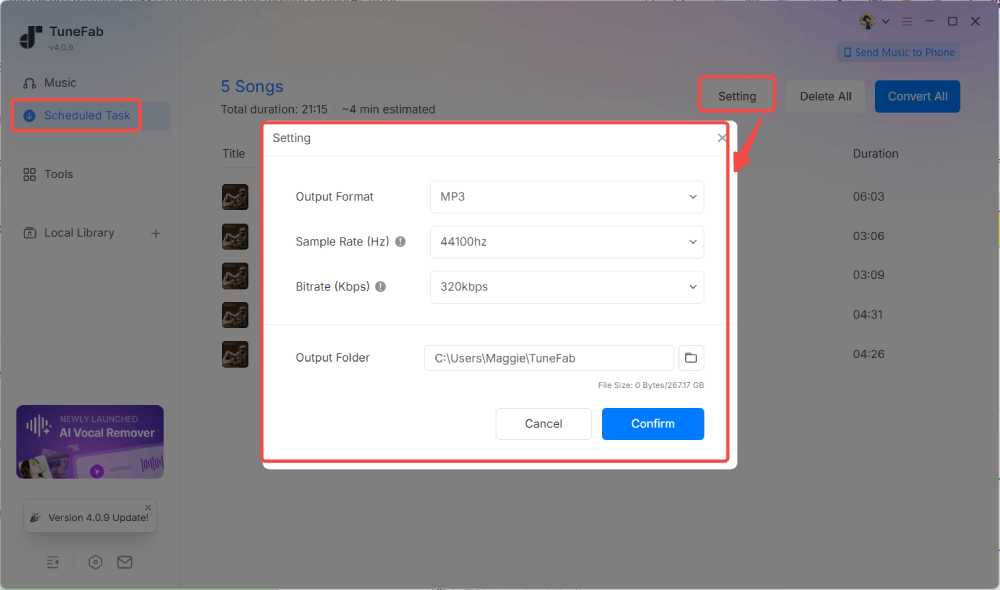
Step 4. Clicking "Convert Now" starts the download immediately. In our test, most songs finished downloading in around 10 seconds, and playlist downloads remained relatively stable throughout the process.
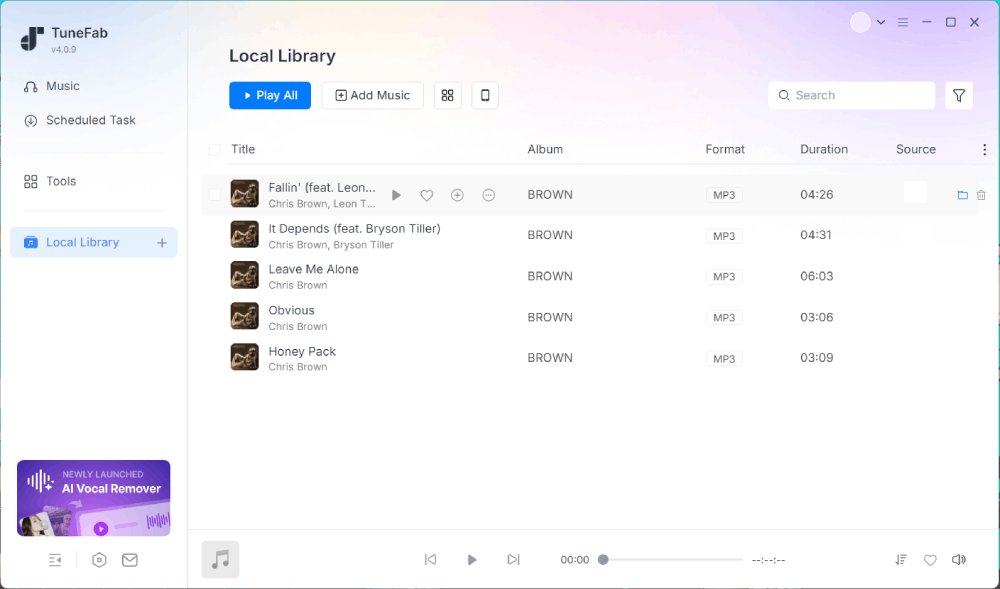
After conversion, all downloaded tracks were organized under the "Library" section, where we could play the files directly or open the output folder. We checked the file info, and the data matched the output settings we selected.
What We Liked & Where It Falls Short
🙆♀️ What we liked:
- Built-in YouTube Music web player makes downloading easier for beginners.
- Playlist and album downloads were stable during testing.
- Keeps ID3 tags and album artwork accurately.
- Supports multiple output formats, including MP3, WAV, FLAC, and M4A.
- Download speed remained consistent even for longer playlists.
🙅♀️ Where it falls short:
- The free version only allows downloading 3 songs per platform.
- The interface is clean, but still feels slightly heavier than lightweight online tools.
Related Reading:
2. NoteBurner YouTube Music Converter
| Supported OS | Windows, Mac |
| Best For | Users who want a simple YouTube Music downloader with a familiar interface and basic batch downloading for occasional offline use. |
NoteBurner YouTube Music Converter is another desktop tool that focuses on converting YouTube Music tracks into local audio files. Similar to TuneFab, it integrates a built-in YouTube Music web player, allowing you to browse and download music inside the software without copying links manually. It supports common audio formats and provides basic batch download functionality for playlists and albums.
In our testing, NoteBurner worked smoothly in terms of navigation and setup, but performance varied depending on the download mode. The interface feels familiar and beginner-friendly, but the free version is heavily restricted, which makes it less useful for real offline listening unless you upgrade.
Our Testing Experience
Step 1. After launching NoteBurner, the software directly opens the built-in YouTube Music web player. No extra setup is required.
Step 2. You can search for songs, playlists, or albums inside the player. When you open a result, a download arrow appears in the bottom-right corner. Clicking it lets you choose specific tracks or add everything at once to the download list.
Step 3. Once items are added to the conversion queue, you can enter the "Settings" panel to configure output format, audio quality, and file location.
After confirming the settings, clicking "Convert" starts the process. At this point, the free version limit appears clearly: each song can only be downloaded for the first 1 minute.
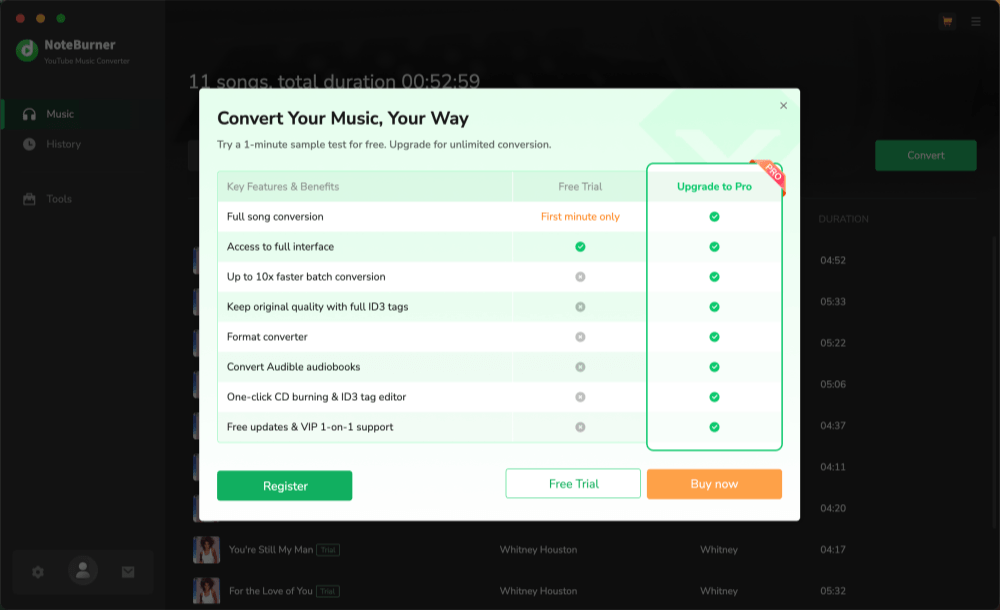
Step 4. The conversion process was relatively slow in our tests. Each track took around 40 seconds to process, and since only 1-minute clips are exported in the free version, the actual output is mainly suitable for preview rather than full offline listening.
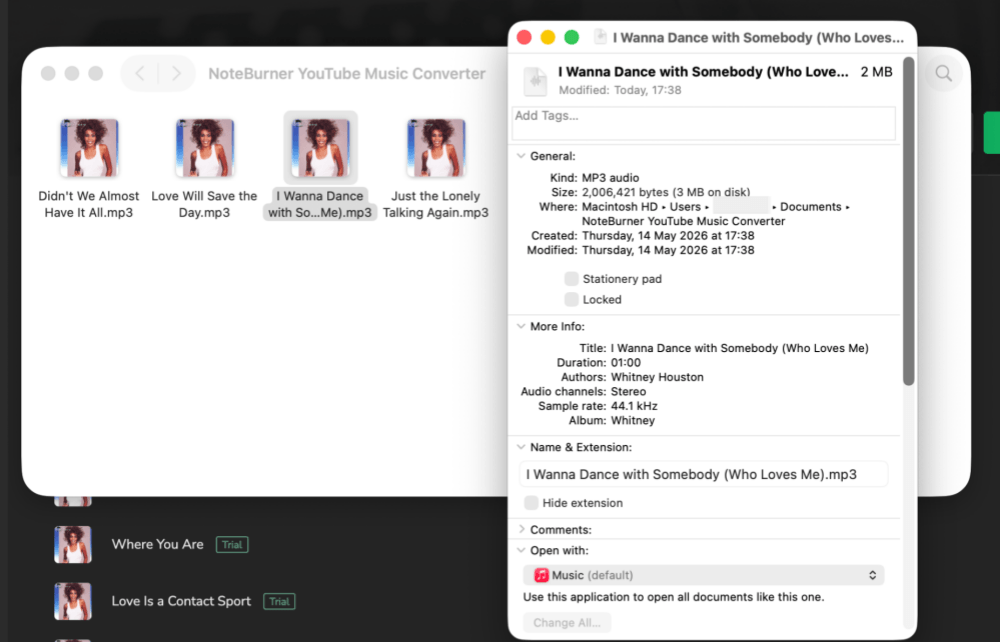
Step 5. After conversion, downloaded files can be found in the "History" section. Clicking the cover allows direct playback, while the "File" icon on the right opens the output folder.
File inspection confirmed that the selected format and basic metadata settings were applied correctly.
What We Liked & Where It Falls Short
🙆♀️ What we liked:
- Built-in YouTube Music web player for direct browsing and downloading.
- Simple and familiar interface, easy for beginners to understand.
- Basic batch download workflow supported.
- Allows customization of output format and audio settings.
🙅♀️ Where it falls short:
- The free version is heavily limited, with only 1-minute output per song.
- Slower conversion speed compared to other tested tools.
- Less practical for real offline music usage in free mode.
- Overall value depends heavily on upgrading to the paid version.
3. Any Video Converter
| Supported OS | Windows, Mac |
| Best For | Users who want a flexible program that can handle YouTube videos and music, with advanced features like format control and video editing. |
Any Video Converter is more than just a YouTube Music downloader. It is a full video processing toolkit that includes downloading, format conversion, audio extraction, and media editing features. It may feel slightly overbuilt for simple music downloading, but it becomes useful when you need more control over output formats or want to download both videos and audio from YouTube.
In our testing, it performed well in download speed and flexibility, but the overall experience depends heavily on the version you use. The free version is usable for testing, but format limitations and output restrictions make it less practical for pure MP3 downloading.
Our Testing Experience
Step 1. When you open Any Video Converter, you'll land on a feature-rich interface that includes multiple tools beyond downloading, such as format conversion, audio extraction, and basic video editing.
Step 2. To start downloading, you need to select the "Video Download" module. Inside this section, you'll see multiple output options on the right side. In our test, MP3 output was only fully available in the paid version, while the free version focused more on video formats.
Step 3. Next, copy a YouTube Music song, playlist, or album URL. If you already have the "Video Download" page open, the software can automatically detect the copied link and prompt you to add it to the task queue. After clicking "Add to Task Queues," you'll be asked to choose a download location before proceeding.
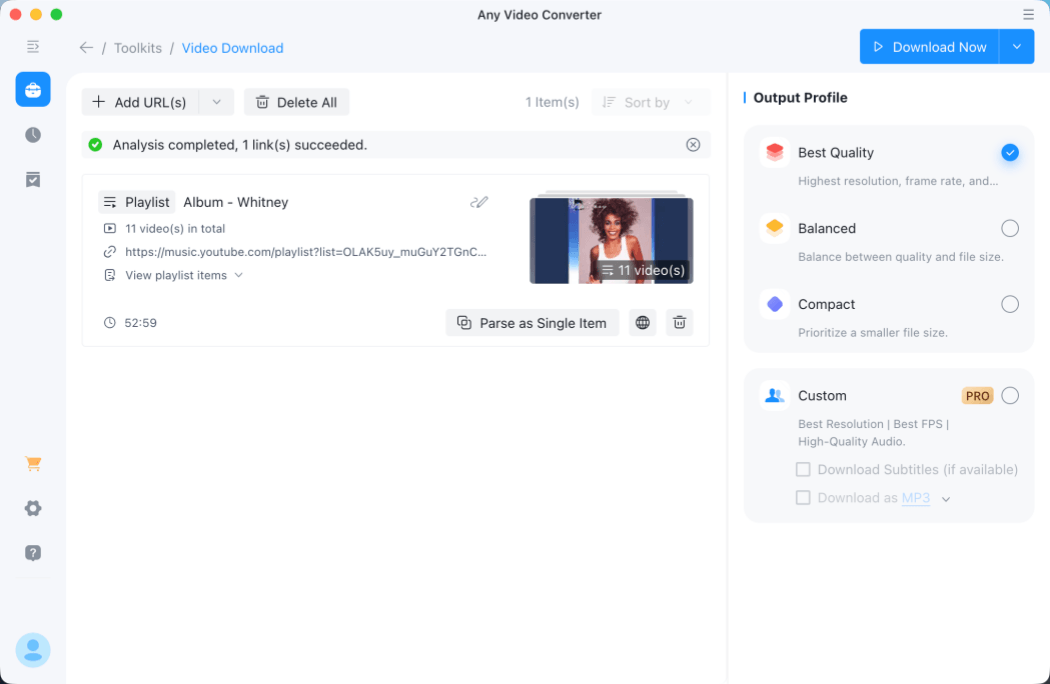
Step 4. Download speed was fairly solid in our tests, averaging around 25 seconds per track. Full album downloads were also supported and typically completed within a couple of minutes, depending on size.
Step 5. After downloading, you can find the files in the "History" section. From there, each item offers quick actions such as opening the output folder or sending the file to the built-in editing tools.
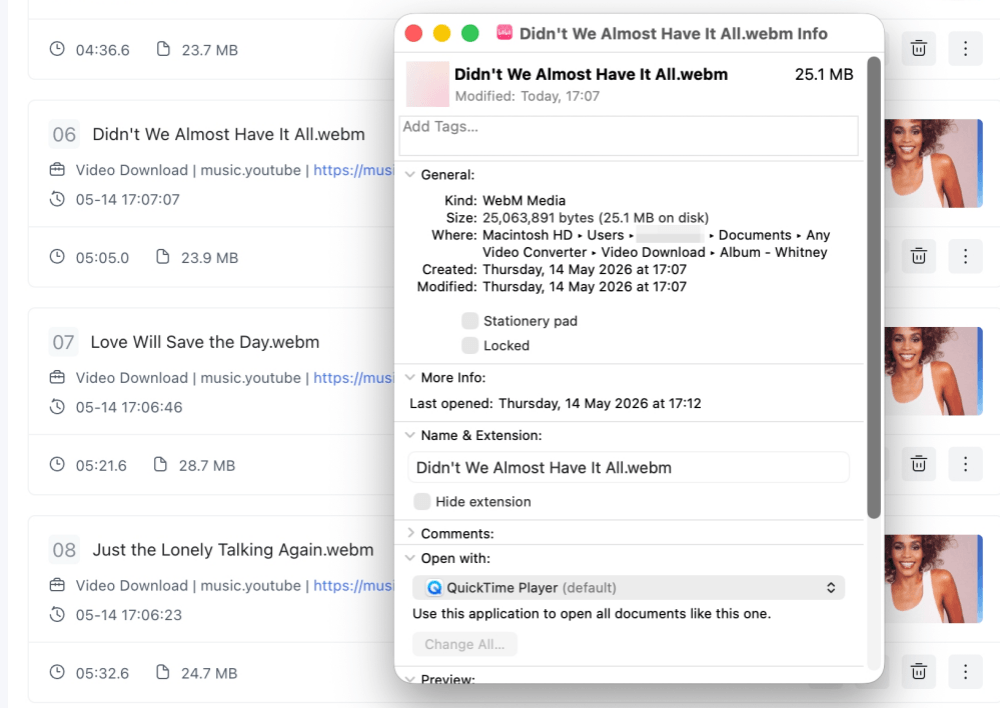
However, we noticed that the downloaded files were saved in a more niche WEBM format in the free version, which may require additional conversion for some devices. Since MP3 export is restricted, audio quality verification is also limited unless you upgrade.
What We Liked & Where It Falls Short
🙆♀️ What we liked:
- Supports both YouTube video and audio downloading in one tool.
- Fast batch download performance, especially for albums and playlists.
- Automatically detects copied URLs for a quicker workflow.
- Multiple built-in tools, including converter, editor, and downloader.
- Stable download speed in testing, at around 20 to 25 seconds per track.
🙅♀️ Where it falls short:
- The free version does not support MP3 output.
- The default output format, WEBM, is not universally compatible.
- The interface can feel overwhelming due to too many features.
- Requires additional conversion or an upgrade for better audio usability.
- Not as focused as dedicated YouTube Music downloaders.
4. MusicFab YouTube Music Converter
| Supported OS | Windows, Mac |
| Best For | Users who want a multi-site downloader besides YouTube Music and are willing to tolerate slower performance for broader format and site support. |
MusicFab YouTube Music Converter positions itself as a multi-platform downloader that supports more sites beyond YouTube Music. In theory, it offers built-in web player access, format selection, and batch downloading features similar to other tools in this list. However, in our testing, its real-world performance felt less stable compared with more focused YouTube Music downloaders.
The main advantage is flexibility across platforms and output formats, with automatic format presets for macOS and Windows. That said, the actual usability is affected by loading issues, download limits in the free version, and inconsistent platform support.
Our Testing Experience
Step 1. After launching MusicFab, the software immediately requested access to the "keychain" on macOS. We selected "Deny," and it still proceeded to the main interface.
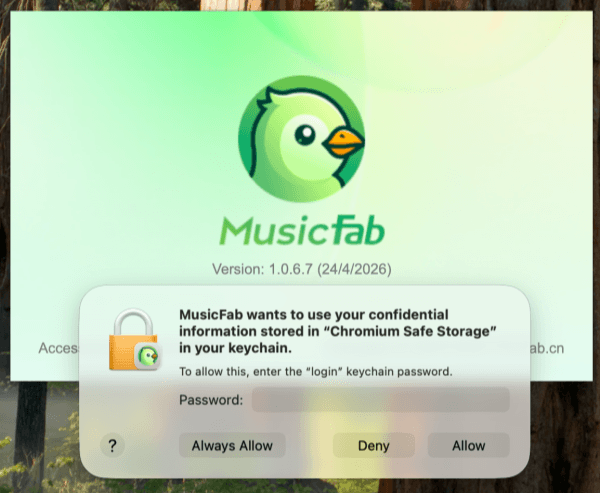
The homepage showed support for multiple streaming sites, but many of them appeared either incomplete or failed to load during testing.
Step 2. Clicking into YouTube Music opens a built-in web player. From there, you can search for playlists or albums, then click the arrow button in the bottom-right corner to add tracks to the download list.
Step 3. Once added, a format selection window appears. On macOS, the default output is M4A, while on Windows it defaults to MP3.
After confirming, the software immediately displays a notice that the free version is limited to 3 songs per platform.
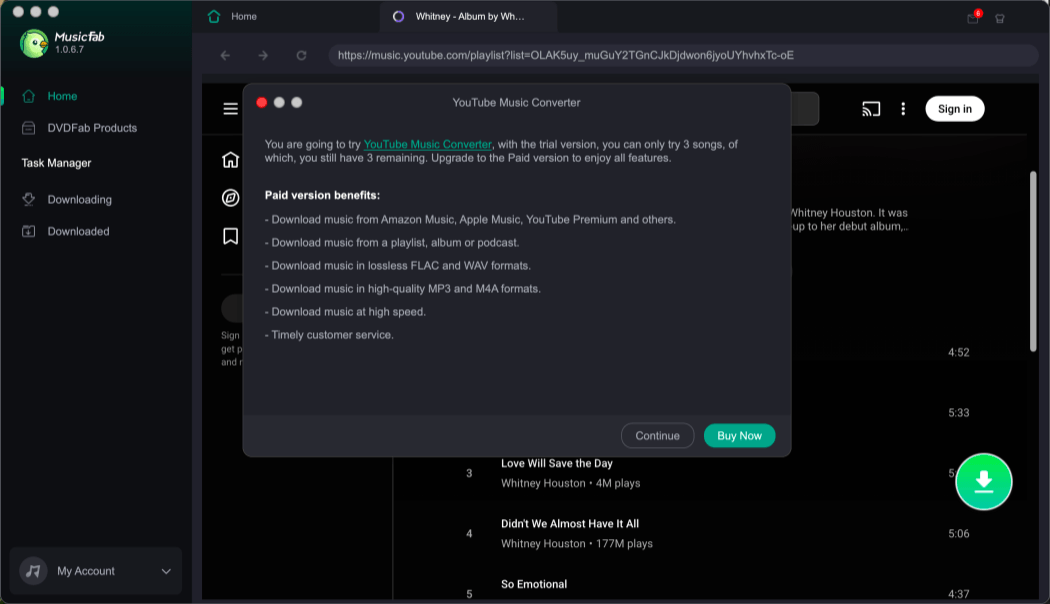
Step 4. In the "Downloading" section, tracks enter a queue and remain "parsing" for a long time before actually starting.
In our test, downloads did not proceed until we reduced the queue to only three songs, after which the process finally started. Even during downloading, repeated pop-ups kept reminding us of the quota limitation.
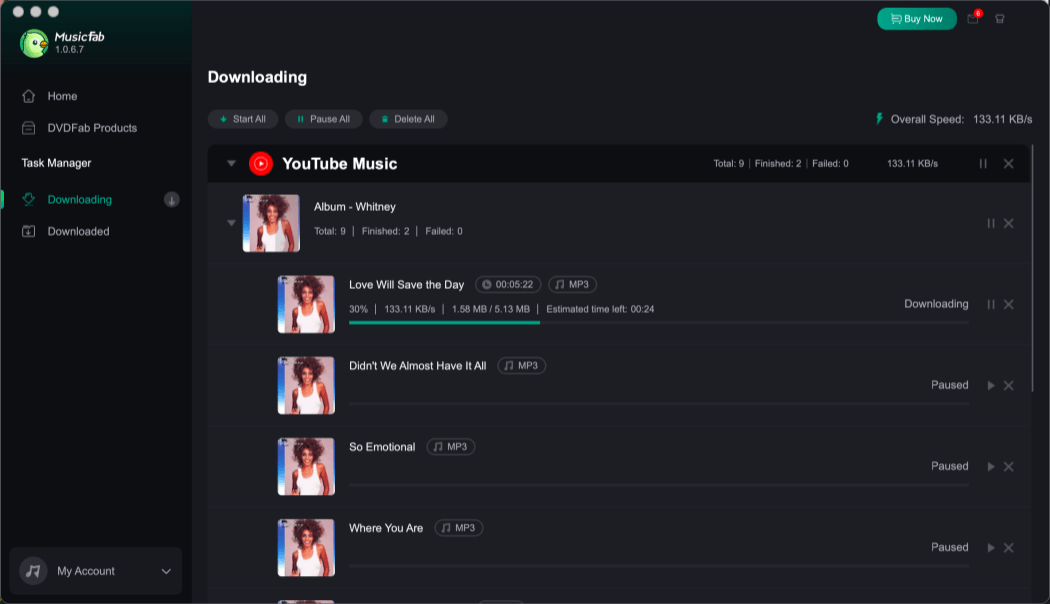
Step 5. Download speed was relatively slow, averaging around 40 seconds per track. After completing three songs, files appeared in the "Downloaded" section.
The app does not support in-app playback, so you need to open the output folder manually to verify the files. The final audio format and quality matched the settings selected earlier.
What We Liked & Where It Falls Short
🙆♀️ What we liked:
- Supports multiple streaming platforms beyond YouTube Music.
- Built-in YouTube Music web player for direct browsing.
- Simple format selection for macOS and Windows users.
- Basic batch download functionality available.
- Output files match selected format and settings.
🙅♀️ Where it falls short:
- Free version limited to only 3 songs per platform.
- Slow and unstable parsing before downloads start.
- Frequent pop-up reminders during usage.
- Some supported platforms fail to load properly.
- Overall performance feels less stable than competitors.
5. Y2Mate Online YouTube Downloader
| Supported OS | Web-based |
| Best For | Users who want a quick, no-installation online downloader for single YouTube Music tracks and are not focused on playlist or audio quality needs. |
Y2Mate is a browser-based YouTube downloader that requires no software installation, making it one of the fastest ways to convert and download individual YouTube Music tracks to MP3 or MP4. It is widely used because of its simple workflow: paste a link, choose a format, and download directly from the browser.
However, while it is convenient for quick single-song downloads, it is not designed for playlists or albums, and its overall experience is heavily affected by intrusive ads and inconsistent reliability. In our testing, it worked best as a "quick grab" tool rather than a serious music downloader.
Related Reading:
Our Testing Experience
Step 1. Open the Y2Mate website and paste a YouTube or YouTube Music link into the input box. Unlike desktop tools, it does not support playlists or albums, but only individual tracks.
Step 2. After parsing the link, you can choose output format options such as MP3 or MP4. Once selected, clicking the "Download" button starts the process immediately.
Step 3. During download, the site frequently triggers pop-up ads alongside the actual file download. In our test, the file was saved directly to the browser's default download folder without additional prompts.
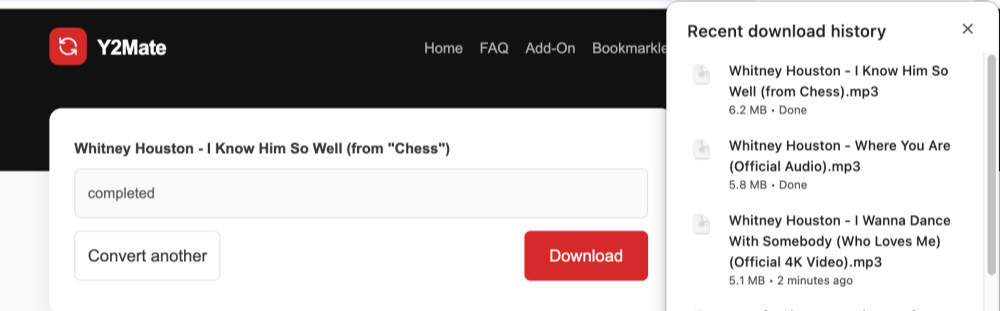
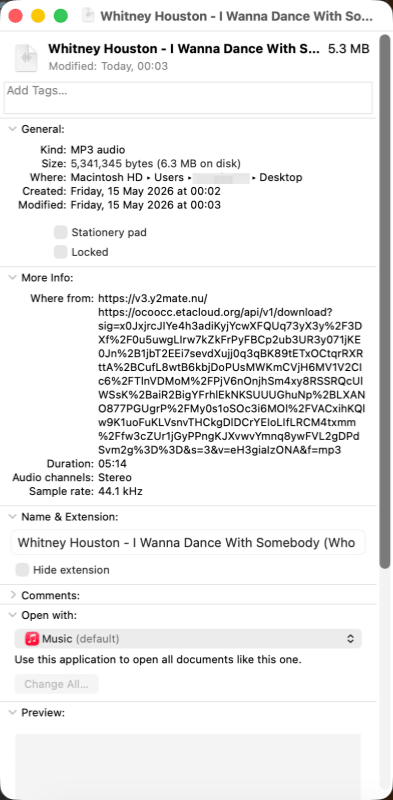
Step 4. Download speed itself was relatively fast, but the output audio quality was noticeably lower compared with desktop converters, especially for higher bitrate expectations.
What We Liked & Where It Falls Short
🙆♀️ What we liked:
- No installation required, fully browser-based.
- Very simple workflow: paste the link, select a format, then download.
- Fast for single-track downloads.
- Works on desktop, tablet, and mobile devices.
- Supports basic MP3 and MP4 conversion.
🙅♀️ Where it falls short:
- Only supports single songs, not playlists or albums.
- Intrusive ads and pop-ups affect user experience.
- Potential security risks from misleading ad networks.
- Unstable reliability and inconsistent download behavior.
- Lower audio quality compared with desktop downloaders.
FAQs About Best YouTube Music Downloaders
Is There A Reliable YouTube Music Downloader on Mobile?
Some mobile apps claim to download YouTube Music, but most of them are not very reliable in practice. Many are poorly maintained or use workarounds to appear on the App Store or Google Play, which means features can break quickly after updates. Others require installing third-party APK files, which can be inconvenient and may introduce security risks. In most cases, mobile options are better suited for casual use rather than stable long-term downloading.
Related Reading:
Are YouTube Music Downloaders Safe to Use?
Safety depends heavily on the type of tool you use. Desktop downloaders from established developers are generally more stable and predictable, while online tools can be riskier due to frequently changing domains, intrusive ads, or misleading clone websites using similar names. If you want a safer experience, it is usually better to rely on well-known desktop YouTube Music downloaders instead of random browser-based tools.
Final Verdict: Which Downloader Is Right for You?
After testing all five YouTube Music downloaders across playlists, albums, and single tracks, one clear pattern stood out: desktop tools are generally more reliable for stable downloads, better audio quality, and consistent metadata retention. Online tools are only suitable for quick, single-song downloads.
Among all the tools we tested, TuneFab YouTube Music Converter is the most balanced option. It offers a smooth workflow, stable performance, and solid output quality without being overly complex. That said, the best choice still depends on your needs. NoteBurner is simpler but more limited; Any Video Converter is better for format flexibility; MusicFab targets multi-platform users despite stability issues; and Y2Mate only fits quick one-off downloads.
| If You Need... | Choose... |
| The best overall balance | TuneFab YouTube Music Converter |
| A simple desktop workflow | NoteBurner YouTube Music Converter |
| Video and audio tools together | Any Video Converter |
| Multi-platform downloading | MusicFab YouTube Music Converter |
| A fast one-song online download | Y2Mate Online YouTube Downloader |
If you download YouTube Music only once in a while, an online tool may be enough. But if you often save albums, playlists, podcasts, or larger music collections, a desktop downloader will usually give you fewer failures and better file control.