

Quick Verdict
TuneFab YouTube Music Converter is a practical choice if you want to save YouTube Music songs, playlists, albums, or podcasts as local audio files. In our test, most downloads finished smoothly, and the converted files played normally outside the YouTube Music app.
With support for MP3, FLAC, WAV, M4A, and ALAC, it works well for users who want more flexible offline listening or personal music backup. The free trial is worth using first to see how it performs with your own YouTube Music library.
At a Glance
| Output Formats | MP3, M4A, WAV, FLAC, AIFF, or ALAC |
| Conversion Speed | Up to 35X faster |
| Supported Platforms | Windows & macOS |
| Pricing | $25.95/Month $79.95/Year Perpetual License $99.95 |
| Overall Rating ⭐ | 4.5/5 |
Who Is It Best For?
✔Give it a try if you:
- Want to listen to YouTube Music offline across multiple devices and media players
- Prefer saving YouTube Music tracks and podcasts as MP3/FLAC files
- Want to back up YouTube Music playlists in case songs become unavailable
- Want a desktop downloader that installs cleanly in our test and includes a built-in YouTube Music player
❌ Probably not for you if you:
- Are looking for a completely free solution
- Are already satisfied with YouTube Music's official offline mode
Overview of TuneFab YouTube Music Converter
TuneFab YouTube Music Converter is a desktop tool designed for the YouTube Music streaming platform. With the built-in YouTube Music web player, users can browse and download songs, playlists, albums, and podcasts directly within the program. The software supports multiple output formats, including MP3 and M4A, allowing downloaded tracks to be saved as DRM-free local files.
Once downloaded, the music files can be played on different media players and devices without relying on the YouTube Music app. Users can also manage the files more freely for offline playback, personal collections, or other everyday uses.
System Requirements
TuneFab YouTube Music Converter is available for both Windows and macOS systems. The software does not require particularly powerful hardware, so it should run smoothly on most modern computers used for everyday tasks.
| Tech Specs | Requirements |
| Operating Systems | Windows 7 or later on 64bit requiredmacOS X 10.12 or higher |
| Processor | 1GHz Intel/AMD processor or above |
| RAM | 512MB or higher of RAM |
| Resolution | 1024×768 display or above |
Interface and Setup
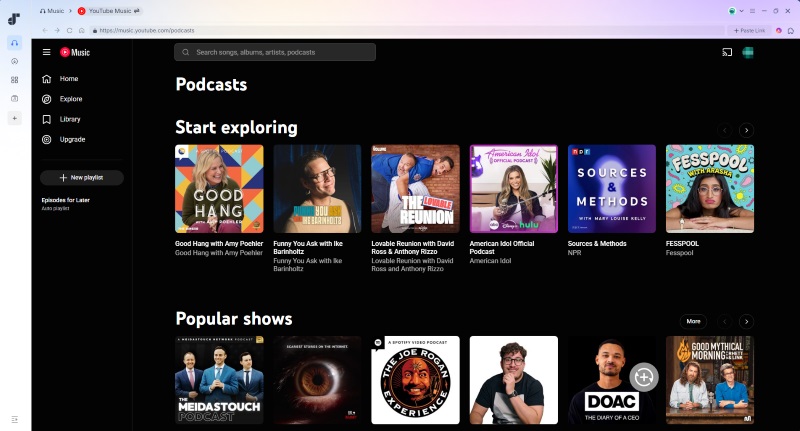
Launch TuneFab YouTube Music Converter, you'll see a clean, dashboard-style interface that provides quick access to multiple music streaming platforms, including YouTube Music, Apple Music, Spotify, and Amazon Music. The home screen is organized into clear platform tiles, allowing users to choose a service directly without navigating through complex menus.
After selecting YouTube Music, the software opens an embedded web player. The layout closely mirrors the official YouTube Music website, including the URL bar, search function, and navigation tabs such as "Home", "Explore", and "Library", along with a visible "Sign in" button. Separate from the YouTube Music interface, the converter also provides a small sidebar on the left for accessing tools such as task scheduling, local file management, and other built-in features.
Overall, the interface looks clean and well-organized. It's easy to distinguish and navigate different sections.
Key Features
In terms of usability, TuneFab YouTube Music Converter leaves a positive impression. It doesn't require much setup before downloading starts. Features are clearly labeled, and the drag-and-drop workflow is also introduced during the first launch of the software. Most users should be able to complete a first download without spending much time learning how the software works.
Features and Tools
As a YouTube Music converter, TuneFab's core function is downloading different types of content from YouTube Music, including songs, playlists, albums, and podcasts. In addition to basic downloading, the software also provides several built-in features and tools during and after the conversion process to better preserve song information and improve offline music management and download flexibility.
# Batch Download Support
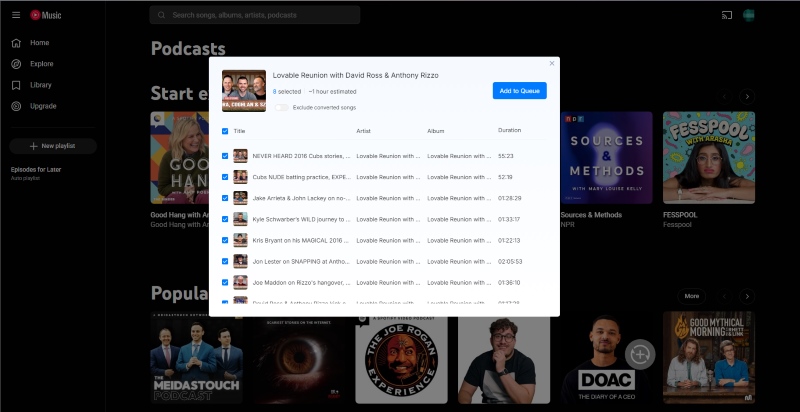
When adding content to the conversion queue, users can select an entire playlist, album, or podcast with one click. Individual songs can also be added to the list one by one. Once everything is selected, simply click "Convert All" in the upper-right corner to start the conversion process. Users can also customize the download process by choosing to download 1 to 3 files simultaneously.
This feature works similarly to the official YouTube Music site. While it is not particularly advanced, it does help reduce the amount of manual interaction required during larger downloads.
# Tag Editor
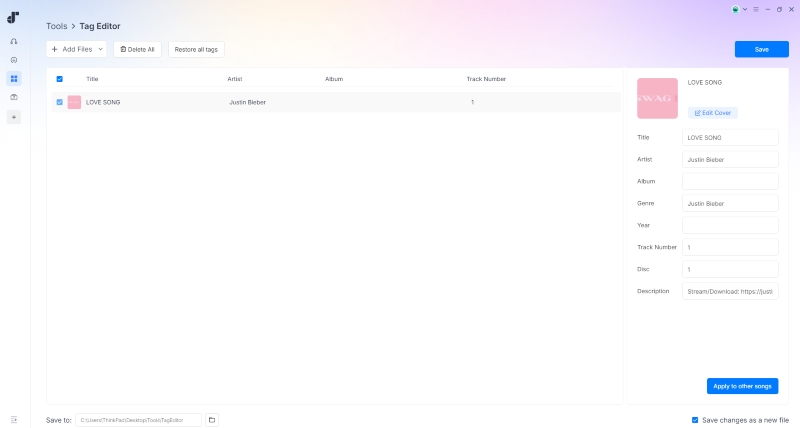
TuneFab YouTube Music Converter can preserve ID3 metadata during downloads, including song titles, artist names, album information, and cover artwork, which remain consistent with what is displayed on YouTube Music. Under the "Tools" section in the left sidebar, the software includes a built-in Tag Editor. Users can import converted local music files and modify or add ID3 tag information manually. For those who want more control over their local audio files, the built-in ID3 Editor can help keep music libraries more organized and easier to manage.
# Format Converter
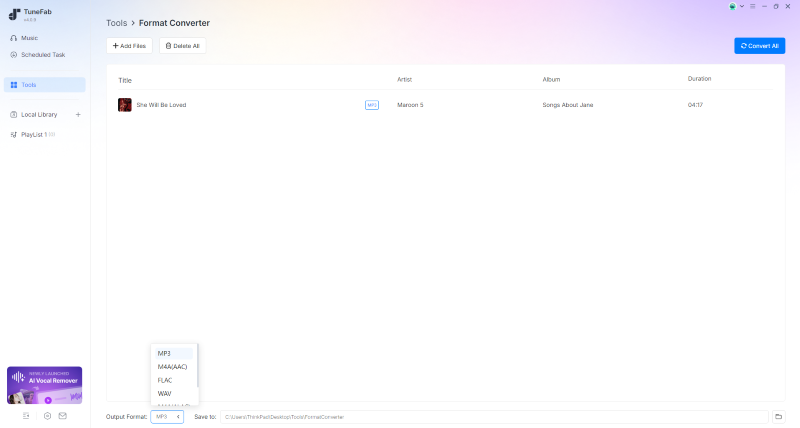
TuneFab YouTube Music Converter is not limited to downloading music from YouTube Music. The software also includes a built-in audio conversion tool. Users can simply drag and drop local audio files into the task window, then choose an output format such as MP3, M4A, FLAC, or WAV, which are the same formats supported by the main converter. In addition, the tool supports converting AA and AAX audiobooks as well. This feature can be useful for users who want to manage different types of audio files in one place without installing separate conversion software.
⭐️ Hands-on Test Results
To evaluate the software in actual use, I tested several different types of downloads, including five songs, a 20-song playlist, one album, and a podcast episode. The goal was mainly to see how stable the software remained during batch downloads and whether the overall workflow felt reliable in daily use.
Testing Environment
| Item | Details |
| Test Date | 46143 |
| Software Version | v4.0.9 |
| Operating System | Windows 10 |
| Processor | Intel Core i7-8550U Windows laptop |
| Internet Connection | 26 Mbps Wi-Fi connection |
| YouTube Music Account | Signed in with a free account |
| Output Settings | · Output Format: MP3 · Sample Rate (Hz): Original · Bitrate (Kbps): Original · Conversion Speed: Smart Mode |
| Auddio Quality | 256kbps |
Testing Results
The actual download process was generally reliable. I didn't encounter crashes, interrupted downloads, or failed conversions afterward. Download speeds were reasonably fast under normal Wi-Fi conditions during testing. Some sample results are listed below:
- Single song (4 minutes): around 30 seconds
- 7 songs (total runtime: ~25 minutes): completed in around 3 minutes and 20 seconds with no conversion failures
- 1 podcast episode (35 minutes): completed in around 1.5 minutes
Note: Actual download time will still depend on network conditions, file size, and system performance.
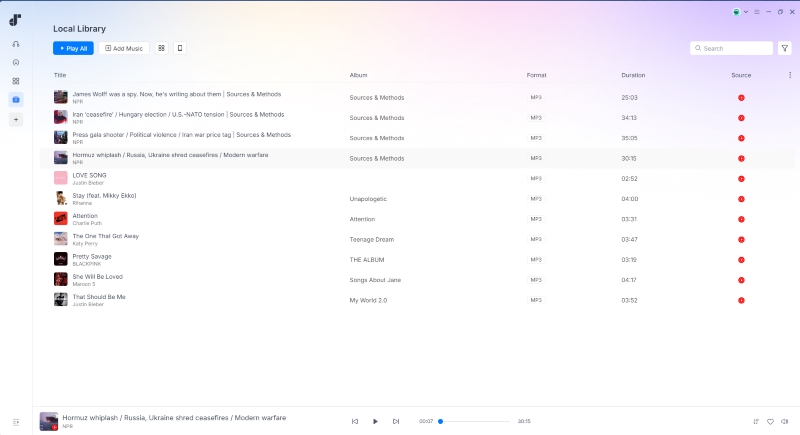
Even with multiple tracks downloading simultaneously, the interface stayed responsive without major freezes or noticeable slowdowns. Downloads also continued smoothly in the background once the queue was started. After conversion, downloaded files appeared quickly in the "Local Library" section and played back normally during testing.
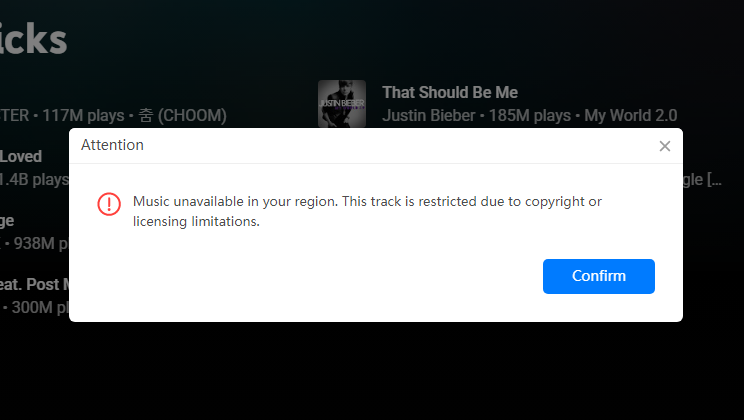
However, I also ran into some regional availability issues. Because of copyright restrictions in my region, several tracks displayed a "Music unavailable in your region" message after being added for conversion. This also affected playlist and album parsing in some cases. If unavailable tracks were included, the entire playlist link occasionally failed to load properly.
Aside from regional restrictions, link parsing itself didn't always feel completely stable. At times, a song link could be added successfully on the first attempt, but fail to parse when retried later. It's possible that network conditions also played a role here. In my case, switching networks and reopening the software usually resolved the issue, but the inconsistency was still noticeable during testing.
TuneFab vs. Other Download Methods
The method for saving music from YouTube Music isn't limited to TuneFab YouTube Music Converter. If you're not fully satisfied with the actual testing results, there are still other options available, including YouTube Music's official offline mode, online downloaders, and even screen recording tools. Each method comes with its own pros and cons, so in the end, the most important thing is finding the one that best fits your own listening habits and needs.
| Options | Best For | Main Limitation |
| TuneFab YouTube Music Converter | Saving YouTube Music tracks and playlists as MP3/FLAC files | Paid desktop software |
| YouTube Music Official Offline Mode | Casual mobile listening | Requires subscription and access within the app |
| Online YouTube Downloaders | Quick one-time downloads | Less stable and limited batch support |
| Screen Recording Tools | Capturing rare audio content | Time-consuming and lower efficiency |
You May Want to Read:
Pricing and Free Trial
Whether or not you have a YouTube Music Premium subscription, you can still use TuneFab YouTube Music Converter to download songs. However, TuneFab itself is not free. There is a free trial available for new users, who can convert 3 full YouTube songs for free. Although the trial is somewhat limited, it is still enough for users to test the software before deciding whether the paid version is worth purchasing. For full access, TuneFab YouTube Music Converter is available through the following subscription plans:
| Plan | Pricing |
| Monthly Plan | 25.95$ |
| Annual Plan | 79.95$ |
| Perpetual License | 99.95$ |
Security and Privacy
Although TuneFab YouTube Music Converter is a third-party YouTube Music downloader, the software did not show any unusual or suspicious behavior during installation or usage. It installs like a standard desktop application, and no bundled programs, aggressive pop-ups, or unexpected background processes were observed.
Logging into the YouTube Music account through the built-in web player also felt similar to using a regular browser session, and no account-related security issues appeared during testing. However, as with any third-party media downloader, it is still recommended to download the installer directly from the official website to avoid modified or potentially unsafe versions from unknown sources. It is also worth noting that downloaded content should only be used for personal offline listening and not for redistribution or commercial purposes.
Pros and Cons
Overall, TuneFab YouTube Music Converter is a functional tool with a clear focus on downloading and converting YouTube Music content. During testing, it performed reliably in most scenarios, although there are still some limitations worth noting.
Pros and Cons of TuneFab Spotify Music Converter
🙆♀️Pros:
- Supports downloading a wide range of YouTube Music content for offline use.
- Offers multiple output formats, including MP3, FLAC, WAV, M4A, and ALAC.
- The conversion process is stable with a high success rate.
- Preserves original audio quality and standard ID3 metadata during conversion.
- Supports batch adding songs to the conversion queue and batch downloading.
🙅♀️Cons:
- Link parsing for playlists or podcasts may occasionally fail, especially with unstable network connections or region-restricted content.
- Full functionality requires a paid subscription after the trial limit is reached.
Final Verdict
Ease of Use: 4.7/5
Audio Quality: 4.6/5
Download Speed: 4.6/5
Features: 4.5/5
Value for Money: 4.5/5
After testing TuneFab YouTube Music Converter, I’d say its main strength is convenience. The built-in YouTube Music web player, batch download support, and local library make the whole workflow easier than using separate online downloaders or recording tools.
In daily use, it felt stable enough for regular YouTube Music downloads. Songs, playlists, and a podcast episode were converted successfully in our test, and the output files played normally afterward. The format options also cover most common needs, from MP3 to FLAC and WAV.
The paid version is best for users who download YouTube Music often and want a cleaner way to keep personal offline copies. It may not be necessary for very occasional downloads, but for playlist backup, batch conversion, and flexible playback outside the YouTube Music app, TuneFab is worth trying.
Overall, it is a practical choice if you want a smoother desktop workflow and more control over your YouTube Music library. Start with the free trial, then upgrade if it fits your actual download needs.