

If you've recently searched for Tunelf Spotify Music Converter, you've probably noticed that things aren't as straightforward as they used to be. The current Tunelf website mainly promotes video downloaders, while its Spotify music converter is no longer available through the main site. Older SpotiBeat pages still exist in some localized versions, but they haven't been updated for years, making it difficult to tell which product is actually maintained.
To find out what happened, we tested the legacy Tunelf download, checked whether it was still available, and then separately tested the current TunesMake Spotify Music Converter free version to compare the user experience. This review walks you through our findings, including installation, conversion performance, output quality, and whether Tunelf is still worth considering today.
Tips: If you want to get a workable Spotify converter right away, check out the posts below.
What Happened to Tunelf Spotify Music Converter?
When we began researching Tunelf Spotify Music Converter, the first thing we noticed was that the product is no longer available on the current Tunelf website, which now mainly focuses on video downloaders. After further searching, we found that the old SpotiBeat Music Converter pages are still accessible on Tunelf's Spanish and French websites. However, these pages appear to have stopped receiving updates, with the latest visible content dating back to 2022.
Because the legacy download links were still available, we decided to test the software ourselves before evaluating any newer alternatives. Our goal was to determine whether the original Tunelf Spotify Music Converter still works as expected today.
Legacy Tunelf Test: Spotify Links Could Not Be Loaded
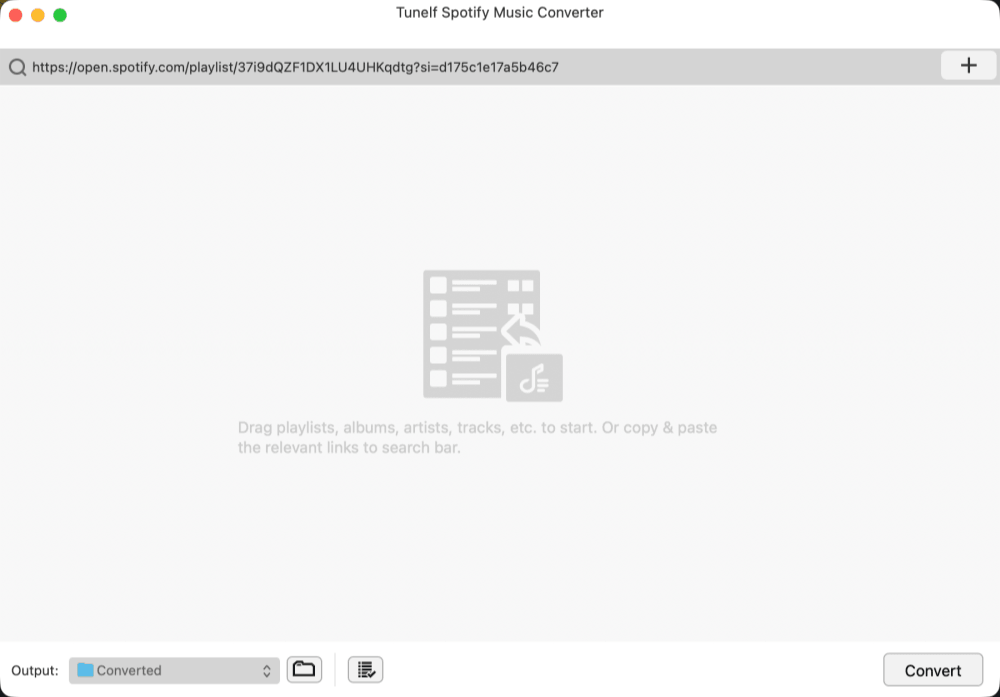
We downloaded the installer from the legacy Tunelf page and completed the installation successfully. Although the website was localized, the application itself still launched in English. The interface instructed us to either drag Spotify songs, playlists, or albums into the program or copy and paste Spotify links into the search bar.
However, neither method worked during our testing. Dragging Spotify content into the application produced no response, and pasting Spotify URLs also failed to load any tracks or playlists. The software was unable to recognize Spotify content or add anything to the conversion queue, making it impossible to proceed with the conversion process using the legacy version we tested.
Testing the Current TunesMake Spotify Music Converter (Free Version)
Since the legacy Tunelf installer we tested could not load Spotify content, we separately tested TunesMake Spotify Music Converter, which was still available at the time of writing. All observations below are based on the free trial version available at the time of writing and are intended to verify the actual user experience rather than the paid features advertised on the official website.
Testing Environment
To keep the results as consistent as possible, we tested TunesMake Spotify Music Converter on both a Windows PC and a MacBook connected to a stable Wi-Fi network. We focused on the complete trial workflow, including installation, Spotify login, conversion process, output files, and the limitations imposed by the free version.
Testing Process: What Can the Free Version Do?
Step 1. Installation was straightforward. After launching the software, we were taken directly to the built-in Spotify Web Player. Songs, playlists, and albums can be added to the conversion list by clicking the "+" button in the lower-right corner, but the software requires you to sign in with a Spotify account before any conversion can begin.
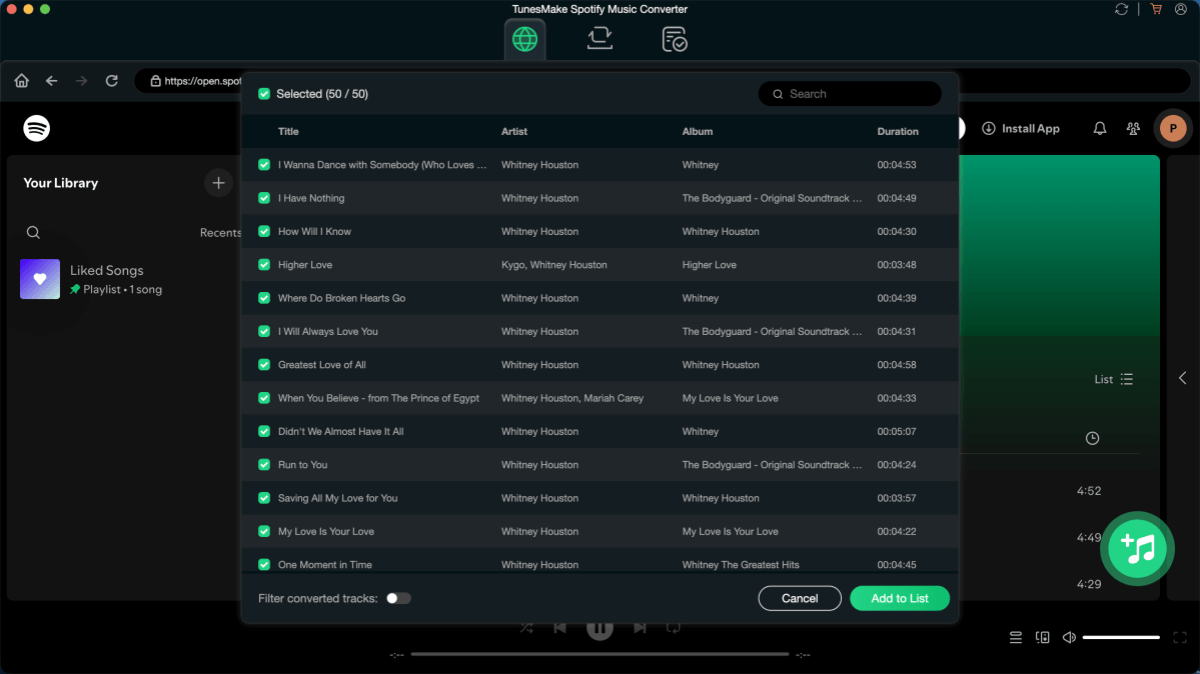
Step 2. Once logged in, a pop-up explained the free trial limitations: unlimited conversions are allowed, but only the first 30 seconds of each track can be exported. In the free-trial workflow we tested, we could not successfully change the default output format. After selecting the free trial option, we clicked "Convert" to start the download.
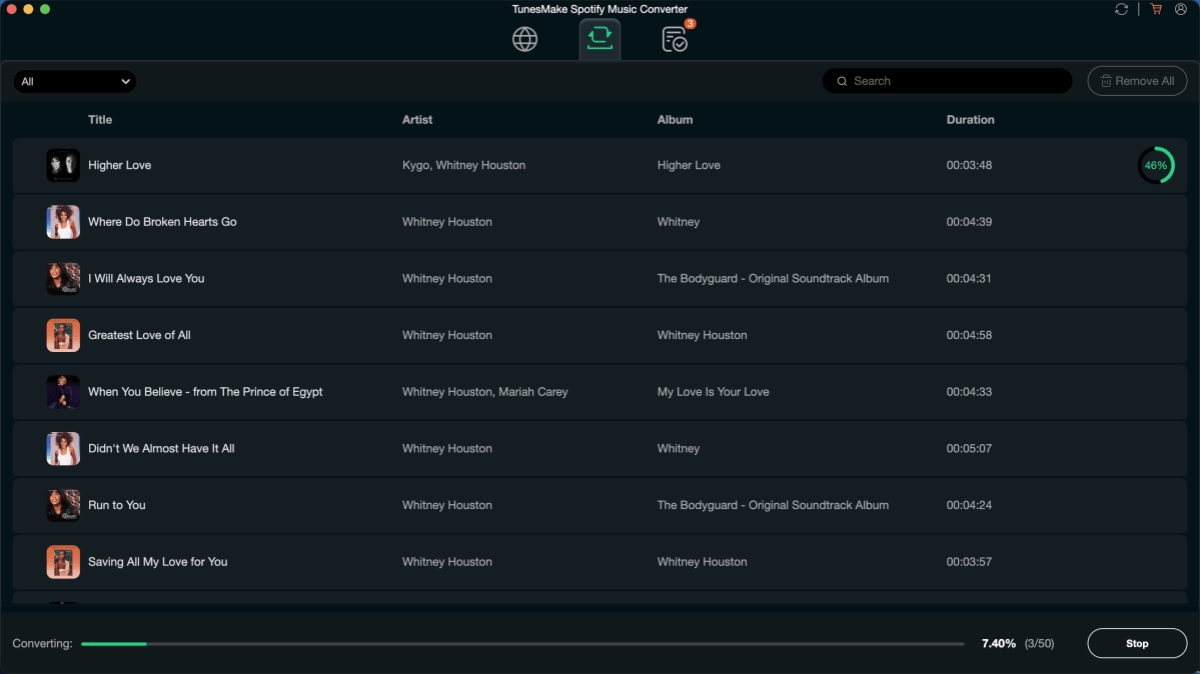
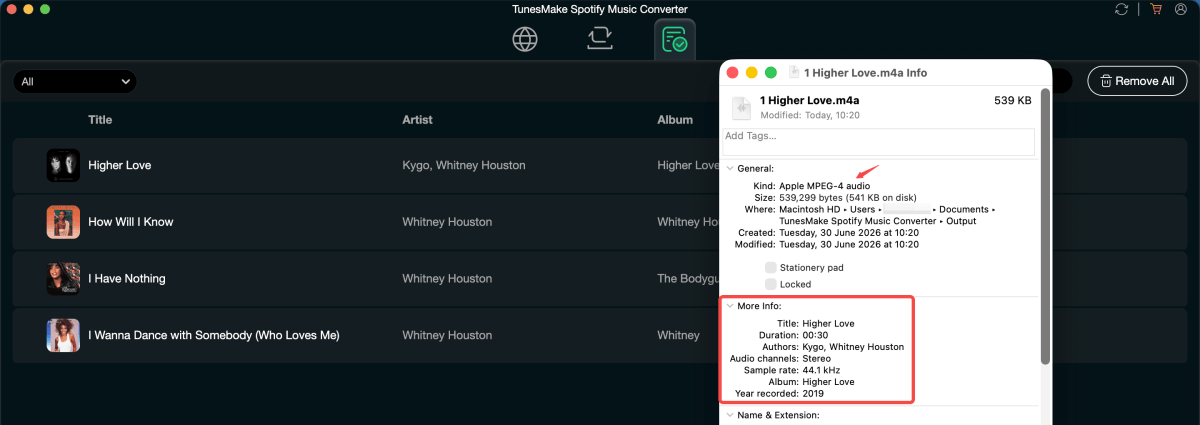
Step 3. In our tests, each track took around 20 seconds to complete, including both the fetching and conversion stages. After the conversion finished, the files appeared under the "Finished" tab, where we could open the output folder directly.
We also noticed a platform difference: the Windows version exported MP3 files by default, while the macOS version exported Apple MP4 Audio (M4A) by default. Although TunesMake’s official guide mentions output settings such as format and bit rate, we could not verify full access to those settings in our trial test.
What We Like & Don't Like About the Legacy Tunelf Test and TunesMake
Based on our hands-on testing of the free version, TunesMake offers a straightforward Spotify conversion workflow, but it also reveals several limitations that are worth considering before upgrading. Here's what stood out during our testing.
Pros
- Easy to get started once you're signed in, thanks to the built-in Spotify Web Player.
- Suitable for testing the basic workflow, allowing users to verify that Spotify tracks can be detected and converted before purchasing.
- Simple interface with minimal learning curve, making it accessible for users who only need occasional Spotify downloads.
Cons
- The legacy Tunelf installer we tested could not load Spotify content, and the relationship between the old Tunelf product pages and the current TunesMake converter is not clearly explained to users.
- The free trial exports only the first 30 seconds of each track, so it's impossible to fully evaluate output quality before upgrading.
- Limited customization in the free version, with default output formats varying between Windows (MP3) and macOS (M4A) and no option to change them during our testing.
- Conversion speed was modest, taking around 20 seconds to process a 30-second audio clip in our test environment.
Overall, TunesMake provides a usable trial experience once you reach the current software, but the path from Tunelf to TunesMake isn't immediately clear. If you prefer a product with a more straightforward brand identity, easier-to-verify trial features, or greater control over output settings before purchasing, it's worth comparing other Spotify music converters before making a decision.
A More Reliable Alternative: TuneFab Spotify Music Converter
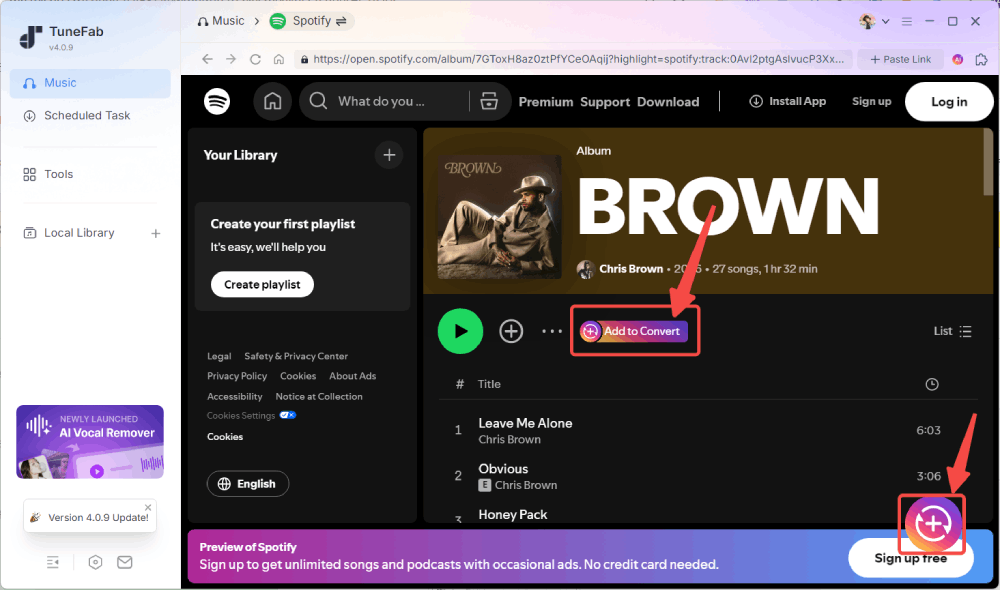
If you prefer a Spotify music converter that's easier to evaluate before purchasing, TuneFab Spotify Music Converter addresses several limits we encountered during testing. Unlike Tunelf or TunesMake's free trial, TuneFab allows you to download 3 complete tracks instead of 30-second previews, making it much easier to verify the actual output quality, metadata, and compatibility before deciding whether to upgrade.
In our test, the free version allowed us to use the main downloading workflow and adjust common output settings, with the main visible limit being the number of complete tracks we could export. During our testing, we found the conversion process noticeably faster, with most songs finishing in around 10 seconds. It also supports more output formats and lets you start downloading directly without requiring a Spotify login, resulting in a smoother overall experience for users who want to fully evaluate the software before purchasing.
TunesMake vs. TuneFab: How to Choose?
Both Tunelf (TunesMake) and TuneFab are capable Spotify music converters, and they share many core features. The bigger difference isn't whether they can download Spotify music, but how easy they are to evaluate before you decide to pay. Based on our testing and observations, here's how they compare in everyday use.
| Before You Buy | Tunelf (TunesMake) | TuneFab |
| Brand & Product | ⚠️ Music product is no longer on the main Tunelf site | ✅ Clear product and official website |
| Free Trial | ✅ 30 seconds per song | ✅ 3 full songs for each platform |
| Pricing Plan | $14.95/month $44.95/year $89.95 lifetime |
$25.95/month $79.95/year $99.95 lifetime |
| Spotify Login | Required | Not required |
| Output Settings | Limited in the free version | Fully available in the free version |
| Our Test Result | ~20s for a 30-second clip | ~10s for a full song |
| Best For | Users who simply want to try the current TunesMake version and don't mind a more limited free trial. | Users who want to thoroughly evaluate the software before purchasing or frequently download Spotify music. |
Final Verdict: Is Tunelf Still Worth Trying Now?
Our testing suggests that the answer depends on which version of Tunelf you find. The legacy Tunelf SpotiBeat Music Converter available through older localized pages was no longer functional in our testing, while the Spotify converter currently distributed through TunesMake remains usable and continues to receive updates.
If you're curious about the current software, the free trial is enough to experience its basic workflow. However, its limited trial, Spotify login requirement, and restricted output options make it difficult to fully evaluate the product before purchasing. If you prefer a more transparent trial with fewer limits and a clearer product identity, it's worth comparing TuneFab Spotify Music Converter alongside TunesMake before making a final decision.
Ultimately, the best choice depends less on features than on how confidently you can verify the software before paying. If being able to thoroughly test download quality, output settings, and the overall experience matters to you, choosing the product that's easier to evaluate is likely to be the safer decision.