

DumpMedia Spotify Music Converter often appears in Spotify-to-MP3 recommendation lists, but some users may still look for an alternative after seeing mixed third-party feedback about stability, CPU usage, or metadata handling.
If you are looking for a more reliable alternative to DumpMedia Spotify Music Converter, read on. We will compare them on download speed, output audio quality, metadata retention, and overall user experience, so you can pick the tool that best suits your needs.
Quick Summary:
DumpMedia can handle basic Spotify conversion tasks, but TuneFab is a more practical alternative if you care more about playlist handling, faster conversion, flexible output settings, and a smoother login-optional workflow.
- Why Look for a DumpMedia Spotify Music Converter Alternative
- Key DumpMedia Limits to Check Before Switching
- TuneFab Spotify Music Converter: A Stronger Alternative for Stable Downloads
- DumpMedia vs TuneFab: Key Differences Before You Pay
- Real-World Test: Songs, Albums, Playlists, and Output Quality
- Safety, Subscription, and Spotify Use Notes Before Switching
- Final Choice: Should You Stay with DumpMedia or Switch to TuneFab?
Why Look for a DumpMedia Spotify Music Converter Alternative?
Most users searching for a DumpMedia Spotify Music Converter alternative already know what DumpMedia is. They usually want to know whether another tool can offer a smoother workflow, clearer limits, or better value before paying. Beyond that, common reasons for seeking a DumpMedia Spotify Music Converter alternative include:
- Similar-Looking UI: The software's interface looks almost the same as competitors like TunePat, NoteBurner, and Sidify.
- Security Concerns: Some users worry about potential risks, including software being repackaged, misused, or distributed through unclear channels.
- Auto-Renewal and Refund Complaints: Many users have reported being charged even after cancelling their subscriptions, doubting unclear or slow refund processes.
- Sluggish Customer Support: It can be incredibly difficult to get timely and effective technical assistance when running into issues.
- Performance and system slowdown issues: Users have observed that running the software can consume up to 50% of CPU usage, severely slowing down daily computer use.
These points do not mean DumpMedia cannot work, but they explain why some users compare it with alternatives before choosing a long-term Spotify converter.
Key DumpMedia Limits to Check Before Switching
To decide whether TuneFab is a better alternative, we checked the points that matter most before switching: trial limits, login requirements, speed, playlist handling, output quality, and stability.
The Pros: Where It Excels
- Its interface is intuitive with instructions, making it easy for beginners to get started quickly.
- DumpMedia features a built-in web player for a seamless streaming and download experience.
- Support flexible audio formats like MP3, M4A, WAV, FLAC, AIFF, AAC, and ALAC to fit various devices and players.
- Batch convert Spotify songs, albums, and playlists, helping save valuable time.
- Deliver a 6X faster conversion speed. In our testing, a 3-minute track took around 30 seconds to download.
- Keep music metadata and ID tags after conversion.
- Provide customizable bitrate from 128kbps to 320kbps and sample rate from 22050Hz to 48000Hz for optimal audio quality.
The Cons: Where It Falls Short
- The actual download speed does not quite match the promised 10X speed.
- Downloads may fail if you are not logged into your Spotify account before starting the conversion process.
- The free trial only allows for 3 track conversions in total, not enough for testing Spotify albums and playlists.
- The lifetime plan costs $109.95, which is more expensive than many alternative Spotify music converters on the market.
- During our testing, the tool failed to parse Spotify audiobooks.
- Some user reviews mention occasional interruptions, crashes, or freezing when handling large playlists. (We were unable to download Spotify playlists due to the free trial limitation)
Overall, DumpMedia can be a practical option for casual Spotify conversion on Windows and Mac. But if you need faster playlist handling, clearer output management, and a smoother workflow for long-term use, TuneFab is worth comparing as a DumpMedia alternative.
TuneFab Spotify Music Converter: A Stronger Alternative for Stable Downloads
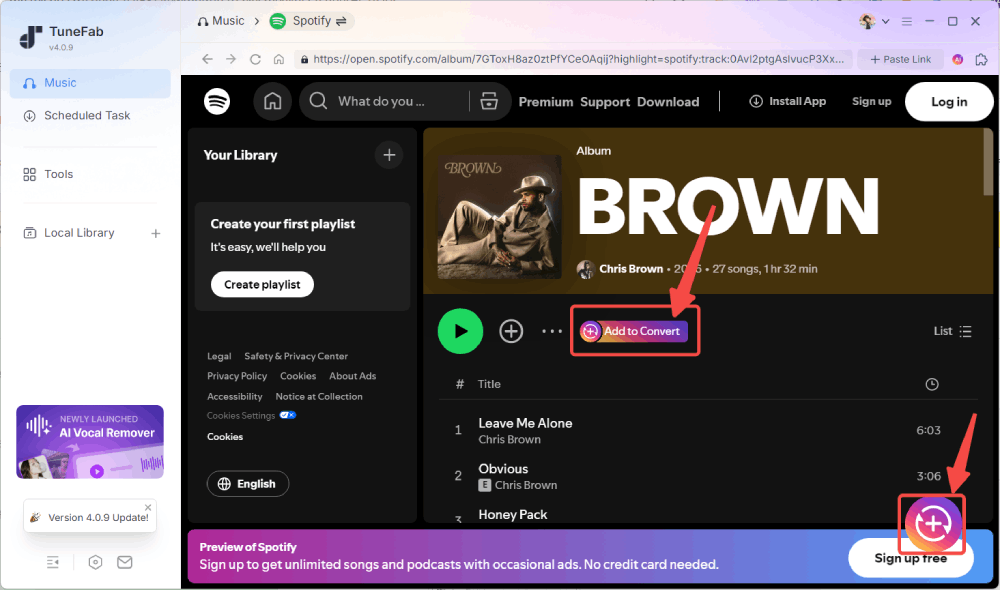
TuneFab Spotify Music Converter covers the same core Spotify conversion needs as DumpMedia, but its value is not just feature similarity. It is more suitable for users who want smoother playlist handling, faster conversion, flexible output management, and a login-optional testing experience. After conversion, you can play the files offline on MP3 players, car stereos, iPods, DJ setups, and other compatible devices.
However, instead of just offering basic conversion, TuneFab is designed as a Spotify playlist downloader for steady bulk processing. During our extended testing using a subscribed version of TuneFab, we downloaded a 100-song playlist, and the entire process was smooth without any software lagging or freezing (Premium subscription required). More importantly, logging into a Spotify account is not mandatory, which helps reduce account-related risks to some extent.
Explore More Highlights of TuneFab Spotify Music Converter
- Save Spotify music in up to 320kbps MP3/M4A and lossless FLAC/WAV/AIFF/ALAC.
- Directly fetch music information from the built-in Spotify web player, no need for the official app.
- Provide flexible archiving methods for filenames and output folders.
- Offer a fast conversion speed up to 35X under stable network conditions.
- Preserve original ID3 tags and lyrics (if available).
- The lifetime plan is listed under $100 at the time of writing.
For a deeper look at TuneFab’s features, limits, and test results, read our full TuneFab Spotify Music Converter Review.
DumpMedia vs TuneFab: Key Differences Before You Pay
You might be wondering if it is worth switching from DumpMedia to TuneFab. Before choosing between these two tools, check the comparison table below to understand how they perform under real usage conditions, not just feature lists.
| Feature | DumpMedia Spotify Music Converter | TuneFab Spotify Music Converter | Winner |
| Interface Appearance | Default mode | Light Mode, Dark Mode, Use System Settings | TuneFab |
| Languages | 14 | 13 | DumpMedia |
| Output Format | MP3, M4A, WAV, FLAC, AIFF, AAC, and ALAC | MP3, M4A, WAV, FLAC, AIFF, AAC, and ALAC | Tie |
| Max Audio Quality | Up to 320kbps and 48kHz | Up to 320kbps and 48kHz | Tie |
| Free Trial Limitations | 3 full downloads | 3 full downloads | Tie |
| ID3 Tag Preservation | Title, artist, album, cover art, release year, track number, lyrics, etc | Title, artist, album, cover art, release year, track number, lyrics, etc | Tie |
| Batch Conversion Stability | Large-playlist performance could not be fully verified in our free trial; some third-party users reported slowdowns. | Stable in our test, with no freezing, crashing, or interruptions. | TuneFab |
| Conversion Speed | Average 6X (Up to 10X) | Average 20X - 30X (Up to 35X) | TuneFab |
| Ads | Software subscription promo popups | None, clean interface | TuneFab |
| Customer Support Options | Email support and software logs | Email support, software logs, and ticket submission | TuneFab |
| Plans | Monthly ($25.95), Quarterly ($79.95), Lifetime ($109.95) | Monthly ($25.95), Annual ($79.95), Lifetime ($99.95) | Based on preference |
| Refund Policy | 7 - 30 days money-back guarantee | 7 - 30 days money-back guarantee | Tie |
Real-World Test: Songs, Albums, Playlists, and Output Quality
We also ran hands-on tests to compare DumpMedia and TuneFab in common Spotify conversion scenarios.
Test Setup:
Device: Windows 11
Network: 500 Mbps wired network connection
Spotify Account: Free account used when login was required
Login status: Tested with and without login, where supported
Test Track: THIS ONE HERE by Kanye West, Ye (3:00)
Test Playlist: Self-made playlist (3 songs)
Software version: Free trial for basic tests; subscribed TuneFab version for the 100-song playlist test
Test Results
| Feature | DumpMedia Spotify Music Converter | TuneFab Spotify Music Converter |
| Download Single Track | ~ 30 seconds | ~ 10 seconds |
| Download 3-Song Playlist | ~ 2 minutes | ~ 1 minute |
| Login-free | ❌ (Required for successful download) | ✔ (Optional) |
| Conversion Speed | 6X | 18X |
| Download Failure | Occurred when we did not log in Spotify account | None |
| Software Stability | Low CPU usage in our test; some third-party users reported higher CPU usage on certain devices. | Low CPU usage in our test. |
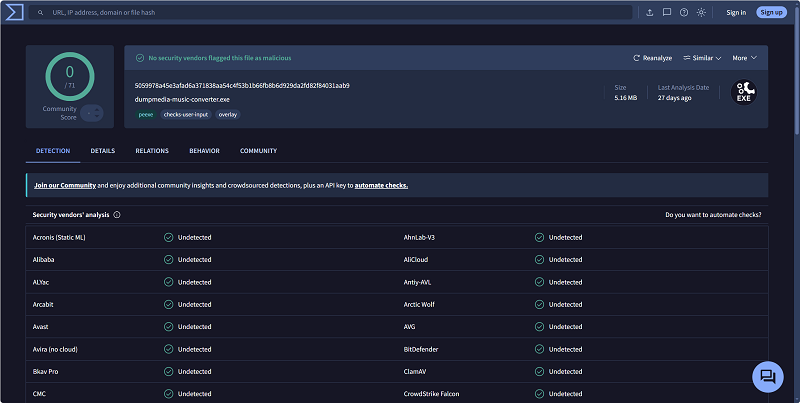
| VirusTotal Test | No detection in our VirusTotal scan at the time of testing. | |
Safety, Subscription, and Spotify Use Notes Before Switching
Before switching to any Spotify converter, download the installer only from the official website and avoid repackaged files from unknown sources. Also check the plan type, auto-renewal rules, refund window, and device limits before purchasing. Converted Spotify files should be used for personal offline listening and device compatibility only, not for redistribution, resale, or unauthorized commercial use.
Final Choice: Should You Stay with DumpMedia or Switch to TuneFab?
So, will you turn to the DumpMedia Spotify Music Converter alternative?
If you only convert a few Spotify tracks from time to time and DumpMedia already works well on your device, you may not need to switch immediately. But if your real need is downloading full playlists, testing without forced login, keeping metadata organized, and getting faster conversion for long-term use, TuneFab Spotify Music Converter is the stronger DumpMedia alternative to try first.