

Many SoundCloud to MP3 converters promise fast downloads, 320kbps audio, or unlimited free conversions, but not all of them deliver. Some only work with public tracks, others are filled with pop-up ads, and many simply stop working after a while. If you're wondering what the best SoundCloud to MP3 converter is, choosing a reliable tool is just as important as choosing a fast one.
To help you save time, we tested desktop software, online converters, browser extensions, and command-line tools based on download quality, safety, supported content, ease of use, and overall reliability. Whether you just want to save a single track or build an offline music library, this guide will help you find the SoundCloud to MP3 converter that best fits your needs.
Tips: If you want to download entire SoundCloud playlists or save music in formats beyond MP3, these guides are worth checking out:
- Best SoundCloud to MP3 Converters: Quick Picks
- #1. TuneFab SoundCloud Music Converter (Windows/Mac) 🔥
- #2. MusicVerter SoundCloud Downloader to MP3 (Online)
- #3. SoundCloudMate (Online)
- #4. DownCloudMe (Online)
- #5. AddonCrop SoundCloud Music Downloader (Extension)
- #6. SoundCloud Track Downloader (Extension)
- #7. OBS Studio: Recording Fallback for SoundCloud Audio (Windows/Mac/Linux)
- #8. Command-Line SoundCloud Downloader (Windows/Mac)
- Final Verdict: What is the Best SoundCloud-to-MP3 Converter?
Best SoundCloud to MP3 Converters: Quick Picks
To get the answer without reading the full reviews, here is a quick verdict. We tested each tool based on download success rate, MP3 output quality, ease of use, ads, metadata support, and overall reliability. The table below highlights the best option for different needs, whether you want a quick online converter, a safer desktop tool, or an advanced command-line option.
| Tool | Best For | Output Quality | Playlist Support | Ease of Use | Overall |
| TuneFab SoundCloud Music Converter | Best overall for playlists, albums, and long-term offline listening | Up to 320kbps MP3 (plus FLAC/WAV, etc.) | ✅ | ⭐⭐⭐⭐⭐ | ⭐⭐⭐⭐⭐ |
| MusicVerter | Fast, clean online downloads for individual tracks | 128kbps (Free) Up to 320kbps (Premium) |
✅ Premium only |
⭐⭐⭐⭐⭐ | ⭐⭐⭐⭐☆ |
| SoundCloudMate | Free online downloads with no installation | 128kbps | ❌ | ⭐⭐⭐⭐☆ | ⭐⭐⭐☆☆ |
| DownCloudMe | Occasional downloads if you don't mind ads | 128kbps | ❌ | ⭐⭐⭐☆☆ | ⭐⭐☆☆☆ |
| AddonCrop | Browser extension with one-click downloads | 128kbps | ✅ | ⭐⭐⭐⭐☆ | ⭐⭐⭐☆☆ |
| SoundCloud Track Downloader | Lightweight Chrome extension | 128kbps | ❌ | ⭐⭐⭐⭐⭐ | ⭐⭐⭐⭐☆ |
| OBS Studio | Recording livestreams or SoundCloud podcasts | Depends on recording settings | ❌ | ⭐⭐⭐☆☆ | ⭐⭐⭐☆☆ |
| Command-Line SoundCloud Downloader | Power users who want maximum control | Best available stream or original file | ✅ | ⭐⭐☆☆☆ | ⭐⭐⭐⭐☆ |
How We Judged These SoundCloud to MP3 Converters
We tested each tool across the factors that matter most to everyday users, not just download success, but also audio quality, safety, ease of use, and long-term reliability. We also considered common concerns discussed on Reddit and in search results, such as fake 320kbps claims, intrusive ads, and metadata preservation.
- Safety & Reliability: We prioritized tools that work consistently, avoid excessive pop-ups or redirects, and don't require installing suspicious software.
- Audio Quality: We evaluated the actual output quality rather than marketing claims, paying close attention to bitrate, encoding quality, and whether the downloaded audio matched the original SoundCloud stream.
- Supported Content: We checked whether each tool can download public tracks, playlists, or other SoundCloud content, along with any restrictions users should know about.
- Metadata Preservation: We looked at whether downloaded files retain useful information such as the track title, artist, album artwork, and other ID3 tags for easier music management.
- Ease of Use & Speed: From one-click online converters to desktop software and command-line tools, we compared setup difficulty, download workflow, and overall efficiency to suit different types of users.
Are 320kbps SoundCloud to MP3 Converters Real?
Not always. While many SoundCloud to MP3 converters advertise 320kbps downloads, the actual output quality depends on the audio source available on SoundCloud, not the converter itself.
For most public tracks, SoundCloud streams audio at a compressed bitrate, so converting it to a 320kbps MP3 does not improve the original sound quality. Some tools may simply re-encode a lower-quality stream into a higher-bitrate MP3 file, resulting in a larger file size without any audible improvement. In other words, a converter cannot create audio quality that's higher than the source it downloads or records.
With that in mind, we evaluated each converter based on the criteria above, including output quality, safety, download reliability, metadata preservation, and ease of use. Unless otherwise noted, all tests were performed on Windows and macOS laptops under a stable internet connection to ensure consistent and fair comparisons.
#1. TuneFab SoundCloud Music Converter 🔥
(Windows/Mac)
| Success Rate | Ease to Use | Output Quality | Pop-up Ads | ID3 Info Preservation | Best For |
| ⭐⭐⭐⭐⭐ | ⭐⭐⭐⭐⭐ | Up to 320kbps MP3 (also supports lossless formats) | No | Yes | Downloading songs, albums, and playlists with the highest success rate |
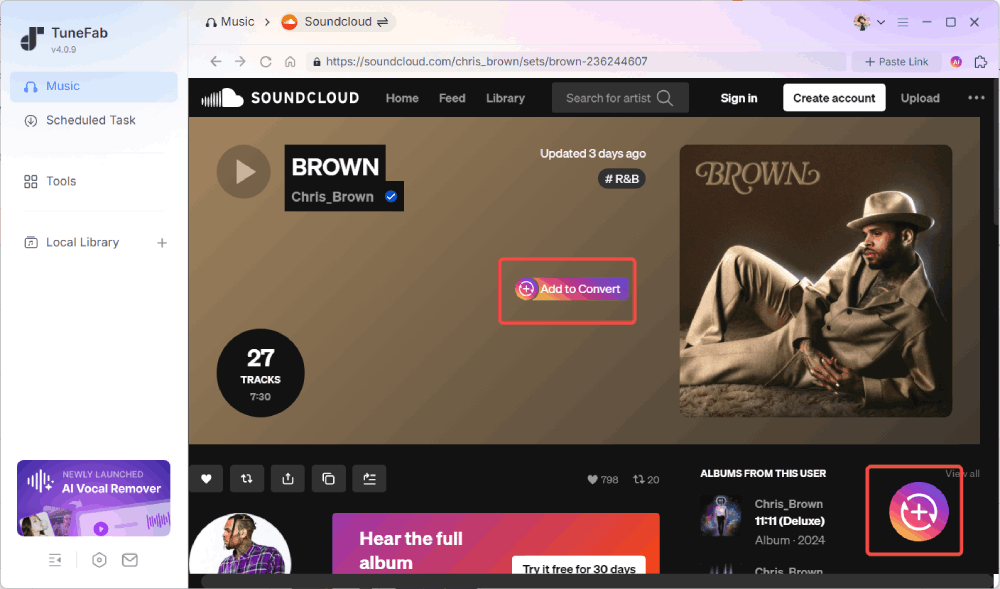
During our testing, TuneFab SoundCloud Music Converter delivered the most reliable overall experience. Unlike online converters that rely on pasted URLs or browser extensions with limited compatibility, it features a built-in SoundCloud web player that lets you search, preview, and download music directly. The interface is clean and beginner-friendly, and the entire download process takes just a few clicks.
In our tests, TuneFab delivered the most stable overall experience among the beginner-friendly tools we tried. It successfully downloaded the selected SoundCloud tracks, preserved ID3 metadata automatically, and completed our single-track MP3 test in about 15 seconds. The free trial also lets users try the full workflow before upgrading, making it a practical option for users who download SoundCloud music regularly.
How We Tested It
1. Installed TuneFab SoundCloud Music Converter on both Windows and macOS using a stable broadband connection.
2. Opened the built-in SoundCloud web player and tested a mix of public tracks, playlists, and longer audio content.
3. Selected MP3 as the output format (320kbps) and downloaded both single tracks and playlists.
4. The test track downloaded successfully in about 15 seconds. We then checked the file properties and confirmed that the file was saved as MP3, the selected bitrate was applied, and the track title, artist information, and artwork were preserved.
Pros
- Supports MP3, FLAC, WAV, and other output formats, though the final audio quality still depends on the original SoundCloud source.
- High download success rate with stable performance throughout testing.
- Preserves ID3 tags, including artwork, artist, album, and track information.
- Built-in SoundCloud web player with a clean and beginner-friendly interface.
- Supports multiple streaming platforms within one software.
Cons
- Requires installation on Windows or macOS.
- Unlimited downloads require the paid version.
#2. MusicVerter SoundCloud Downloader to MP3 (Online)
| Success Rate | Ease to Use | Output Quality | Pop-up Ads | ID3 Info Preservation | Best For |
| ⭐⭐⭐⭐⭐ | ⭐⭐⭐⭐⭐ | 128kbps MP3 (Free) | None during testing | Yes | Users who want the fastest online SoundCloud-to-MP3 conversion |
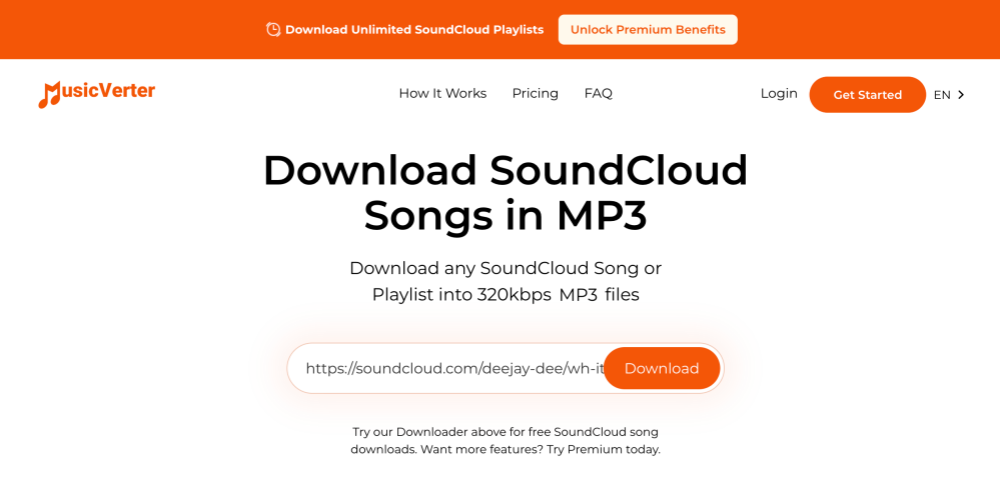
MusicVerter SoundCloud Downloader to MP3 proved to be one of the quickest online SoundCloud-to-MP3 converters we tried. The workflow couldn't be much simpler: paste a SoundCloud URL, click Download, and the file is generated almost immediately. Unlike many similar online tools, we didn't encounter misleading redirects or pop-up ads throughout the entire process, which made the experience surprisingly smooth.
The trade-off is output quality. The free version downloads tracks at 128kbps MP3, which is suitable for casual listening but falls short if you're looking for the highest possible quality. On the plus side, the downloaded file retained basic ID3 information, making it easy to organize in a local music library. According to MusicVerter, higher-quality downloads, additional output formats, and playlist support are available through its Premium plan.
How We Tested It
1. Opened the website and pasted the SoundCloud track URL we wanted to convert into the search bar.
2. Clicked Download, and the MP3 file was generated almost immediately. No pop-up ads or unexpected redirects appeared during the process.
3. Checked the downloaded file and found that it was encoded at 128kbps. The basic ID3 information (such as the track title and artist) was also preserved.
Pros
- Fast conversion with almost no waiting time
- No software installation or account registration required
- No pop-up ads or misleading redirects during our testing
- Basic ID3 information (such as title and artist) was preserved
Cons
- Free downloads are limited to 128kbps MP3
- No option to choose the output format in the free version
- Playlist downloads and higher-quality output require a Premium subscription
#3. SoundCloudMate (Online)
| Success Rate | Ease to Use | Output Quality | Pop-up Ads | ID3 Info Preservation | Best For |
| ⭐⭐⭐☆☆ | ⭐⭐⭐⭐☆ | 128kbps MP3 | Redirect ads during testing | Yes | Users who only need to download an occasional SoundCloud track |
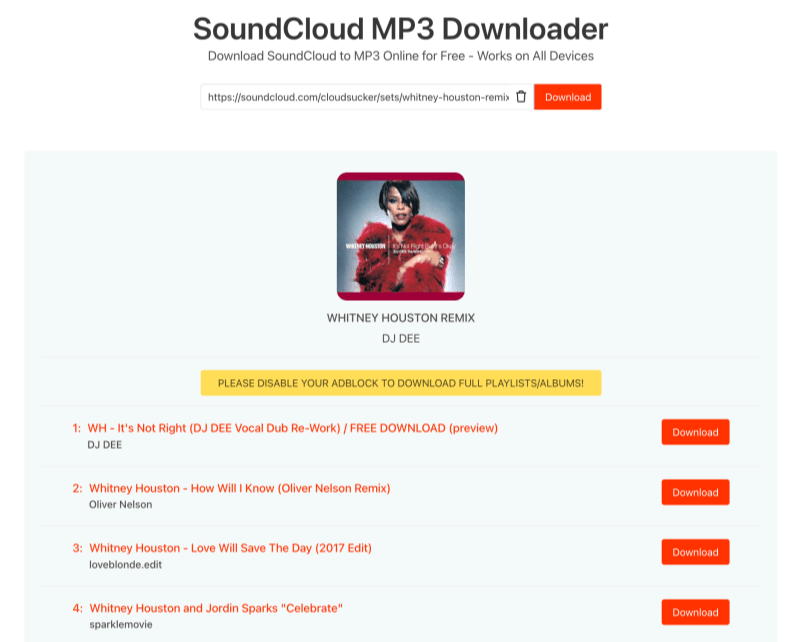
Getting started with SoundCloudMate is straightforward. Simply paste a SoundCloud URL, wait for the track information to load, and click Download again to save the file. The conversion itself was fairly quick, and the downloaded file matched the original track with basic metadata preserved.
The overall experience, however, wasn't as smooth as some other online converters we tested. During our attempts, the website opened additional tabs and briefly displayed a connection error before the download eventually succeeded. While the tool worked after a second try, the inconsistent behavior makes it feel less reliable for regular use. Like most free online converters, it also limits downloads to 128kbps MP3 and doesn't support playlists or batch downloads.
How We Tested It
1. Opened the SoundCloudMate website and pasted the SoundCloud track URL into the search bar.
2. Clicked Download, and the site successfully parsed the track information, displaying the cover art and a second Download button.
3. After clicking the download button, the site opened several new tabs. Once we closed them and returned to the original page, it briefly showed a connection error.
4. After trying again, the download completed successfully. The file matched the selected track, but the output was limited to 128kbps MP3.
Pros
- No installation or registration required
- Fast conversion once the track is successfully parsed
- Simple URL-based download process
- Works on any device with a web browser
Cons
- Redirects opened during our testing
- The download process wasn't consistently reliable
- The output quality is limited to 128kbps
#4. DownCloudMe (Online)
| Success Rate | Ease to Use | Output Quality | Pop-up Ads | ID3 Info Preservation | Best For |
| ⭐⭐⭐☆☆ | ⭐⭐⭐☆☆ | 128kbps MP3 | None during testing | Yes | Users looking for a free backup online converter |
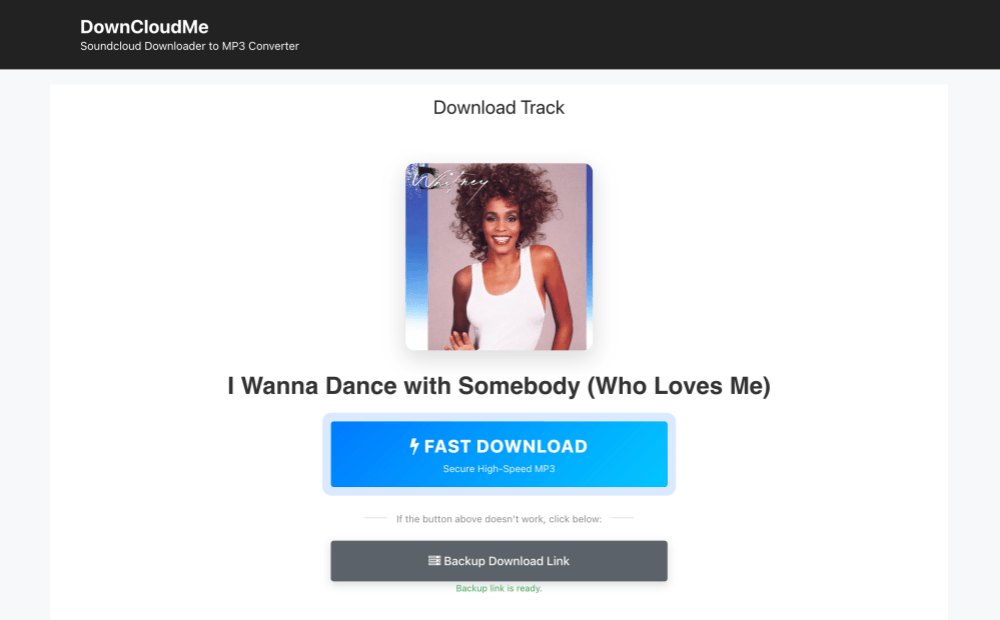
DownCloudMe follows the same basic workflow as most online SoundCloud downloaders—paste a track URL, wait for the song information to load, and click Fast Download to save the file. Once the download eventually started, the file itself was correct and retained the track information, making it easy to identify in a local music library.
The overall experience, however, was the least consistent among the online tools we tested. Multiple redirects appeared during the process, and the download stalled on our first few attempts before finally succeeding after several retries. Although the website claims to support playlist downloads, tracks still need to be downloaded individually. Combined with the 128kbps MP3 output limit, it's best treated as a backup option rather than a downloader you'd rely on regularly.
How We Tested It
1. Opened the DownCloudMe website and pasted the SoundCloud track URL into the search bar.
2. Clicked Download, and the site successfully parsed the track information, displaying the cover art along with a Fast Download button.
3. After clicking Fast Download, several new tabs opened. Returning to the original page showed a "Downloading, please don't close this window" message, but the download never started.
4. After closing the window and repeating the process twice, the download finally completed. The downloaded file matched the selected track, but the output was limited to 128kbps MP3.
Pros
- No software installation required
- Successfully preserved basic track information
- Straightforward URL-based workflow
- Works in any modern web browser
Cons
- Frequent pop-up ads and redirect pages
- The download process may require multiple attempts
- Limited to 128kbps MP3 output
- Playlist links are supported, but tracks must still be downloaded one by one
#5. AddonCrop SoundCloud Music Downloader (Extension)
| Success Rate | Ease to Use | Output Quality | Pop-up Ads | ID3 Info Preservation | Best For |
| ⭐⭐☆☆☆ | ⭐⭐⭐⭐⭐ | 128kbps MP3 (Free) | None during testing | Yes | Users who prefer downloading directly from the SoundCloud website |
Unlike online converters that require copying and pasting URLs, AddonCrop integrates directly into the SoundCloud website. Once installed, it adds a Download button beside supported tracks, making the workflow much more convenient if you frequently save music from SoundCloud. During our successful downloads, the output files retained the expected track information without requiring any additional steps.
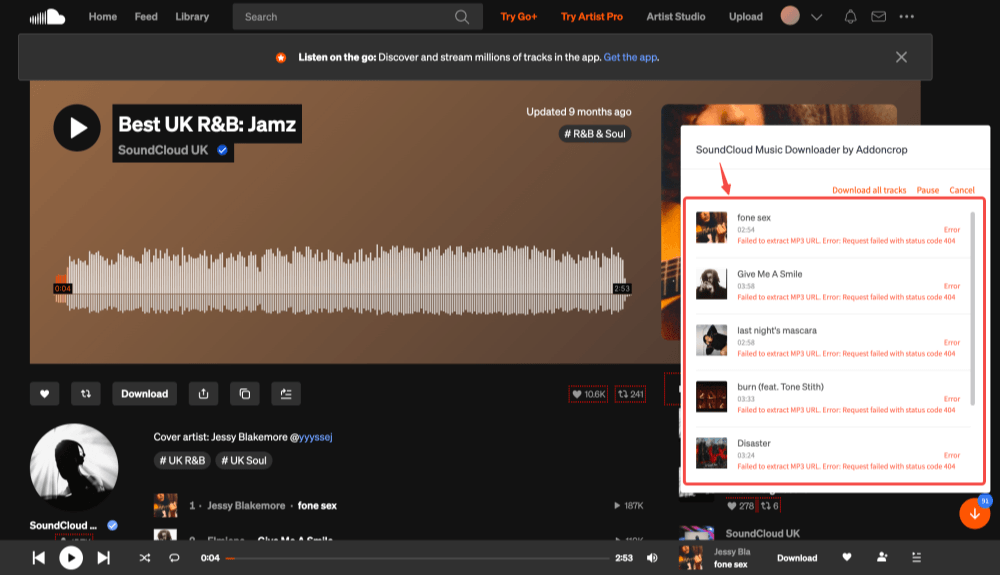
The downside is reliability. We encountered multiple Download Failed errors before the extension finally worked, and changing networks appeared to improve the success rate. Download speeds were acceptable, around 30 seconds for a typical song in our testing, but the inconsistent performance makes it less dependable than desktop software. It's a useful browser-based option, but not one we'd rely on for downloading large music libraries.
How We Tested It
1. Visited the AddonCrop website, selected the SoundCloud Downloader extension, and installed the recommended version for our browser.
2. Opened the SoundCloud website and played several public tracks. A Download button appeared directly on the player page after the extension was activated.
3. Clicked Download, and the selected tracks were added to the extension's download queue for processing.
4. Our first few attempts failed with Download Failed errors. After several retries and switching to a different network, the downloads eventually completed. The downloaded files contained the expected track information, although the overall download speed and stability were average.
Pros
- Downloads directly from the SoundCloud website
- No need to copy and paste track URLs
- Basic track information is preserved
- Supports several Chromium-based browsers
Cons
- Multiple download failures during our testing
- Performance wasn't consistently stable
- Some tracks may not display a download button
#6. SoundCloud Track Downloader (Extension)
| Success Rate | Ease to Use | Output Quality | Pop-up Ads | ID3 Info Preservation | Best For |
| ⭐⭐⭐⭐☆ | ⭐⭐⭐⭐☆ | 128kbps MP3 (Free) | None during testing | Yes | Users who want a lightweight Chrome extension for quick SoundCloud downloads |
Compared with most browser-based downloaders, SoundCloud Track Downloader offers a much cleaner workflow. There's no need to copy and paste URLs or visit third-party websites, as the extension simply detects the track playing in your browser and lets you download it with a single click. Throughout our testing, downloads completed quickly, and no pop-up ads or redirects interrupted the process.
Its biggest limitation is audio quality. Like many free browser extensions, downloads are limited to 128kbps MP3 or M4A, making it better suited for casual offline listening than building a high-quality music library. During our testing, it worked well for single-track downloads, but it did not provide playlist or batch download support.
How We Tested It
1. Installed the SoundCloud Track Downloader extension from the Chrome Web Store.
2. Opened the SoundCloud website and played several public tracks.
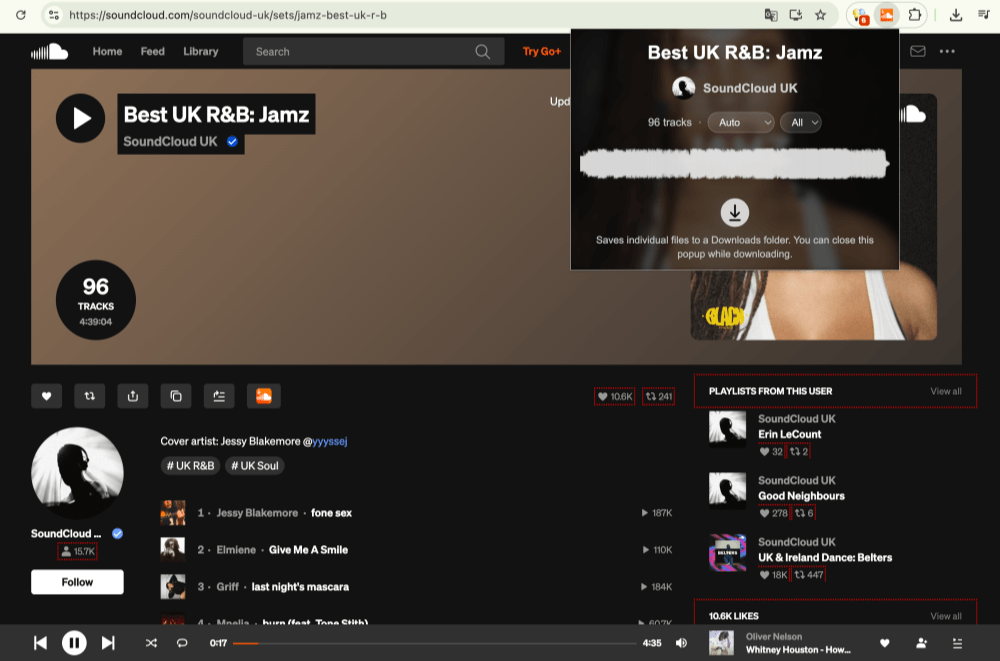
3. Clicked the extension icon in Chrome, and it automatically detected the track currently playing. The extension also allowed us to choose the available output format and select the item to download.
4. Pressed Download, and the file was saved successfully within seconds. We verified the downloaded file and found that the track information was preserved, although the output quality was limited to 128kbps.
Pros
- Simple one-click downloads directly from the SoundCloud website
- No URL copying or third-party converter websites required
- Fast download speed during our testing
- No pop-up ads or redirects encountered
- Basic track information was preserved
Cons
- Limited to 128kbps output format
- Only available for Google Chrome–based browsers
- No playlist or batch download support
- Lacks advanced output and customization options
#7. OBS Studio: Recording Fallback for SoundCloud Audio
(Windows/Mac/Linux)
| Success Rate | Ease to Use | Output Quality | Pop-up Ads | ID3 Info Preservation | Best For |
| ⭐⭐⭐⭐⭐ (for recording) |
⭐⭐⭐☆☆ | Depends on recording settings (video recording) | None during testing | No | Users who want to record short clips of SoundCloud playback, podcasts |
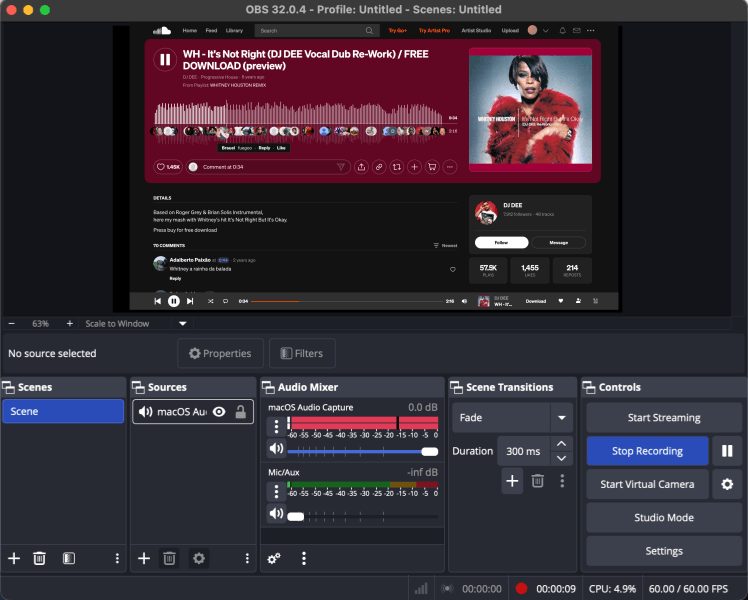
OBS Studio is not a true SoundCloud to MP3 converter. It is a free, open-source screen recorder that can capture SoundCloud playback when a downloader does not work, making it more suitable for recording podcasts, livestreams, or on-screen audio than for downloading MP3 music files directly. In our test, we configured macOS Audio Capture, recorded SoundCloud playback successfully, and found the recording process stable once the audio source was set up.
The main drawback is that OBS exports video files (such as MP4 or MKV) instead of MP3 audio. Although the recording quality was acceptable for casual listening, we noticed some quality loss compared with the original stream when listening through headphones. If you simply want MP3 files for offline listening, dedicated SoundCloud converters are much faster and more convenient.
How We Tested It
1. Installed OBS Studio and added macOS Audio Capture as the audio source.
2. Configured the system audio output and started recording while playing SoundCloud.
3. Reviewed the exported recording for audio quality, file format, and ease of editing.
Pros
- Completely free and open source
- Available for Windows, macOS, and Linux
- Excellent for recording livestreams, podcasts, and on-screen content
- Recorded files can be edited later with a separate audio or video editor.
Cons
- Not a true SoundCloud to MP3 converter
- Exports video files rather than MP3 audio
- Initial setup is more complicated than online tools
- Audio quality depends on recording settings and system configuration
#8. Command-Line SoundCloud Downloader
(Windows/Mac)
| Success Rate | Ease to Use | Output Quality | Pop-up Ads | ID3 Info Preservation | Best For |
| ⭐⭐⭐⭐☆ | ⭐☆☆☆☆ | Best available source (AAC/MP3/Original) | None during testing | Yes | Power users who download playlists or entire SoundCloud libraries |
Unlike browser-based downloaders, yt-dlp is a command-line tool designed for users who want maximum control over their downloads. It supports downloading individual tracks, playlists, albums, and even entire SoundCloud profiles while automatically selecting the best audio format available from SoundCloud. For advanced users, it can also save thumbnails, metadata, and JSON information for archiving purposes.
The trade-off is ease of use. yt-dlp requires installing the program and running commands in Terminal or Command Prompt, and converting downloads to MP3 also requires FFmpeg. For most casual listeners, this setup is unnecessarily complicated. However, if you regularly archive large SoundCloud collections or simply want the highest success rate available, it's one of the most reliable tools currently available.
How We Tested It
1. Installed yt-dlp and FFmpeg, then opened Terminal (macOS) or Command Prompt (Windows).
2. Used "yt-dlp -F
3. Downloaded several public SoundCloud tracks and compared the available formats, metadata, and download reliability.
4. Converted the downloaded audio to MP3 using FFmpeg, then checked the output quality and metadata. We also tested a SoundCloud playlist URL separately to confirm playlist download support.
Pros
- Downloads tracks, playlists, albums, and user profiles
- Automatically selects the best available audio quality
- Supports metadata, thumbnails, and archive files
- Completely free and open source
- No ads or download limits
Cons
- Requires command-line knowledge
- MP3 conversion requires FFmpeg
- No graphical interface
- Less beginner-friendly than desktop or online tools
Final Verdict: What is the Best SoundCloud to MP3 Converter?
After testing all these tools, we found that there's no single solution for every user. If you only need to download an occasional public track, an online converter like MusicVerter or a browser extension like SoundCloud Track Downloader can be fast and convenient, with little to no setup required. Power users who value automation and playlist archiving may prefer a command-line solution like yt-dlp, while OBS Studio is better suited for recording livestreams or podcasts rather than downloading music.
However, if you're looking for the best balance of download quality, success rate, ease of use, and long-term reliability, TuneFab SoundCloud Music Converter remains our top recommendation. Among the beginner-friendly options we tested, TuneFab SoundCloud Music Converter offered the best balance of download quality, success rate, ease of use, and metadata preservation. It handled both individual tracks and playlists without the pop-ups, redirects, and parsing failures we encountered with several online alternatives.