

When searching for the best SoundCloud downloader, you will find a wide range of desktop software, online services, and browser extensions available. However, not all of them are worth using. Some deliver poor audio quality, others suffer from slow download speeds or excessive ads, and some are unable to parse the latest SoundCloud links.
To save you time, we tested a variety of popular SoundCloud download tools and compared them based on download quality, speed, performance, and overall user experience. Based on our findings, we have compiled a list of the 9 best tools worth considering in 2026.
Disclaimer: This article is intended for educational and personal use only. You should avoid any commercial use and always comply with copyright laws and SoundCloud's Terms of Service.
- Quick Check: Which Type of SoundCloud Downloader Should You Choose?
- Best Desktop SoundCloud Downloader for Stable Downloads
- Best Online SoundCloud Downloaders for Quick Single Tracks
- Best SoundCloud Downloader Extensions
- Mobile SoundCloud Downloaders: Useful, But Limited
- Need Bulk Playlist or ZIP Downloads?
- Comparison of the 9 SoundCloud Downloader Tools
- FAQs About Using a SoundCloud Downloader
Quick Check: Which Type of SoundCloud Downloader Should You Choose?
SoundCloud offers a few official options for saving music, but they come with important limitations:
- Download button on the Official Website: Only appears if the uploader enables it, but most tracks do not have this.
- Subscribe to SoundCloud Go / Go+: It allows you to save tracks and playlists for offline listening inside the SoundCloud app only. Also, you cannot export these as local audio files.
If you need to save downloadable or permitted SoundCloud audio as standard files such as MP3 for personal offline use, a third-party SoundCloud downloader may be useful. Here is a quick comparison to help you decide which type is right for you:
| Type | Proven Tool | Best For |
| Desktop Software | TuneFab SoundCloud Music Converter | Batch downloading playlists with stable performance and high-quality output. |
| Online Services | Lucida.to | Occasionally, download a single SoundCloud track without installing software. |
| Browser Extension | AddonCrop | One-click download from the SoundCloud web player directly inside Chrome or other browsers. |
| Mobile Solutions | SoundLoader MP3 Downloader | Save SoundCloud tracks on mobile devices for offline access when on the go. |
Best Desktop SoundCloud Downloader for Stable Downloads
Although online SoundCloud downloaders and Chrome extensions provide convenient solutions, desktop software remains the most reliable option for those who need stable performance, high-quality audio output, and batch downloading features. This makes them ideal for long-term use. Here is one of the best desktop tools for downloading music from SoundCloud to your computer.
#1 TuneFab SoundCloud Music Converter
Pros:
- Batch download support for songs, playlists, and albums.
- Supports multiple formats, including MP3, FLAC, and WAV.
- Preserves ID3 tags and lets you choose high-quality output settings, though the final audio quality still depends on the original SoundCloud source.
- Integrates a built-in SoundCloud web player for an ad-free and intuitive workflow.
- Works with SoundCloud accounts, including Go and Go+ accounts when login is needed.
Cons:
- The free trial allows 3 full song downloads only.
- Requires software installation on PC/Mac.
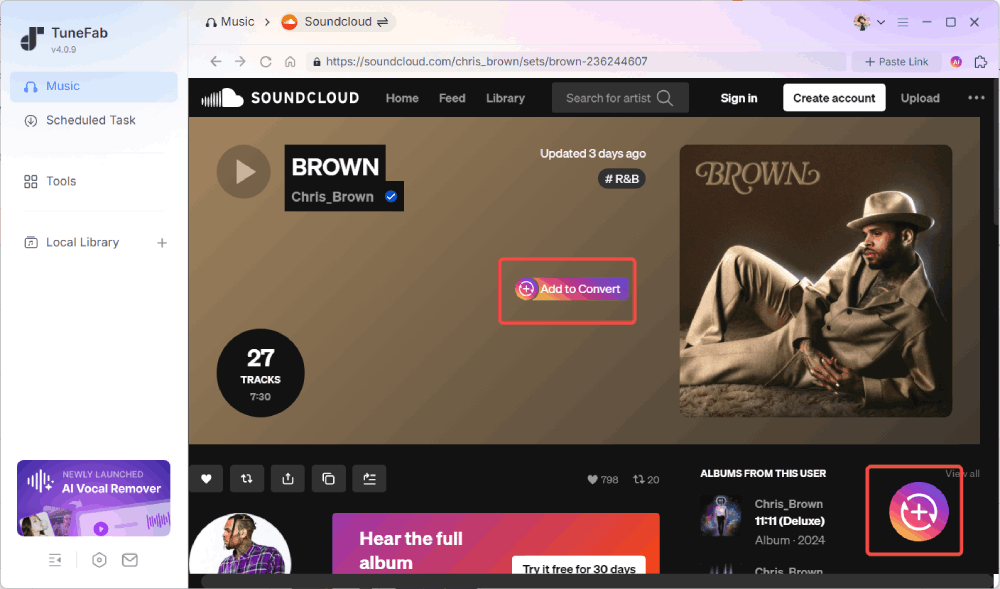
TuneFab SoundCloud Music Converter is a reliable SoundCloud download tool for PC and Mac. It allows you to download songs, albums, and playlists from SoundCloud and convert them to MP3, WAV, FLAC, M4A, AIFF, and ALAC. This way, you can transfer and enjoy your favorite music offline on any player and device. Even better, it comes with a built-in SoundCloud web player, so the entire download process is seamless and easy-to-navigate.
In our hands-on testing, we processed a 50-song SoundCloud playlist in about 13 minutes (10-12s per track). Three tracks failed on the first attempt, but all of them downloaded successfully after we retried the failed tasks.
Our Test Experience & Findings:
- 320kbps output setting confirmed: After conversion, we checked the files in MediaInfo and confirmed that the exported MP3 files were saved at 320kbps and 44.1kHz, matching our selected settings. However, the final listening quality still depends on the original SoundCloud source.
- Simple workflow: The built-in SoundCloud web player made the process easy to follow. After finding a track or playlist, we only needed to click the "Add" button to fetch the music information before starting the download.
- Stable performance: In our tests, TuneFab handled both single tracks and large playlists smoothly, with a high download success rate and no unexpected interruptions.
- Ad-free Interface: Unlike many online SoundCloud downloaders, TuneFab features a clean and ad-free interface without pop-up ads or redirect pages.
- Safe to Use: Our VirusTotal test confirmed that its installer is safe, without bundled software or suspicious malware.
Best Online SoundCloud Downloaders for Quick Single Tracks
Online SoundCloud downloaders are great for users who need a quick, no-installation solution to download music from SoundCloud for free. These tools are accessible via any browser and offer convenience. Here are some of the working SoundCloud downloaders online.
Note: Online tools are quick and easy, but they come with limitations like slower speeds, fewer formats, lower quality, and ads. For a faster, ad-free experience with better quality, we recommend using the desktop tool TuneFab SoundCloud Music Converter.
#2 Lucida.to
Pros:
- No registration required.
- No SoundCloud subscription is required.
- Clean interface with no ads.
- Supports SoundCloud ZIP downloads.
- Provides custom output settings for format and quality.
Cons:
- May fail to parse newly released tracks.
- Occasional downtime.
- Limited playlist support.
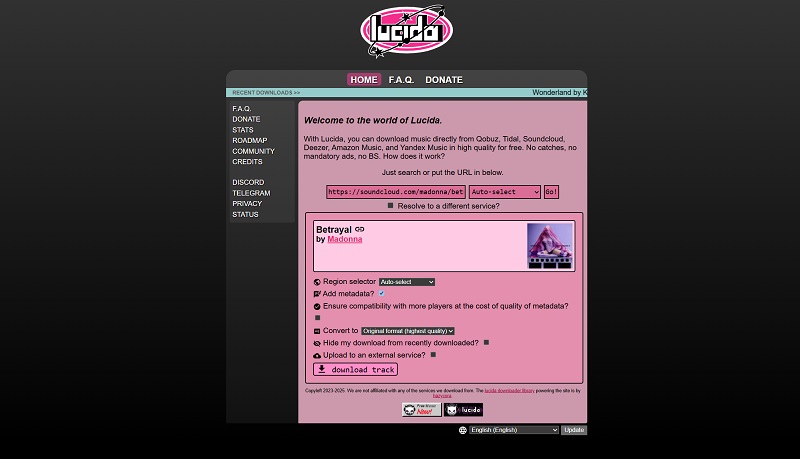
Lucida.to is an online SoundCloud downloader that offers more output options than many basic URL-based tools. It supports multiple formats and quality settings, making it more flexible than most simple MP3-only downloaders. Unlike most online services, it allows users to customize output format (MP3, WAV, FLAC, OGG, Opus, M4A, etc), bitrate from 128kbps to 320kbps, and even metadata.
Our Test Experience & Findings:
- Download speed: Most tracks were processed within 4 - 8 seconds.
- Audio quality: Lucida.to offered several output settings, including up to 320kbps MP3, WAV, and 16-bit 44.1kHz FLAC. These formats do not necessarily improve the original SoundCloud source quality.
- Success rate: Single-track downloads were stable. Playlist URLs were only partially supported and often suffer from sudden interruptions.
- Metadata: Album cover was downloaded, but more ID3 tags like release year and album name were missing.
- Interface: No ads. The overall layout feels somewhat crowded, which can cause users to easily overlook or skip the output settings.
#3 MusicVerter
Pros:
- No software installation is required.
- Beginner-friendly interface.
- Simple copy-paste workflow for SoundCloud URLs.
Cons:
- Requires a paid plan for SoundCloud playlist downloads.
- Audio output limited to MP3 format.
- No consistent metadata (ID3 tags often missing).
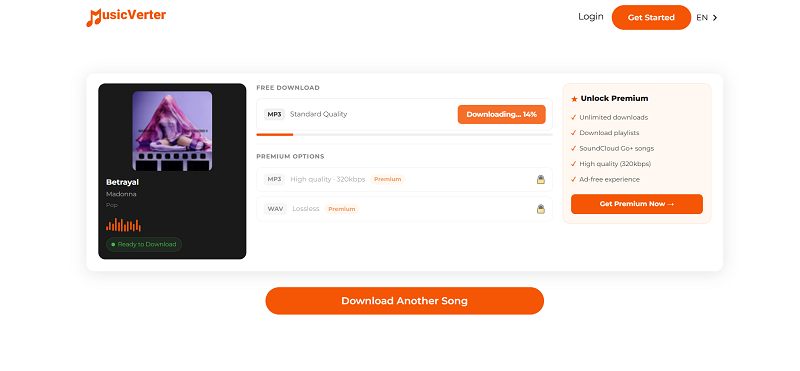
MusicVerter is a browser-based SoundCloud downloader tool that allows users to convert SoundCloud tracks into MP3 files by simply pasting a URL. While it is easy to use, it does not support playlist extraction. To unlock this feature, you will have to upgrade to the subscription plan, starting at $9/month (500 downloads).
Our Test Experience & Findings:
- Download speed: The average processing time was around 20 - 30 seconds per track, slower than top-performing tools.
- Success rate: When we tested a SoundCloud Go+ track, the tool failed to generate a downloadable file. Clicking the "Error - try again" button did not resolve the issue.
- Metadata: This SoundCloud MP3 converter online only preserved basic ID3 tags, including title, artist, and cover art.
- Audio quality: All exported audio files were saved as MP3 files with "Standard Quality". For more preference settings, a Premium subscription is required.
- Interface: Promo ads were common but less intrusive than pop-up redirects.
#4 KlickAud
Pros:
- Free and easy to use.
- Fast URL parsing (usually under 5s).
- No installation required, works in most browsers
- Simple interface for beginners.
Cons:
- Limited to MP3 format with 128kbps quality.
- Downloaded tracks may sometimes fail to play.
- Fail to download SoundCloud playlists during testing.
- Extensive ads on the page.
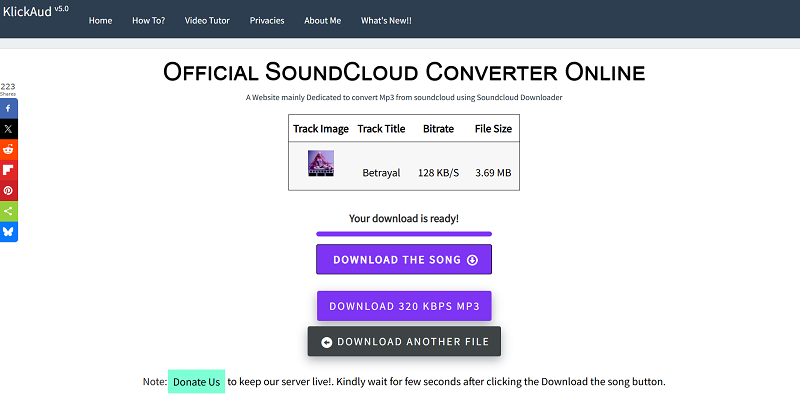
KlickAud is a free online SoundCloud downloader that can help you convert SoundCloud tracks to MP3 format without extra software or extensions. Simply paste a SoundCloud URL, and the site will generate a download link within seconds. Since it only offers basic features for single-track downloads, it is better suited for occasional use.
Our Test Experience & Findings:
- Audio quality: It saves SoundCloud music at 128kbps by default with no custom options. While it provides a button for "DOWNLOAD 320 KBPS MP3", it is for its desktop software installer.
- Workflow: It requires no registration to start the process of SoundCloud downloads.
- Success rate: Based on our test, individual songs were successfully downloaded (~ 5s average), while playlist links could not be parsed. We also tested SoundCloud Go+ tracks, but the tool only saved about the first 30 seconds instead of downloading the full track.
- Interface: Ads everywhere. Although it features an intuitive layout design, it is easy to accidentally click on any pop-up ads or in-page ads.
- Metadata: This web-based SoundCloud downloader only saves basic ID3 tags like title and artist. Additionally, it also adds a website name to the output filename.
#5 ScloudDownloader
Pros:
- Free to use, no registration needed.
- Available for use on all devices (Windows, macOS, iOS, and Android).
- Simple and easy-to-use interface.
Cons:
- Limited to MP3 format only.
- No support for playlists and newly released songs.
- Audio quality is low.
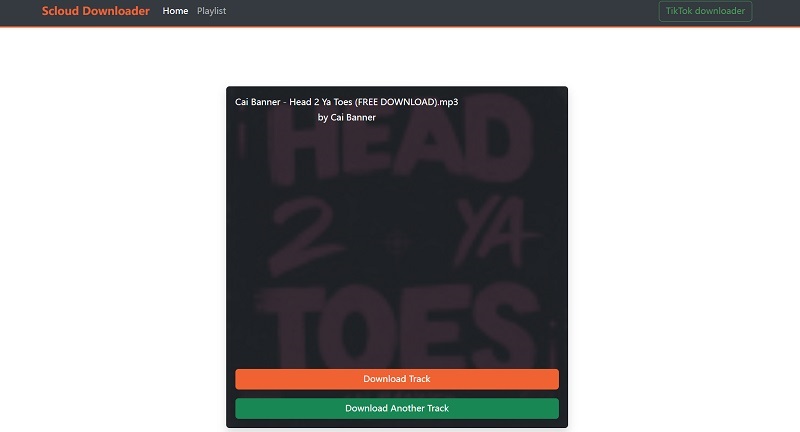
ScloudDownloader is a free online tool designed to download music from SoundCloud to iPhone, Android, or PC in MP3 format. Compared with KlickAud, it offers a clean interface. During testing, we did not see any ads. It is a pity that the output audio quality is limited to 128kbps only.
Our Test Experience & Findings:
- Download speed: The download process is generally fast. It parses a song quickly and finishes downloading in around 4s.
- Success rate: Most older public tracks downloaded successfully, but some newly released tracks could not be parsed. We also tested SoundCloud albums and playlists, but the tool failed to download them.
- Metadata: We checked the exported MP3 file after downloading and found that only basic ID3 tags were saved.
- Audio quality: The actual bitrate of the exported MP3 track is 128kbps only.
- Interface: ScloudDownloader applies a clean and concise layout, making the download process smooth. Also, we did not encounter ads during testing.
Best SoundCloud Downloader Extensions
Browser extensions offer a convenient way to download SoundCloud music directly from your browser without the need for extra software. These tools are simple to install and use, making them a great choice for users who want to quickly save individual tracks while browsing.
#6 AddonCrop SoundCloud Music Downloader
Pros:
- Downloads both individual tracks and playlists.
- Preserves music metadata, including ID3 tags.
- Works across multiple browsers, including Chrome, Opera, and Edge.
Cons:
- Not available directly in the Chrome Web Store.
- May collect personal data or display adware.
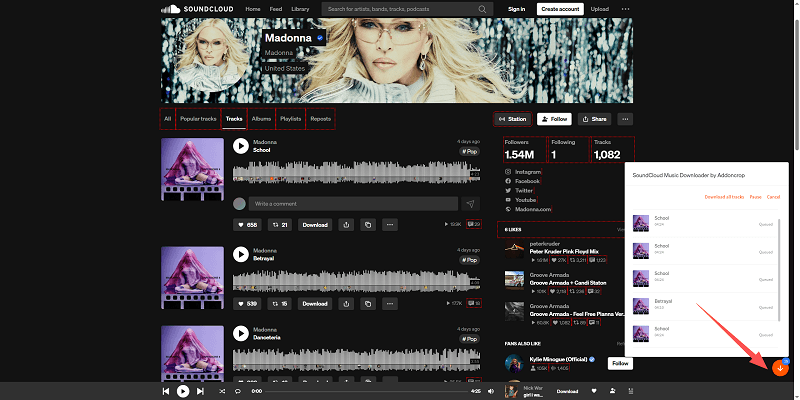
AddonCrop is a SoundCloud downloader extension that adds a download option directly to supported SoundCloud pages, making it convenient for saving individual tracks without copying URLs manually. This SoundCloud music downloader extension works across multiple browsers, including Chrome, through the CrossPilot extension. This tool enables users to download both individual tracks and entire playlists, while also preserving ID3 tags for the music, such as artist and album information.
Our Test Experience & Findings:
- Installation source: Requires manual installation with a separate "Crosspilot" companion extension to function.
- Download experience: One-click download button appeared correctly on most track pages
- Metadata: ID3 tags were preserved in most single-track downloads, but were inconsistent for playlists.
- Reliability note: In our test, the extension worked on supported tracks. However, because browser extensions can be affected by SoundCloud or browser updates, users may experience occasional compatibility issues over time.
#7 SaveFrom.net Helper
Pros:
- Supports 12 different websites, including SoundCloud.
- Allows batch downloading from albums.
- Works on multiple browsers.
Cons:
- Not available in some regions, including the United States.
- Downloaded tracks may appear as numbers instead of original titles.
- Requires Chameleon extension for Chrome.
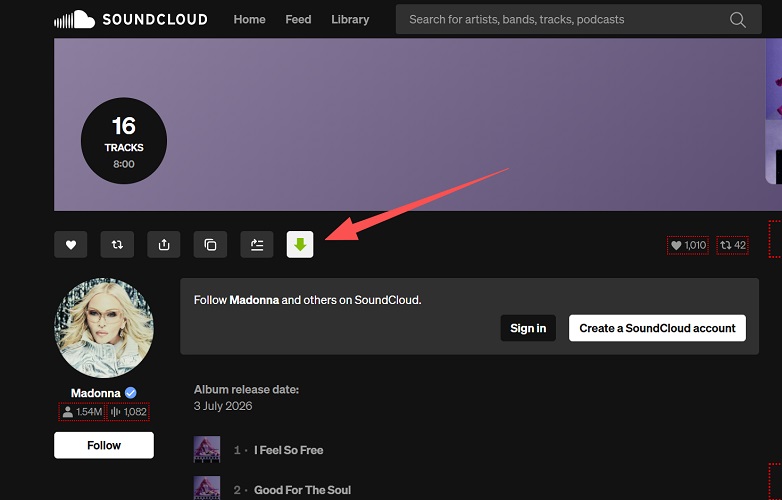
SaveFrom.net Helper is a versatile browser extension that allows users to download music from SoundCloud, YouTube, Vimeo, and other platforms. It adds a download button beneath SoundCloud tracks, making it easy to download with one click. The extension works on multiple browsers, including Chrome, Firefox, Opera, and Safari. To use it with Chrome, you'll need to install the Chameleon extension first.
Our Test Experience & Findings:
- Download experience: One-click download buttons appeared on supported SoundCloud tracks, making the workflow straightforward once the extension was installed.
- Metadata accuracy: Track titles were sometimes replaced with generic filenames.
- Audio quality: We tested 6 songs, and MediaInfo confirmed all of them were 128kbps MP3 output.
- Compatibility: This SoundCloud downloader Chrome extension also works on Edge, Firefox, Opera, and Safari. Additionally, since it is not available in the USA, we have to switch to EU nodes before testing.
Mobile SoundCloud Downloaders: Useful, But Limited
You may be looking for a mobile app to download music from SoundCloud on Android/iPhone. We did find some existing options, but they are not our top recommendation for most users.
Based on our test results, these mobile solutions work for single-track or on-the-go grabs, but none offer batch downloading, lossless quality, or reliable metadata retention. So, it is advisable to consider them as a backup method only.
#8. SoundLoader MP3 Downloader
SoundLoader MP3 Downloader is a dedicated SoundCloud song downloader that allows users to download SoundCloud tracks easily and save them as high-quality MP3 files. With a simple and intuitive interface, it's ideal for users who prefer mobile-based downloading without needing to rely on browsers or Telegram bots.
The app supports download speeds that are relatively fast, and audio quality can go up to 320kbps, depending on the source track. However, users need to manually search for the SoundCloud track inside the app, and some ads may appear during use. Batch downloading is not supported, so it's more suited for casual or light users who want to download tracks one by one on their phones.
#9. Telegram Bot: @scdlbot
@scdlbot is a free Telegram bot that acts as a reliable SoundCloud music downloader, letting users download SoundCloud tracks by simply pasting the track link in a chat. It provides MP3 files at 256kbps and includes complete ID3 tag information, which helps organize downloaded music in your library.
However, the downloaded files have random numerical filenames, so you'll need to rename them manually. It only supports single-track downloading, but the trade-off is that it's completely free and works across multiple platforms, including Android, iOS, Windows, macOS, and Linux. If you already use Telegram, this tool is a quick and clean option with no ads or pop-ups.
Need Bulk Playlist or ZIP Downloads?
If your goal is to download entire SoundCloud playlists, export ZIP files, or handle batch downloads, mobile tools and bots are not designed for this use case.
For full playlist downloading, check out our dedicated guide: Best SoundCloud Playlist Downloaders of 2026 (PC & Mobile)
Comparison of the 9 SoundCloud Downloader Tools
Choosing the best SoundCloud downloader depends on what you need. To make it easier for you to make an informed decision, we tested these SoundCloud download tools and compared their key features, including supported download types, output formats, login requirements, common limitations, and more. Below is the comparison table.
| Tool | Type | Best For | Single Track | Playlist Support | Output Format | Free from Ads/Redirects | Login Needed | Main Limitation |
| TuneFab SoundCloud Music Converter | Desktop | Bulk playlist/album backup with high-quality output, suitable for long-term use. | ✔ | ✔ | MP3, FLAC, WAV, M4A, AIFF, ALAC | ✔ | Optional | Free trial downloads only 3 full songs |
| Lucida.to | Online | Simple playlist downloads online with several customizable output settings. | ✔ | Limited | MP3, WAV, FLAC, OGG, Opus, M4A, etc | ✔ | No | The website experiences frequent downtime |
| MusicVerter | Online | Occasionally download SoundCloud songs without installation. | ✔ | ✔ (Subscription required) | MP3 | ✔ | No | MP3 only |
| KlickAud | Online | Quick MP3 single-track downloads | ✔ | ❌ | MP3 | ❌ | No | Annoying ads everywhere |
| ScloudDownloader | Online | Offer a clean and ad-free SoundCloud download experience online | ✔ | ❌ | MP3 | ✔ | No | Unable to handle new releases |
| AddonCrop SoundCloud Music Downloader | Browser Extension | In-browser SoundCloud playlist download with ID3 tags. | ✔ | ✔ | MP3 | ❌ | No | Not available in Chrome Web Store |
| SaveFrom.net Helper | Browser Extension | Multi-browser users wanting one-click SoundCloud track grabbing | ✔ | ❌ | MP3 | ❌ | No | Not available in US |
| SoundLoader MP3 Downloader | Android App | Directly download music from SoundCloud on Android mobile | ✔ | ❌ | MP3 | ❌ | No | Android only |
| Telegram @scload_bot | Telegram Bot | Cross-platform Telegram users downloading on the go | ✔ | ❌ | MP3 | ✔ | Telegram account | Can be taken down without notice |
FAQs About Using a SoundCloud Downloader
Is it legal to use a SoundCloud downloader for personal use?
The answer depends on the content you are downloading and how you use it. Downloading tracks that the artist or rights holder has made available for download is generally acceptable for personal use. However, downloading copyrighted content without permission may violate SoundCloud's Terms of Service or local copyright laws, even if you only use it for offline listening.
Are SoundCloud downloaders safe?
Not all SoundCloud downloaders are equally safe. During our testing, desktop software like TuneFab SoundCloud Music Converter generally provided a safer experience because it contained no pop-up ads or redirect pages. In contrast, some online downloaders displayed intrusive ads, pop-ups, or redirects, while browser extensions installed outside official stores carried higher security risks.
If safety is your priority, choose a trusted SoundCloud download tool and always download it from official sources.
What are the risks of using a SoundCloud downloader?
- Fake 320kbps: Some tools claim to offer 320kbps but deliver re-encoded 128kbps.
- Ads & redirects: Many free sites may open pop-ups or send you to unrelated pages.
- Data privacy: Tools from untrusted platforms may request unnecessary permissions, collect browsing data, or expose your account information if you sign in through unsafe pages.
- Broken files: Downloaded tracks may lack metadata, artwork, or proper filenames.
- Malware/viruses: This usually happens if you get the downloader from shady download sites.
What is the best method to download songs from SoundCloud in lossless quality?
Desktop SoundCloud downloaders for Windows and Mac typically offer higher audio quality and support lossless formats such as WAV and FLAC. However, they can only preserve the original quality. If the source file uploaded to SoundCloud is compressed, they can't create lossless audio.
Final Verdict
This article has explored several types of SoundCloud downloader tools, including desktop software, online tools, browser extensions, mobile apps, and Telegram bots.
For occasional single-track downloads, online tools and browser extensions are an easy way to get started since they usually don't require complicated steps.
However, if you frequently download playlists and value higher success rates, better audio quality, and an ad-free experience, a desktop downloader remains the better long-term choice. Among all the tools we tested, TuneFab SoundCloud Music Converter stood out for its stable performance, reliable batch downloading, ad-free workflow, and metadata preservation, making it the strongest choice for users who frequently download SoundCloud tracks or playlists on a desktop.