

TunePat Amazon Music Converter is a widely used tool that allows users to download and convert Amazon Music tracks, albums, playlists, and podcasts into common audio formats while preserving audio quality and metadata. While its feature list appears impressive on paper, marketing claims don't always reflect real performance.
If you're considering TunePat but aren't sure whether it's worth the investment, this review is for you. We tested the software with individual tracks, playlists, albums and podcasts and evaluated its parsing speed, output audio quality, usability, and pricing. Does the converter actually deliver on its promises? Let's take a closer look.
Quick Verdict
As an Amazon Music converter, TunePat performs reliably. It successfully converts Amazon Music tracks into widely compatible audio formats with minimal effort. For frequent Amazon Music users looking for seamless offline listening, TunePat Amazon Music Converter is a solid choice.
However, its features are largely similar to what many competing Amazon Music converters already offer. While there are few major weaknesses, there are also few standout points that clearly set it apart from the competition.
Pros and Cons of TunePat Amazon Music Converter
Pros:
- Fast parsing for songs, albums, playlists, and podcasts.
- Built-in Amazon Music web player makes browsing and adding songs easier.
- Can add entire playlists to the conversion queue in one click.
- Supports six output formats for flexible playback.
- Preserves key ID3 tags in most cases.
- Offers extra tools such as format conversion, tag editing, and CD burning.
Cons:
- The free trial only exports the first minute of each song, which limits real testing.
- The interface may feel slightly laggy when switching sections or loading larger playlists.
- Playlist queueing is supported, but we did not find clear support for parallel multi-track downloading in our test.
- Its core features overlap with many similar Amazon Music converters.
Overall Rating
| Rating Item | Rating |
| Ease of Use | 4.3/5 |
| Parsing Speed | 4.3/5 |
| Download Speed | 4/5 |
| Output Quality | 4.3/5 |
| Stability | 4/5 |
| Value for Money | 4/5 |
| Overall | 4/5 |
What Is TunePat Amazon Music Converter?
TunePat Amazon Music Converter is a desktop application for Windows and macOS that allows users to convert Amazon Music tracks into DRM-free audio files for offline playback and permanent saving.
Key Features
The software claims to support batch downloading songs and playlists via a built-in Amazon Music web player, multiple output formats, and metadata preservation during conversion. It also states compatibility with Amazon Music Free, Prime, and Unlimited accounts, along with additional tools such as format conversion and CD burning.
System Requirements
Windows Computer
- Windows 7 or above (32 bits or 64 bits);
- 1GHz processor or above;
- 512 megabytes (MB) or higher of RAM;
- 1GB of available hard-disk space or higher;
- 1024*768 resolution display or higher Monitor.
macOS Computer
- macOS 11 or above;
- 1GHz processor or above;
- 512 megabytes (MB) or higher of RAM;
- 1GB of available hard-disk space or higher;
- 1024*768 resolution display or higher Monitor.
How We Tested TunePat Amazon Music Converter?
Our goal was to determine how well it performs in everyday usage and examine whether it delivers the experience suggested by the developer. The following testing dimensions and setup were used throughout our review.
Testing Dimensions
- Ease of setup and login experience with Amazon Music accounts
- Playlist and album parsing performance
- Download workflow for songs, albums, and playlists
- Output format options and configuration settings
- Metadata retention, including artist, album, and artwork information
- Audio output quality compared with original Amazon Music streams
- Stability during continuous or long playlist downloads
- Free trial limitations and usability restrictions
Our Testing Setup
| Test Item | Details |
| Device | Windows 10 PC |
| CPU | Intel Core i7 |
| RAM | 16GB |
| Amazon Account | Amazon Music Free |
| Tested Version | v4.3.2 |
| Website (country/region) | United States |
| Test Content | 3 playlists + 2 albums + 10 tracks+ 2 podcasts |
| Formats Tested | MP3 |
| Network | 26 Mbps Wi-Fi |
What We Found During Testing
Installation and Setup
Installing TunePat Amazon Music Converter was straightforward. From downloading the installer to completing the setup on our Windows test machine, the entire process took around 10 minutes.
After launching the application, the built-in Amazon Music web player loaded directly within the interface and was immediately ready for browsing and selecting content. No additional plugins, extensions, or the Amazon Music desktop app were required.
The software then displays a sign-in prompt. Out of curiosity, we tried using TunePat without logging into an Amazon account and found that it was still able to parse, convert, and download Amazon Music tracks. But streaming content directly was not available without signing in.
For the remainder of our testing, we used a free Amazon Music account. One difference compared with many other music downloaders is that TunePat's accessible library is tied directly to the Amazon account being used. In other words, the software can only access the content available under your current subscription. If you want to download tracks from Amazon Music Prime or Amazon Music Unlimited, you will still need an active subscription to the corresponding Amazon Music plan.
UI and Ease of Use
The interface feels familiar right away because the software uses a built-in Amazon Music web player. If you've used Amazon Music before, you won't really need time to adjust. You just browse songs, albums, or playlists inside the app and add them for conversion with one click, without going back to the website.
Batch parsing is also handled well. Instead of adding tracks one by one, you can queue up an entire playlist in one go, which saves time if you're downloading a lot of music. Most of the important settings like output format, audio quality, and save location are easy to find without digging through menus. It doesn't feel complicated, even on first use.
However, the experience wasn't entirely seamless; when switching between sections or loading larger playlists, we noticed occasional, slight delays during heavy usage.

Parsing Performance and Download Efficiency
Compared with conversion and download speeds, which are heavily influenced by local processing performance and network conditions, we paid closer attention to the parsing process itself. This is where many music downloaders tend to run into problems early in the process.
For our testing, we converted multiple playlists, albums, individual tracks, and podcasts using the default MP3 settings. Overall, TunePat performed reliably throughout the process. We did not encounter any major issues during our testing, with most content being successfully resolved within 5 seconds. While the speed varied depending on the length of the content and the number of items in the queue, we found it fast enough for everyday use.
It's worth noting that the software does not support simultaneous batch downloads, even though you can add an entire playlist to the queue at once. We did not find an option to download multiple songs at the same time in the software. So if you're downloading a large playlist, it can still take a considerable amount of time, even though single-song downloads are fast.

Notes: Some users have reported that the software may stop working properly or experience conversion failures after several days of use. This is something potential you should take into consideration before deciding to subscribe.
Audio Formats and Output Quality
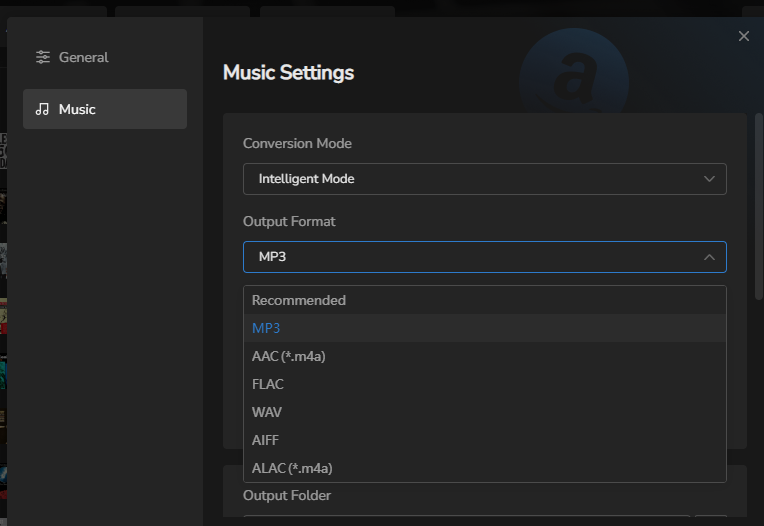
The tool supports six audio formats, including MP3, AAC, WAV, FLAC, AIFF, and ALAC, with bitrates of up to 320kbps. In our testing, we mainly used MP3 as the output format and consistently selected 320kbps in the export settings.
For most tracks, the resulting audio files matched the quality settings we selected. However, we also notice that a small number of songs were saved with 256kbps. This variation may be related to the source of the tracks. We also noticed three conversion modes in the settings: Intelligent Mode, Record Mode, and YouTube Mode.
When TunePat cannot directly access certain Amazon Music resources, it may switch to a recording-based or YouTube-based method, depending on the selected mode. This could explain why some output files may not always match the selected quality setting.
Metadata and Organization
In most cases, essential information such as song title, artist name, album, and track number was preserved correctly after conversion. Album artwork was also retained for the majority of tracks, which helps keep the local library visually organized.
We tested multiple playlists and albums, and the tagging results were generally reliable. Converted files were automatically sorted into folders based on the chosen output settings, which made it easy to locate and manage downloaded music without additional manual organization.
In 3 tracks, we observed incomplete metadata tags. But this does not seem to be a significant issue and may be related to the source content from Amazon Music. When metadata is missing, it can be manually completed using the built-in tag editor.
Pricing and Free Trial
TunePat Amazon Music Converter offers a free trial version that allows users to download and experience the first minute of each song for testing purposes. However, the trial functionality is quite limited.
| Feature | Trial Version |
| Full Song Download | Only the first minute of each track |
| Access to the Full Interface | Yes |
| Up to 10× Faster Batch Conversion | No |
| Preserve Original Audio Quality and Full ID3 Tags | No |
| Audio Format Converter | No |
| Audible Audiobook Conversion | No |
| One-Click CD Burning & ID3 Tag Editing | No |
To unlock unlimited conversion, users need to upgrade to a paid subscription. The pricing plans are as follows:
| 3-month Plan | $29.95 |
| 1-year Plan | $44.95 |
| Lifetime Plan | $89.90 |
TunePat Amazon Music Converter requires users to purchase at least a 3-month subscription in order to use the full version. For users with only short-term needs, this pricing structure may not feel very flexible or user-friendly. In addition, the lifetime license is slightly more expensive compared to some similar competing products.
If TunePat’s pricing or feature set does not fully meet your needs, you can compare it with other options in our TunePat Amazon Music Converter alternatives guide.
Final Verdict: Is TunePat Amazon Music Converter Worth Buying?
| Amazon Music Downloading | Song, Album, Playlist & Podcast |
| Output Formats | MP3, AAC, WAV, FLAC, AIFF, ALAC |
| Metadata Retention | ✅ |
| Batch Download | ❌ |
| Output Quality | Up to 320kbps |
| Pricing | 3-month Plan-$29.95 1-year Plan-$44.95 Lifetime Plan-$89.90 |
By this point, you should have a clear understanding of what TunePat Amazon Music Converter offers and how it performs in real-world use. So, is it worth buying?
In terms of subscription pricing, we believe it is more suitable for users who regularly download playlists and tracks, as they are more likely to benefit from its subscription plans.
From a functional perspective, TunePat is an average-performing tool. Compared with audio recording methods and some less stable online tools, it does provide more reliable conversion performance and a straightforward user experience. However, when compared with other similar products, it does not offer many standout features. If you do not want to spend additional time comparing numerous alternatives, TunePat can still be a practical and convenient choice.