

To enjoy Spotify songs offline, many users consider using third-party downloaders, particularly if they do not want to subscribe to Spotify Premium. Sidify Spotify Music Converter is one of the most popular choices. But is it truly safe? Is it still worth buying in 2026? Does any alternative exist?
Read on for our honest Sidify Spotify music converter review. We will evaluate output music quality, efficiency, stability, and more aspects with details to help you determine if it meets your needs before you try it.
- A Quick Verdict (30-Sec Checklist)
- What is Sidify Spotify Music Converter?
- Is Sidify Legal and Safe to Use?
- Sidify Pricing: Is It Free & How Much Does It Cost?
- Our Test Experience of Sidify Spotify Music Converter
- Real User Reviews
- Best Alternative to Sidify: TuneFab Spotify Music Converter
- FAQs About Sidify Spotify Music Converter
- Final Verdict: Is Sidify Still Worth Buying in 2026?
A Quick Verdict (30-Sec Checklist)
Based on our latest review of Sidify Music Converter for Spotify, covering testing on Windows and Mac, here is a quick summary to help you decide instantly.
Tips: If this is not the tool you are looking for, you can also skip to its best alternative and learn more.
| Overall Rating | ⭐⭐⭐⭐☆ (4.5/5) |
| Best for | Spotify Free users who want to convert Spotify songs or small playlists without Premium for offline playback or backup with no ads. |
| Not Best for | Heavy users who regularly handle long playlists (200+ tracks) and require 100% stability during batch processing. |
| Main Pros | ✔ Convert Spotify music to 6 formats. ✔ Support both Spotify Free and Premium users. ✔ Preserve ID3 tags, album art, and lyrics. ✔ Enable truly offline listening on any device. ✔ Deliver up to 10X faster batch conversion speed. ✔ Provide extensive customizable settings. |
| Main Cons | ❌ The free trial is limited to the first 1 minute of each track. ❌ The starting price is relatively high. ❌ May become unstable or fail when processing very large playlists. |
| Final Take | Sidify is still a solid choice in 2026 if you need a reliable Spotify converter for PC and Mac, but it is not the best fit for users expecting a fully free or bulk download solution. |
What is Sidify Spotify Music Converter?
Sidify Spotify Music Converter is a popular desktop software among audiophiles that can download Spotify songs, playlists, and podcasts, then convert them into DRM-free formats like MP3, FLAC, WAV, etc. Whether you use a Spotify Free or Premium account, it allows you to keep Spotify music offline permanently on any device without hassle.
Spec Info
- Compatible OS: Windows 8, 10, 11 (32-bit & 64-bit), macOS 11 or later.
- Latest Version: V4.5.1 (Updated June 2026)
- Audio Source: Spotify web player, Spotify app.
- Input Audio: Spotify tracks, albums, playlists, podcasts, radio, and audiobooks.
- Output Audio: DRM-free MP3, AAC(.m4a), FLAC, WAV, AIFF, ALAC
Is Sidify Legal and Safe to Use?
You may hesitate before trying, wondering if Sidify Spotify Music Converter software is legal and safe to use.
Is it legal? Sidify Music Converter for Spotify itself is legitimate software, but you must ensure that you only use downloaded tracks for personal offline use. Distributing, reselling, or using copyrighted content for commercial purposes violates both local copyright laws and Spotify's Terms of Service.
Although the legal risks are generally low when used for personal listening and backup purposes, they are not zero. Therefore, it is highly recommended to always check your local laws before using any Spotify music converter.
Is it safe? Based on our testing, Sidify Spotify Music Converter is generally safe if you download the installer from the official website. We did not detect bundled malware or hidden adware during installation and conversion tests. The real danger is not Sidify itself, but cracked versions, which may spy on your personal credentials.
Sidify Pricing: Is It Free & How Much Does It Cost?
So, is Sidify Spotify Music Converter free? Not exactly. We were initially misled by the "Free version" listed on its official website. However, our testing revealed that it is only a limited trial version, not a truly free tool. To unlock all features, an upgrade to the paid version is required.
Sidify Pricing (As of June 2026):
| Plan | Free Trial | 1-Year Plan | Lifetime Plan |
| Price | $0 | $44.95 | $89.90 |
| Supported OS | Windows | Windows, Mac | |
| Conversion length | First 1 minute per track | Full track | |
| Output Quality | Lossy | Lossless | |
| Batch Conversion | ❌ Not Supported | ✔ | |
| Speed | 1X | Up to 10X | |
| Full ID3 Tags | ❌ Basic only | ✔ | |
| Best For | Testing software features on short clips | Long-term audiophiles who need unlimited access | |
Note: Sidify does not offer a monthly subscription. Compared to its competitors, the starting price is quite high. However, if you plan to use the software for years, the lifetime plan at $89.90 is fairly reasonable.
Our Test Experience of Sidify Spotify Music Converter
In this 2026 Sidify Spotify Music Converter review, we put the software to the test on both Windows and Mac to see how it actually performs in real-world scenarios.
How We Tested Sidify Spotify Music Converter
- Test Device: Windows 11 PC, macOS 15
- Test Samples: A single track, a 100-track playlist, a 200-track playlist
- Spotify Account: Spotify Free and Premium accounts
- Output Settings: 320kbps MP3
- What We Tracked: Conversion speed, audio quality retention, ID3 tag accuracy, and overall stability.
User Interface (UI)
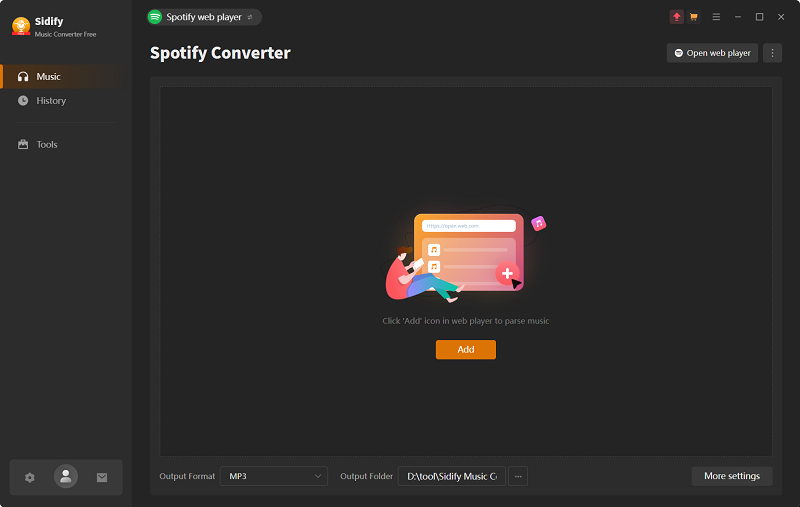
Sidify Spotify Music Converter software features a clean and intuitive layout with the navigation sidebar on the left and the main area for adding and converting music on the right. There is no cluttered menu, so even first-time users like us can quickly get started. Moreover, it integrates the official Spotify web player, making our entire conversion testing process seamless.
Download Singles, Albums, and Playlists
We conducted separate tests using a single track, a 100-track playlist, and a 200-track playlist to assess Sidify Spotify Music Converter's parsing and processing capabilities.
Step 1. Run Sidify and open the built-in Spotify web player.
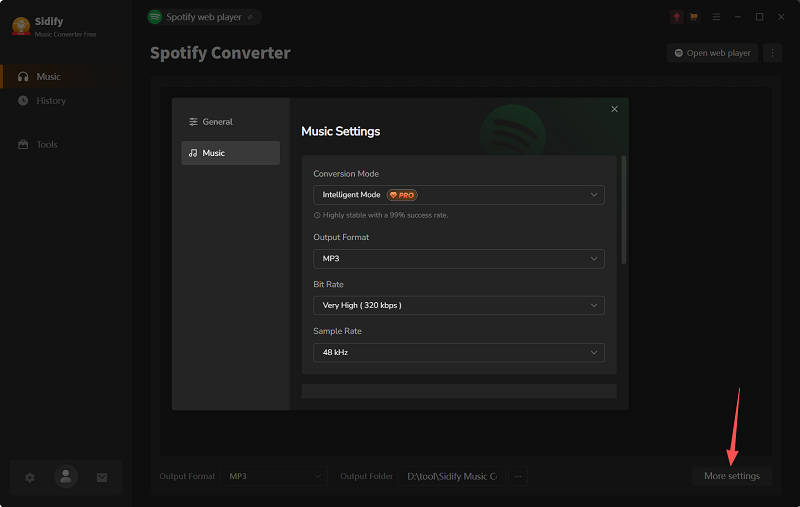
Step 2. Click on "More Settings" to adjust output format (MP3), bitrate (320kbps), and sample rate (48kHz).
Step 3. Navigate to the track/playlist on the Spotify web player and click the floating "+" icon to fetch music information. Then, select the wanted songs from the list.
Note: Sidify does not offer a button for parsing single tracks.
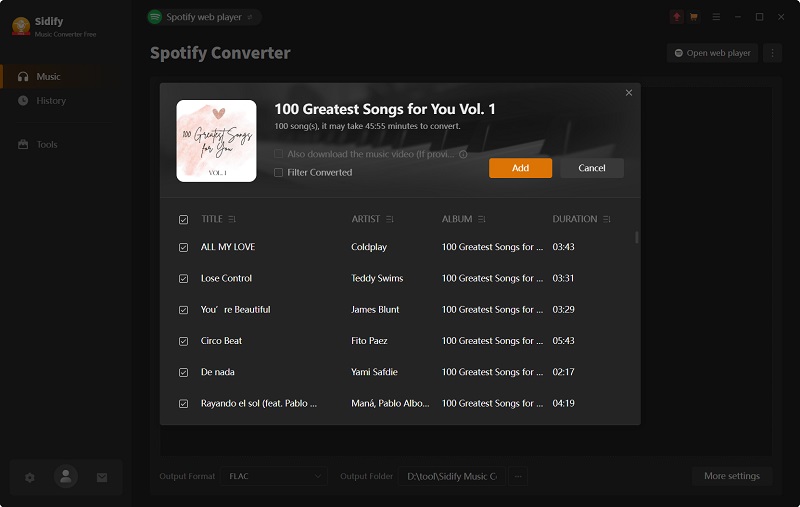
Step 4. Download Spotify music for offline playback with ease.
Test Results
- Single Track (3:41): ~ 20s
- 100-Track Playlist: ~ 53 minutes, 9 failures.
- 200-Track Playlist: ~ 2 hours, success rate of around 70% only.
Output Format, Audio Quality, and Metadata
After conversion, we transferred DRM-free audio files to MP3 players, car stereos, iPhones, and iPods. Across all devices, the tracks played smoothly with HD offline playback.
By default, Sidify converts Spotify music to MP3 at 256kbps quality. Additionally, it also allows users to customize the output to MP3 or AAC, ranging from 128kbps to 320kbps, or opt for lossless formats like FLAC, WAV, AIFF, and ALAC (up to 24-bit & 192kHz).
As for metadata retention, titles, artists, album art covers, and even lyrics (if provided) were preserved and accurately embedded into the local files.
Conversion Speed and Stability
When we handled a single track, the whole conversion process was fast and stable, taking around 20 seconds, which was close to what it advertised (10X).
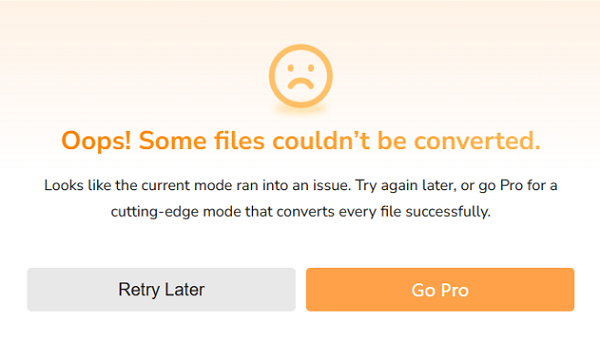
However, when it comes to a playlist with 200+ tracks, it was different. During our first attempt, an error message popped up saying, "Oops! Some files couldn't be converted". After restarting the software, the second attempt worked, and the playlist was analyzed in roughly 6 seconds. But the actual conversion speed was much slower than expected. We also observed a significant spike in CPU usage, which surged to around 67%. This makes it not an ideal Spotify playlist downloader for managing a large library.
Additional Tools Available
On its "Tools" tab, we found several practical free tools that can improve the offline playback experience, including: Format Converter, Burn CD, Tag Editor, Audio Editor, and AA/AAX Converter (Paid).
Real User Reviews
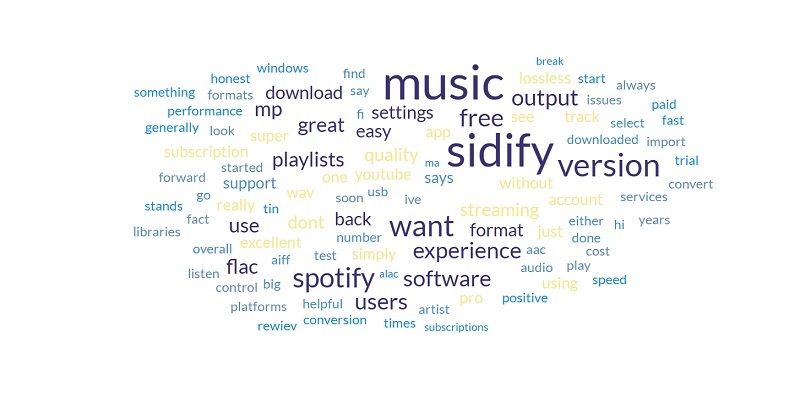
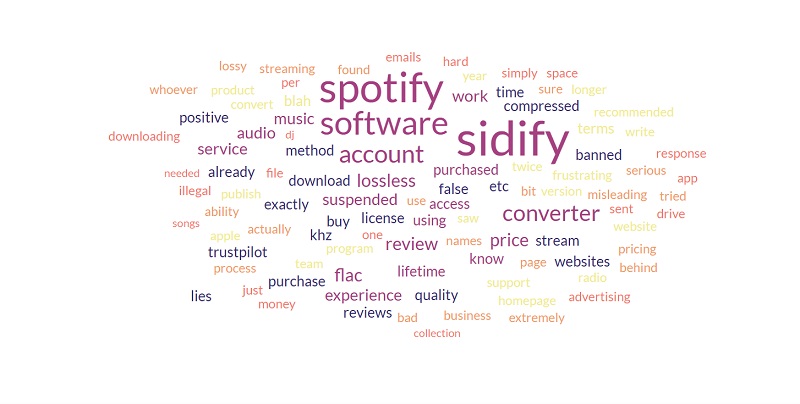
As of June 2026, Sidify Spotify Music Converter has received an overall rating of 4.1 out of 5 on 816 user reviews on Trustpilot, with 61% of users awarding it 5 stars and 22% leaving a 1-star rating. Here is our breakdown of the most common positive and negative feedback shared by users.
What Users Love About Sidify
- Intuitive interface, making it easy to use.
- Ability to convert Spotify music to MP3 and other formats like FLAC, AAC, WAV, and M4A.
- Consistent high output audio quality.
- Efficient for small-scale playlists.
What users complain about
- Occasional stability issues or failed conversions during batch processing of large playlists.
- Laggy customer support.
- Account suspension risks.
Best Alternative to Sidify: TuneFab Spotify Music Converter
According to our review of Sidify music converter for Spotify, we found that although the tool delivers high customization and decent audio quality, it may not be powerful enough for those who manage thousands of tracks. If you are frustrated by the 10X speed limit or if you frequently encounter conversion errors when downloading long public playlists, then a reliable alternative like TuneFab Spotify Music Converter may be worth considering.
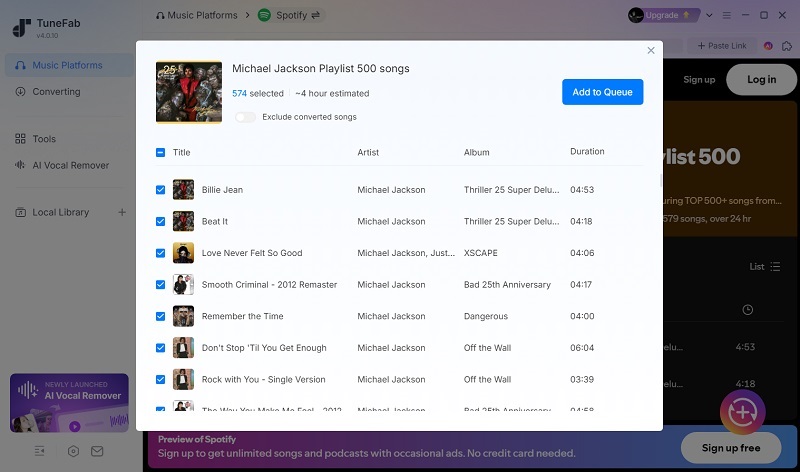
Similarly, it works on Windows and Mac, enabling you to batch convert singles, albums, playlists, and podcasts from Spotify to MP3, AAC, FLAC, WAV, AIFF, and ALAC while preserving the original audio quality and ID3 tags.
Notably, TuneFab offers conversion speeds of up to 35X, making it one of the fastest Spotify to MP3 converters we tested. A 3:41 track can be parsed and downloaded in just 8 seconds. On top of that, there are no limits on playlist capacity. We tested a 500-track playlist, and it handled the entire process without issues. As for pricing, TuneFab provides greater flexibility with a monthly subscription tier starting at just $25.95, providing a lower starting cost.
What Can You Get from TuneFab Spotify Music Converter?
- Compatible with both Spotify Free and Premium accounts.
- Batch process Spotify playlists at 35X faster speed.
- Integrated Spotify web player available for seamless conversion with the best success rate.
- No DRM or playback restrictions on downloaded files.
- Parameter customization settings to your favor, such as MP3 in 320kbps & 48kHz or FLAC in 24 bit.
- Preserve full ID3 tags for every Spotify track.
- Highly customizable archive rules for output files.
More Detailed Reading: TuneFab Spotify Music Converter: Hands-on Review
Sidify vs TuneFab Spotify Music Converter: Side-by-Side Comparison
| Feature | Sidify | TuneFab |
| Free version | First 1 min per track | 3 full tracks |
| Pricing | $44.95/year, $89.90/lifetime | $25.95/month, $79.95/year, or $99.95 lifetime |
| Output formats | MP3, AAC(.m4a), FLAC, WAV, AIFF, ALAC | MP3, AAC, FLAC, WAV, AIFF, and ALAC |
| Playlist support | Good for ≤200 tracks | Stable for 500+ tracks |
| Conversion Speed | Up to 10X | Up to 35X |
| Metadata | Full ID3 tags and lyrics | Full ID3 tags and lyrics |
| Best for | Process small-scale music backup | Back up a huge music library at a fast speed |
| Main limit | Occasional stability issues on large playlists | No CD burning feature; Higher annual or lifetime cost. |
FAQs About Sidify Spotify Music Converter
Can Spotify detect Sidify and suspend my account?
Generally, Spotify does not directly detect Sidify Spotify Music Converter because the software does not modify Spotify's servers. However, based on the user reviews on Trustpilot and Reddit, if you keep batch processing large playlists in a short period, Spotify may flag this action as abnormal account behavior, triggering account suspension.
Does Sidify work with Spotify Free accounts?
Yes, Sidify supports both Spotify Free and Premium accounts, letting users download Spotify music without Premium.
Why is Sidify Spotify Music Converter not working?
If Sidify Spotify Music Converter stops working, it is usually because of a slow internet connection, insufficient storage space, or Spotify API changes. In most cases, updating Sidify Spotify Music Converter to the latest version resolves the issue.
Final Verdict: Is Sidify Still Worth Buying in 2026?
After reading this Sidify Spotify Music Converter review, you likely have your answer. Sidify Music Converter for Spotify offers rich customizable options and lets users easily download Spotify music for offline use. However, when handling large playlists, its stability and efficiency may drop. Also, its starting subscription cost to unlock its full download feature can be a bit pricey.
For frequent bulk playlist downloads or a lower cost, TuneFab Spotify Music Converter may be a better alternative. It delivers up to 35X faster batch download speeds and a more affordable monthly plan, although its lifetime license is slightly more expensive than Sidify's.
So, try Sidify's free trial first. Then decide based on your playlist size and budget.