

Soundloaders is a browser-based Spotify downloader that is often mentioned by users looking for a free way to download Spotify songs online. According to its website, users can download Spotify songs, playlists, albums, artists, podcasts, episodes, and shows without requiring a Spotify login or software installation. It also claims to provide Spotify MP3 downloads at up to 320kbps while preserving full metadata and cover art.
Instead of simply repeating the official feature list, we tested Soundloaders ourselves, compared its claims with publicly available information, and reviewed feedback from real users to see where it performs well and where it falls short.
Note: If you're searching for Soundloaders on Google, be aware that many older articles still reference soundloaders.com. At the time of writing, that domain no longer hosts the Spotify downloader. The currently active website is soundloaders.app.
Soundloaders Test Results: Does It Deliver What It Promises?
To see what you can really expect from Soundloaders and whether its performance matches the claims on its website, we conducted a series of real-world tests. Our evaluation covered download success, track completeness, bitrate, metadata preservation, and overall download time.
Testing Environment
| Device | Windows 10 |
| CPU | Intel Core i7 |
| RAM | 16GB |
| Network | 26 Mbps Wi-Fi |
| Browser | Chrome |
Claim#1 Can Soundloaders Download Every Type of Spotify Content?
Soundloaders advertises support for downloading Spotify songs, playlists, albums, artists, podcasts, episodes, and shows. To verify this claim, we tested each supported content type individually.
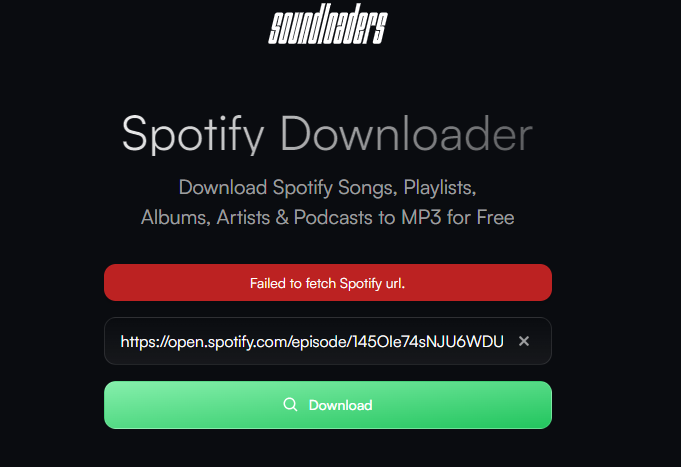
During testing, Soundloaders successfully recognized and converted song, playlist, album, and artist URLs. However, podcast, episode, and show links consistently failed to parse. As a result, we couldn't download any of these types of content.
Once a supported link was successfully parsed, clicking the Download button redirected us to a download options page. There, Soundloaders provided three download choices:
Download MP3
Download HD Cover
Download 320kbps / FLAC / AAC
We tested all three options. Both Download MP3 and Download HD Cover worked as expected. However, selecting 320kbps / FLAC / AAC redirected us to an advertising page instead of initiating the download. We weren't able to download any files in these formats.
Verdict
Soundloaders successfully processed song, playlist, album, and artist URLs during our testing, but it failed to parse podcast, episode, and show links. Although the website displays additional download options such as 320kbps, FLAC, and AAC, MP3 was the only format available throughout our testing.
Claim#2 Does Soundloaders Really Deliver 320kbps Audio?
Audio quality is one of the biggest concerns with free online Spotify downloaders. According to the Soundloaders website, downloaded files can reach up to 320kbps while preserving complete metadata and album artwork.
In our testing, most of the downloaded songs were displayed as 320kbps, while a few were only 128kbps. This is consistent with feedback we've seen from users on platforms like Reddit, where some users speculate that the audio may originate from YouTube sources. If that's the case, the final bitrate will ultimately depend on the quality of the original source, meaning Soundloaders cannot guarantee that every song will be delivered in true 320kbps quality.

It's also worth noting that the bitrate displayed in a file's properties doesn't necessarily reflect the quality of the original audio source. We did not perform spectrogram analysis or other advanced audio quality tests, so we can't confirm whether the downloaded files truly deliver original Spotify streaming quality. If audio fidelity is your top priority, you may want to perform additional verification yourself or consider a desktop Spotify music converter that offers more consistent output quality.
We also examined the downloaded MP3 files individually. Essential metadata, including the song title, artist, album, and ID3 tags, was accurately preserved in our samples. Album artwork was embedded in the files and could also be downloaded separately in high resolution.
Verdict
Soundloaders performed well in preserving metadata and cover art, and most downloaded tracks were displayed as 320kbps. However, the advertised "up to 320kbps" should be understood as a maximum possible quality rather than a guaranteed bitrate for every download.
Note: Some users have reported that downloaded Spotify songs with Soundloaders were shorter than the original Spotify versions. We paid close attention to this in our tests and found that every song we downloaded matched the original track length. That said, our testing covered only a limited number of samples, so we cannot guarantee that every download will always be complete. It's still worth checking the duration of downloaded files, especially when saving longer tracks or playlists.
Claim#3 How Fast Is Soundloaders?
For users planning to download large playlists or albums, conversion speed is only part of the experience. Overall download efficiency is equally important.
Soundloaders recognized and converted song, playlist, and album URLs within approximately 5–7 seconds. Once a link was parsed, downloading each song took around 20 seconds on average, although the actual speed may vary depending on server availability, internet connection, and the size of the playlist or album.
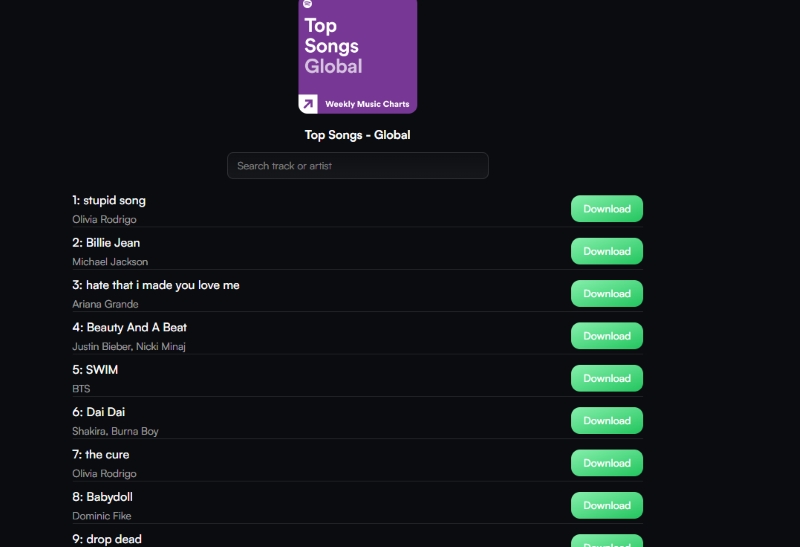
However, we also found a significant limitation. While Soundloaders supports playlist and album links, it doesn't offer one-click batch downloading. Instead, every track must be downloaded individually. There is no option to download an entire playlist or album at once as a ZIP file, despite playlist support being advertised on the website.
Verdict
Soundloaders provides fast link parsing and acceptable download speeds for individual songs. However, if you're downloading dozens or even hundreds of tracks, having to download every track individually makes the process much less efficient than using a dedicated desktop Spotify music converter.
Claim#4 Is Soundloaders Really Unlimited and Easy to Use?
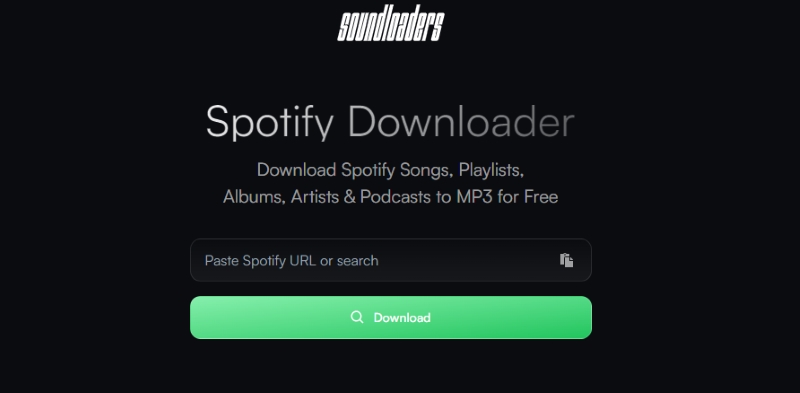
Ease of use is another important factor when evaluating an online Spotify downloader. Throughout our testing, Soundloaders was completely free to use and didn't require installing software or logging into a Spotify account. Users can simply paste a Spotify link into the search box, wait for it to be parsed, and start downloading.
The interface is clean, straightforward, and beginner-friendly. Even users who have never used an online Spotify downloader before should have no difficulty navigating the site. Unlike many free online downloaders that impose daily download limits or require account registration, we didn't encounter any usage restrictions during our testing.
Verdict
As far as we could verify, Soundloaders does allow unlimited downloads. This was one of the few official claims that consistently matched our test results. That said, "unlimited" shouldn't be interpreted as guaranteed long-term availability. As an online service, Soundloaders' accessibility and performance may change over time depending on the service's availability.
What Are the Downsides of Using Soundloaders?
Online Spotify downloaders like Soundloaders are popular because they're free, require no installation, and work directly in a browser. However, our testing also revealed several limitations that users should keep in mind before relying on the service.
Long-term reliability isn't guaranteed. Since Soundloaders is an online service, its domain, availability, and download performance may change over time. As discussed earlier, the official website has already changed from soundloaders.com to soundloaders.app. This change highlights that browser-based tools may not always provide a stable long-term solution.
Ads and redirects can interrupt the experience. Like many free online tools, Soundloaders relies on advertising to support its service. While this is understandable for a free service, pop-up ads and redirect pages can make the download experience less efficient, especially when downloading multiple songs.
Audio quality can vary from one download to another. Unlike desktop Spotify converters, Soundloaders doesn't let you choose the output format or bitrate before downloading. As a result, users can't verify the actual output quality until after the download is complete, and even then, the displayed bitrate doesn't necessarily reflect the quality of the original audio source.
The original audio source isn't transparent. Soundloaders doesn't explain where its downloadable audio comes from or how files are obtained. While this doesn't necessarily make the service unsafe, it makes it difficult to evaluate the consistency of the downloaded audio quality or determine whether every downloaded track matches the original Spotify version.
Safety extends beyond malware detection. During our testing, we didn't encounter malware or forced software installation. However, evaluating a service's safety involves more than checking for malware. Users should also consider the service's privacy practices, transparency, download sources, and compliance with Spotify's Terms of Service.
Who Is Soundloaders Best For?
After testing Soundloaders, we don't think it's the right downloader for every user. If you only need to save a few Spotify songs occasionally, Soundloaders is a reasonable option. It works entirely in a web browser, doesn't require software installation or a Spotify login, and is quick enough for casual downloads. For users who simply want a free and convenient way to download a few songs occasionally, it performs well.
However, if you regularly download playlists or albums, or you're building a long-term offline Spotify music library, its limitations become increasingly apparent. In this case, a desktop Spotify music converter is the more dependable choice.
If Soundloaders is not working for you, or if you need a more stable way to download Spotify playlists or albums, a desktop Spotify music converter like TuneFab Spotify Music Converter may be a better fit. It offers batch downloading, more output format options, and more predictable download performance, which makes it more suitable for users who manage a larger offline Spotify music library. Ultimately, the decision isn't about which tool is objectively better, it's about choosing the one that best fits how you actually download and manage your Spotify music.
Final Verdict: Is Soundloaders Worth Using?
Soundloaders succeeds in what it sets out to do: providing a quick, browser-based way to download Spotify songs without requiring software installation or a Spotify login. However, our testing also revealed that convenience comes with uncertainty.
The key question isn't whether Soundloaders can generate downloadable MP3 files—it can. The more important question is whether it can consistently deliver the advertised audio quality, handle large playlist downloads efficiently, and remain reliable over time.
If you only need to save a few songs occasionally, Soundloaders is a convenient option worth trying. If you're building a large offline Spotify music library and expect reliable batch downloads, consistent metadata, and predictable audio quality, a dedicated desktop Spotify music converter like TuneFab Spotify Music Converter is likely to offer a more dependable long-term experience.