

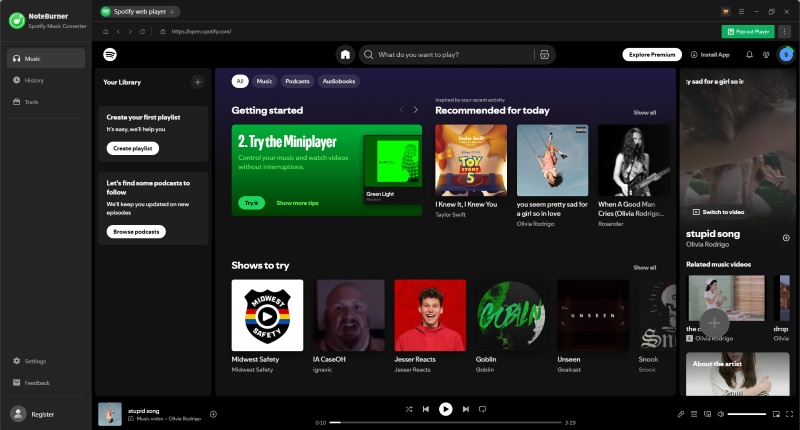
NoteBurner Spotify Music Converter has long been one of the best Spotify music converters. However, with similar tools like Sidify and TunePat offering comparable features, many users wonder whether NoteBurner Spotify Music Converter is still worth paying for in 2026.
To answer that question, we tested the current free trial version of NoteBurner Spotify Music Converter (v4.6.0) and combined our findings with official information and real user feedback. In this review, we'll examine its audio quality, trial limitations, conversion performance, playlist handling, and overall user experience to see whether it provides enough value to justify the subscription.
- Does NoteBurner Spotify Music Converter Deliver the Promised Output Quality?
- App Mode vs Web Player Mode: Do They Really Work the Same Way?
- 1-Minute Trial: Is It Enough to Evaluate NoteBurner?
- Playlist and Library Test: Is It Suitable for Long-Term Collectors?
- User Feedback: What Users Like and What Concerns Them
- NoteBurner vs TuneFab: Which One Gives You More Proof Before Paying?
- Final Verdict
Does NoteBurner Spotify Music Converter Deliver the Promised Output Quality?
Audio quality is one of the biggest concerns surrounding Spotify music converters. While NoteBurner Spotify Music Converter claims to preserve original quality and supports MP3, AAC, FLAC, WAV, AIFF, and ALAC formats, many users still wonder whether the converted files actually sound as good as expected and whether the advertised output settings are reflected in the exported files. To evaluate these claims, we tested NoteBurner Spotify Music Converter under the following conditions.
Testing Environment
| Device | Windows 10 |
| CPU | Intel Core i7 |
| RAM | 16GB |
| Network | 26 Mbps Wi-Fi |
| Test Version | 4.6.0 |
| Spotify Plan | Free |
| NoteBurner Account | Free trial |
| Test Library | Playlist (50 songs), Album (29 tracks), Podcast (1 episode) |
| Output Format | MP3 |
| Bitrate Selected | 320 kbps |
What We Found
In our test, the exported MP3 files retained the expected 320kbps bitrate, with each track averaging around 2.2 MB in size.
Beyond bitrate measurements, we also analyzed the frequency spectrum of the converted files. While the bitrate information indicates a standard 320kbps encoding, the spectral analysis showed some differences compared with Spotify's original streams.
In practical listening tests, these differences were not easy to notice. In casual playback tests, the converted files did not show obvious distortion or artifacts, and the overall listening experience remained consistent with typical 320kbps audio quality. For everyday listening and local music library management, the output quality is generally sufficient.
Note: Our tests were conducted using the current free trial version of NoteBurner Spotify Music Converter, which converts only the first minute of each track. While no obvious quality issues were observed, the consistency of audio quality across full-length conversions and other formats still requires further evaluation.
App Mode vs Web Player Mode: Do They Work the Same Way?
NoteBurner Spotify Music Converter provides two different conversion modes: Spotify App mode and Spotify Web Player mode. While both are designed to download and convert Spotify music, they do not necessarily work in the same way, and this difference can affect speed, stability, and overall user experience.
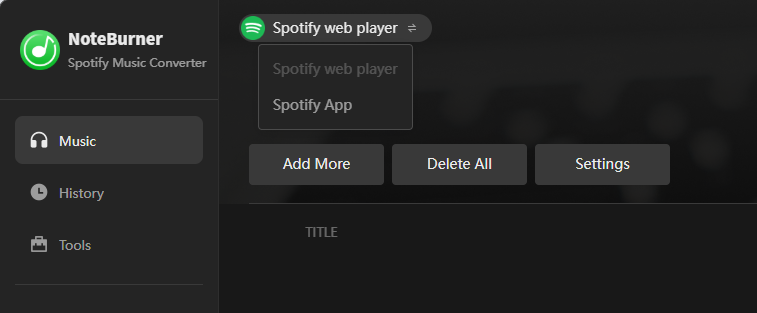
Web Player Mode
In this mode, NoteBurner Spotify Music Converter runs through an embedded Spotify web interface. Users can log in, browse playlists, and directly select songs or albums for conversion.
During testing, the built-in web player was able to correctly load playlists and albums without issues. Tracks could then be added to a queue for batch conversion, making it suitable for straightforward downloading workflows.
From a technical perspective, this mode behaves more like a browser-based extraction process, where the software processes audio content through the web player interface rather than relying on the native Spotify desktop application.
As a result, overall conversion speed and download stability are more closely tied to network conditions and the software's processing efficiency during batch tasks.
App Mode
App Mode works differently from the Web Player approach. Instead of using an embedded browser, it works with the official Spotify desktop application and appears to rely more on playback-based processing.
In other words, rather than directly processing content through a web interface, this mode depends more on Spotify desktop playback during conversion. This may offer more consistent results in some cases, but it can also make the workflow slower when processing large playlists.
However, this mechanism also introduces different trade-offs. Since tracks are processed in real time, batch conversion of large playlists may take longer compared to the Web Player mode. Users who prioritize speed and large-scale playlist handling may find this workflow less efficient.
1-Minute Trial: Is It Enough to Evaluate NoteBurner?
In some older reviews and online discussions, it is mentioned that NoteBurner's trial version previously allowed conversion of up to three minutes of each track. However, in our testing with version 4.6.0, the current trial is limited to only the first minute of each song. At the same time, the trial version also comes with several functional restrictions compared to the full version.
| Features | Free Trial | Upgrade to Pro |
| Full song conversion | First minute only | √ |
| Access to full interface | × | √ |
| Up to 10x faster batch conversion | × | √ |
| Keep original quality with full ID3 tags | × | √ |
| Format converter | × | √ |
| Convert Audible audiobooks | × | √ |
| One-click CD burning & ID3 tag editor | × | √ |
| Free updates & VIP 1-on-1 support | × | √ |
While the trial still allows users to install the software and experience the basic workflow, it provides limited insight into:
- Full-length audio quality
- Stability when processing large playlists
- Long-term reliability during regular use
Playlist and Library Test: Is It Suitable for Long-Term Collectors?
Many people use Spotify converters not just for individual songs, but for building local music libraries, organizing playlists, or preparing DJ collections. During our tests, NoteBurner Spotify Music Converter was able to parse and add all songs in the tested playlists and albums to the download list within 5 seconds. After downloading, we checked the local files and found that all song information was successfully recognized and preserved, including:
- Album Name
- Album Artwork
- Track Title
- Artist Name
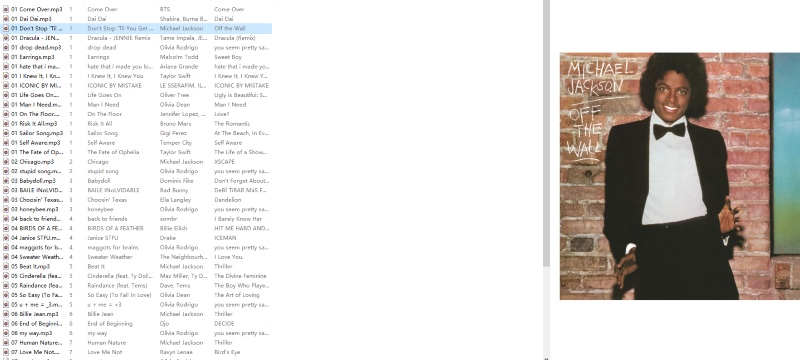
The software also offers a Tag Editor, allowing users to batch import converted songs and edit ID3 tag information, which can be useful for managing large music collections.
It is also worth noting that during our testing, we could not find any dedicated option for simultaneous downloads. NoteBurner Spotify Music Converter does support dragging an entire playlist (up to around 500 songs) into the conversion list at once. However, once the conversion process starts, tracks are downloaded one by one rather than simultaneously, which means multiple songs cannot be downloaded in parallel to improve speed. As a result, users planning to archive hundreds of tracks may need to consider this limitation more carefully.
User Feedback: What Users Like and What Concerns Them
As one of the more established Spotify music downloaders, NoteBurner Spotify Music Converter generally enjoys a solid reputation among users. Reviews on Trustpilot and discussions on Reddit frequently mention its ease of use, high output quality, and long history in the market. However, user feedback also shows that brand recognition alone does not eliminate all concerns. To better understand this tool, we summarized common user feedback from publicly available Trustpilot reviews and Reddit discussions. These comments may vary by software version, operating system, Spotify updates, and individual use cases.
⭐ Positive reviews often highlight:
- An intuitive interface and straightforward workflow
- Satisfactory audio quality for everyday listening
- Support for multiple output formats such as MP3, AAC, FLAC, WAV, and more
- Preserved full ID3 tags and metadata after conversion
💬 Common Concerns
NoteBurner Spotify Music Converter has received highly mixed reviews across forums and review platforms. While there are many positive comments from satisfied users, there are also several frequently reported negative experiences.
- Subscription and refund experience: Although the software offers a 5-day refund policy, some users report difficulties when requesting refunds or delays in customer support responses.
- Account safety concerns: Multiple users have reported that their Spotify accounts were flagged or banned after using NoteBurner. Although there is currently no conclusive evidence that NoteBurner Spotify Music Converter itself directly causes account bans, this remains a point worth paying attention to.
- Download and conversion errors: Some users mention occasional issues such as incomplete playlist downloads or errors when converting specific tracks.
- Compatibility issues after updates: There are reports of temporary instability or reduced functionality after Spotify, macOS, or Windows system updates.
- Trial limitations: Some users also express frustration that the trial version does not fully reflect the software's capabilities, making it difficult to evaluate before purchase.
NoteBurner vs TuneFab: Which One Gives You More Confidence Before Purchase?
By this point, you may already have a basic understanding of NoteBurner. However, if you are still hesitant due to some of the concerns mentioned earlier, it is worth taking a closer look at this section.
To address these concerns about NoteBurner Spotify Music Converter, we selected another popular software, TuneFab Spotify Music Converter, for comparison in the hope of helping you make a more informed decision.
Most of the features of TuneFab Spotify Music Converter are similar to those of NoteBurner Spotify Music Converter, but it offers a slightly more flexible trial experience, which allows users to evaluate the software more thoroughly before making a purchase. So, rather than focusing only on features, the comparison below highlights how each tool supports pre-purchase evaluation.
| Aspect | NoteBurner | TuneFab |
| Brand history | Longer (since 2006) | Shorter (Since 2016) |
| Free Trial | First minute of each song | Three complete songs |
| Playlist Handling | Occasionally unstable on large playlists | Generally stable for standard playlists |
| Batch Download | Supports playlist import, but processes sequentially | Supports simultaneous downloads of up to three tracks. |
| Subscription pricing | 1-year plan: $44.95 Lifetime plan: $89.90 |
1-month plan: $25.95 1-year plan: $79.95 Lifetime plan: $99.95 |
Final Verdict
Based on our testing, official information, and user feedback, NoteBurner Spotify Music Converter did not show major performance issues in our limited test. It remains one of the most recognizable Spotify music converters and continues to be a popular choice among users in 2026, but several purchase-related concerns are still worth noting.
It is suitable for users who prefer well-established brands and need multiple output formats for quick Spotify conversions. However, if you feel that the trial period is too limited for proper evaluation, or if you are not fully satisfied with subscription plans that typically start at one year or longer, it is worth considering alternatives such as TuneFab Spotify Music Converter to help you make a more informed decision.