

Finding a reliable Spotify album downloader is not easy in 2026. Although many tools claim to work, some fail to preserve ID3 tags, others miss tracks during the download process, and some simply stop working due to Spotify updates. Our team spent 7 days testing 10+ popular Spotify album downloaders under the same conditions, across desktop software, online tools, and mobile services. Based on our findings, we've rounded up the 6 best options worth trying.
- Quick Comparison: Best Spotify Album Downloaders Tested
- How We Tested Top Spotify Downloaders for Albums
- Spotify Album Downloaders for PC/Mac (Fast Batch Conversion & Metadata Preservation)
- Online Spotify Album Downloaders (For Small Albums, Not Always Stable)
- Spotify Album Download Apps (Best for Mobile Devices)
- FAQs About Spotify Album Downloads
- Final Verdict: Which Spotify Album Downloader Should You Pick?
Quick Comparison: Best Spotify Album Downloaders Tested
We evaluated each tool on album download success rate, conversion speed, output quality, metadata preservation, batch processing performance, etc. The table below summarizes our hands-on testing results to help you quickly find the right option for your needs.
| Spotify Album Downloader | Rating | Tool Type | Full Album Download | Output Quality | Output Format | Metadata Retention | Batch Download | Best Use Case |
| TuneFab Spotify Music Converter | ⭐⭐⭐⭐⭐ | Desktop | ✔ | Highest | MP3, M4A, WAV, FLAC, AIFF, AAC, and ALAC | ✔ | ✔ | Users wanting permanent local backups, high-quality music libraries |
| SpotDL | ⭐⭐⭐⭐ | Open Source Desktop | ✔ | Medium | MP3, M4A, and OPUS | ✔ | ✔ | Tech-savvy users looking for a 100% free Spotify album downloader |
| SpotiSaver | ⭐⭐⭐ | Online Tool | ⚠ Limited | Medium | MP3 | ✔ Basic | ✔ | Beginner users are avoiding desktop software |
| SpotiDost | ⭐⭐⭐ | Online Tool | ⚠ Limited | Low | MP3 | ✔ Basic | ✔ | Casual users don't care about audio quality |
| Soundbound | ⭐⭐ | Android App | ✔ | Medium | MP3 | ✔ | ✔ | Android users download albums on mobile |
| Telegram Bots | ⭐⭐ | Telegram-Based Service | ⚠ Varies by Bot | Low | MP3 | ✔ Basic | ❌ | Save Spotify album files within the chat app |
If you want to see how each Spotify album downloader actually performs, we have provided detailed reviews below.
How We Tested Top Spotify Downloaders for Albums
Since advertised performance from official websites can sometimes differ from real-world results, we spent a week testing the top Spotify album downloaders under the same conditions to make the comparison more consistent and easier to verify.
Device Testing: Windows 11 PC, macOS Sonoma MacBook Air, Android 17 phone, iOS 26.5 iPhone.
Network Conditions: A stable 500 Mbps wired network/home WiFi network.
Testing Output Settings: We used each tool’s default or best available album-download settings. When custom settings were available, we checked MP3 320kbps and 44.1kHz as one output option.
Spotify Accounts: Spotify Free and Premium accounts.
Test Albums: On My Youth - The 2nd Album by WayV (10 songs), VIEWS by Drake (20 songs)
What We Measured:
- Audio Fidelity
- Metadata Preservation
- Customizable Options
- Batch Download Performance
- Success Rate
- Ease of Use
- Safety
- Pricing
Disclaimer: This guide is intended for informational and personal-use purposes only. Downloading copyrighted content may violate Spotify’s Terms of Service and local copyright laws. Please review Spotify’s terms and your local copyright rules before using any third-party Spotify album downloader.
Spotify Album Downloaders for PC/Mac (Fast Batch Conversion & Metadata Preservation)
Based on our hands-on testing, Spotify album downloaders for PC/Mac remain the most reliable choice for handling large libraries, preserving metadata, and supporting high-quality output formats.
TuneFab Spotify Music Converter
Rating: ⭐⭐⭐⭐⭐(4.8/5)
Work On: Windows, macOS, and web
Best for: Users who want stable full-album downloads with flexible output formats, metadata, track numbers, and cover art
What We Like:
- Supports full Spotify album batch conversion at a fast speed.
- Full ID3 tag and metadata preservation.
- Flexible album archiving methods.
- Saves Spotify albums to MP3, M4A, WAV, FLAC, AIFF, AAC, and ALAC.
- Offers customizable output quality up to 320kbps.
- Works with Spotify Free and Premium accounts.
What We Don't Like:
- The free trial is limited to 3 full song downloads.
- Pricey for casual users.
TuneFab Spotify Music Converter is able to help you download music from Spotify to your Windows PC and Mac to build your permanent local music library. Unlike mobile and online services, TuneFab integrates a built-in Spotify web player and supports up to 35X batch conversion of entire albums, making the whole process efficient. The free trial lets users download 3 full songs, so they can test the workflow before upgrading.
During our testing, we added multiple albums to the download queue at once, and it was able to process and download them with a single click. This makes it a stronger option for users who need full-album downloads with stable metadata and batch processing.
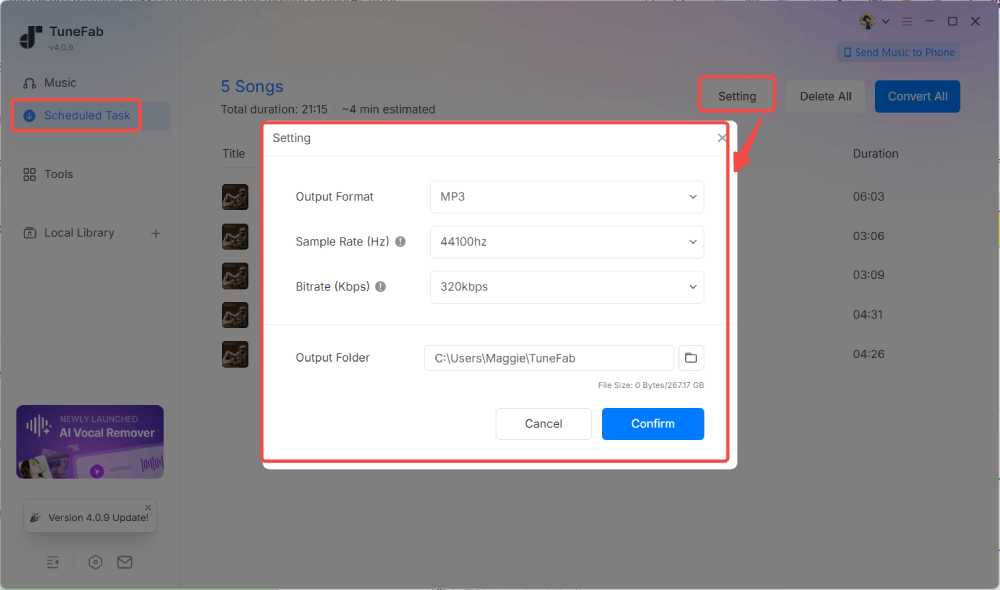
Test Results:
| Test Item | TuneFab Spotify Music Converter |
| Album Source | Spotify Web Player |
| Output Format | MP3, FLAC, WAV, AIFF, AAC, ALAC |
| 320kbps, 44.1kHz MP3 Quality | ✔ |
| Album Cover | ✔ |
| 10-Track Album Test | ✔ ~ 1 minute |
| 20-Track Album Test | ✔ ~ 3 minutes |
| Success Rate | 100% (No download failure during testing) |
| Metadata Preservation | Full ID3 tags, track numbers |
| Ad-free UI | ✔ |
| Album Archiving | Excellent |
| Full Album Tracklist | ✔ |
| Full Review | TuneFab Spotify Music Converter Review: Is It Worth It? |
SpotDL
Rating: ⭐⭐⭐⭐(4.3/5)
Work On: Windows, macOS, Linux
Best for: Tech-savvy users who want an open-source Spotify album downloader with no cost and don't mind using command-line tools.
What We Like:
- Offers a free Spotify album downloading option.
- Preserves ID3 tags, lyrics, and more.
- Provides a flexible and customizable downloading process.
- Matches Spotify album tracks with audio sources such as YouTube Music, then saves the matched files in formats like MP3, M4A, or OPUS.
What We Don't Like:
- Requires a steeper learning curve.
- Relies on YouTube or other matched sources for audio.
- No auto folder sorting for discography archiving.
- Inconsistent audio quality.
If you are comfortable with command-line tools and want a free, open-source option, SpotDL can be worth trying. In our testing, it worked more like a Spotify album matcher than a direct Spotify audio downloader. It reads the Spotify album tracklist and metadata, then finds matching audio sources and saves the matched tracks locally. This makes it flexible for advanced users, but the setup process is more technical than TuneFab, and the final audio quality may vary depending on the matched source.
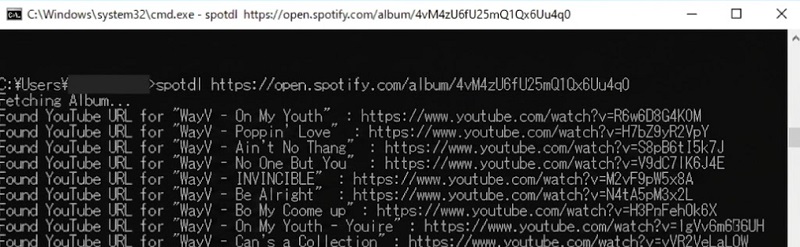
Test Results:
| Test Item | SpotDL |
| Album Source | YouTube |
| Output Format | MP3, M4A, OPUS |
| 320kbps, 44.1kHz MP3 Quality | ❌ Usually save in 128kbps MP3 or 256kbps M4A (YouTube Music Premium required) |
| Album Cover | ✔ |
| 10-Track Album Test | ✔ 4 minutes |
| 20-Track Album Test | ✔ 9 minutes |
| Success Rate | 80% (2 download failures during testing) |
| Metadata Preservation | Full ID3 tags, track numbers, lyrics |
| Ad-free UI | ✔ |
| Album Archiving | Less flexible |
| Full Album Tracklist | ✔ |
Online Spotify Album Downloaders (For Small Albums, Not Always Stable)
Sometimes you don't want to install anything. It is important to note that our testing found that most Spotify album downloaders online struggled with larger albums, failed links, metadata loss, and unstable performance. So, it is best to treat them as convenient backup options rather than long-term album archiving solutions.
SpotiSaver
Rating: ⭐⭐⭐ (3.8/5)
Work On: Web
Best for: Occasional lightweight album rips online, without logins.
What We Like:
- Free to use.
- Includes a clean, intuitive interface.
- Archives a full Spotify album as a ZIP file.
- No Spotify login is required.
What We Don't Like:
- No customizable output settings.
- Supports MP3 only.
- Does not save the track number.
- Output filename includes a "Spotisaver" tag.
In our test, SpotiSaver recognized smaller Spotify album links quickly and exported the album as a ZIP file after we clicked the button labeled “Download Entire Playlist.” However, it only supports MP3 output, adds a “Spotisaver” tag to filenames, and did not preserve track numbers in our downloaded files. This makes it convenient for quick album downloads, but less suitable for users who care about clean album organization.
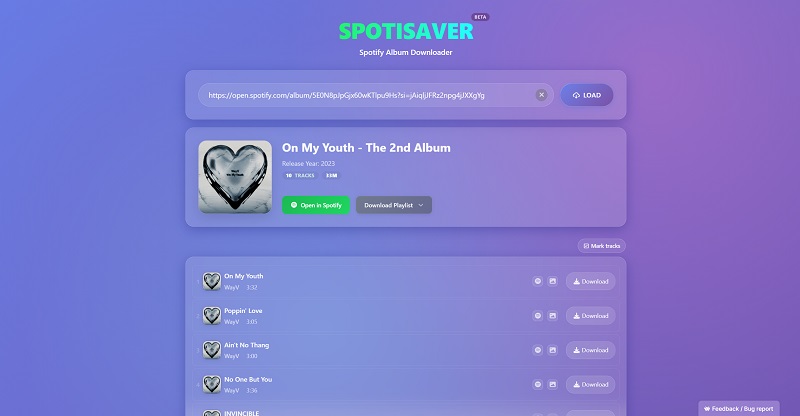
Test Results:
| Test Item | SpotiSaver |
| Album Source | YouTube |
| Output Format | MP3 only |
| 320kbps, 44.1kHz MP3 Quality | ✔ |
| Album Cover | ✔ |
| 10-Track Album Test | ✔ 6 minutes |
| 20-Track Album Test | ✔ 10 minutes |
| Success Rate | 80% (2 download failures during testing) |
| Metadata Preservation | Basic only (artist, album, cover art, release date) |
| Ad-free UI | ✔ |
| Album Archiving | ZIP archive |
| Full Album Tracklist | ❌ |
SpotiDost
Rating: ⭐⭐⭐ (3/5)
Work On: Web
Best for: Occasional lightweight album rips online
What We Like:
- Displays an ad-free interface.
- Efficient Spotify album download process.
- Save the entire album as one compressed ZIP file.
What We Don't Like:
- Offers only up to 132kbps audio quality in our test.
- Filenames include "SpotiDost".
- Provides no customizable settings.
- Requires login, which may be a concern for users who do not want to connect a Spotify account to a third-party tool.
SpotiDost is another popular web-based Spotify album downloader we tested. Similarly, you simply paste the Spotify album URL, and it will fetch all the songs while keeping the original track order intact. In our testing, SpotiDost delivered relatively fast performance. A 10-track Spotify album was downloaded in under 3 minutes. However, after analyzing the downloaded files, we verified that the output audio quality maxes out at 132kbps. Because of this, SpotiDost is not the right choice if you care about premium audio quality.
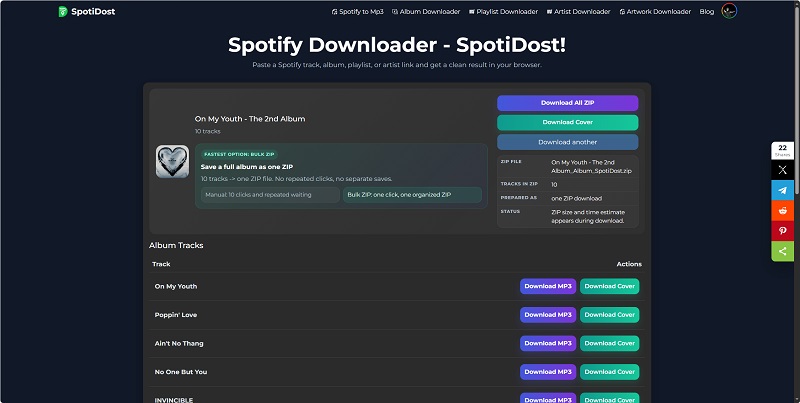
Test Results:
| Test Item | SpotiDost |
| Album Source | YouTube |
| Output Format | MP3 |
| 320kbps, 44.1kHz MP3 Quality | ❌ No higher than 132kbps |
| Album Cover | ✔ |
| 10-Track Album Test | ✔ ~ 3 minutes |
| 20-Track Album Test | ✔ ~ 6 minutes |
| Success Rate | 100%, no download failures during testing |
| Metadata Preservation | Basic only (artist, album, cover art, release date) |
| Ad-free UI | ✔ |
| Album Archiving | ZIP archive |
| Full Album Tracklist | ✔ |
Spotify Album Download Apps (Best for Mobile Devices)
For listeners who want a direct way to download full Spotify album files to mobile devices, some mobile apps and Telegram bots are frequently mentioned in the community. We also did real tests on them.
Soundbound
Rating: ⭐⭐ (2.8/5)
Work On: Android
Best for: Android users who want a free Spotify album downloader app with multi-platform support.
What We Like:
- An open-source, free tool.
- Also works on Windows, Mac, and Linux.
- Features a built-in music player for offline downloads.
What We Don't Like:
- Unstable download process.
- Requires login.
- Output quality was around 129kbps at 44.1kHz in our test.
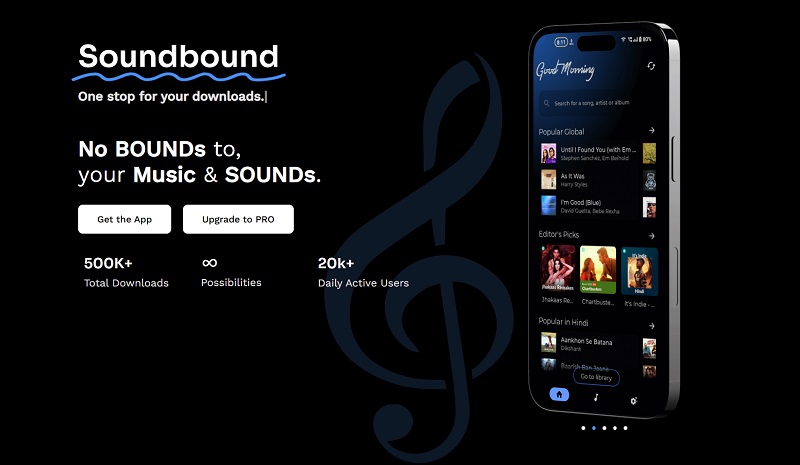
Soundbound, the evolution of SpotiFlyer, allows streaming and downloading songs and albums from Spotify on Android devices. In addition to pasting Spotify album links, it also lets users connect their Spotify accounts, making it easy to download favorite albums directly from their music library. Although the app is available on the Google Play Store, users should still check its permissions, reviews, and update history before installing it.
However, its download performance was less impressive than expected. In our test, the downloaded tracks were around 129kbps at 44.1kHz, which was much lower than the advertised high-definition quality.
Test Results:
| Test Item | Soundbound |
| Album Source | YouTube |
| Output Format | MP3 |
| 320kbps, 44.1kHz MP3 Quality | ❌ |
| Album Cover | ✔ |
| 10-Track Album Test | ✔ ~ 6 minutes |
| 20-Track Album Test | ❌ (Require Soundbound coins to unlock more downloads) |
| Success Rate | 70% (3 download failures) |
| Metadata Preservation | ID3 tags, album cover, lyrics |
| Ad-free UI | ✔ |
| Album Archiving | Manual sorting |
| Full Album Tracklist | ❌ |
Telegram Bots (Use with Caution)
Rating: ⭐⭐ (2.5/5)
Work On: Android, iPhone, Windows, Mac
Best for: Telegram users who want the fastest way to download Spotify albums from mobile devices.
What We Like:
- No installation beyond Telegram.
- Easy and free to use.
- Can respond quickly to Spotify album links.
- Work on all devices with Telegram.
What We Don't Like:
- May become unavailable or unreliable when Spotify changes its access rules.
- Limited batch control and unstable availability.
- The output quality depends on the bot’s source.
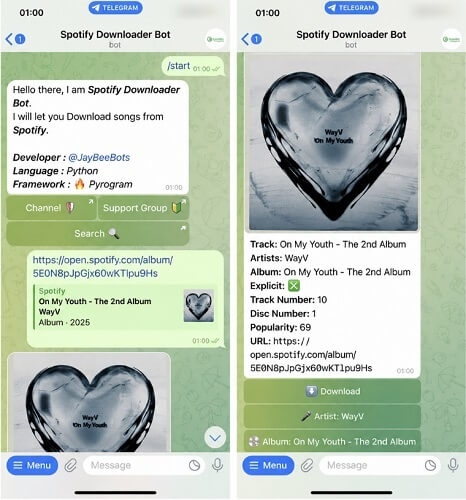
Telegram-based Spotify album downloader bots are popular among mobile users. During testing, we simply pasted Spotify album links into a bot chat and received downloadable tracks within minutes. The experience was surprisingly convenient, especially on smartphones.
However, we verified that the output audio quality was around 128kbps only. Plus, the reliability of these bots remains a concern. During our week-long testing period, we evaluated five different options, but two of them became unavailable before the tests were completed. While this method is frequently recommended by many, we still suggest keeping your expectations low and staying cautious.
Test Results:
| Test Item | Telegram Bots |
| Album Source | YouTube and third-party sources |
| Output Format | MP3, FLAC |
| 320kbps, 44.1kHz MP3 Quality | ❌ Usually save audio in 128kbps only |
| Album Cover | ✔ |
| 10-Track Album Test | ✔ ~ 9 minutes |
| 20-Track Album Test | ✔ ~ 20 minutes |
| Success Rate | 60% (4 download failures) |
| Metadata Preservation | Basic only (artist, album, cover art, release date) |
| Ad-free UI | ✔ |
| Album Archiving | Not supported |
| Full Album Tracklist | ❌ |
FAQs About Spotify Album Downloads
Is it legal to use Spotify Album Downloaders?
The answer depends on how the downloaded content is used and the copyright laws in your region. Actually, many third-party Spotify album downloaders may violate Spotify’s Terms of Service, especially when they bypass access restrictions or save copyrighted tracks as local files. Copyright rules vary by region, so you should review local laws and avoid redistribution or commercial use.
Do I need Spotify Premium to use these downloaders?
Most tools in our test worked with both Spotify Free and Premium accounts. However, some features, login requirements, or higher output settings may vary by tool.
Can Spotify album downloaders preserve the original audio quality?
Output quality varies widely by tool. Desktop Spotify album downloaders for Windows and Mac, such as TuneFab, usually offer more stable output settings, including 320kbps MP3 or FLAC output options, along with better cover art and metadata retention. In our tests, free online tools were more limited in bitrate, track-number preservation, metadata retention, and batch downloading.
Final Verdict: Which One Should You Pick in 2026?
The best Spotify album downloader should do more than save separate audio files. It should keep the album structure, track order, cover art, metadata, and batch-download process as consistent as possible. If you need a free option, SpotDL and SpotiSaver may cover basic album downloads, but each has clear limits: SpotDL requires command-line setup, while SpotiSaver can be less stable with longer albums and metadata.
Based on our tests, desktop tools were more reliable for full-album downloads. TuneFab Spotify Music Converter is a stronger choice for users who need stable batch processing, preserved metadata, cover art, track order, and flexible output formats. Start with the free trial to confirm whether it fits your workflow before upgrading.