

Spotify Deezer Music Downloader was once a popular Chrome extension for saving tracks from Spotify and Deezer. However, it was removed from the Chrome Web Store in 2021. Since archived ZIP or CRX packages can still be found on third-party sites, many users now wonder whether the extension still works — and whether it is safe to install.
To check its current status, we downloaded an archived ZIP package, tried to load it manually in Chrome, and recorded what happened during installation. Below, you’ll find our installation test result, the main compatibility and safety concerns, and a more stable option for users who still need to save Spotify or Deezer music locally.
Related Reading:
- Best Deezer Music Downloaders for Online, PC, Mac, and Mobile
- Best Spotify Downloaders Review: Free and Paid Options for All Devices
- What Is Spotify Deezer Music Downloader?
- Our Test: Does Spotify Deezer Music Downloader Still Work?
- Latest Test Result: Failed to Load in Chrome
- What You May See If the Extension Still Loads
- Is Spotify Deezer Music Downloader Safe?
- Why Spotify Deezer Music Downloader No Longer Works Reliably
- A More Stable Alternative to Spotify Deezer Music Downloader
- Final Verdict
What Is Spotify Deezer Music Downloader?
Spotify Deezer Music Downloader, also known as Spotify™ & Deezer™ Music Downloader, was a Chrome extension that let users save tracks from streaming sites such as Spotify and Deezer. Instead of using a separate desktop app, it worked inside Google Chrome and added download buttons next to tracks it could detect.
According to its archived description, Spotify Deezer Music Downloader could detect songs on supported sites and save them as MP3 files. However, the extension is no longer available in the Chrome Web Store and appears to have been discontinued for years. Although archived packages can still be found on third-party sites, they may not work with modern Chrome versions and may also carry security risks. Changes to Spotify, Deezer, Chrome’s extension system, and Chrome’s Manifest V2 phase-out may all affect whether the extension can load, detect songs, or generate working download buttons today.
In the sections below, we’ll show our installation test, explain why the extension is no longer reliable, and introduce a maintained desktop option for users who still need a music downloader.
Our Test: Does Spotify Deezer Music Downloader Still Work?
Since Spotify Deezer Music Downloader is no longer available from the Chrome Web Store, we tried to install an archived ZIP package manually. Our test was run on [Windows/macOS], using Chrome [version] on [test date]. Downloading and extracting the ZIP file was simple, but Chrome failed to load the extension during manual installation.
Test Environment
- Test Date: June 2026
- Test Device: MacBook Air M2
- Operating System: macOS 26.3
- Browser: Google Chrome Version 148.0.7778.179 (Official Build) (arm64)
- Package Source: Spotify™ & Deezer™ Music Downloader
Latest Test Result: Failed to Load in Chrome
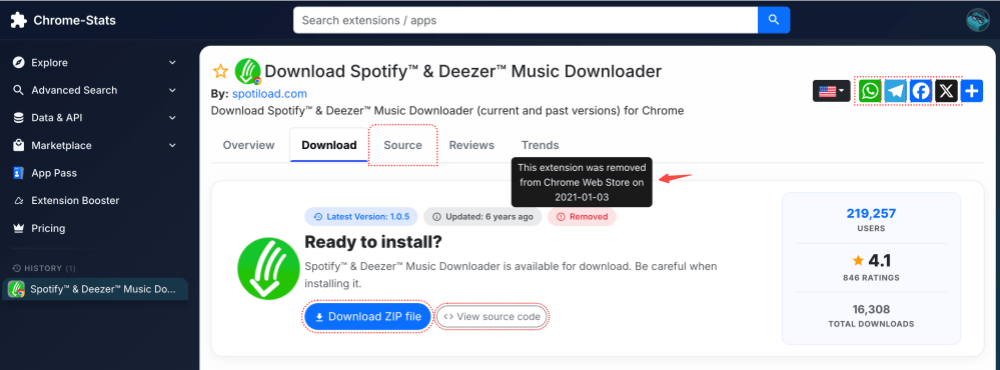
Step 1. We downloaded an archived Spotify™ & Deezer™ Music Downloader ZIP package from a third-party archive and extracted it to a local folder.
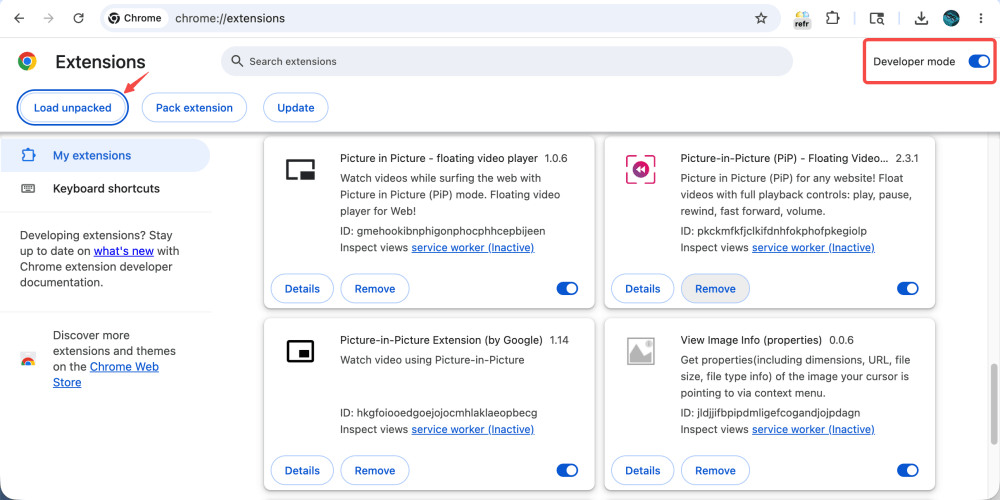
Step 2. Next, we opened Google Chrome and went to chrome://extensions. To allow manual installation, we turned on “Developer mode” in the upper-right corner of the Extensions page.
Step 3. After enabling Developer mode, we clicked "Load unpacked" and selected the folder containing the extracted extension files. However, Chrome failed to load the extension and did not add it to the extension list. Because the extension could not be loaded, we could not activate it or test whether it still detects Spotify or Deezer tracks.
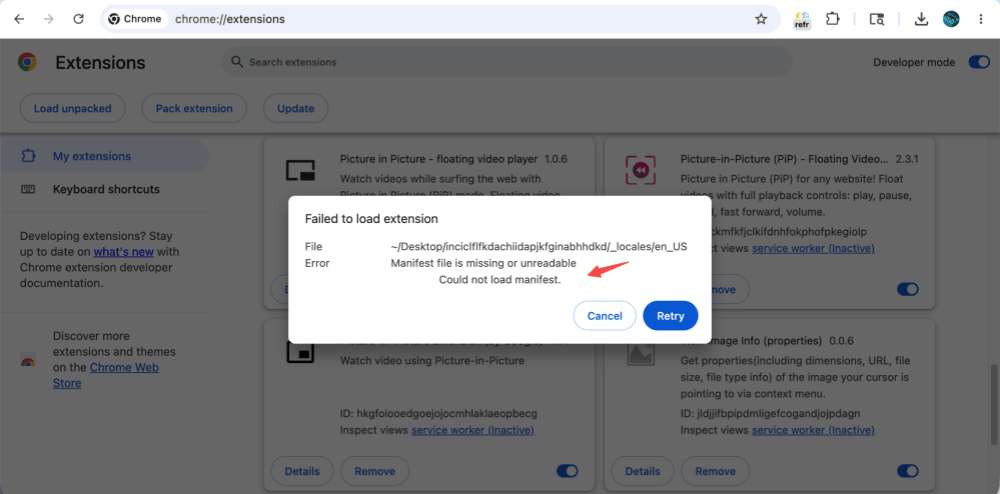
As a result, Spotify Deezer Music Downloader did not appear in Chrome’s extension list, so we could not activate it or continue with a download test.
What You May See If the Extension Still Loads
In our latest test on Chrome [version], we were unable to load Spotify & Deezer Music Downloader, so we could not verify its current download function. Users who installed the extension years ago, or who can still load an old package in an older browser environment, may see its original interface. However, we do not recommend installing unverified archived packages on your main browser.
Based on older test records and archived descriptions, here is how Spotify Deezer Music Downloader was designed to work when it could still load correctly.
Step 1. Once the extension is active, open the Spotify Web Player or Deezer Web Player in Chrome.
Step 2. When the extension detects a supported track, it may show a download button next to the song. It scans the current page and tries to match the track with an available audio source.
Step 3. In older versions, users could click the download button generated by the extension. When a track was matched successfully, the extension could save an MP3 file to the computer.
Note:
In our earlier test records, Spotify Deezer Music Downloader could generate download buttons for some individual tracks and save them as MP3 files. However, its performance was not always consistent. Detection failures, unavailable downloads, and missing tracks occurred, especially with region-restricted songs or tracks that could not be matched correctly.
Is Spotify Deezer Music Downloader Safe?
We do not recommend installing random ZIP or CRX packages of Spotify Deezer Music Downloader from third-party sites. The extension is no longer available from the Chrome Web Store, and a third-party Chrome-Stats archive flags it as high-risk.
Old browser extensions may request sensitive permissions and no longer receive security updates. Installing an unverified package can put your browser data at risk, especially when you use it in the same browser where you sign in to music, email, payment, or work accounts.
For safety, avoid using archived packages on your main browser. A maintained desktop app or another currently supported tool is a safer path for most users.
Why Spotify Deezer Music Downloader No Longer Works Reliably
Spotify Deezer Music Downloader was removed from the Chrome Web Store in 2021, according to a third-party Chrome-Stats archive, and it appears to have no recent maintenance. Although archived installation packages are still available on some third-party websites, the extension no longer appears to receive maintenance, bug fixes, or compatibility updates. These packages also come from outside the Chrome Web Store, so users need to consider security risks before installing them.
As a result, newer versions of Chrome may fail to load the extension properly, especially as Chrome continues moving away from Manifest V2 extensions. This matches what we saw in our latest installation test.
Even when the extension is already installed, its performance may still be inconsistent. Spotify and Deezer have changed their web players and delivery systems over the years, which can break older downloader extensions. Because Spotify Deezer Music Downloader is no longer actively maintained, it may fail to detect songs, show download buttons, or save MP3 files as reliably as it once did.
For users who still need a maintained tool on modern Windows or Mac systems, a dedicated desktop converter is usually a more practical path than an abandoned browser extension.
A More Stable Alternative to Spotify Deezer Music Downloader
Unlike Spotify Deezer Music Downloader, which is no longer available from the Chrome Web Store and appears to be outdated, TuneFab All-in-One Music Converter is a maintained desktop program for Windows and Mac. It uses built-in web players, so users can open supported music services, add songs or playlists, and convert them inside the program instead of using a Chrome extension.
TuneFab All-in-One Music Converter also supports more than Spotify and Deezer. This makes it more useful for users who switch between different music services and want one tool for batch conversion, output formats, and file management.
Why TuneFab May Be a Better Fit Today
- No browser extension required — Avoid manual installation errors, Chrome compatibility issues, and removed-extension problems.
- Supports multiple platforms — Work with Spotify, Deezer, and other supported music services in one program.
- Playlist and album downloads — Add full playlists or albums instead of handling songs one by one.
- Batch conversion — Convert multiple tracks in batches to save time.
- More output formats — Export tracks as MP3, M4A, WAV, FLAC, and more.
- Keeps ID3 tags — Preserve song titles, artists, albums, and cover art automatically.
Here is a quick example of how TuneFab works. In this demo, we use Deezer to show how to add songs, choose an output format, and save tracks as local audio files.
Step 1. Install and open TuneFab All-in-One Music Converter on your Windows or Mac computer. Choose Deezer from the supported services and sign in to access the built-in web player.
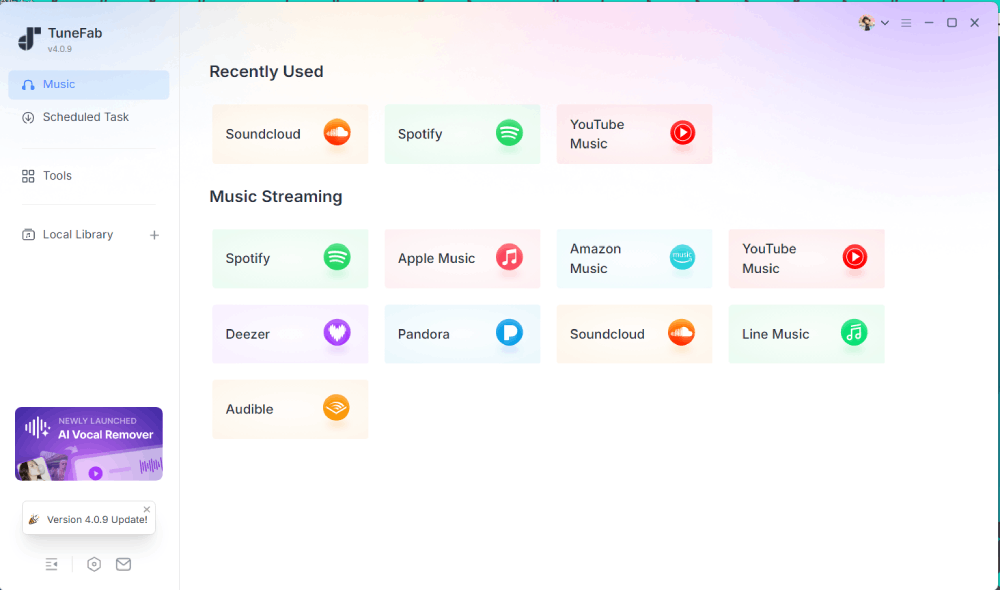
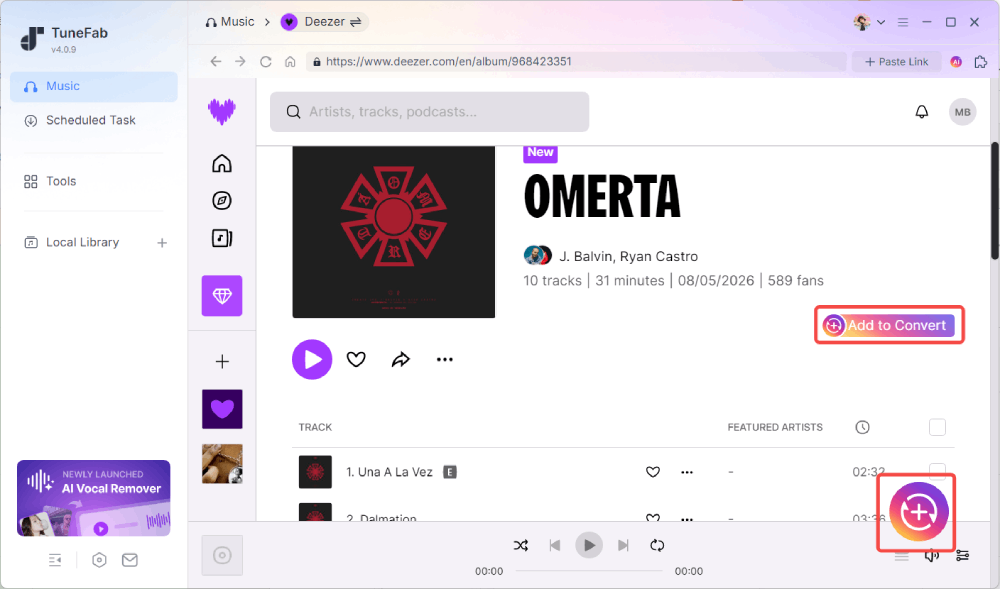
Step 2. Search for the tracks, albums, or playlists you want to save. Click the floating “Add to Convert” button or the “+” button on the right side to add them to the conversion list.
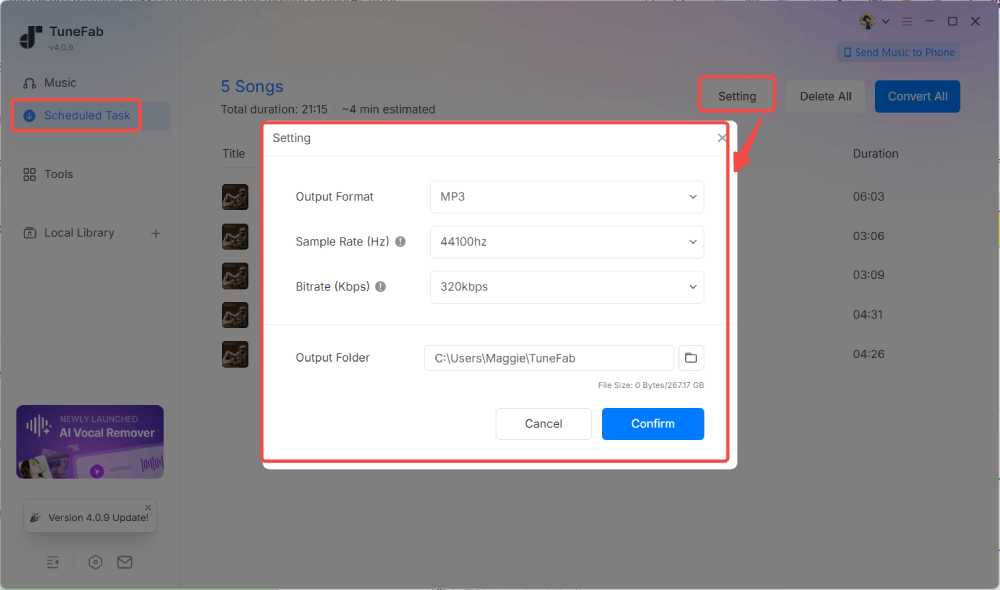
Step 3. After adding your songs, choose the output format, audio quality, and output folder.
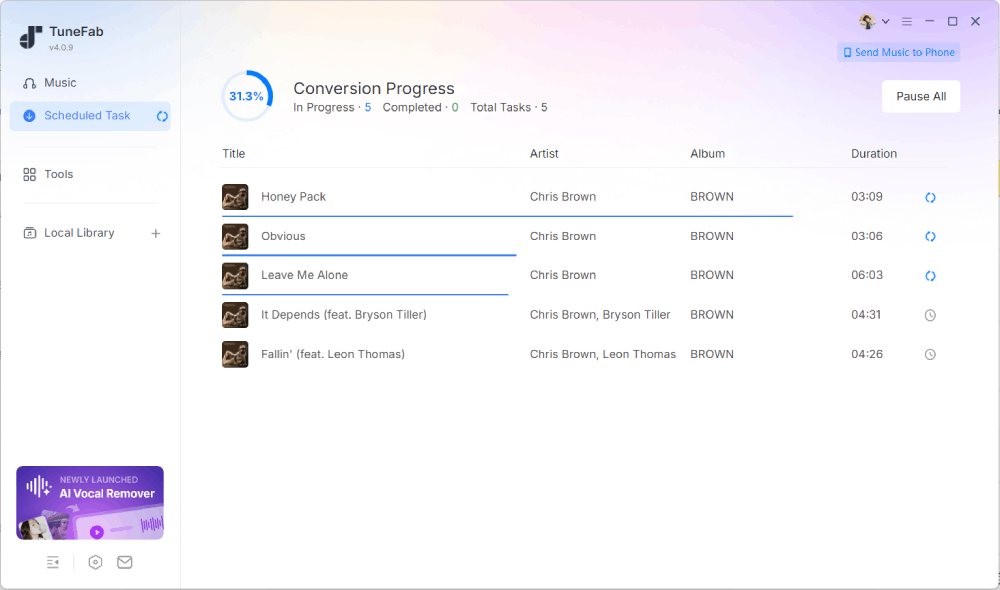
Step 4. When the conversion is finished, you can find the saved files under the “Local Library” tab. When the conversion is finished, you can find the saved files under the “Local Library” tab.
TuneFab is not as lightweight as a one-click browser extension. You need to install a desktop app and use its built-in web player. But compared with an abandoned Chrome extension, it is easier to maintain, supports batch conversion, and gives users more control over output format and file management.
Final Verdict
Spotify Deezer Music Downloader was once a convenient Chrome extension for saving tracks from Spotify and Deezer. However, after being removed from the Chrome Web Store and left without recent updates, it has become difficult to recommend because of installation, compatibility, and safety concerns.
In our latest test on Chrome [version], we were unable to load the archived extension package, so we could not verify whether it can still download Spotify or Deezer tracks.
For users who still need a maintained tool for saving music as local audio files, TuneFab All-in-One Music Converter is a more practical option to test. It supports multiple services, batch conversion, common output formats, and ID3 tag preservation. You can start with the free trial to check whether it fits your workflow before upgrading.